The open-source platform for understanding your health data.
openvitals.io · Issues · GitHub

⭐ Star this repo to help others discover it
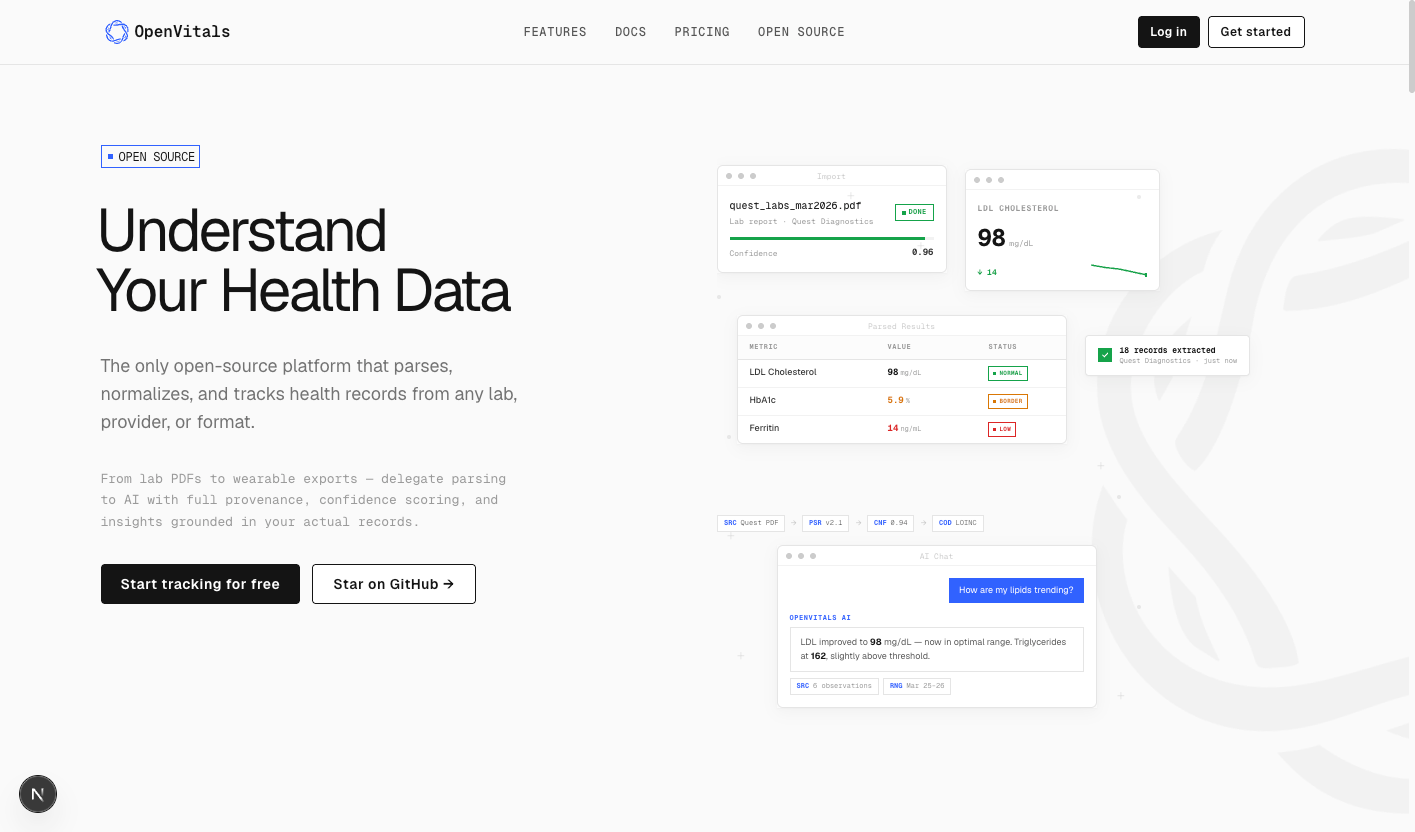
OpenVitals parses, normalizes, and tracks health records from any lab, provider, or format. Upload a PDF from Quest Diagnostics, sync your Whoop, or import a CSV — AI extracts every value, maps it to standard codes, and lets you track trends across years of results. Every observation traces back to its source with full provenance, confidence scoring, and a complete audit trail.
Use the hosted version at openvitals.io, or self-host the entire platform on your own infrastructure.
- AI-Powered Ingestion — Upload lab PDFs, CSVs, images, or any medical document. AI parses and normalizes values, units, and codes automatically.
- Full Provenance — Every data point traces back to its source document, parser version, and confidence score. No black boxes.
- AI Health Chat — Ask questions about your health data and get answers grounded in your actual records, with citations to specific observations and dates.
- Wearable Integration — Connect Whoop (and more coming) to pull in recovery scores, HRV, sleep, and activity data alongside your lab work.
- Scoped Sharing — Create time-limited, category-filtered shares for your doctors. Your cardiologist sees lipids and vitals. Your nutritionist sees diet-related labs.
- Medication Tracking — Log medications and supplements, then correlate them against your biomarker trends over time.
- Biomarker Dashboard — Unified view of all health metrics with trend charts, optimal ranges, and status indicators.
- 13+ Data Categories — Labs, vitals, medications, conditions, encounters, imaging, dental, immunizations, allergies, procedures, social history, family history, and wearable data.
- Plugin SDK — Extend with custom parsers, views, and analyzers.
- Self-Hostable — TypeScript end-to-end, Postgres, Drizzle ORM, tRPC. Run it yourself, read every line of code.
| Layer | Technology |
|---|---|
| Framework | Next.js 16 (App Router, Turbopack) |
| Language | TypeScript 5.9 |
| UI | React 19, Radix UI, Tailwind CSS 4 |
| API | tRPC 11 (end-to-end type safety) |
| Database | PostgreSQL 16, Drizzle ORM |
| Auth | BetterAuth (email/password, Google OAuth) |
| AI | Anthropic Claude via Vercel AI SDK |
| Monorepo | pnpm workspaces, Turborepo |
| File Storage | Vercel Blob (production) / local filesystem (dev) |
| Charts | Recharts |
| E2E Tests | Playwright |
openvitals/
├── apps/
│   └── web/                     # Next.js frontend & API
│       ├── app/                 # App Router (auth, dashboard, marketing, onboarding)
│       ├── components/          # Shared React components
│       ├── features/            # Feature modules (AI chat, marketing, layout)
│       └── server/              # tRPC routers, auth config, integrations
├── packages/
│   ├── ai/                      # AI/Claude integration logic
│   ├── blob-storage/            # File storage abstraction
│   ├── common/                  # Shared types and utilities
│   ├── database/                # Drizzle schema, migrations, queries, seeds
│   ├── events/                  # Event system
│   ├── ingestion/               # Document parsing logic
│   ├── plugin-sdk/              # Plugin system SDK
│   └── sharing/                 # Data sharing utilities
└── services/
    └── ingestion-worker/        # Background worker for async document processing
git clone https://github.com/zmeyer44/OpenVitals.git
cd OpenVitalspnpm installUsing Docker Compose:
docker compose up -dThis starts a Postgres 16 instance on localhost:5432 with database openvitals, user postgres, password postgres.
If you have your own Postgres instance, skip this step and set DATABASE_URL accordingly in the next step.
cp .env.example .envThe defaults in .env.example are configured for local development and will work out of the box with the Docker Compose database. Open .env and review:
# Database — matches docker-compose.yml defaults
DATABASE_URL=postgresql://postgres:postgres@localhost:5432/openvitals

# Auth — change in production
BETTER_AUTH_SECRET=change-me-in-production
BETTER_AUTH_URL=http://localhost:3000

# AI — set your model (requires an Anthropic API key configured in your AI gateway)
AI_DEFAULT_MODEL=claude-sonnet-4-20250514

# Storage — "local" stores uploads on disk in development
BLOB_STORAGE_PROVIDER=local

# Encryption — must be exactly 32 bytes, change in production
ENCRYPTION_KEY=change-me-32-byte-key-here-pad00

# Ingestion worker
RENDER_WORKER_URL=http://localhost:4000
RENDER_WEBHOOK_SECRET=dev-secret-change-me

# App
NEXT_PUBLIC_APP_URL=http://localhost:3000
NODE_ENV=developmentThese are not required for basic local development but enable additional features:
| Variable | Service | Purpose |
|---|---|---|
GOOGLE_CLIENT_ID / GOOGLE_CLIENT_SECRET |
Google OAuth | "Sign in with Google" |
WHOOP_CLIENT_ID / WHOOP_CLIENT_SECRET |
Whoop API | Wearable data sync |
UPSTASH_REDIS_REST_URL / UPSTASH_REDIS_REST_TOKEN |
Upstash Redis | Rate limiting |
RESEND_API_KEY |
Resend | Transactional email |
NEXT_PUBLIC_GOOGLE_MAPS_API_KEY |
Google Maps | Testing site locator |
pnpm db:migrateOptionally, seed the database with sample data:
pnpm db:seedpnpm devThis starts all services concurrently via Turborepo:
| Service | URL | Description |
|---|---|---|
| Web app | http://localhost:3000 | Next.js frontend & API |
| Ingestion worker | http://localhost:4000 | Background document processing |
Visit http://localhost:3000 to create an account and start uploading health data.
pnpm dev              # Start all services in development mode
pnpm build            # Production build
pnpm lint             # Run linter across all packages
pnpm typecheck        # Type-check all packages
pnpm format           # Format code with Prettier

# Database
pnpm db:generate      # Generate a new migration after schema changes
pnpm db:migrate       # Apply pending migrations
pnpm db:seed          # Seed the database

# From packages/database
pnpm db:studio        # Open Drizzle Studio (visual database browser)

# From apps/web
pnpm test:e2e         # Run Playwright end-to-end tests
pnpm test:e2e:ui # Run Playwright tests with interactive UIThe project includes a render.yaml for deploying the ingestion worker to Render. The Next.js web app deploys to any platform that supports Node.js — Vercel, Render, Railway, Fly.io, or a plain VPS.
For production deployments:
- Set
BLOB_STORAGE_PROVIDER=verceland configureBLOB_READ_WRITE_TOKENfor file uploads. - Use a managed Postgres instance and set
DATABASE_URL. - Set strong values for
BETTER_AUTH_SECRETandENCRYPTION_KEY. - Configure
BETTER_AUTH_URLandNEXT_PUBLIC_APP_URLto your production domain.
Contributions are welcome. Please open an issue to discuss your idea before submitting a pull request.
OpenVitals is licensed under the GNU General Public License v3.0.