Testing
// PASS
it('Array.indexOf should return -1 when the value is not present', () => {
  expect([1, 2, 3].indexOf(5)).to.equal(-1)
})

// FAIL
it('Array.indexOf should return -1 when the value is not present', () => {
  expect([1, 2, 5, 3].indexOf(5)).to.equal(-1)
})
https://stackblitz.com/github/we-learn-js/js-training-code/tree/master/src/Testing/jovanep?embed
A testing framework is a testing tool.
It provides an API to describe your test cases.
It handles both success and failed tests and provides info what failed.
There are many testing frameworks: YUI test, Jasmine, Mocha, JSUnit, and many more...
Mocha is one of the most popular testing frameworks.
describe() allows to declare a suite of tests.
it() allows to describe a test.
These functions are used to make the output as explicit as possible.
describe('Array', () => {
  describe('#indexOf', () => {
    it('should return -1 when the value is not present', () => {
      expect([1, 2, 3].indexOf(5)).to.equal(-1)
      expect([1, 2, 3].indexOf(0)).to.equal(-1)
    })
  })
})
https://stackblitz.com/github/we-learn-js/js-training-code/tree/master/src/Testing/yukori-4?embed
Mocha is just a tool.
It's up to you to describe your tests in a better or worse manner.
Better Specs (based on ruby), is a good source to help your make better tests descriptions.
describe('Array', () => {
  describe('#indexOf', () => {
    it('should return -1 when the value is not present', () => {
      expect([1, 2, 3].indexOf(5)).to.equal(-1)
      expect([1, 2, 3].indexOf(0)).to.equal(-1)
    })

    it('should return 2 when the value is on third position', () => {
      expect([1, 2, 3].indexOf(3)).to.equal(2)
    })
  })
})describe('Array', () => {
describe('#indexOf', () => {
describe('When the value is not present', () => {
it('returns -1 ', () => {
expect([1, 2, 3].indexOf(5)).to.equal(-1)
expect([1, 2, 3].indexOf(0)).to.equal(-1)
})
})
describe('When the value is present', () => {
it('returns its position', () => {
expect([1, 2, 3].indexOf(3)).to.equal(2)
})
})
})
})https://stackblitz.com/github/we-learn-js/js-training-code/tree/master/src/Testing/buzava?embed
A test assertion is an expression which encapsulates some testable logic specified about a target under test.
Assertions are the "checks" that you perform to determine if test passes or fails.
Tend to be one assertion per test (it).
Many libraries offer slightly different interfaces
Chai is one of the most popular assertion libraries.
It provides 3 different interfaces so you can pick the one your are more comfortable with.
var assert = chai.assert

assert.typeOf(foo, 'string')
assert.equal(foo, 'bar')
assert.lengthOf(foo, 3)
assert.property(tea, 'flavors')
assert.lengthOf(tea.flavors, 3)var expect = chai.expect
expect(foo).to.be.a('string')
expect(foo).to.equal('bar')
expect(foo).to.have.lengthOf(3)
expect(tea)
.to.have.property('flavors')
.with.lengthOf(3)chai.should()
foo.should.be.a('string')
foo.should.equal('bar')
foo.should.have.lengthOf(3)
tea.should.have.property('flavors').with.lengthOf(3)expect(object)
.to.equal(expected) // target is strictly equal (===) to value
.deep.equal(expected) // target is deeply equal to value.
.exist // asserts that the target is neither null nor undefined.
.contain(val) // assert the inclusion of an object in an array or a substring in a stringexpect(object)
.to.be.a('string') // asserts a value’s type
.ok // asserts that the target is truthy
.true // asserts that the target is true
.false // asserts that the target is false
.null // asserts that the target is null
.undefined // asserts that the target is undefined
.empty // asserts that the target’s length is 0
.arguments // asserts that the target is an arguments object.
.function // asserts that the target is an function object.
.instanceOf(constructor) // asserts that the target is an instance of constructor.expect(object)
.to.gt(5) // or .above .greaterThan
.gte // or .at.least
.lt(5) // or .below
.satisfy(function(num) {
return num > 0
})
// asserts that the target passes a given truth test.expect( () => { ... } ).to
.throw // asserts that the function target will throw an exception
.throw(ReferenceError) // asserts that the function target will throw a specific errorNegates any of assertions following in the chain.
expect(object).to.not.be.a('string').to.not.be.ok.to.not.be.true.to.not.be.false // assert a value is NOT given type // asserts that the target is NOT truthy // asserts that the target is NOT true // asserts that the target is NOT false

expect(object).to.not.equal(expected) // target is NOT strictly equal (===) to valueTest behaviour of Array.push function.
Use chai expect assertion interface.
https://stackblitz.com/github/we-learn-js/js-training-code/tree/master/src/Testing/miniqe?embed
https://stackblitz.com/github/we-learn-js/js-training-code/tree/master/src/Testing/yahigim-3?embed
Some tests need a context to be set in many cases.
Mocha provides hooks to set up a context/state and tear down it afterwards.
Also serves to undo side effects provoked by operations executed in test.
Test execution MUST NOT have side effects.
describe('hooks', () => {
  before(() => {
    // runs before all tests in this block
  })
  after(() => {
    // runs after all tests in this block
  })
  beforeEach(() => {
    // runs before each test in this block
  })
  afterEach(() => {
    // runs after each test in this block
  })

  // test cases
})
https://stackblitz.com/github/we-learn-js/js-training-code/tree/master/src/Testing/nezimuc?embed
Use
afterandafterEachto undo side effects of tests
before(() => {
  fixturesElement = document.createElement('DIV')
  document.body.appendChild(fixturesElement)
})
/* ... */
beforeEach(() => {
  button = document.createElement('Button')
  button.innerHTML = 'TEST APPEND BUTTON'
  button.id = 'test-append-button'
  $(fixturesElement).append(button)
})
https://stackblitz.com/github/we-learn-js/js-training-code/tree/master/src/Testing/cokuxaj?embed
before(() => {
  fixturesElement = document.createElement('DIV')
  document.body.appendChild(fixturesElement)
})
after(() => {
  document.body.removeChild(fixturesElement)
})beforeEach(() => {
button = document.createElement('Button')
button.innerHTML = 'TEST APPEND BUTTON'
button.id = 'test-append-button'
$(fixturesElement).append(button)
})
afterEach(() => {
fixturesElement.removeChild(button)
})https://stackblitz.com/github/we-learn-js/js-training-code/tree/master/src/Testing/pifura-2?embed
SinonJs is a library with tools to force behaviour of the environment or the dependencies on which the tested object relies.
A test spy is a function that records functions calls: arguments, returned values, the values of this and exceptions thrown (if any) for all its calls.
A test spy can be an anonymous function or it can wrap an existing function.
sinon.spy() wraps the original function
describe('getUsers', () => {
  beforeEach(() => {
    sinon.spy($, 'get')
    getUsers(() => {}, 5)
  })

  afterEach(() => {
    $.get.restore()
  })

  it('should make right ajax request to retrieve users', () => {
    expect($.get).to.have.been.calledOnce
    expect($.get.firstCall.args[0]).to.contain('/users')
  })
})
https://stackblitz.com/github/we-learn-js/js-training-code/tree/master/src/Testing/hirehir-5?embed
Spies must always be restored to reset the original behaviour of spied method
afterEach(() => {
  $.get.restore()
})
Avoid tests' side effects
Recorded activity
spy.callCount
// The number of recorded calls.

spy.args
// Array of arguments received, spy.args[0] is an array of arguments received in the first call.

spy.exceptions
// Array of exception objects thrown, spy.exceptions[0] is the exception thrown by the first call. If the call did not throw an error, the value at the call’s location in .exceptions will be ‘undefined’.

spy.returnValues
// Array of return values, spy.returnValues[0] is the return value of the first call. If the call did not explicitly return a value, the value at the call’s location in .returnValues will be ‘undefined’.

spy.thisValues
// Array of this objects, spy.thisValues[0] is the this object for the first call.
Method calls
spy.called
// true if the spy was called at least once

spy.calledOnce
// true if spy was called exactly once

spy.calledTwice
// true if the spy was called exactly twice

spy.calledThrice
// true if the spy was called exactly thrice

spy.firstCall.args
// The first call

spy.secondCall.args
// The second call

spy.thirdCall.args
// The third call

spy.lastCall.args
// The last call
Inputs
spy.calledWith(arg1, arg2, ...)
// Returns true if spy was called at least once with the provided arguments. Can be used for partial matching, Sinon only checks the provided arguments against actual arguments, so a call that received the provided arguments (in the same spots) and possibly others as well will return true.

spy.calledWithExactly(arg1, arg2, ...)
// Returns true if spy was called at least once with the provided arguments and no others.
Outputs
spy.threw()
// Returns true if spy threw an exception at least once.

spy.threw('TypeError')
// Returns true if spy threw an exception of the provided type at least once.

spy.threw(obj)
// Returns true if spy threw the provided exception object at least once.

spy.returned(obj)
// Returns true if spy returned the provided value at least once. Uses deep comparison for objects and arrays. Use spy.returned(sinon.match.same(obj)) for strict comparison (see matchers).Test stubs are spies with pre-programmed behaviour.
They replace the behaviour of an existing method by the one expected by your test case.
beforeEach(() => {
  sinon.stub($, 'get', () => {
    return {
      done(callback) {
        callback([
          { name: 'user1' },
          { name: 'user2' },
          { name: 'user3' },
          { name: 'user4' },
          { name: 'user5' },
          { name: 'user6' },
          { name: 'user7' },
          { name: 'user8' },
          { name: 'user9' },
          { name: 'user10' },
          { name: 'user11' },
          { name: 'user12' }
        ])
      }
    }
  })
})
https://stackblitz.com/github/we-learn-js/js-training-code/tree/master/src/Testing/fiquqa?embed
Stubs inherit spies interface, with additional methods to determine the behaviour on every call.
Defining behaviour
stub.returns(obj)
// Makes the stub return the provided value.

stub.returnsThis()
// Causes the stub to return its this value. Useful for stubbing jQuery-style fluent APIs.

stub.throws()
// Causes the stub to throw an exception (Error).

stub.throws('TypeError')
// Causes the stub to throw an exception of the provided type.
Filtering calls
stub.onFirstCall() // Alias for stub.onCall(0)

stub.onSecondCall() // Alias for stub.onCall(1)

stub.onThirdCall() // Alias for stub.onCall(2)

stub.onCall(n)
// Defines the behaviour of the stub on the nth call.
// Useful for testing sequential interactions.
var callback = sinon.stub()
callback.onFirstCall().returns(1)
callback.onCall(1).throws()
callback.onThirdCall().returnsThis()Mocha uses the
done()pattern
Require the
donecallback on youritcallbacks and invoke thedone()when your test is complete.
describe('getOneUser', () => {
  it('should filter number of return results', function(done) {
    getOneUser(5).then(function(result) {
      expect(result).to.be.an('object')
      expect(result.id).to.equal(1)
      done()
    })
  })
})
https://stackblitz.com/github/we-learn-js/js-training-code/tree/master/src/Testing/wuliyo?embed
Sinon's fake timers helps you for time depending time.
Use it to set the current dates
Use it to make time pass without having to wait for real time to pass.
beforeEach(() => {
  clock = sinon.useFakeTimers()
  sinon.spy(console, 'log')
  countdown(5)
})

afterEach(() => {
  clock.restore()
  console.log.restore()
})

it('should log numbers step by step', () => {
  clock.tick(500)
  expect(console.log).to.have.been.calledOnce
  clock.tick(1000)
  expect(console.log).to.have.been.calledTwice
})
https://stackblitz.com/github/we-learn-js/js-training-code/tree/master/src/Testing/sofubep?embed
Helps with testing requests made with XHR.
Also fakes the native XMLHttpRequest.
For
fetchAPI, other mocks can be used.
server = sinon.fakeServer.create()

server.respondWith([
  200,
  { 'Content-Type': 'application/json' },
  JSON.stringify([
    { name: 'user1' },
    { name: 'user2' },
    { name: 'user3' },
    { name: 'user4' },
    { name: 'user5' },
    { name: 'user6' },
    { name: 'user7' },
    { name: 'user8' },
    { name: 'user9' },
    { name: 'user10' },
    { name: 'user11' },
    { name: 'user12' }
  ])
])

server.respond()
https://stackblitz.com/github/we-learn-js/js-training-code/tree/master/src/Testing/kucugaz?embed
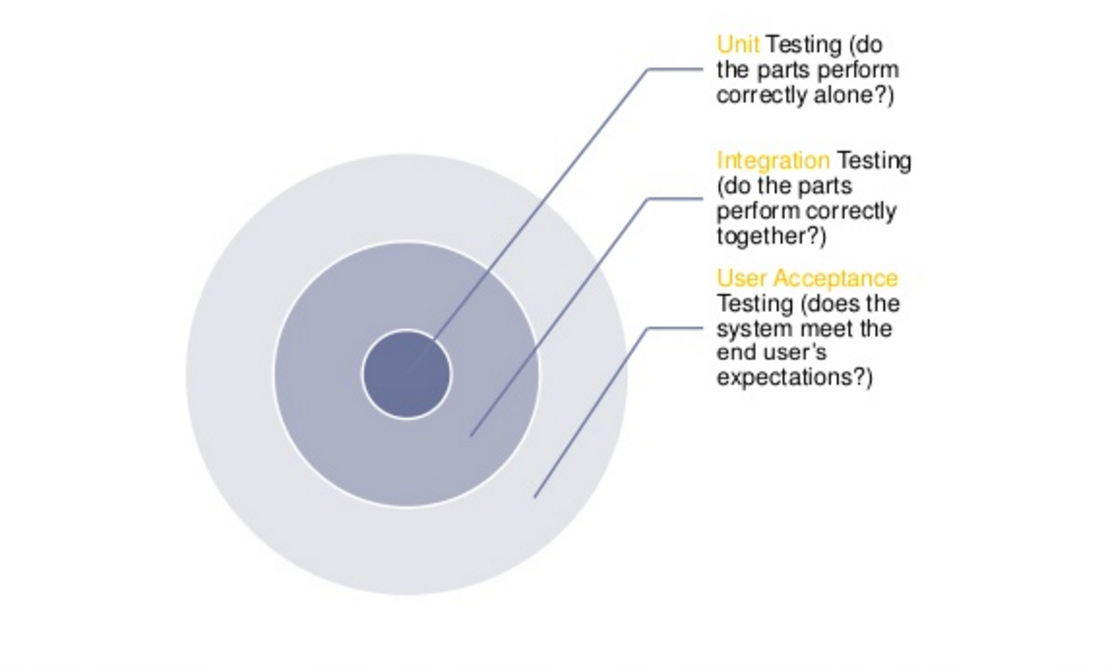
Unit testing is the first level of testing and focuses on testing small units of individual codes.
Ensure that individual components of the app work as expected.
Assertions test the component API.
Test the combined parts of the application to check that they function correctly together.
Two or more units are combined to check their working functionality.
Ensure that component collaborations work as expected.
Assertions may test component API, UI, or side-effects (such as database I/O, logging, etc…).
Testing is conducted to test a system as a whole.
The testing is carried out from the user’s point of view.
Ensure that the app works as expected from the user’s perspective.
Goal is to verify the system specifications according to business requirements.
Assertions primarily test the user interface.
Multiple runs of the same test should ALWAYS return same output.
Only too possible results: PASS or FAIL.
Each test must be isolated: Test B should not depend on Test A previous execution.
One test should be responsible for one concern, one scenario only.
Test behaviours, no methods:
- one method, multiple behaviours -> multiple tests
- one behaviour, multiple methods -> One test
Name you test to read by humans.
Test should have no uncertainty
Method behaviour should be predictable
Expected output should be strictly defined
If there is to conditional cases, split into too tests with each predefined condition
Separate test in separated folder, repo, project
Do not create methods of properties only used in testing context