Solution for the second project in Udacity's Deep Reinforcement Learning Nanodegree
In this project I trained an agent to move a double-jointed arm to a target location.

A reward of +0.1 is provided for each step that the agent's hand is in the goal location. Thus, the goal of your agent is to maintain its position at the target location for as many time steps as possible.
The observation space consists of 33 variables corresponding to position, rotation, velocity, and angular velocities of the arm. Each action is a vector with four numbers, corresponding to torque applicable to two joints. Every entry in the action vector must be a number between -1 and 1.
In this version of the environment there are 20 identical agents, each with its own copy of the environment. The task is episodic, and in order to solve the environment, your agents must get an average score of +30 over 100 consecutive episodes(over all agents).
To set up your python environment to run the code in this repository, follow the instructions below.
-
Create (and activate) a new environment with Python 3.6.
- Linux or Mac:
conda create --name drlnd python=3.6 source activate drlnd- Windows:
conda create --name drlnd python=3.6
activate drlnd
-
Follow the instructions in this repository to perform a minimal install of OpenAI gym.
- Install the box2d environment group by following the instructions here.
-
Clone the repository (if you haven't already!), and navigate to the
python/folder. Then, install several dependencies.
git clone https://github.com/vladfatu/project-continuous-control-udacity.git
cd src/python
pip install .- Create an IPython kernel for the
drlndenvironment.
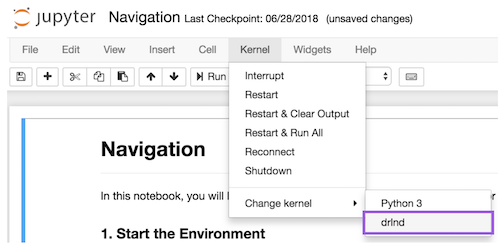
python -m ipykernel install --user --name drlnd --display-name "drlnd"- Before running code in a notebook, change the kernel to match the
drlndenvironment by using the drop-downKernelmenu.
Choose your operating system:
- Linux: click here
- Mac OSX: click here
- Windows (32-bit): click here
- Windows (64-bit): click here
Then, place the file in the src/ folder, and unzip (or decompress) the file.
After running the previous setup steps, you should be able to just open the notebook(Continuous Control.ipynb) and run the cells yourself.