Releases: vishaltps/solid_queue_monitor
v2.1.0 — Custom Authentication

Highlights
Solid Queue Monitor can now plug into your host app's existing auth chain (Devise, Pundit, OmniAuth, custom sessions) instead of being limited to HTTP Basic. Set SolidQueueMonitor.base_controller_class = "AdminController" in an initializer and every before_action, rescue_from, layout, and current_user helper cascades into the dashboard. Default behaviour is byte-identical to v2.0.0 — both changes are opt-in.
Added
SolidQueueMonitor.base_controller_classconfig option. Set it to the name of a host-app controller (e.g.'AdminController') and the engine'sApplicationControllerwill inherit from that class, so everybefore_action,rescue_from, layout, andcurrent_userhelper cascades into the dashboard. This unblocks integration with Devise, Pundit, OmniAuth, and custom session middleware without monkey-patching. Defaults to'ActionController::Base'; behaviour is unchanged when not set.- README "Custom Authentication" section documenting the integration pattern with minimal and role-gated examples.
Changed
- The activity chart's x-axis labels and bucket boundaries now consistently use the host application's
Time.zoneinstead of UTC. No new config knob — setconfig.time_zoneinconfig/application.rbas usual. Tests now pin this behaviour inAmerica/Los_Angeles.
Migration
bundle update solid_queue_monitor is sufficient. The default behaviour matches v2.0.0 exactly; both features are opt-in (the chart automatically picks up your existing Time.zone).
Full Changelog: v2.0.0...v2.1.0
v2.0.0 — Rails Conventions Refactor
Highlights
Major architectural refactor — the dashboard now renders via standard Rails ERB views, helpers, and partials instead of HTML-in-Ruby presenters. CSS and JavaScript are served as external assets via a new AssetsController with content-hashed URLs and Cache-Control: immutable. Public API (config, mount, URLs, auth, CSP nonce support) is unchanged.
The dashboard now works under a strict script-src 'self'; style-src 'self' Content Security Policy without requiring host-app nonce configuration.
Changed
- Major architectural refactor: the dashboard now renders via standard Rails ERB views, helpers, and partials instead of Ruby presenters emitting HTML strings. Configuration, mount point, URLs, HTTP Basic auth, and CSP nonce support are unchanged.
- CSS and JavaScript are now served as external assets via a new
AssetsControllerwith content-hashed URLs andCache-Control: immutable. No Sprockets or Propshaft dependency is required, so Rails API-only host applications keep working as in v1.x. - Dashboard pages now work under a strict
script-src 'self'; style-src 'self'Content Security Policy without requiring host-app nonce configuration. Nonce-on-link-tag behavior is preserved for hosts running nonce-only CSPs. - Runtime configuration such as auto-refresh interval, auto-refresh enabled state, and theme preference is now passed via
<body data-*>attributes instead of inline JavaScript interpolation.
Removed
SolidQueueMonitor::HtmlGenerator,StylesheetGenerator,ChartPresenter,BasePresenter, and all*Presenterclasses. These were internal and not documented as public API. Users who reached into them via monkey patches will need to migrate to view/helper overrides.SolidQueueMonitor::BaseController#render_pagenow that Rails implicit rendering handles all pages.- The brief inline
<script>that prevented dark-mode first-paint flash has been removed in favor of zero inline scripts. Users with a dark system preference may see a short light flash on the first page load; subsequent loads use the cached localStorage value.
Migration
For most users, bundle update solid_queue_monitor is sufficient. The dashboard looks and behaves identically. Configuration options, routes, authentication, and CSP nonce support are unchanged.
If you customized the UI by monkey-patching a presenter, migrate that customization to view/helper overrides. Open an issue if you need guidance.
Full Changelog: v1.3.0...v2.0.0
v1.3.0 — CSP Compatibility
Highlights
Strict Content Security Policy support. The monitor now works under nonce-based script-src / style-src CSP without any host-app changes. Apps not using CSP see byte-identical output to prior versions.
Added
- CSP compatibility for nonce-based strict CSP. Reads
content_security_policy_noncefrom the host controller and stamps it onto every inline<style>and<script>tag. (#36)
Changed
- Removed all inline
onclick,onchange, andonsubmitattributes — behavior wired viaaddEventListener+data-*attributes. - Replaced runtime
element.style.display|opacity|transformmutations with CSS class toggles (.is-hidden,.is-fading,.is-expanded,.tooltip-visible,.countdown-paused). Tooltip cursor-tracking position is unchanged. - Consolidated confirm-on-submit dialogs into a single
data-confirm="…"pattern.
Fixed
- Chart bucket assignment on PostgreSQL and MySQL/Trilogy —
CAST(... AS INTEGER)rounds, which silently dropped rows near bucket boundaries. Switched toFLOOR(...)to truncate.
Full Changelog: v1.2.2...v1.3.0
v1.2.2
v1.2.0 — Performance at Scale
Performance at Scale
Resolves gateway timeouts on the overview page with large datasets (millions of rows). #27
Benchmark (100K jobs on PostgreSQL)
| Pain Point | Before | After | Speedup |
|---|---|---|---|
| Stats calculation | 75ms | 3ms | 24x |
| Chart data (1d) | 148ms | 22ms | 7x |
| Chart data (1w) | 771ms | 89ms | 9x |
| Filter queries | 7ms | 1.6ms | 5x |
| Queue stats (N+1) | 37ms | 7ms | 5x |
Changed
- BREAKING: Dashboard "Total Jobs" and "Completed" stats replaced with "Active Jobs" (sum of ready + scheduled + in-progress + failed)
Fixed
- Overview stats no longer query
solid_queue_jobs— all counts derived from execution tables - Chart data service uses SQL GROUP BY bucketing instead of loading timestamps into memory
- All filter methods use subqueries instead of unbounded
.pluck(:job_id) - Queue stats pre-aggregated, eliminating N+1 per-queue COUNT queries
Added
config.show_chartoption to disable the job activity chart and skip chart queries entirely
Full Changelog: v1.1.0...v1.2.0
v1.1.0 — Search & Sortable Columns
What's New
Global Search
Search across all job types (ready, scheduled, failed, in-progress, completed) and recurring tasks.
- Search by class name, queue name, arguments, active job ID, and error messages
- Results grouped by category with counts
- Accessible from the header on every page
Sortable Column Headers
Click column headers to sort job tables.
- Sort by any column (class name, queue, created at, priority, etc.)
- Toggle ascending/descending with visual indicators
- Available on all job list views
Installation
gem 'solid_queue_monitor', '~> 1.1'Full Changelog: v1.0.1...v1.1.0
v1.0.1 - Job Details Page CSS Fix
Fixed
- Added missing CSS styles for job details page
- Job details page now uses full width layout consistent with other pages
What's Included
The job details page now has proper styling for:
- Job header with title, status badge, and meta info
- Timing cards with indicators (fast/normal/slow)
- Timeline visualization with status dots and connecting lines
- Error section with type, message, and backtrace toggle
- Details grid for job attributes
- Arguments section with copy button
- Collapsible raw data section
- Recent executions table
- Responsive design for mobile devices
Installation
gem 'solid_queue_monitor', '~> 1.0'bundle update solid_queue_monitorFull Changelog: v1.0.0...v1.0.1
v1.0.0 - Worker Monitoring, Job Details & Queue Details
🚀 The Most Elegant Dashboard for Solid Queue
This is a milestone release that brings comprehensive monitoring capabilities to Solid Queue with a beautiful, zero-dependency interface.
✨ What's New
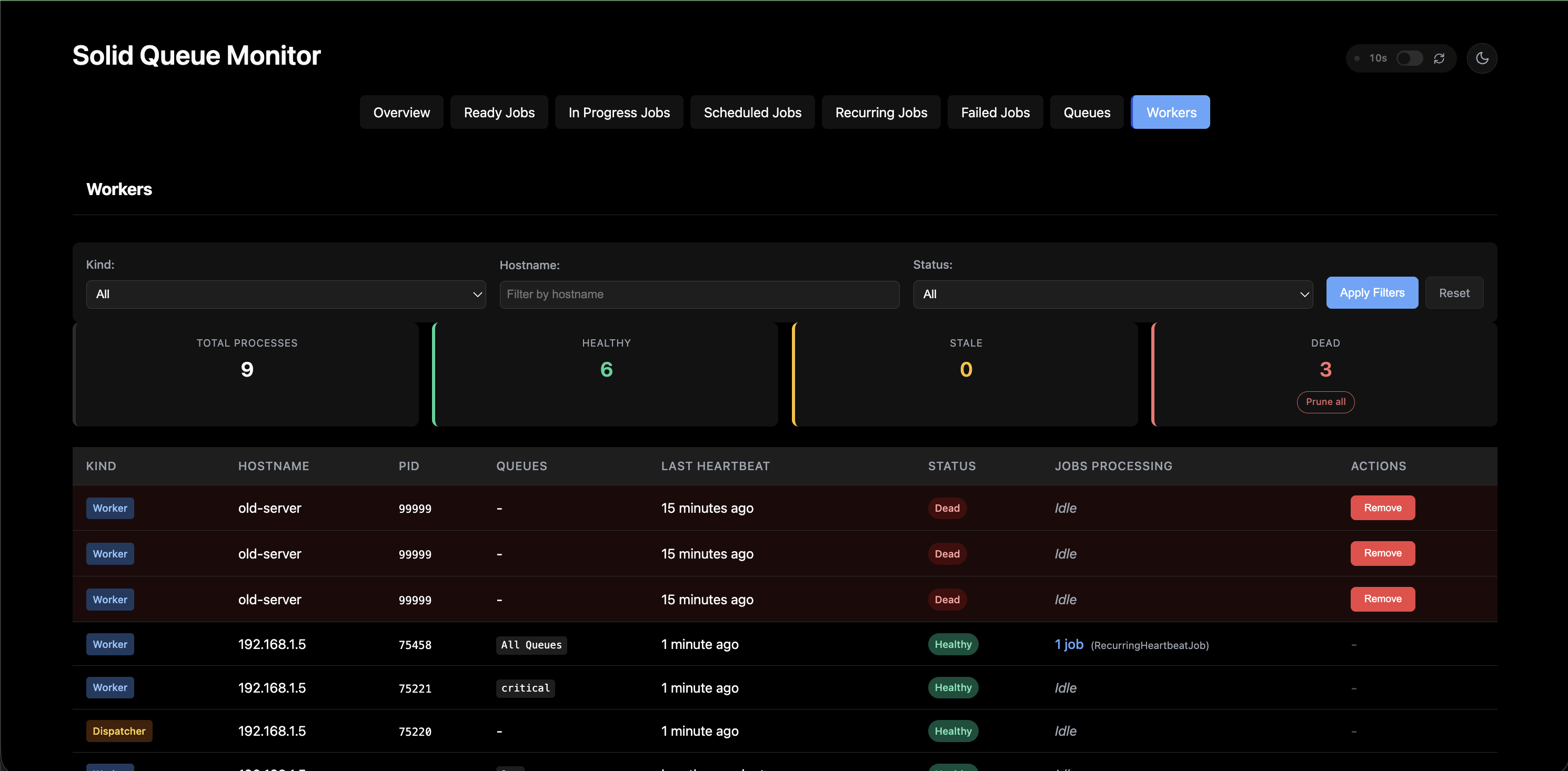
Worker Monitoring
- Real-time view of all Solid Queue processes (workers, dispatchers, schedulers)
- Health status indicators (healthy, stale, dead) based on heartbeat
- Shows queues each worker is processing
- Displays jobs currently being processed by each worker
- Summary cards showing total, healthy, stale, and dead process counts
- Prune Dead Processes - Clean up zombie workers with one click
Job Details Page
- Full job timeline showing created, scheduled, started, and finished states
- Timing breakdown with queue wait time and execution duration
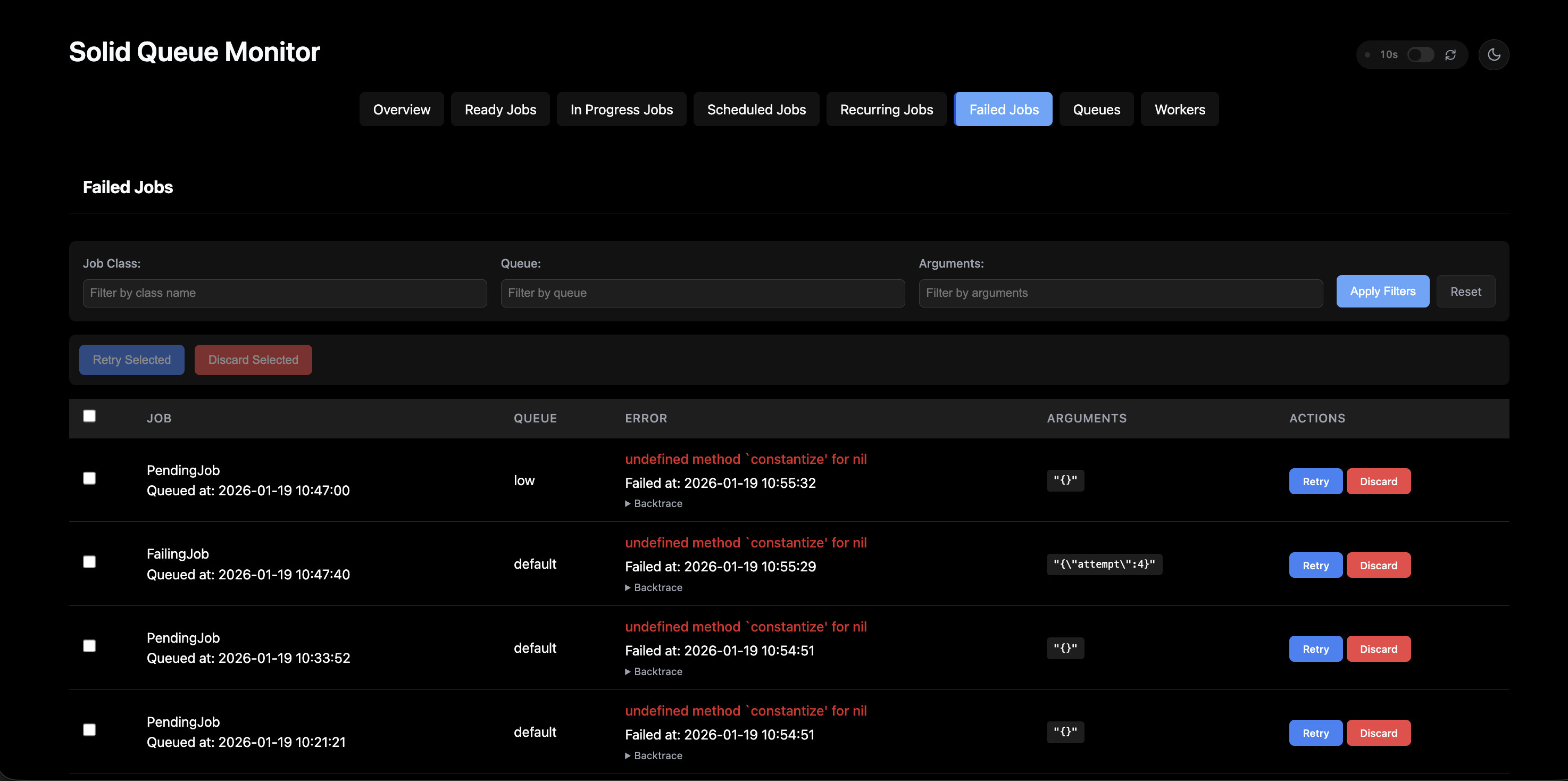
- Complete error details with backtrace for failed jobs
- Job arguments displayed in formatted JSON
- Quick actions (retry/discard) for failed jobs
- Clickable job class names throughout the UI
Queue Details Page
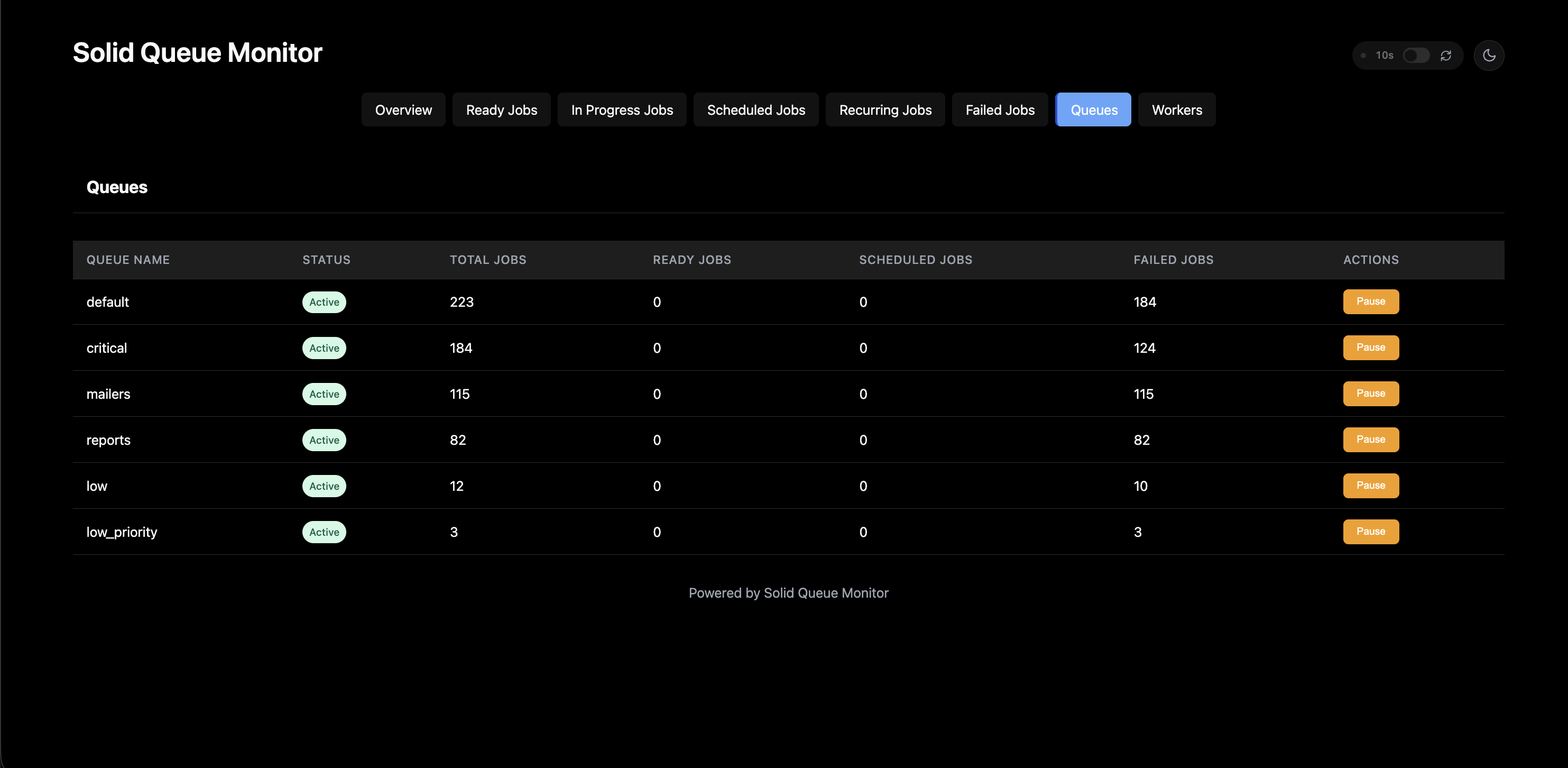
- Detailed view for individual queues
- Shows all jobs in a specific queue with filtering
- Displays queue status (active/paused) with pause/resume controls
- Job counts by status
📸 Screenshots
Worker Monitoring
Queue Management
Failed Jobs
📦 Installation
gem 'solid_queue_monitor', '~> 1.0'bundle install
rails generate solid_queue_monitor:installVisit /solid_queue in your browser to access the dashboard.
💡 Why solid_queue_monitor?
- Zero Dependencies - No JavaScript frameworks, no CSS libraries
- Works in API-only Rails Apps - Unlike other solutions
- Beautiful Dark Mode - Because we code at night too
- Incident Response Ready - Pause/resume queues instantly
Full Changelog: https://github.com/vishaltps/solid_queue_monitor/blob/main/CHANGELOG.md
v0.5.0
What's New
Added
- Pause/Resume queue functionality for incident response
- Pause button to stop processing jobs on specific queues
- Resume button to restart processing on paused queues
- Visual status indicator showing Active/Paused state
- Confirmation dialog before pausing to prevent accidents
- Paused queues highlighted with amber background
- New
QueuePauseServicefor handling pause/resume business logic
Improved
- Replaced controller specs with request specs for better integration testing
- Enhanced flash message handling for better compatibility across environments
- Improved route loading to prevent duplicate route errors in test environments
Changed
- Updated CI workflow to test on Ruby 3.2 and 3.3 (Rails 8 requires Ruby >= 3.2)
- Reorganized test support files for better maintainability