Releases: tylergraydev/claude-limitline
v1.5.3 - Fix Rate Limiting via Disk Cache

Bug Fix
- Persist usage cache to disk to respect
pollIntervalacross process invocations (#18, closes #17)- The statusline plugin runs as a new process on each refresh, so the in-memory cache was lost every time, causing an API call on every refresh and triggering 429 rate limits
- Cache is now written to
~/.claude/limitline-usage-cache.jsonso polling intervals are properly honored
- Add
preparescript so installing vianpxfrom a GitHub URL works correctly
v1.5.2 - macOS Credential File Fallback
Bug Fix
When the macOS Keychain entry "Claude Code-credentials" is missing, claude-limitline now falls back to reading credential files — matching the existing Linux and Windows behavior.
This fixes the issue where users who authenticated via tmux/byobu sessions (where credentials are stored in files rather than the Keychain) would see -- -- instead of actual usage data.
Changes
- Added file-based credential fallback to
getOAuthTokenMacOS()when Keychain lookup fails - Checks
~/.claude/.credentials.json,~/.claude/credentials.json, and~/.config/claude-code/credentials.json
Fixes #12
Full Changelog: v1.5.1...v1.5.2
v1.5.1 - macOS Keychain Fix
Bug Fix
Fixes OAuth token retrieval on macOS that was causing -- -- to display instead of actual usage percentages.
Changes
- Fixed keychain service name from
"Claude Code"to"Claude Code-credentials" - Added JSON parsing for the keychain credential structure (
{"claudeAiOauth":{"accessToken":"..."}}) - Updated README to clarify macOS Keychain support
- Added 6 new tests for macOS keychain retrieval
Full Changelog: v1.5.0...v1.5.1
v1.5.0 - Context Window Usage
New Features
- Context percentage segment: Shows current context window usage on the right side of the statusline with left-pointing arrows
Bug Fixes
- Fixed missing
contextPercentproperty in renderer tests
v1.4.0 - Model-Aware Smart Mode
What's New
Smart Mode Improvements
- Model-aware display: Smart mode now detects which model you're using
- Opus/Haiku: Shows only overall weekly usage (
○47% (wk 85%)) - Sonnet: Shows both Sonnet and overall (
◇7% | ○47% (wk 85%))
- Opus/Haiku: Shows only overall weekly usage (
Simplified View Modes
- Removed
detailedview mode - now justsimple(default) andsmart - Updated README with mode preview screenshot
Other
- Added demo script (
demo-modes.mjs) to showcase view modes
v1.3.0 - Model-Specific Usage Tracking
What's New
Model-Specific Weekly Usage Tracking
Added support for tracking Opus and Sonnet-specific weekly usage limits with three view modes:
| Mode | Description | Example |
|---|---|---|
simple |
Shows overall weekly usage only (default) | ○ 47% (wk 85%) |
detailed |
Shows overall, Opus, and Sonnet side by side | ○47% ◈15% ◇7% |
smart |
Shows the bottleneck (highest %) with indicator | ○47%▲ (wk 85%) |
Configuration
{
  "weekly": {
    "viewMode": "smart"
  }
}
New Symbols
- ◈ Opus usage
- ◇ Sonnet usage
- ▲ Bottleneck indicator
Other Changes
- Added Opus/Sonnet colors to all 6 themes
- Added 11 new tests (166 total)
- Updated documentation
Note: Model-specific limits are only available on certain subscription tiers. When unavailable, they are hidden from the display.
Full Changelog: v1.2.0...v1.3.0
v1.2.0 - QoL Improvements
What's New
QoL Improvements
- Segment ordering - New
segmentOrderconfig to customize which segments appear and in what order - Compact mode - New
compactModeoption (auto/always/never) adapts display for narrow terminals - Trend arrows - New
showTrendoption displays ↑↓ arrows when usage changes
New Segment Icons
- Model: ✱ (heavy asterisk)
- Block: ◫ (square with line)
- Weekly: ○ (circle)
Config Location Change
- Config now loads from
~/.claude/claude-limitline.json(alongside other Claude Code settings) - Also checks
./.claude-limitline.jsonfor project-specific config
Example Output
claude-limitline main ● ✱ Opus 4.5 ◫ 20% (1h55m) ○ 46% (wk 86%)
New Configuration Options
| Option | Description | Default |
|---|---|---|
display.compactMode |
"auto", "always", or "never" |
"auto" |
display.compactWidth |
Terminal width threshold | 80 |
segmentOrder |
Array to customize segment order | ["directory", "git", "model", "block", "weekly"] |
showTrend |
Show ↑↓ arrows for usage changes | true |
Full Changelog: v1.1.0...v1.2.0
v1.1.0 - Powerline Style & Themes
What's New
Powerline-Style Display
- Beautiful segmented display with smooth arrow transitions between segments
- Proper powerline arrows (requires Nerd Font)
New Segments
- Directory - Shows current repo/project name
- Git Branch - Shows branch name with dirty indicator (●)
- Model - Displays active Claude model (Opus 4.5, Sonnet 4, etc.)
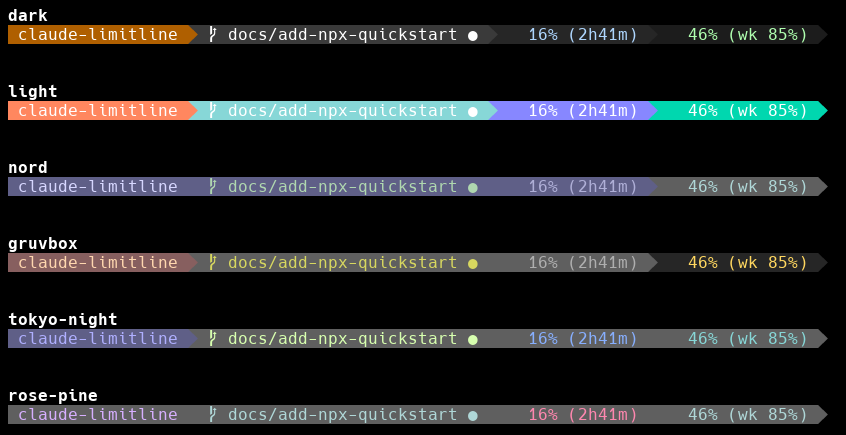
New Themes
6 color themes inspired by claude-powerline:
dark(default)lightnordgruvboxtokyo-nightrose-pine
Hook Data Support
- Reads model info from Claude Code's stdin hook data
- Properly formats model names (Opus 4.5, Sonnet 4, etc.)
Configuration
New segment options in .claude-limitline.json:
{
  "directory": { "enabled": true },
  "git": { "enabled": true },
  "model": { "enabled": true },
  "theme": "tokyo-night"
}
Full Changelog
v1.0.1
Changes
- Fix TypeScript strict mode errors
- Add GitHub Actions for automated npm publishing
- Auto-version from release tags
Usage
Add to ~/.claude/settings.json:
{
  "statusLine": {
    "type": "command",
    "command": "npx claude-limitline"
  }
}v1.0.0 - Initial Release
claude-limitline v1.0.0
A statusline for Claude Code showing real-time usage limits and weekly tracking.
Features
- 5-Hour Block Limit - Shows current usage percentage with time remaining
- 7-Day Rolling Limit - Tracks weekly usage with progress indicator
- Real-time Tracking - Uses Anthropic's OAuth usage API
- Progress Bar Display - Visual progress bars
- Cross-Platform - Windows, macOS, and Linux support
- Multiple Themes - Dark, light, nord, and gruvbox
Usage
Add to your Claude Code settings (~/.claude/settings.json):
```json
{
"statusLine": {
"type": "command",
"command": "npx claude-limitline"
}
}
```