Development Pipeline
How to implement a task using Github issues, branches and pull requests
- Task management
- Milestones
- Where development begins
- Branches
- Pull request
- Reviewing changes
- Merging the Pull Request
Task management is done with a combination of GitHub and Jira, where Github is used for pull requests and technical aspects of the task, while Jira is used to define the requirements and associated information like time estimates.
The tasks are split into epics based on the common functionality requirements. The epics are defined and managed via Jira and do not have a representation in Github.
The existing milestones in Github are a part of a legacy task management system and can be ignored for new tasks. The new system has become active as of 08/11/2021.
You can view the wiki history to see the legacy development pipeline
From the Developers' point of view, the development process begins with the Sprint backlog column in Jira. It contains a list of issues that are supposed to be worked on.
Each issue has a time estimate and a list of requirements.
When a developer starts working on an issue, they get assigned to it and the issue gets moved to the in-progress column.
After the developer starts working on an issue, they move it to the In Progress column in the project.
Once the assignee deems the issue ready for review, they mark the pull request as ready for review (they can make a draft PR during development) and request a review.
The time estimation and issue assignment happen during sprint planning, and daily standup respectively
Each issue has its own dedicated branch that is based on development. The base may differ if the issue requires functionality from a different branch.
The branch name has the following syntax: type/#jiraIssueId-fullIssueName.
For example, an issue Add License information to readme with an id of 7, and a label of docs, would be worked on in a branch named docs/#7-add-license-information-to-readme.
If more than one label is present, the label with the highest impact is chosen (feature>fix>chore>perf>refactor>test>docs>style)
If the issue name is too long (above 50), the developer should shorten it while keeping it verbose
Once the developer deems the issue ready for review, they create a pull request.
Pull requests' name gets auto-generated and can remain unchanged unless the branch name was incorrect.
For example, the previously mentioned issue would have a pull request named Feat:/#TC-7 Add License information to readme.
The Description contains information about what has been implemented and how it affects the project. Related issues should be mentioned.
At the bottom of the description, a Closes # keyword has to be added. For example, for issue #TC-7, the description would say
✅ Closes: #TC-7The Developer is to assign themselves to the PR and fill out the description with information about the implemented changes.
TODO: Modify requirement regarding IDs depending on how we decide the issue replication between Jira nad Github should function
When a Pull request is created, a series of checks are run (also known as Github Actions). They test the project, validate the formatting etc. All checks must be successful in order to continue.
If the branch happens to be out of date to development, it will be stated below the checks.

The developer must update the branch before continuing. This can be done by either clicking the update branch button or manually merging development into their branch.
If merging the branch with development would cause merge conflicts, it will be stated under the checks.
The conflict has to be resolved before continuing. This can be done in the browser or by manually merging development into your branch and resolving the conflict via your preferred tool

Once the checks have passed, the branch is up-to-date, and the merge conflicts are gone, the pull request is ready for a review.
This is done by selecting a reviewer in the Pull request sidebar. The reviewer will receive a notification and be able to look through the code.
The reviewer should go through the changes and ensure that the code is okay, there are no typos and it follows the best practices.
If any changes are needed, they should be commented and requested.
If changes are requested, the developer has to resolve them (either implement them or discuss them with the reviewer and cancel them) before the Pull Request can be merged.
Once the requested changes are resolved, the developer has to re-request a review, which may introduce new changes. This cycle continues until the pull request is approved by the reviewer(s).
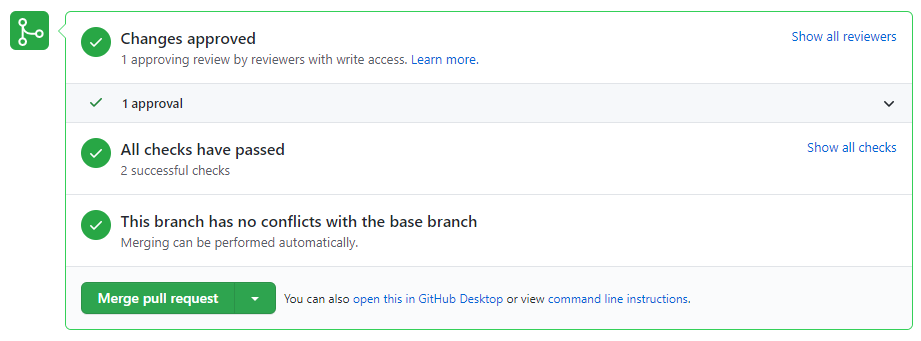
Once the review is finished and the pull request is approved, the Pull request status changes to green and an option to merge gets enabled
 \
\
The reviewer can merge the pull request by clicking the merge button. Github will fill out the title and description will the branch name and Pull Request name, and they don't need to be modified.
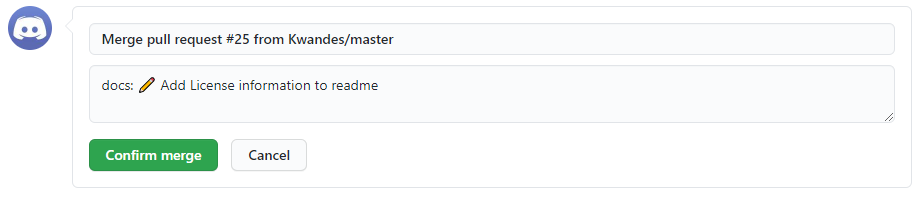
If there are multiple reviewers, the last one to approve the changes should perform the merge.
Once confirm merge button is clicked, the Pull Request will get merged and change its status.
It will also automatically close the related issue and both the issue and the pull request to the Done column in Jira.
This marks the end of work on a given issue. If any problems related to it arise, a new issue has to be created and the cycle begins again.