 |
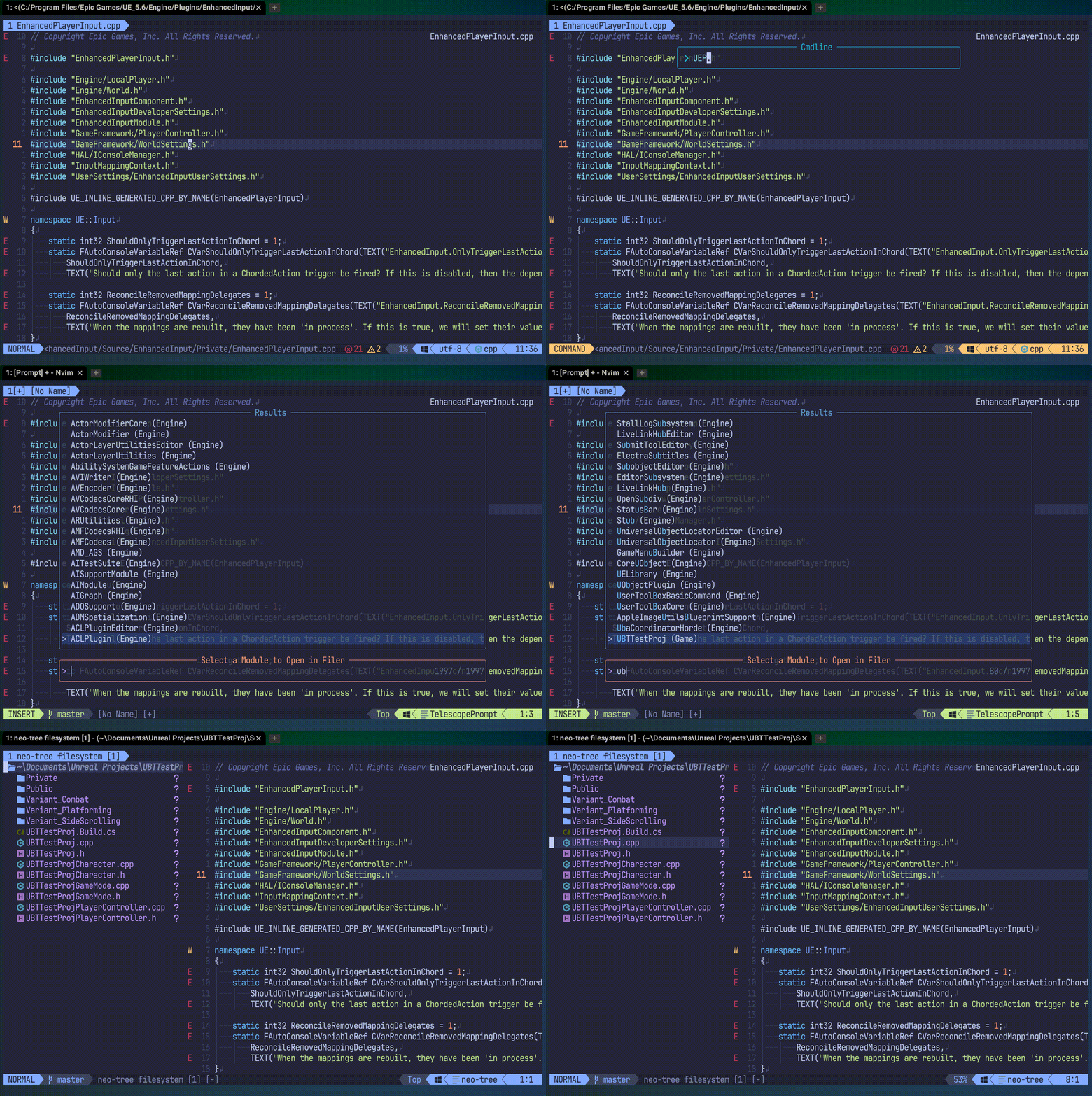 |
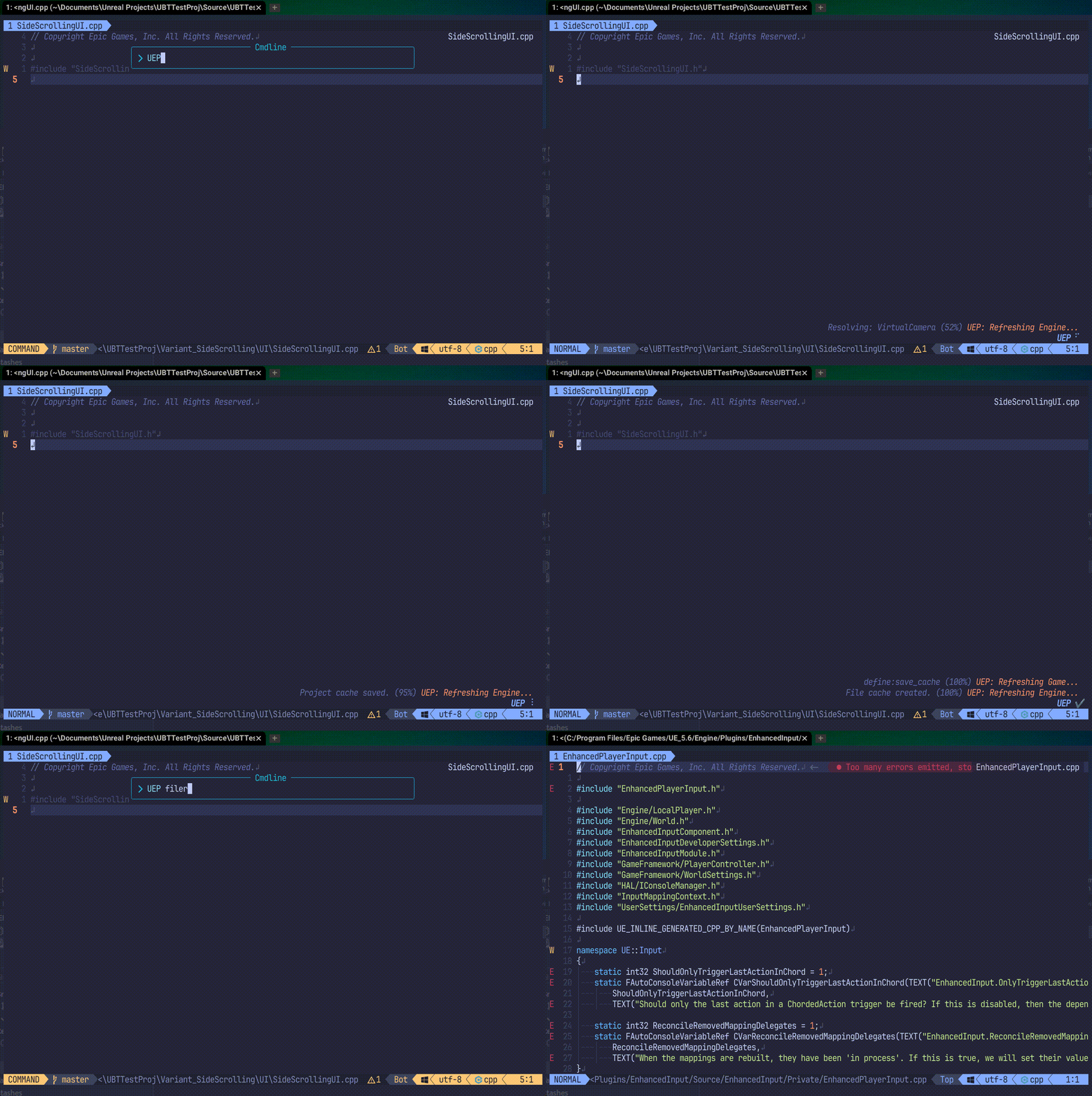
UEP.nvim is a Neovim plugin designed to understand, navigate, and manage the structure of Unreal Engine projects. It asynchronously parses and caches module and file information for the entire project, providing an exceptionally fast and intelligent file navigation experience.
This is a core plugin in the Unreal Neovim Plugin suite and depends on UNL.nvim as its library.
- Fast Asynchronous Caching:
- Scans the entire project (game and linked engine modules) in the background without blocking the UI.
- Intelligently separates game and engine caches, maximizing efficiency by allowing multiple projects to share a single engine cache.
- Ensures the file list is always in sync with the module structure through a
generationhash system.
- Powerful File Searching:
- Provides a flexible
:UEP filescommand to find your most-used source and config files instantly. - High-Performance Filtering: If you provide search keywords as arguments (e.g.,
:UEP files Game MyActor), filtering is performed on the server side beforehand, allowing instant results even in large-scale projects. - Offers specialized commands for targeted searches within a single module (
:UEP module_files). - Allows filtering files by scope (Game, Engine, Runtime, Editor, Full).
- Supports including module dependencies in the search (--no-deps, --shallow-deps, --deep-deps).
- Instantly search for all classes, structs, or enums within the specified scope (:UEP classes, :UEP structs, :UEP enums).
- Provides a flexible
- Intelligent Code Navigation:
- The
:UEP find_derivedcommand instantly finds all child classes that inherit from a specified base class. - The
:UEP find_parentscommand displays the entire inheritance chain from a specified class up toUObject. - The
:UEP find_includerscommand finds all files that#includea specified header, enabling reverse-include lookup across the project. - The
:UEP find_usagecommand finds all usages of the symbol under the cursor (type references or method call sites) using tree-sitter analysis. - The
:UEP rename_symbolcommand renames the symbol under the cursor across all usage files using the same search scope asfind_usage(code only — file names are not changed). - The
:UEP add_includecommand automatically finds and inserts the correct#includedirective for a class name under the cursor or one chosen from a list. - The
:UEP find_modulecommand allows you to select a class from a list and copies the name of the module it belongs to (e.g., "Core", "Engine") to the clipboard, making it easy to editBuild.cs. - Leverages the class inheritance data cached by
:UEP refreshfor high-speed navigation.
- The
- Intelligent File Watching:
- The
:UEP startcommand starts monitoring the project for changes. - It automatically compares the current VCS (Git) revision with the last cached state.
- If changes are detected (or on first run), it triggers a
:UEP refreshautomatically, then begins a low-overhead file watcher.
- The
- Intelligent Content Searching (Grep):
- Performs high-speed content searches across the entire project and engine source code (requires ripgrep).
- The
:UEP grepcommand lets you specify the search scope (Game, Engine, Runtime, Editor, Full). - The
:UEP module_grepcommand enables focused, noise-free searches within a specific module (<module_name>).
- UI Integration:
- IDE-like Logical Tree View:
- Provides a logical tree view similar to an IDE's solution explorer through integration with neo-tree-unl.nvim.
- The
:UEP treecommand gives you an overview of the entire project structure (Game, Plugins, Engine). - The
:UEP module_treecommand allows you to switch to a view focused on a single module. - Running
:UEP refreshautomatically updates the open tree to the latest state.
- Neovim v0.11.3 or later
- UNL.nvim (Required)
- fd (Required for project scanning)
- rg (Required for project Grep)
- Optional (Strongly recommended for the full experience):
- UI (Picker):
- UI (Tree View):
- UNX.nvim (Required for
:UEP treeand:UEP module_treecommands)
- UNX.nvim (Required for
Install with your favorite plugin manager.
return {
  'taku25/UEP.nvim',
  -- UNL.nvim is a required dependency
  dependencies = {
     'taku25/UNL.nvim',
     'nvim-telescope/telescope.nvim', -- Optional
  },
  -- All settings are inherited from UNL.nvim, but can be overridden here
  opts = {
    -- UEP-specific settings can be placed here
  },
}This plugin is configured through the setup function of its library, UNL.nvim. However, you can also pass opts directly to UEP.nvim to configure settings in the UEP namespace.
Below are the default values related to UEP.nvim.
-- Place inside the spec for UEP.nvim or UNL.nvim in lazy.nvim
opts = {
  -- UEP-specific settings
  uep = {
    -- Automatically start Neovim server (named pipe) on :UEP start
    server = {
      enable = true,
      name = "UEP_nvim", -- \\.\pipe\UEP_nvim on Windows
    },
    -- Command template for opening files in external IDEs
    ide = {
      -- {file} and {line} will be replaced with actual values
      open_command = "rider --line {line} \"{file}\"",
    },
  },


  -- Directory names to search for files during tree construction
  include_directory = { "Source", "Plugins", "Config", },

  -- Folder names to exclude during tree construction
  excludes_directory  = { "Intermediate", "Binaries", "Saved" },

  -- File extensions to be scanned by the ':UEP refresh' command
  files_extensions = {
    "cpp", "h", "hpp", "inl", "ini", "cs",
  },

  -- Manually specify the engine path if automatic detection fails.
  -- Example: "C:/Program Files/Epic Games/UE_5.4"
  engine_path = nil,

  -- UI backend settings (inherited from UNL.nvim)
  ui = {
    picker = {
      mode = "auto", -- "auto", "telescope", "fzf_lua", "native"
      prefer = { "telescope", "fzf_lua", "native" },
    },
    grep_picker = {
      mode = "auto",
      prefer = { "telescope", "fzf-lua" }
    },
    progress = {
      enable = true,
      mode = "auto", -- "auto", "fidget", "window", "notify"
      prefer = { "fidget", "window", "notify" },
    },
  },
}All commands start with :UEP.
" Re-scan the project and update the cache. This is the most important command.
:UEP refresh [Game|Engine]

" Open a UI to search for commonly-used source and config files.
:UEP files[!] [Game|Engine|Runtime|Editor|Full] [--no-deps|--shallow-deps|--deep-deps]

" Search for files belonging to a specific module.
:UEP module_files[!] [ModuleName]

" List dependent files of the current file.
:UEP depend_files [game|full] [recursive|shallow]

" LiveGrep across the project or engine source code.
:UEP grep [Game|Engine|Runtime|Editor|Full]

" LiveGrep files belonging to a specific module.
:UEP module_grep [ModuleName]

" Open an include file by searching the project cache.
:UEP open_file [Path]

" Find and insert an #include directive for a class.
:UEP add_include[!] [ClassName]

" Delete ALL structural (*.project.json) and file (*.files.json) caches for the current project.
:UEP cleanup

" Find derived classes. Use [!] to open the base class picker.
:UEP find_derived[!] [ClassName]

" Find the inheritance chain. Use [!] to open the starting class picker.
:UEP find_parents[!] [ClassName]

" Find all files that #include a specified header (reverse include lookup).
:UEP find_includers [FileName]

" Find all usages of the symbol under the cursor (type or method mode).
:UEP find_usage

" Rename the symbol under the cursor across all usage files (code only).
:UEP rename_symbol

" Search for C++ classes (use '!' to refresh cache).
:UEP classes[!] [Game|Engine|Runtime|Editor|Full] [--no-deps|--shallow-deps|--deep-deps]

" Search for C++ structs (use '!' to refresh cache).
:UEP structs[!] [Game|Engine|Runtime|Editor|Full] [--no-deps|--shallow-deps|--deep-deps]

" Search for C++ enums (use '!' to refresh cache).
:UEP enums[!] [Game|Engine|Runtime|Editor|Full] [--no-deps|--shallow-deps|--deep-deps]

" Display the logical tree for the entire project (requires neo-tree-unl.nvim).
:UEP tree

" Display the logical tree for a specific module (requires neo-tree-unl.nvim).
:UEP module_tree [ModuleName]

" Close the UEP tree and clear its expanded state.
:UEP close_tree

" Display a list of known projects in a UI and change the current directory to the selected project.
:UEP cd

" Remove a project from the list of known projects (does not delete files).
:UEP delete

" Create a new Unreal Engine project from a template.
:UEP new_project

" Start project monitoring. Checks for Git updates, runs refresh if needed, then watches for file changes.
:UEP start

" Stop the project monitor.
:UEP stop

" Jumps to the actual class or struct definition file, skipping forward declarations.
:UEP goto_definition[!] [ClassName]

" Select a class first, then select a symbol (function/property) within it to jump.
:UEP class_symbol[!] [Game|Engine|Runtime|Editor|Full] [--no-deps|--shallow-deps|--deep-deps]

" Open the file location in the system file explorer.
:UEP system_open[!] [Path]

" Jumps to the parent class definition of the current function.
:UEP goto_super_def

" Jumps to the parent class implementation of the current function.
:UEP goto_super_impl

" Override a virtual function from the parent class hierarchy.
:UEP implement_virtual

" Find the module name for a class and copy it to the clipboard.
:UEP find_module[!]

" Open the Build.cs file for the current module. Use '!' to list all modules.
:UEP build_cs[!]

" Open the Target.cs file. Use '!' to include Engine targets.
:UEP target_cs[!]

" Search Unreal Engine Web Docs. Use '!' to pick a class.
:UEP web_doc[!]

" Search for shader files (.usf, .ush).
:UEP shaders[!] [Game|Engine|Runtime|Editor|Full]

" Open the current file in an external IDE (Rider, VS, etc.).
:UEP open_in_ide

" Create a new module.
:UEP create_module [module_path] [module_type] [loading_phase] [targets]:UEP refresh:Game(default): Scans only the modules of the current game project. If the linked engine is not cached, it will be scanned automatically first.Engine: Scans only the modules of the linked engine.
:UEP cd:- Changes the current directory to the root of a project managed by UEP.
- Projects are registered to management during
refresh.
- Projects are registered to management during
- Changes the current directory to the root of a project managed by UEP.
:UEP delete:- Deletes a project from UEP's management.
- This only removes it from UEP's internal list; the actual UE project files are not deleted.
- Deletes a project from UEP's management.
:UEP new_project:- Creates a new Unreal Engine project by copying an existing template from the installed engine's
Templatesdirectory. - Provides an interactive wizard to select:
- Engine Version (auto-detected from Windows Registry).
- Template (e.g.,
TP_FirstPerson,TP_ThirdPerson). - Project Name.
- Automatically performs recursive file copying, renaming, and string replacement (e.g., changing
TP_FirstPersontoMyNewProjectin source files). - Configures the
.uprojectfile with the correctEngineAssociation.
- Creates a new Unreal Engine project by copying an existing template from the installed engine's
:UEP files[!]:- Without
!: Selects files from the existing cache data. - With
!: Deletes the cache and creates a new one before selecting files. [Game|Engine|Runtime|Editor|Full](defaultruntime): The scope of modules to search.[--no-deps|--shallow-deps|--deep-deps](default--deep-deps):--no-deps: Searches only within the modules of the specified scope.--shallow-deps: Includes direct dependencies.--deep-deps: Includes all dependencies (deep_dependencies).
[mode=source|config|shader|programs|build_cs|target_cs]: (Optional) Filter by file type.
- Without
:UEP module_files[!]:- Without
!: Searches for files in the specified module using the existing cache. - With
!: Performs a lightweight update of the file cache for only the specified module before searching.
- Without
:UEP depend_files [game|full] [recursive|shallow]:- Displays a list of files that the current file depends on (via
#include). [game|full](defaultfull):game: Shows only files within the project (Source/Plugins).full: Includes Engine and external library files.
[recursive|shallow](defaultshallow):shallow: Shows only files directly included by the current file.recursive(ordeep): Recursively traces all dependencies.
- Displays a list of files that the current file depends on (via
:UEP program_files:- Searches for files within all
Programsdirectories related to the project and engine (e.g., UnrealBuildTool, AutomationTool). - Useful for investigating the code of build tools.
- Searches for files within all
:UEP config_files:- Searches for all configuration files (.ini) across the project and engine.
:UEP tree:- Only works if
neo-tree-unl.nvimis installed. - Opens a full logical tree in
neo-tree, including "Game", "Plugins", and "Engine" categories for the entire project. - Clears any previously saved expanded state.
- Only works if
:UEP module_tree [ModuleName]:- Only works if
neo-tree-unl.nvimis installed. - If
ModuleNameis provided, it displays a tree rooted at that module only. - If run without arguments, it displays a picker UI to select from all modules in the project.
- Clears any previously saved expanded state.
- Only works if
:UEP close_tree:- Closes the
neo-treewindow (if open) and clears UEP's internal cache of which nodes were expanded. - This ensures that the next
:UEP treeor:UEP module_treecommand starts with a fully collapsed view.
- Closes the
:UEP grep [Scope]:- LiveGreps the entire project and engine source code (requires ripgrep).
Scopecan beGame,Engine,Runtime(default),Editor, orFull.Game: Searches only your project's source files and plugins.Engine: Searches only the associated engine source code.Full/Runtime/Editor/Developer: Searches both project and engine code.
:UEP module_grep <ModuleName>;- Searches for content within the directory of the specified
<ModuleName>. - Provides noise-free results when investigating the implementation of a specific feature.
- If no module is specified, a picker will be shown to select a module.
- Searches for content within the directory of the specified
:UEP program_grep:- Performs a live grep for files within all
Programsdirectories related to the project and engine. - Useful for investigating the code of build tools and automation scripts.
- Performs a live grep for files within all
:UEP config_grep [Scope]:- LiveGreps for content within
.iniconfiguration files. Scopecan beGame,Engine, orFull(defaultruntime, which aliases toFull).
- LiveGreps for content within
:UEP open_file [Path]:- Finds and opens a file based on an include path, either extracted automatically from the text on the current line or explicitly provided by
[Path]. - It performs an intelligent hierarchical search within the project cache (checking current file directory, module Public/Private folders, dependency modules, etc.).
- Finds and opens a file based on an include path, either extracted automatically from the text on the current line or explicitly provided by
:UEP add_include[!] [ClassName]:- Finds and inserts the correct
#includedirective for a C++ class. - Without
!: Uses the[ClassName]argument if provided, otherwise it uses the word under the cursor. - With
!: Ignores arguments and the word under the cursor, and always opens a picker UI to select a class from the entire project. - Intelligently places the include directive: In header files (
.h), it is inserted before the.generated.hline. In source files (.cpp), it is inserted after the last existing#includestatement.
- Finds and inserts the correct
:UEP find_derived[!] [ClassName]: Searches for all classes that inherit from a specified base class.- Without
!: Uses the[ClassName]argument if provided, otherwise it uses the word under the cursor. - With
!: Ignores arguments and opens a picker UI to select a base class from the entire project.
- Without
:UEP find_parents[!] [ClassName]: Displays the inheritance chain for a specified class.- Without
!: Uses the[ClassName]argument if provided, otherwise it uses the word under the cursor. - With
!: Ignores arguments and opens a picker UI to select the starting class.
- Without
:UEP find_includers [FileName]: Finds all files in the project that#includethe specified header.- If
[FileName]is omitted, the current buffer's filename is used. If the current file is a.cpp, the corresponding.his automatically looked up. - Results are displayed in a streaming picker showing
[ModuleName] Public/Foo.hstyle labels.
- If
:UEP find_usage: Finds all usages of the symbol under the cursor using tree-sitter based analysis.- Type mode (cursor on a class/struct name, e.g.
AMyActor): searches type references — variable declarations, parameters, return types, template arguments, inheritance. - Method mode (cursor on a method name, e.g.
GetHealth): searches call sites —obj->GetHealth(),obj.GetHealth(),AMyActor::GetHealth(). Scope is verified viaqualified_identifierto minimise false positives. - Search scope in both modes: all files that
#includethe owning header. - Results stream into a picker with
[ModuleName] path:line contextlabels.
- Type mode (cursor on a class/struct name, e.g.
:UEP rename_symbol: Renames the symbol under the cursor across all usage files (code only — file names are not changed).- Prompts for a new name via
vim.ui.inputwith the current name pre-filled. - Uses the same search scope as
:UEP find_usage(type mode or method mode). - Applies column-precise replacement in usage files; the definition header is updated with whole-word replacement to cover the class/method declaration.
- Progress is shown while processing; open buffers are reloaded automatically on completion.
- Prompts for a new name via
:UEP classes[!][Game|Engine|Runtime|Editor|Full] [--no-deps|--shallow-deps|--deep-deps]: Opens a picker to select and jump to the definition of a C++ class.- Flags: Controls cache regeneration and scope filtering.
- Scope: Default is
runtime. - Deps: Default is
--deep-deps.
:UEP structs[!] [Game|Engine|Runtime|Editor|Full] [--no-deps|--shallow-deps|--deep-deps]: Opens a picker to select and jump to the definition of a C++ struct.- Flags: Controls cache regeneration and scope filtering.
- Scope: Default is
runtime. - Deps: Default is
--deep-deps.
:UEP enums[!] [Game|Engine|Runtime|Editor|Full] [--no-deps|--shallow-deps|--deep-deps]: Opens a picker to select and jump to the definition of a C++ enum.- Flags: Controls cache regeneration and scope filtering.
- Scope: Default is
runtime. - Deps: Default is
--deep-deps.
:UEP purge [ComponentName]:- Deletes only the file cache (
*.files.json) for the specified Game, Engine, or Plugin component. - This allows forcing a file rescan without re-analyzing the project's dependency structure.
- Deletes only the file cache (
:UEP cleanup:- DANGEROUS: Permanently deletes ALL structural caches (
*.project.json) and ALL file caches (*.files.json) associated with the current project, including all plugins and the linked engine. - The command runs asynchronously with a progress bar and requires confirmation.
- After running this, you must run
:UEP refreshto rebuild the project structure from scratch.
- DANGEROUS: Permanently deletes ALL structural caches (
:UEP goto_definition[!] [ClassName]: Jumps to the actual definition file of a class, skipping forward declarations.- Without
!: Uses the[ClassName]argument if provided, otherwise it uses the word under the cursor. It performs an intelligent hierarchical search based on the current module's dependencies (current component -> shallow deps -> deep deps) before falling back to LSP. - With
!: Ignores arguments and the word under the cursor, and always opens a picker UI to select a class from the entire project.
- Without
:UEP class_symbol[!] [Game|Engine|Runtime|Editor|Full] [--no-deps|--shallow-deps|--deep-deps]:- Opens a two-step picker: first select a class from the project, then select a symbol (function or property) within that class to jump to.
- This command leverages UEP for global class searching and delegates to UCM for detailed symbol parsing of the selected file.
- Flags: Controls cache regeneration (
!) and scope/dependency filtering.
:UEP system_open[!] [Path]:- Opens the location of the specified file in the OS file explorer (Explorer/Finder/xdg-open).
!(Bang): Ignores arguments/current buffer and opens a picker UI to select a file from the entire project cache.[Path]: Optional path. If omitted and no!, opens the directory of the current file.
:UEP goto_super_def:- Jumps to the definition (header file) of the parent class's function that corresponds to the current function under the cursor.
- Intelligently resolves the inheritance chain using cached project data.
:UEP goto_super_impl:- Jumps to the implementation (source file) of the parent class's function.
- Falls back to the header definition if the source file is not found.
:UEP implement_virtual [ClassName]:- Lists all overrideable virtual functions from the parent class hierarchy.
- Selecting a function automatically inserts the declaration into the header file and copies the implementation stub to the clipboard.
- Must be executed within a header file.
:UEP find_module[!]:- Opens a picker UI to select a class, struct, or enum from the entire project.
- Selecting an item copies the name of the module it belongs to (e.g.,
"Core","UMG") to the system clipboard. - This is extremely useful when adding dependencies to
Build.cs. - Use
!to force a cache refresh before opening the picker.
:UEP build_cs[!]:- Without
!: Opens theBuild.csfile corresponding to the module of the current file. If the module cannot be determined, it falls back to the picker. - With
!: Displays a picker to select from allBuild.csfiles in the project.
- Without
:UEP target_cs[!]:- Without
!: Displays a list ofTarget.csfiles in the current project (Game/Plugins) for selection. If there is only one target, it opens immediately. - With
!: IncludesTarget.csfiles from the Engine in the list.
- Without
:UEP web_doc/:UEP web_doc!:- Opens the Unreal Engine Web Documentation in your browser.
- Without
!: Searches for the word under the cursor. - With
!: Opens a picker to select a class from the project. - Note (Experimental): The logic for generating direct URLs (especially for Plugins) is currently in beta and may not be 100% accurate. In such cases, it falls back to a site-specific search.
:UEP shaders[!] [Scope]:- Searches for shader files (
.usf,.ush) within the specified scope (defaultFull). - Useful for quickly accessing engine or project shaders.
- Searches for shader files (
:UEP open_in_ide:- Opens the current file at the current line in an external IDE configured in
uep.ide.open_command. - Defaults to Rider, but can be configured for VS Code, Visual Studio, etc.
- Opens the current file at the current line in an external IDE configured in
:UEP create_module [module_path] [module_type] [loading_phase] [targets]:- Create a new module. The module can be in the source folder or inside a plugin.
[module_path]: path to the module folder, relative to the project root.[module_type]: type of the module to create. See Unreal's documentation for more details.[loading_phase]: loading phase of the module. See Unreal's documentation for more details.[targets]: list of the targets that will build the module.
- Neovim Server (Named Pipe):
- When
:UEP startis executed, UEP automatically starts a Neovim server. - This allows external tools (like Rider/VS) to send commands back to Neovim.
- A helper script
scripts/open_in_uep.ps1is provided to facilitate this integration.
- When
You can use the UEP.api module to integrate with other Neovim configurations.
Create keymaps to quickly perform common tasks.
Enhance the built-in gf command to use UEP's intelligent file searching for includes.
-- in init.lua or keymaps.lua
vim.keymap.set('n', 'gf', require('UEP.api').open_file, { noremap = true, silent = true, desc = "UEP: Open include file" })Quickly add an #include directive for the class under the cursor.
-- in init.lua or keymaps.lua
vim.keymap.set('n', '<leader>ai', require('UEP.api').add_include, { noremap = true, silent = true, desc = "UEP: Add #include directive" })
Find all files that #include the header under the cursor (reverse include lookup).
vim.keymap.set('n', '<leader>fi', require('UEP.api').find_includers, { noremap = true, silent = true, desc = "UEP: Find includers of current header" })Find all usages of the symbol under the cursor (type references or method call sites).
vim.keymap.set('n', '<leader>fu', require('UEP.api').find_usage, { noremap = true, silent = true, desc = "UEP: Find usages of symbol under cursor" })Rename the symbol under the cursor across all usage files.
vim.keymap.set('n', '<leader>rn', require('UEP.api').rename_symbol, { noremap = true, silent = true, desc = "UEP: Rename symbol under cursor" })Create a keymap to quickly search for files in the current project.
-- in init.lua or keymaps.lua
vim.keymap.set('n', '<leader>pf', function()
  -- The API is simple and clean
  require('UEP.api').files({})
end, { desc = "UEP: [P]roject [F]iles" })Use UEP's intelligent definition jump, complementing LSP's default jump.
-- in init.lua or keymaps.lua
-- Use standard 'gd' for LSP
vim.keymap.set('n', 'gd', vim.lsp.buf.definition, { desc = "LSP Definition" })
-- Use <leader><C-]> for UEP's enhanced definition jump (cursor word)
vim.keymap.set('n', '<leader><C-]>', function() require('UEP.api').goto_definition({ has_bang = false }) end, { noremap = true, silent = true, desc = "UEP: Go to Definition (Cursor)" })
-- Optional: Use <leader>gD for UEP's definition jump via picker
vim.keymap.set('n', '<leader>gD', function() require('UEP.api').goto_definition({ has_bang = true }) end, { noremap = true, silent = true, desc = "UEP: Go to Definition (Picker)" })Add a keymap in Neo-tree to open the UEP logical tree for the project to which the selected directory belongs.
-- Example Neo-tree setup
opts = {
  filesystem = {
    window = {
      mappings = {
        ["<leader>pt"] = function(state)
          -- Get the directory of the currently selected node
          local node = state.tree:get_node()
          local path = node:get_id()
          if node.type ~= "directory" then
            path = require("vim.fs").dirname(path)
          end

          -- Set CWD inside the project before calling the API
          vim.api.nvim_set_current_dir(path)
          require("UEP.api").tree({})
        end,
      },
    },
  },
}Unreal Engine Related Plugins:
- UnrealDev.nvim
- Recommended: An all-in-one suite to install and manage all these Unreal Engine related plugins at once.
- UNX.nvim
- Standard: A dedicated explorer and sidebar optimized for Unreal Engine development. It visualizes project structure, class hierarchies, and profiling insights without depending on external file tree plugins.
- UEP.nvim
- Analyzes .uproject to simplify file navigation.
- UEA.nvim
- Finds Blueprint usages of C++ classes.
- UBT.nvim
- Use Build, GenerateClangDataBase, etc., asynchronously from Neovim.
- UCM.nvim
- Add or delete classes from Neovim.
- ULG.nvim
- View UE logs, LiveCoding, stat fps, etc., from Neovim.
- USH.nvim
- Interact with ushell from Neovim.
- USX.nvim
- Plugin for highlight settings for tree-sitter-unreal-cpp and tree-sitter-unreal-shader.
- neo-tree-unl
- Integration for neo-tree.nvim users to display an IDE-like project explorer.
- tree-sitter for Unreal Engine
- Provides syntax highlighting using tree-sitter, including UCLASS, etc.
- tree-sitter for Unreal Engine Shader
- Provides syntax highlighting for Unreal Shaders like .usf, .ush.
MIT License
Copyright (c) 2025 taku25
Permission is hereby granted, free of charge, to any person obtaining a copy of this software and associated documentation files (the "Software"), to deal in the Software without restriction, including without limitation the rights to use, copy, modify, merge, publish, distribute, sublicense, and/or sell copies of the Software, and to permit persons to whom the Software is furnished to do so, subject to the following conditions:
The above copyright notice and this permission notice shall be included in all copies or substantial portions of the Software.
THE SOFTWARE IS PROVIDED "AS IS", WITHOUT WARRANTY OF ANY KIND, EXPRESS OR IMPLIED, INCLUDING BUT NOT LIMITED TO THE WARRANTIES OF MERCHANTABILITY, FITNESS FOR A PARTICULAR PURPOSE AND NONINFRINGEMENT. IN NO EVENT SHALL THE AUTHORS OR COPYRIGHT HOLDERS BE LIABLE FOR ANY CLAIM, DAMAGES OR OTHER LIABILITY, WHETHER IN AN ACTION OF CONTRACT, TORT OR OTHERWISE, ARISING FROM, OUT OF OR IN CONNECTION WITH THE SOFTWARE OR THE USE OR OTHER DEALINGS IN THE SOFTWARE.