Do It Yourself Remote Access to Locally Stored video on Unsupported Arlo Base Station(s).

(or get your bird out of EOL jail)
Cameras for this proprietary eco-system push recordings to the vendor's cloud storage service thereby allowing authorized access to such recordings virtually from anywhere using a web browser or phone app. Furthermore, those same recordings (except for "manually" initiated recordings), can also be alternatively saved/mirrored on local storage (known as "Local Storage Backups") when enabled by a "base station".
Local storage backups are only available for specific camera models and base stations. Such recordings are made to a supplied USB mass storage device inserted externally into the base station. For all base stations that support local storage backup, those recordings can be accessed by physically removing the USB mass storage device from the base station and subsequently reviewed on another computer.
There is, however, a subset of base stations which permit remote acess to location storage backup (a.k.a., RATLS). When enabled, with the proper base station, these locally stored backups are integrated into the web brower or phone application's Library.
There are a number of limitations what come with the vendor's RATLS approach:
- Not all base stations support RATLS
- Manually initiatied reocrdings are not locally stored
- RATLS only supports viewing of locally stored videos for the last 30 days
- RATLS only allows access to the locally stored videos via the cell phone app
- RATLS only allows access to the locally stored videos through the primary account
- RATLS is only supported on the LAN (WAN access required VPN or opening ports from WAN to LAN)
- Locally stored videos will not have thumbnails viewable from the
Library - Locally stored videos must be downloaded before they can be viewed
- Locally stored videos cannot be deleted remotely from the base stations (requires removing the USB mass storage device)
Starting in 2023, the vendor has announced End Of Life Policy meaning that legacy products will no longer push recordings to the vendor's cloud storage service completely defeating the ability to access historical recordings which were part of the vendor's marketing and service agreement (implied through the vendor's explicit marketing literatire) with owners which was advertised and maintained from 2016-Oct-12 to 2020-May-27 based on third-party web site captures.
Furthermore, Automatic email alerts and push notifications may be reduced or eliminated, meaning that owners may have no idea that something has transpired (i.e., motion or audio detection) thereby placing the onus on the owner to determine (by some means) that there is an event that needs attention. And if by some "magic" the owner is made aware that something has occurred, the owner must access the locally stored videos as a means determine the extent of the event.
This means for products which include base stations without the ability to access locally stored videos, the owners have no automated means to access those backup recordings without physical, manual, intervention with the base station and the USB mass storage device. This burden can be intolerable in a number of situations and use cases which are too numerous to enumerate, but here are a few examples:
- Owner must physically access the base station, properly disable local recordings, safely remove the USB mass storage device, insert the removed USB mass storage device into another computer, and sift through the myriad list of folders and obscure directory and file names to find the proper video event. Upon completing that activity, the owner must reverse the process to properly reinsert the USB mass storage device back into the base station.
- The product is employed at remote locations from the owner to monitor current and previous recorded events. In this case, the owner needs to do everything just listed above PLUS actually travel to the remote location(s) with the proper equipments (e.g., another computer) to conduct that investigation.
- (I am sure you can think of others burdensome use cases)
The goal of this approach is to overcome some of the short-falls of the vendor's RATLS as well as preserving some of the capabilities lost by the EOL announcement. Most specifically:
- Support base stations that are not supported by the vendor's RATLS
- Support access to locally stored recordings beyond the 30 day limit
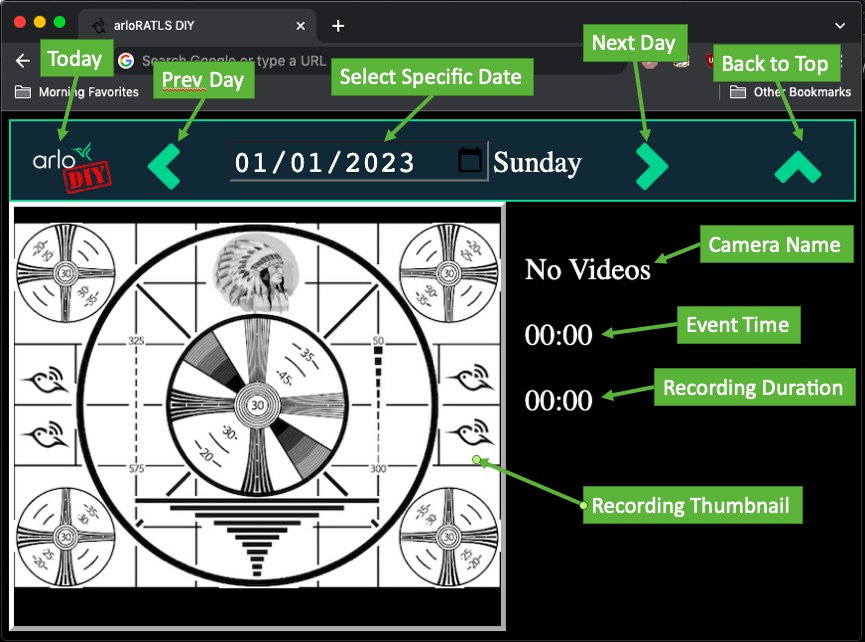
- Support thumbnails for locally stored videos
- (TODO) Support deletion of locally stored videos
However, the vendor's eco-system does inhibit overcoming specific limitations which are beyond arloRATLS-diy:
- LAN vs. WAN access to
arloRATLS-diy: this defined approach does NOT preclude the use of private cloud storage but the approach within continues to use WAN to LAN access via (self-hosted) VPN. - Vendor's web brower or phone app approach cannot be "pointed" to
arloRATLS-diy: this defined approach requires your own (i.e.,diy) web brower for this access.
- Base station which supports locally stored video backups
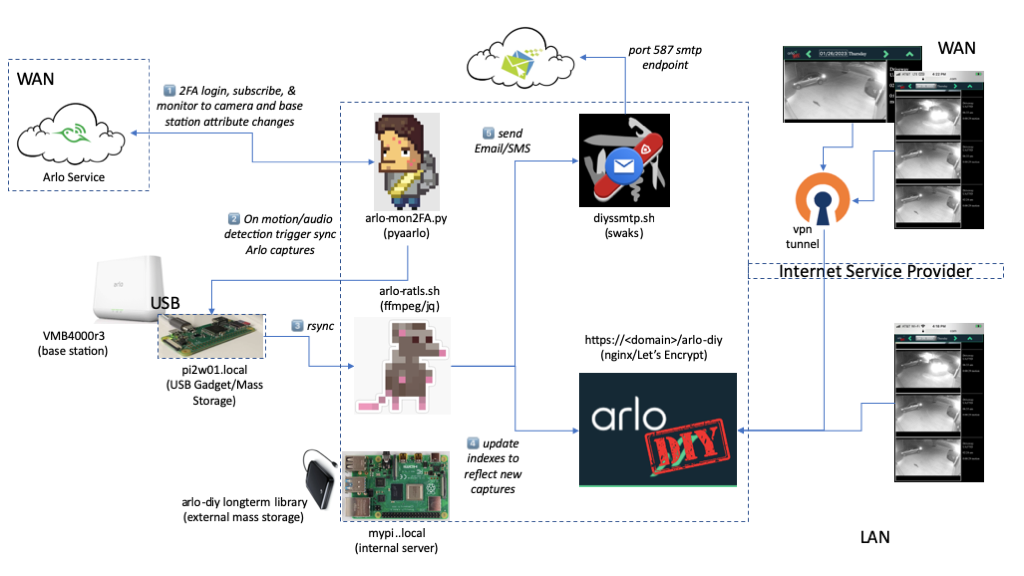
- A device(1) which supports the Linux USB Gadget(2) (e.g., Raspberry Pi 2 Zero)
- A device(1) which supports backend services (e.g., web server, ffmpeg)
- An external mass storage for longterm video backups (e.g., GB to TB storage)
(1) these two devices could be the same device, this approach elected to separate these two devices.
(2) here,here,here,here, and here.
Beyond what is available with typical install of a Linux/debian distribution (e.g., Raspberry Pi OS, raspbian, etc. ):
- pyaarlo: subscribes to base station, camera attribute changes
- nginx: presents the
arloRATLS-diylibrary - Let's Encrypt: some features are only supported by browsers that require a secure server
- OpenVPN: enable WAN to LAN access via VPN
- ffmpeg: thumbnail generation
- jq: parse video metadata files in
jsonformat - swaks: sending email (and SMS) notifications(3)
- browser to view the
arloRATLS-diylibrary, tested with Chrome and Safari (desktop and iphone)
(3) using cellphone provider email/SMS gateways
MORE COMING SOON