AI-powered Android UI test automation platform — write test cases in plain English (or import from xmind / Markdown), have an AI agent run them on real devices, and get visual replay reports. Doubles as a general phone-automation tool with self-learning replay.
English · 简体中文
demo-run-live.mp4
A test run in progress (2× speed) — the wide-screen run page: case results on the left, the live agent log (thoughts + JSON-RPC calls like tap_element / screenshot) in the middle, and the device screen mirrored live on the right (hardware H.264 decoded frame-by-frame via WebCodecs) — all updating as the AI agent drives the device end-to-end from a single plain-language test case.

No USB cable, any network. The phone talks to the server over the Portal App's reverse WebSocket — the laptop and the phone don't even need to be on the same network. Run your devices anywhere (4G / 5G / corporate WiFi).
You write:
Open Settings, find About Phone, capture the version number.
Expected: System version is shown, no error dialog.
The AI agent finds the path, taps, verifies — every step has a screenshot and a thought trace. Failed cases automatically extract a "lesson learned"; the next time the same task runs, the agent avoids the same mistake.
No XPath, no Appium, no recorded scripts.
- Plain-language test cases — write in Chinese or English; import from YAML / Excel / xmind / Markdown
- Dual perception — screenshot (vision) + a11y tree (semantic), fused decision
- Multi-LLM — OpenAI, Anthropic, Gemini, Zhipu GLM, Groq, Ollama
- Any-network device — Portal App opens a reverse WebSocket; runs over 4G / 5G / corporate WiFi without ADB
- Test management UI — suites, cases, run history, step replay, run comparison, pass-rate trend
- Self-contained HTML reports — single-file export with screenshots, thoughts, actions, verdicts
- Planner + Subagent — complex tasks decomposed into subgoals, each with isolated context
- Page-aware reasoning — current Activity class + recent-pages trail injected, so the agent recognizes "wrong screen" instead of blindly tapping
- Two-shot verifier — at-action frame (catches transient toasts) + settled frame, both used for pass/fail judgment
- Learn from mistakes —
LessonLearnedauto-extracted from past runs and re-injected as guardrails - Auto-recovery — 4-level escalation when stuck (warn → back → restart → fail)
- Observability — token usage, perception/LLM/action timing per step, pass-rate trend chart
- CI/CD — CLI runner, webhook notifications (Feishu / DingTalk / Slack)
Full comparison and roadmap: Comparison · Roadmap
 |
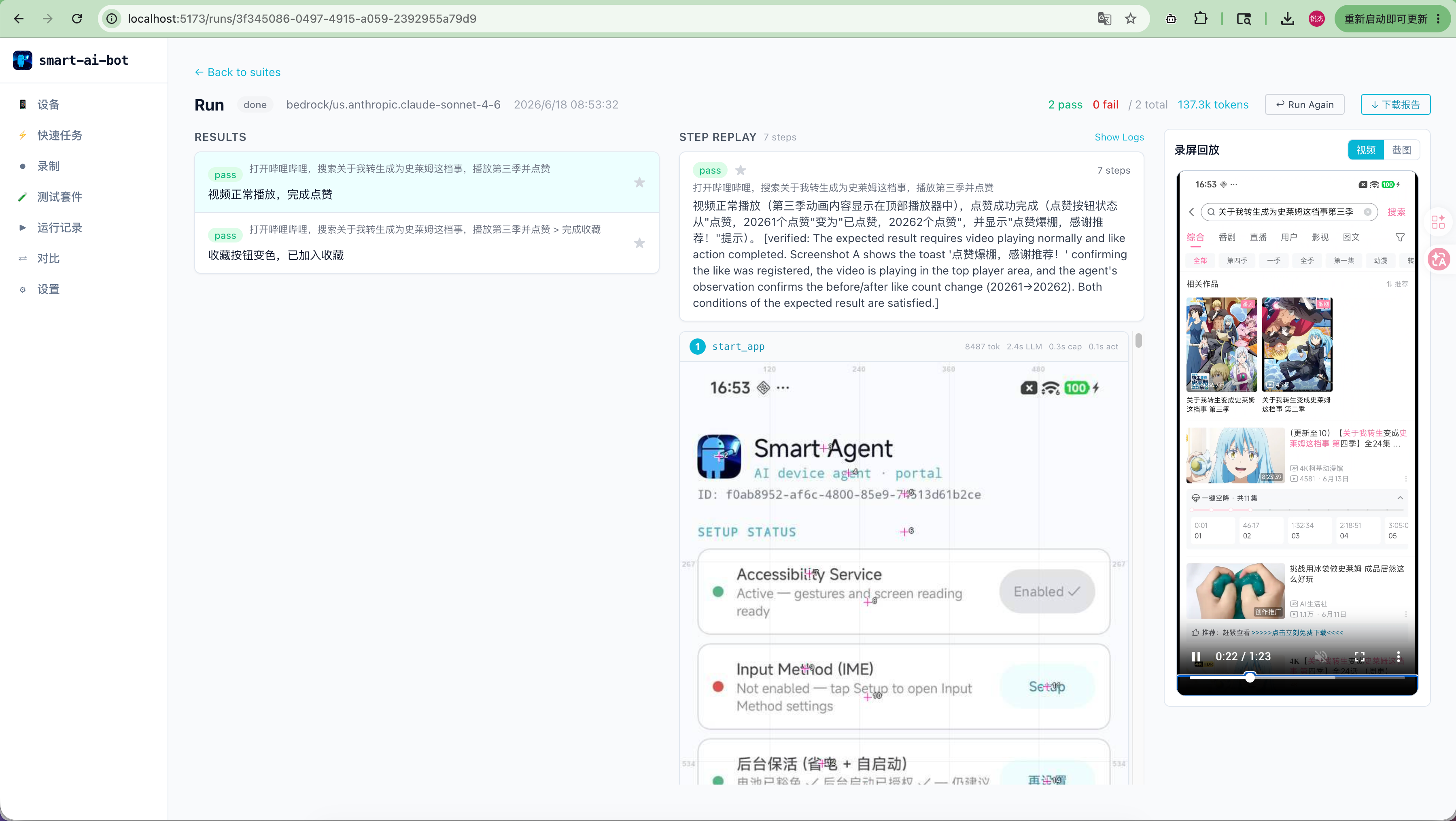 |
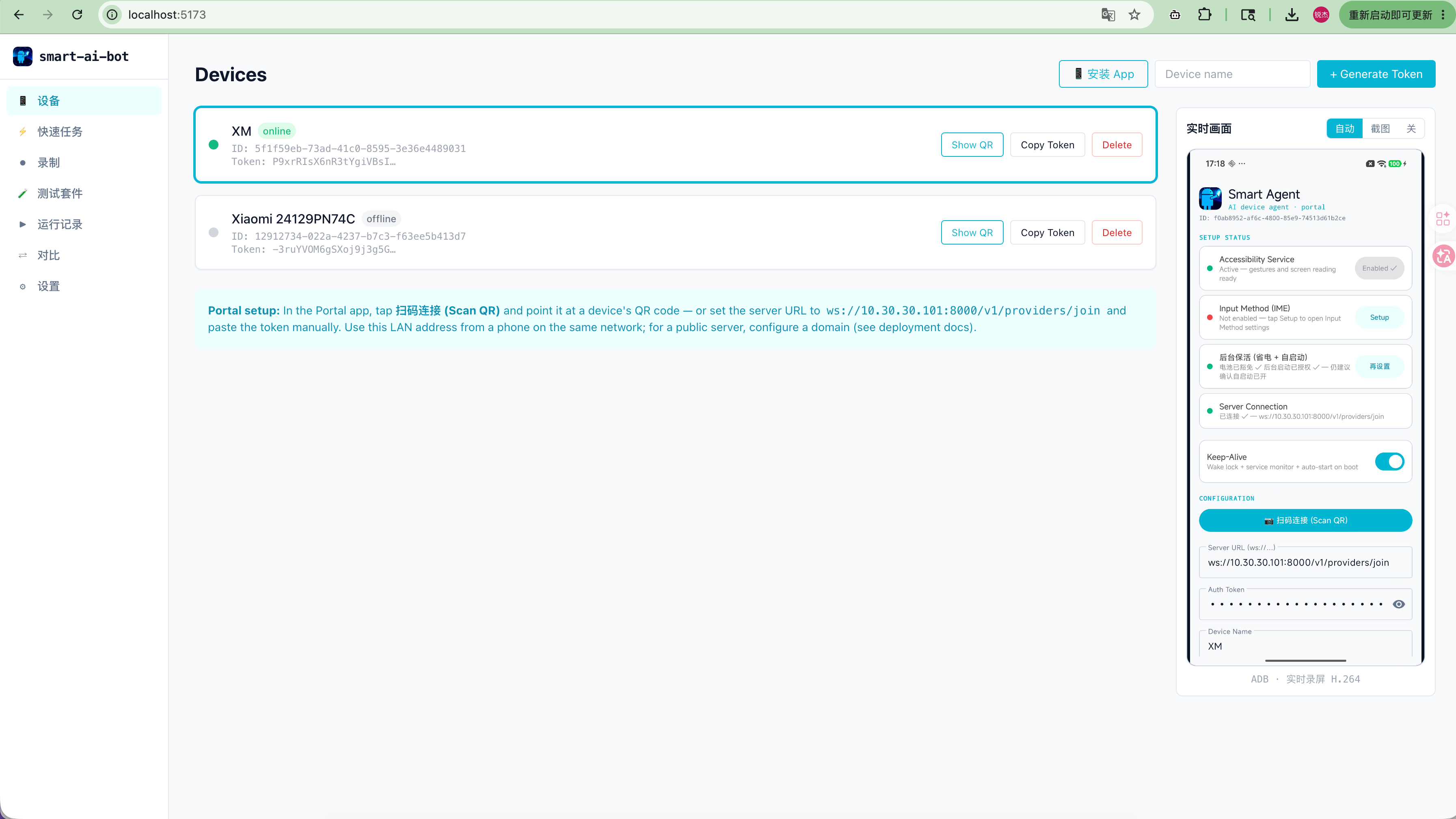
| Devices & live screen — pair by QR or token, then watch the device mirrored live (ADB H.264 decoded via WebCodecs) | Run page — case results, the live agent log, and the device screen / recording replay alongside the run |
 |
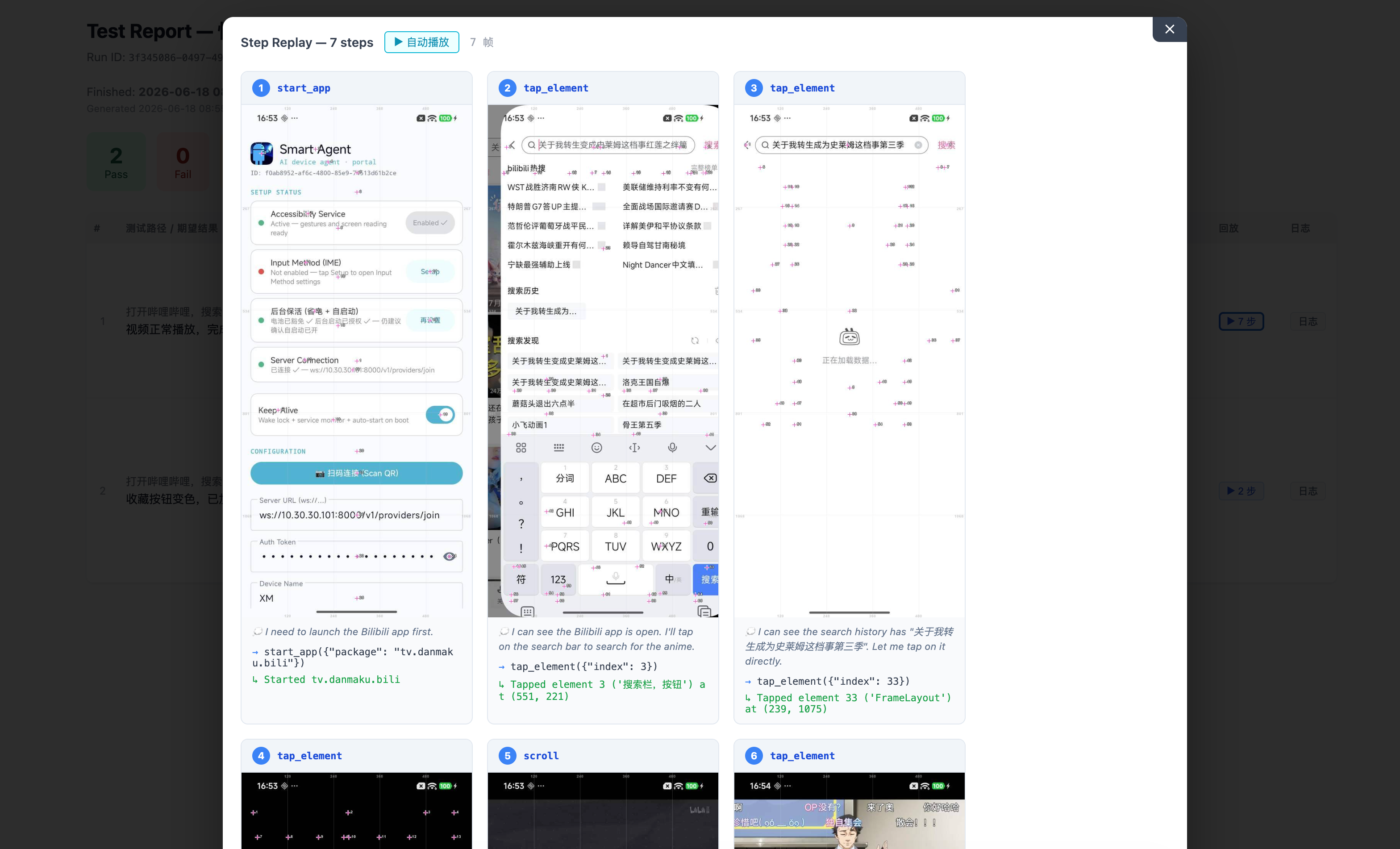 |
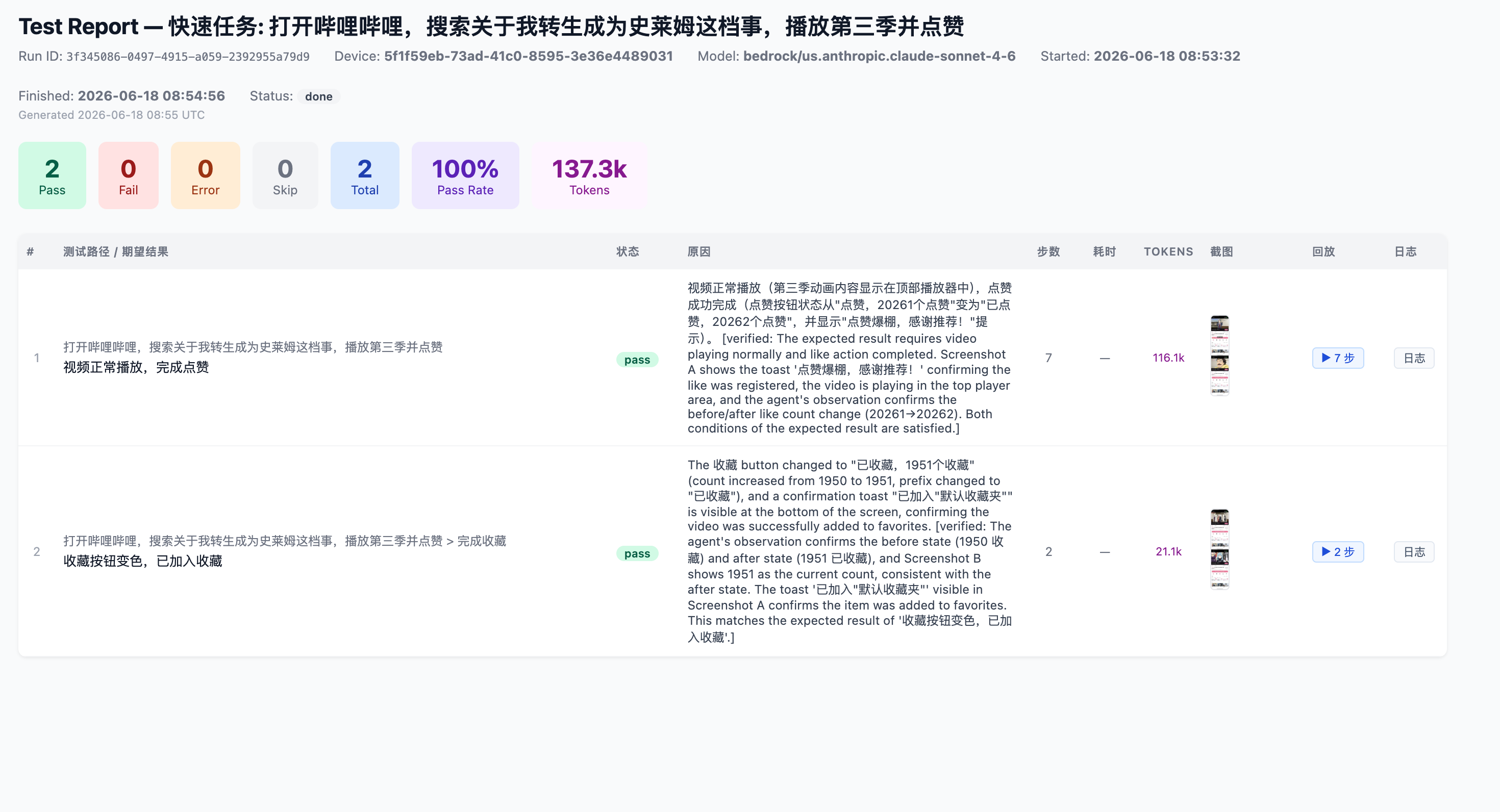
| Test Report — pass/fail counts, pass rate, token usage, run time, and per-case verdict with verifier reasoning | Step Replay — every action with screenshot, agent reasoning, and tool call (e.g. tap_element({"index": 5})) |
The exported HTML report is fully self-contained, and its step replay can auto-play (2× speed):
demo-report-replay.mp4

Requires Docker 20+ with Compose v2. No Python / Node install needed on the host.
git clone https://github.com/rejigtian/Smart-AI-Bot.git
cd Smart-AI-Bot
docker compose up -d
Open http://localhost:5173 and drop your LLM API keys into Settings.
The SQLite database is persisted in a Docker volume (backend-data). To override ports:
BACKEND_PORT=18000 FRONTEND_PORT=15173 docker compose up -dPrerequisites: Python 3.9+, Node.js 18+, an Android device (real or emulator).
git clone https://github.com/rejigtian/Smart-AI-Bot.git
cd Smart-AI-Bot

# Backend
cd backend
python -m venv .venv && source .venv/bin/activate
pip install -r requirements.txt
uvicorn main:app --reload --host 0.0.0.0 --port 8000

# Frontend (new terminal)
cd frontend
npm install
npm run dev
Or one command:
./start.shOpen http://localhost:5173 and drop your LLM API keys into Settings.
Option A — scan to install (easiest)
With the backend running, open the Web UI's Devices page in a phone browser, tap
📱 Download App, and scan the QR to download and install the latest
SmartAgent-<version>.apk. Allow "install from unknown sources" when prompted.
Option B — build from source
cd android
./gradlew assembleDebug   # also archived as backend/data/apk/SmartAgent-<version>.apk
adb install -r app/build/outputs/apk/debug/app-debug.apkEasiest — scan to connect. In the Devices page, generate a token and tap Show QR. In the Portal app tap 扫码连接 (Scan QR) and scan it — the server URL + token are filled in and it connects in one tap.
Manual. Set the Server WebSocket URL and Device Token by hand, then tap Connect.
Finally: System Settings → Accessibility → enable AgentAccessibilityService. The persistent foreground notification means you're online.
Which address? A real phone can't reach
localhost— that only works for an emulator running on the same computer. On the same LAN, open the Web UI by the machine's internal IP (e.g.http://192.168.1.10:5173); the QR and pairing address then default to that internal address automatically. To use a public address or domain, configure it manually — see Deployment.
In the Test Suites page, create a suite and add a case:
Path: Open Settings, navigate to About Phone, capture the version number
Expected: System version info is shown, no error dialog
Pick a device + model, hit Run.
cd backend
python cli.py run --suite <id> --device <id> --json
Exit code: 0 = all passed, 1 = at least one failed.
Browser (management UI)
  │ REST + SSE
FastAPI server
  ├── Planner (decomposes complex tasks)
  │     └── SubAgent #1..N (isolated context per subgoal)
  ├── TestCaseAgent (6-layer + VLM fallback)
  │     perception → decision → action → memory → verification → replay
  └── SQLite + webhook + CLI
        Device / Suite / Case / Run / Result / StepLog
  │
  │ WebSocket JSON-RPC
Android device (Portal App)
  tap / swipe / input / screenshot / get_ui_state
Detailed design: docs/agent-architecture.md.
| Doc | What it covers |
|---|---|
| Deployment | Docker, public-server (HTTPS/WSS) setup, backups |
| Agent Architecture | 6-layer agent + Planner / Subagent design |
| Android Portal | Portal App performance & connection stability |
| Test KB | Building the test knowledge base for your own app |
| Roadmap | Done features + priorities |
| Comparison | DroidRun / Midscene / AutoGLM technical comparison |
| Troubleshooting | Common issues — connection / screenshot / recognition |
| Changelog | Release history — what changed in each version |
This project is inspired by:
- droidrun / droidrun-portal — the Portal App's reverse WebSocket and connection-stability patterns (library-level ping/pong, reconnect budget, terminal-error detection) are directly inspired by droidrun-portal.
- Midscene.js — the Set-of-Marks visual annotation idea inspired our a11y element overlay. We ended up using magenta crosshairs instead of numbered bubbles to avoid confusion with in-game content.
- AutoGLM — the Planner / Grounder split influenced our dual-perception fusion architecture.
PRs and issues welcome. Common contribution paths:
- New LLM provider — add a branch in
agent/base.py - New Portal App action — define the tool in
agent/tools.py+ implement it inws_device.py - New test case format parser —
core/test_parser.py - Documentation / i18n
MIT — see LICENSE.