VoiceAI Pro is a sophisticated, real-time, voice-driven conversational AI assistant designed to provide a uniquely engaging user experience. Move beyond traditional text-based chats and interact with 'Circuit'—an AI with the personality of a friendly, street-smart "Mumbai Tapori." This project leverages an end-to-end streaming architecture to ensure that the journey from your voice input to the AI's audio response is seamless and instantaneous.
Below is a snapshot of the application's live interface. For the best demonstration, consider replacing this image with a short GIF or video that showcases the application in action.
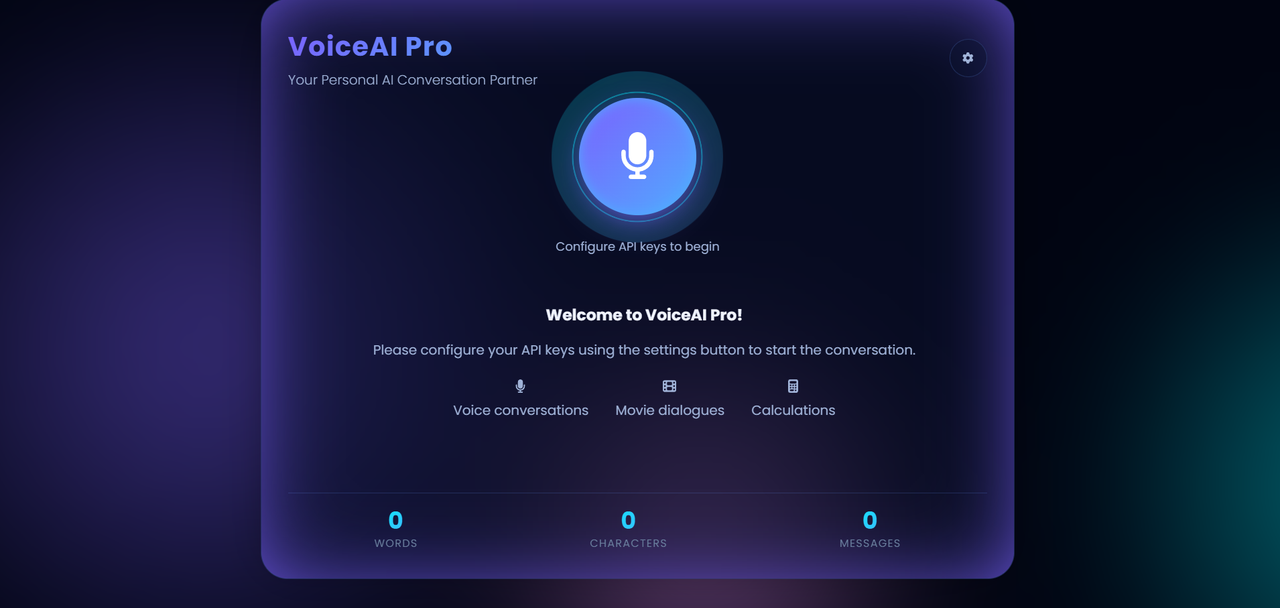
Every feature has been thoughtfully implemented to deliver a superior user experience.
-
🎙️ Real-time Voice Conversation No typing required. Simply press the record button, speak your query, and receive an audio response from the AI. The experience is designed to be as fast and natural as a phone call.
-
🚀 End-to-End Streaming Architecture This is the core of the project's architecture. Data doesn't wait; it flows.
- Live Speech-to-Text: As you speak, your voice is transcribed into text in real-time (AssemblyAI).
- Streaming LLM Responses: The AI's response is generated in chunks, causing the text to appear on the screen almost instantly (Google Gemini).
- Streaming Text-to-Speech: The AI's text response is simultaneously converted into audio and streamed back, eliminating delays in the audio response (Murf.ai).
-
😎 Unique AI Persona: 'Circuit' This isn't a typical, robotic AI. 'Circuit' interacts with you in a Mumbai-style Hinglish dialect. Its responses are friendly, street-smart, and entertaining, embodying a unique and memorable character.
-
🎬 Special Skill: Movie Dialogue Finder Feeling bored? Ask Circuit to recite a famous dialogue from a Bollywood movie. For example: "Circuit, tell me a dialogue from Sholay." and prepare to be entertained!
-
🧮 Special Skill: Instant Calculator No need to open a separate calculator app for complex calculations. Just ask Circuit. For example: "What is 25 multiplied by 4?" and you will get an instant answer.
-
🔐 Secure Local API Key Management Your privacy is a top priority. API keys are stored exclusively in your browser's
localStorage. They are never sent to or stored on the server, ensuring your credentials remain 100% secure. -
🎨 Futuristic UI & UX The application features a modern and visually appealing design. An aurora background, engaging animations, and a clean layout provide a premium and immersive user experience.
This project operates on a seamless, event-driven data flow. Let's trace the journey of a user's voice from input to response:
-
🎤 Step 1: Audio Capture (Frontend) The user clicks the record button. The browser's
getUserMedia APIcaptures audio from the microphone. -
⏩ Step 2: Audio Streaming (Frontend → Backend) The captured audio is down-sampled to 16-bit PCM format (16,000 Hz) and streamed in real-time to the FastAPI server via a WebSocket connection.
-
📝 Step 3: Live Transcription (Backend → AssemblyAI) The backend immediately forwards the incoming audio stream to AssemblyAI's real-time transcription service through another WebSocket.
-
🗣️ Step 4: Final Transcript (AssemblyAI → Backend) Once the user stops speaking, AssemblyAI detects the end of the utterance and sends the final, formatted transcript back to the backend.
-
🧠 Step 5: The Brain of the Operation (Backend Logic)
- The backend receives the user's text transcript.
- It first checks if the query triggers a special skill (like Calculation or Movie Dialogue).
- If it's a general query, the text is streamed to the Google Gemini LLM, which is configured with the 'Circuit' persona system prompt.
- Gemini begins generating a response in character.
-
✍️ Step 6: Text Streaming (Backend → Frontend) The response from Gemini is streamed back to the Frontend in chunks. This allows the user to see the response appearing on the screen in real-time.
-
🔊 Step 7: Voice Synthesis (Backend → Murf.ai) Simultaneously, the complete text response from Gemini is streamed to Murf.ai for Text-to-Speech synthesis.
-
🎧 Step 8: Audio Streaming (Murf.ai → Backend → Frontend) Murf.ai converts the text into audio and streams the audio chunks back to the Backend, which then forwards them to the Frontend.
-
▶️ Step 9: Playback (Frontend) The Frontend assembles all the incoming audio chunks into a singleAudio Bloband plays it back to the user, completing the conversation loop with minimal latency.
| Technology | Rationale (Why it was chosen) |
|---|---|
| FastAPI (Backend) | Ideal for real-time applications due to its high performance, native asynchronous support, and excellent WebSocket handling. |
| Vanilla JavaScript (Frontend) | Keeps the project lightweight and fast without the overhead of a heavy framework. Provides full control over audio processing and DOM manipulation. |
| AssemblyAI | Its real-time streaming transcription service is recognized for its industry-leading speed and accuracy. |
| Google Gemini | A powerful and fast LLM that supports streaming responses. Its System Prompt feature is crucial for maintaining the AI's persona. |
| Murf.ai | Provides high-quality, natural-sounding voices, and its streaming TTS API is key to reducing audio response latency. |
| Uvicorn | A lightning-fast ASGI server for FastAPI, perfect for both development and production environments. |
Follow these steps to set up and run the project on your local machine.
Ensure you have the following installed and ready:
- Python 3.8+
- A modern Web Browser (e.g., Chrome, Firefox).
- API Keys for the following services:
- AssemblyAI
- Google AI (Gemini)
- Murf.ai
- TMDB (Optional, for movie-related features)
git clone [https://github.com/](https://github.com/)[your-github-username]/Murf_ai_project.git
cd Murf_ai_project- Create a Virtual Environment: This is a best practice to isolate project dependencies.
python -m venv venv
- Activate the Environment:
# On Windows:
.\venv\Scripts\activate

# On macOS/Linux:
source venv/bin/activate
- Install Dependencies:
pip install -r requirements.txt
- Execute the following command in your terminal:
uvicorn main:app --reload
- Your server will now be running at
http://127.0.0.1:8000.
- Open your web browser and navigate to
http://127.0.0.1:8000. - Click the settings icon (⚙️) in the top-right corner.
- Enter your API keys for AssemblyAI, Murf, Gemini, and TMDB.
- Click "Save Configuration". The application is now ready to use!
This project supports two methods for handling API keys:
-
Browser
localStorage(Recommended Method):- How it works: When you enter your keys in the frontend settings modal, they are saved securely in your browser's local storage.
- Advantage: This is the most secure method. The keys remain on your client machine and are sent directly from the frontend when establishing the WebSocket connection. The server never stores these keys.
-
.envFile (Server-side Fallback):- What it is: You can store your keys in a
.envfile in the project's root folder. - Purpose: This serves as a fallback. If keys are not provided by the browser, the server will use these keys instead.
- Setup: Create a file named
.envin the root directory and add your keys as follows:ASSEMBLYAI_API_KEY="your_assemblyai_api_key" MURF_API_KEY="your_murf_api_key" GEMINI_API_KEY="your_gemini_api_key" TMDB_API_KEY="your_tmdb_api_key"
- What it is: You can store your keys in a
Important: The
.envfile is already listed in.gitignoreto prevent you from accidentally committing your secret keys to GitHub.
This project has the potential for further expansion:
- Multiple Personas: Allow users to choose from different AI personas (e.g., a teacher, a comedian, a formal assistant).
- Session History: Implement a feature to save and load conversation history.
- More Skills: Integrate new skills like fetching live weather updates, news headlines, or music recommendations.
- Progressive Web App (PWA): Convert the application into a PWA to make it installable on devices for an app-like experience.
Prateek Mani Tripathi
- GitHub: @prateekmtri
- LinkedIn: My LinkedIn Profile