
The project has been recently renamed from 'Spring Boot Database Admin' to 'SnapAdmin'. If you were already using 'Spring Boot Database Admin' make sure to update your
pom.xmland other references with the new updated name.
Generate a powerful database/CRUD management dashboard for your Spring Boot® application in a few minutes.
SnapAdmin scans your @Entity classes and automatically builds a web UI with CRUD operations (and much more)
for your database schema. No modifications required to your existing code (well, you will need to add 1 line to it...)!
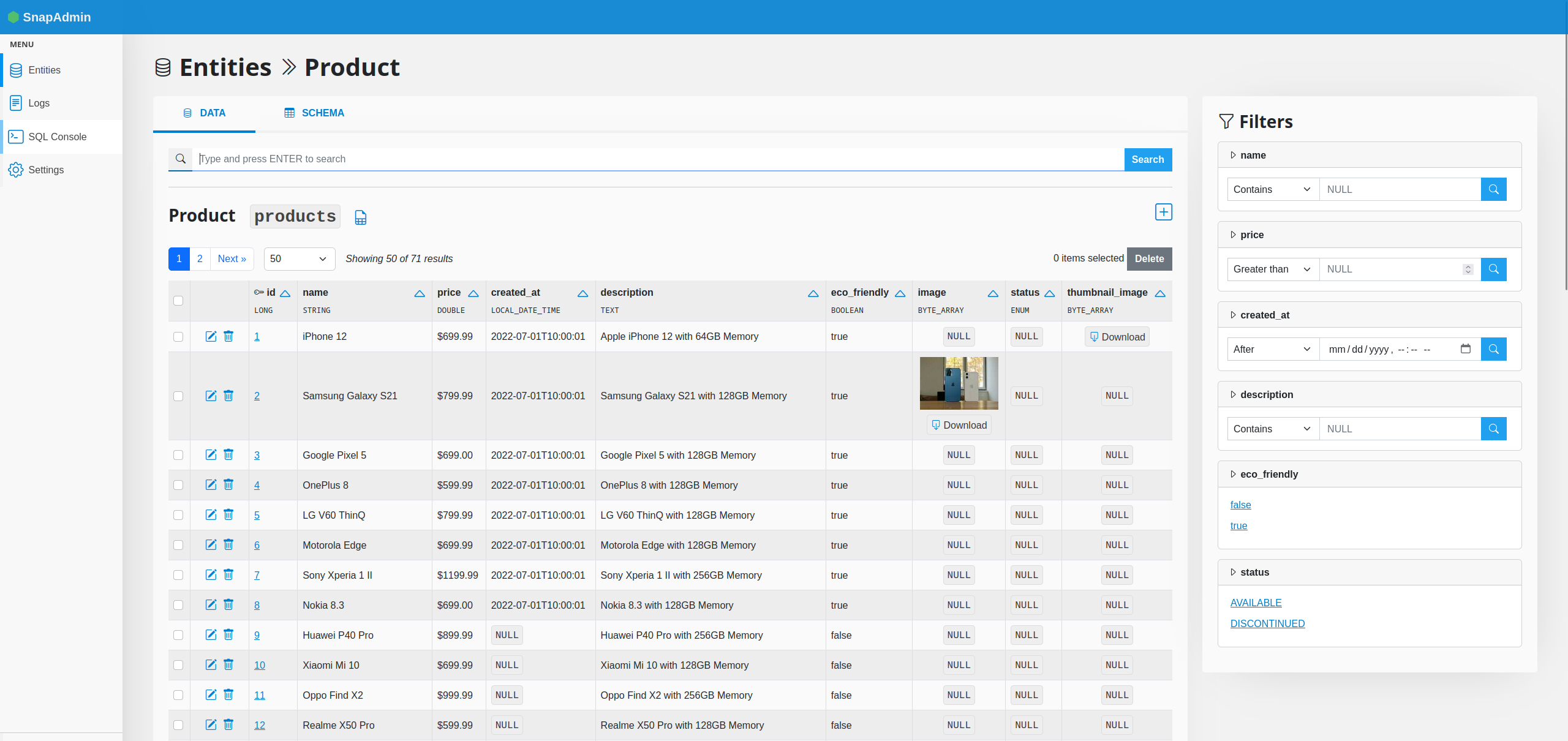
Features:
- List objects with pagination and sorting
- Object detail page, which also includes
@OneToManyand@ManyToManyrelated objects - Create/Edit objects
- Action logs: history of all write operations executed through the web UI
- Advanced search and filtering
- Annotation-based customization
- Data export (CSV, XLSX, JSONL)
- SQL console to run, save for later use and export results of custom SQL queries
Supported JPA annotations
- Core: @Entity, @Table, @Column, @Lob, @Id, @GeneratedValue
- Relationships: @OneToMany, @ManyToOne, @ManyToMany, @OneToOne
- Validation: all JPA validation annotations (
jakarta.validation.constraints.*)
The behaviour you specify with these annotations should be applied automatically by SnapAdmin as well. Keep in mind that using non-supported annotations will not necessarily result in an error, as they are simply ignored. Depending on what the annotation actually does, this could be just fine or result in an error if it interferes with something that SnapAdmin relies on.
Supported field types
These are the supported types for fields inside your @Entity classes (excluding fields for relationships to other entities). Fields with unsupported types are ignored, but functionality may be limited; refer to the documentation for more information.
- Double, Float, Integer, Short, Byte, Character, BigDecimal, BigInteger
- Boolean
- String, UUID
- Date, LocalDate, LocalDateTime, OffsetDateTime, Instant
- byte[]
- Enum
The code is still in a very early stage and it might not be robust if you use not-yet-supported JPA annotations and/or other custom configurations (e.g., custom naming strategy). If you find a bug with your settings, please report it as an issue and I will take a look at it.
SnapAdmin supports visualizing hierarchical data structures (like Brand -> Model -> Part) in an interactive tree view.
To enable the tree view for an entity, use the @SnapTree annotation.
1. Define the Root Entity
Annotate the root entity (e.g., Brand) with @SnapTree.
@Entity
@SnapTree(
    label = "Vehicle Hierarchy",
    icon = "bi bi-truck",
    childField = "models" // The field in this entity that points to children
)
public class Brand {
    // ...
    @OneToMany(mappedBy = "brand")
    private Set<VehicleModel> models;
}
2. Define Child Links Annotate the child link field in the parent entity to define the next level of hierarchy.
For example, in VehicleModel:
@Entity
public class VehicleModel {
    // ...
    @ManyToMany
    @SnapTree(childLabel = "Compatible Parts", icon = "bi bi-gear")
    private Set<AutoPart> compatibleParts;
}The tree view includes a powerful search feature that allows users to find nodes by name.
- It searches across all entities in the hierarchy.
- It automatically expands the tree to show the selected result.
- It displays the path context (e.g.,
Toyota > Camry > Brake Pad).
To customize the label shown in search results, use the @DisplayName annotation on a method in your entity:
@Entity
public class AutoPart {
    // ...
    @DisplayName
    public String getFullName() {
        return name + " (" + partNumber + ")";
    }
}For Many-to-Many relationships, you can link existing entities to a parent node directly from the tree view.
- Right-click on a node that has a Many-to-Many relationship (e.g., a
VehicleModelwithAutoParts). - Select "Link Existing...".
- Search for the item you want to link.
- Select the item and click "Link".
This feature is automatically enabled for fields annotated with @ManyToMany where the child entity has a corresponding inverse field.
- SnapAdmin is distributed on Maven. For the latest stable release you can simply include the following snippet in your
pom.xmlfile:
<dependency>
	<groupId>tech.ailef</groupId>
	<artifactId>snap-admin</artifactId>
	<version>0.2.1</version>
</dependency>- A few simple configuration steps are required on your end in order to integrate the library into your project. If you don't want to test on your own code, you can clone the test project which provides a sample database and already configured code.
Otherwise, go ahead and add these to your application.properties file:
## SnapAdmin is not enabled by default
snapadmin.enabled=true

## The first-level part of the URL path: http://localhost:8080/${baseUrl}/
snapadmin.baseUrl=admin

## The package(s) that contain your @Entity classes
## accepts multiple comma separated values
snapadmin.modelsPackage=your.models.package,your.second.models.package

## At the moment, it's required to have open-in-view set to true.
# spring.jpa.open-in-view=true

## OPTIONAL PARAMETERS

## Whether to enable SnapAdmin
# snapadmin.enabled=true
#
## Set to true if you need to run the tests, as it will customize
## the database configuration for the internal DataSource
# snapadmin.testMode=false
#
## SQL console enable/disable (true by default)
# snapadmin.sqlConsoleEnabled=falseIMPORTANT: The configuration prefix dbadmin. has been changed to snapadmin. starting from version 0.2.0, as part of the project being renamed. Remember to update your configuration files accordingly if you were already using SnapAdmin <= 0.1.9.
Now annotate your @SpringBootApplication class containing the main method with the following:
@ImportAutoConfiguration(SnapAdminAutoConfiguration.class)This will autoconfigure SnapAdmin when your application starts. You are good to go!
- At this point, when you run your application, you should be able to visit
http://localhost:${port}/${snapadmin.baseUrl}and see the web interface.
If you find a problem or a bug, please report it as an issue. When doing so, include as much information as possible, and in particular:
- provide the code for the involved
@Entityclasses, if possible/relevant - provide the full stack trace of the error
- specify if you are using any particular configuration either in your
application.propertiesor through annotations - if the problem occurs at startup, enable
DEBUG-level logs and report whatgrep SnapAdminreturns