Sub-GHz (433 / 868 / 915 MHz) + 2.4GHz wireless expansion module for M5Stack Cardputer ADV · Bruce firmware compatible · Hardware auto-switching · No soldering required






The PINGEQUA Hydra RF is a plug-and-play dual-band RF expansion module for the M5Stack Cardputer ADV. It integrates a Texas Instruments CC1101 Sub-GHz transceiver and a Nordic nRF24L01 2.4GHz transceiver on a single PCB, connected via the Cardputer ADV's native 18-Pin SPI/GPIO header.
Unlike modules that require manual frequency switching or separate wiring, the Hydra RF uses hardware mutual-exclusion logic — the firmware controls which chip is active at any time, automatically. No jumpers, no physical toggles.
It is the only dual-band RF expansion purpose-built for the Cardputer ADV platform and is natively supported by Bruce firmware.
Three hardware variants cover every major Sub-GHz ISM band. Choose the model for your region:
| Model | Sub-GHz Band | Primary Regions | 2.4GHz | Form Factor |
|---|---|---|---|---|
| Hydra RF 424 Cap | 433 MHz | China, Japan, Southeast Asia, EU | nRF24L01 | Cap |
| Hydra RF 824 Pro | 868 MHz | EU, UK, Germany, France, Netherlands | nRF24L01 | Pro DevBoard |
| Hydra RF 924 Pro | 915 MHz | USA, Canada, Australia, Brazil | nRF24L01 | Pro DevBoard |
433 MHz covers the widest range of consumer ISM devices in Asia and Europe (remotes, sensors, automotive key fobs, garage doors).
868 MHz is the dominant Sub-GHz ISM band in the EU/UK, used in Z-Wave, LoRa, and European smart metering.
915 MHz is the standard Sub-GHz ISM band in North America and Australia, common in LoRa, RPMA, and US smart home protocols.
⚠️ The Cardputer ADV host device is not included. Verify which Sub-GHz frequencies are permitted for use in your country before purchase.
| Parameter | Value |
|---|---|
| Host Platform | M5Stack Cardputer ADV (exclusive) |
| Sub-GHz Chip | Texas Instruments CC1101 — up to +10 dBm TX power |
| 2.4GHz Chip | Nordic nRF24L01+ with PA + LNA — up to +20 dBm TX power |
| Interface | 18-Pin SPI/GPIO (native Cardputer ADV header) |
| Voltage Regulator | ME6211 Low-Noise LDO |
| Power Stability | 100µF Tantalum Capacitor Array |
| Band Switching | Hardware mutual-exclusion (automatic) |
| Firmware | Bruce (native brucepins.conf support) |
| Antennas Included | 2× High-Gain (1× Sub-GHz, 1× 2.4GHz) |
| Soldering Required | None |
The Hydra RF PCB implements a hardware mutual-exclusion circuit between the CC1101 and nRF24L01. When Bruce firmware activates one chip, the other is electronically isolated. There is no manual band-select switch and no software overhead for the transition.
RF transmit bursts create instantaneous current spikes that can destabilize poorly designed modules. The Hydra RF addresses this with an ME6211 LDO and a 100µF tantalum capacitor array, maintaining a clean voltage rail throughout sustained scanning, sniffing, and replay operations.
Each frequency band has an independently optimized RF front end. Combined with the included high-gain antennas, this delivers measurably better range and sensitivity compared to generic breakout boards — important for real-world field use.
The module uses only the standard 18-Pin expansion header of the Cardputer ADV. No soldering, no modification to the host device, no loss of warranty.
Bruce firmware's brucepins.conf system is the intended configuration method. The module activates fully once the correct GPIO pins are set in the config file via WebUI — no custom code required.
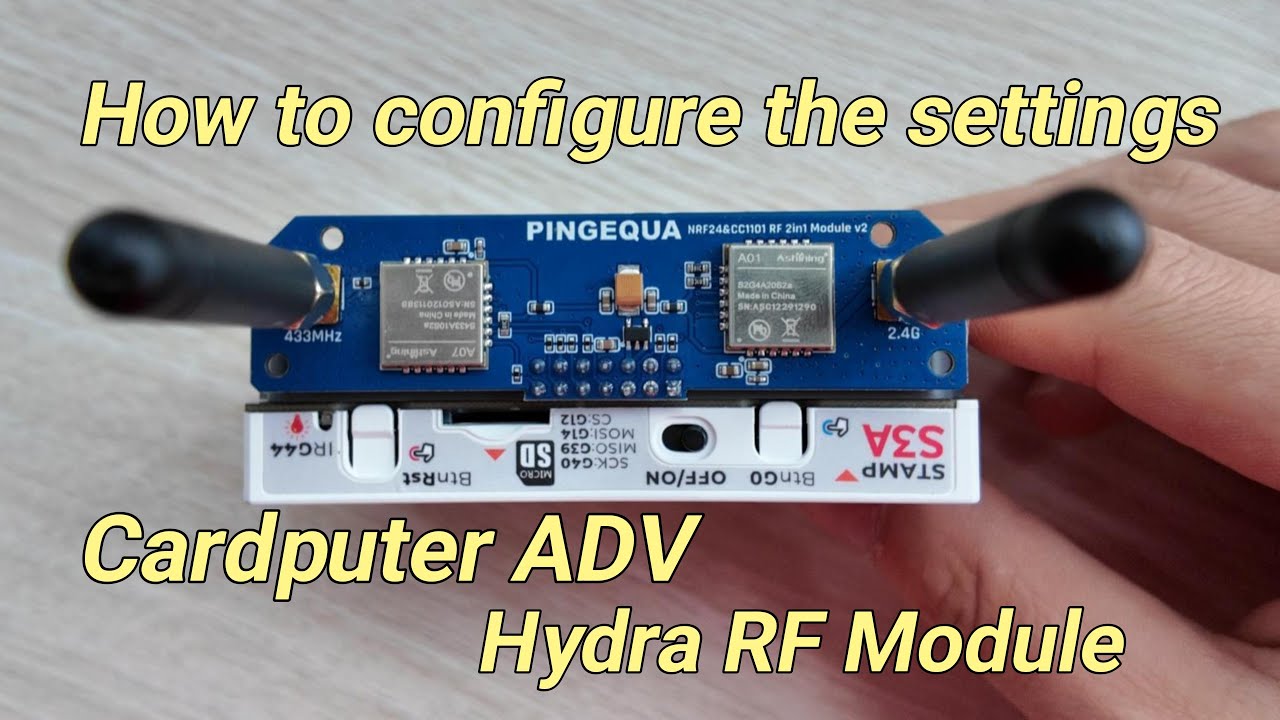
Ultimate Cardputer ADV Module: PINGEQUA Hydra RF Auto-Switching Setup Guide (Bruce Pins) — official walkthrough on the PINGEQUA YouTube channel. Covers physical install,
brucepins.confediting via WebUI, and CC1101 / nRF24 activation. The procedure is identical for all three regional variants (424 Cap / 824 Pro / 924 Pro) — only the final frequency differs.
- M5Stack Cardputer ADV
- Bruce Firmware (latest stable or beta)
- PC or smartphone (for WebUI access)
- This module + included antennas
- Power off the Cardputer ADV
- Align the Hydra RF module with the 18-Pin expansion header on the Cardputer ADV
- Press firmly and evenly until fully seated — all 18 pins must make contact
- Screw on the Sub-GHz antenna to the CC1101 SMA port
- Screw on the 2.4GHz antenna to the nRF24 SMA port
Flash the latest version of Bruce firmware to your Cardputer ADV if not already done:
https://github.com/pr3y/Bruce
Tip: If you encounter module detection issues after configuration, try the latest beta release of Bruce, or perform a full flash erase before reflashing.
All three Hydra RF models use the same GPIO pin assignment. This step is identical regardless of which frequency variant you own.
Access the WebUI:
- On the Cardputer ADV, navigate to Files → WebUI
- The device will broadcast a Wi-Fi access point — connect your PC or phone to it
- Open the IP address shown on the Cardputer ADV screen in a browser
- Username:
admin - Password:
bruce
- Username:
- Open the file
brucepins.conf
Enter these values:
# CC1101 — Sub-GHz transceiver
CC1101_CS  = 13
CC1101_GDO = 5

# NRF24L01 — 2.4GHz transceiver
NRF24_CS   = 6
NRF24_CE = 4- Click Save
- Restart the device (mandatory — changes only apply after reboot)
⚠️ Critical: You must updatebrucepins.confin both SD card and LittleFS. If only one is updated, the module may fail to initialize on some boot paths. Edit both locations.
This is the only step that differs between the three models.
In Bruce firmware:
RF → Config → RF Module → CC1101
RF → Frequency → [select your frequency]
| Your Model | Select This Frequency |
|---|---|
| Hydra RF 424 Cap | 433.00 MHz |
| Hydra RF 824 Pro | 868.35 MHz |
| Hydra RF 924 Pro | 915.00 MHz |
Once set, you can use all Sub-GHz features: signal sniffing, raw capture, replay, frequency scanning.
In Bruce firmware:
Main Menu → [any NRF24 tool, e.g. NRF Spectrum, NRF Scanner]
Tool Settings → SPI Mode
The 2.4GHz band is independent from Sub-GHz at both hardware and software levels. You can switch between bands at any time through the firmware menu.
┌──────────────────────────────────────────┐
│        brucepins.conf — Hydra RF         │
├──────────────────────────┬───────────────┤
│ CC1101  CS  (Chip Select)│  GPIO 13      │
│ CC1101  GDO0 (Interrupt) │  GPIO 5       │
├──────────────────────────┼───────────────┤
│ NRF24   CS  (Chip Select)│  GPIO 6       │
│ NRF24   CE  (Enable)     │  GPIO 4       │
└──────────────────────────┴───────────────┘
| Problem | Cause | Fix |
|---|---|---|
| Module not detected at boot | brucepins.conf not updated in both storage locations |
Edit config in both SD card and LittleFS |
| Module detected but no signal | Antenna not attached or loose | Fully tighten both SMA antennas |
| WebUI not accessible | Device not in WebUI mode | Navigate to Files → WebUI; reconnect to the broadcasted Wi-Fi |
| Frequency option grayed out | RF Module not set to CC1101 | Go to RF → Config → RF Module → select CC1101 first |
| Device crashes during TX | Power instability on host | Ensure Cardputer ADV battery is adequately charged |
| Changes not persisting after reboot | Edited wrong storage location | Confirm edits saved to both SD and LittleFS |
Sub-GHz RF Research (CC1101)
- Capture and analyze signals from ISM-band devices: key fobs, garage door remotes, door/window sensors, weather stations, smart meters
- Raw signal recording and replay for protocol analysis
- Frequency sweep scanning across the Sub-GHz ISM spectrum
- LoRa and Z-Wave adjacent-frequency monitoring
2.4GHz Research (nRF24L01)
- 2.4GHz spectrum visualization and interference analysis
- nRF24 protocol sniffing and channel hopping
- BLE-adjacent band monitoring
Platform Use Cases
- IoT and wireless protocol education and STEM coursework
- Portable wardriving and field spectrum surveys
- Hardware security research in authorized lab environments
- RF-based CTF (Capture the Flag) challenges
| Component | Requirement |
|---|---|
| Host Device | M5Stack Cardputer ADV only |
| Firmware | Bruce (recommended: latest stable or beta) |
| Interface | 18-Pin SPI/GPIO expansion header |
| Power Source | Via host device (Cardputer ADV internal battery) |
This module is not compatible with the original M5Stack Cardputer (non-ADV version), M5StickC, M5StickC Plus, or any other M5Stack device without the 18-Pin expansion header.
| Item | Quantity |
|---|---|
| Hydra RF Module (your chosen variant) | 1× |
| High-Gain Sub-GHz Antenna | 1× |
| High-Gain 2.4GHz Antenna | 1× |
M5Stack Cardputer ADV host device — not included.
| 424 Cap (433 MHz) kit | 924 Pro (868 / 915 MHz) kit |
|---|---|
 |
 |
This hardware is designed for authorized wireless protocol research, security education, and lawful testing only. It does not carry FCC, CE, ETSI, or any other regional radio certification. RF transmission is subject to local regulations — before transmitting on any frequency, verify that your use is permitted in your country. The user is solely responsible for regulatory compliance. Unauthorized interception or interference with wireless communications is illegal in most jurisdictions.
- 14-day return window for unused, unopened items
- Limited warranty covering manufacturing defects
- Not covered: damage from incorrect flashing, overvoltage, physical modification, or misuse
PINGEQUA Official Store (recommended — direct from manufacturer, fastest firmware/spec updates)
Amazon — search pingequa cardputer to find the Hydra RF series on your regional Amazon site (.com / .co.uk / .de / .co.jp etc.).
AliExpress — search pingequa cardputer to find the Hydra RF series in the official PINGEQUA store.
Tip: regardless of channel, verify the listing ships the variant for your region's ISM band (433 / 868 / 915 MHz) before ordering.
| Resource | URL |
|---|---|
| PINGEQUA Official Store | https://www.pingequa.com |
| PINGEQUA Wiki | https://www.pingequa.com/pages/wiki |
| Official Setup Documentation | https://www.pingequa.com/pages/support-m5stack-cardputer-adv-hydra-rf-924-devboard |
| Bruce Firmware (GitHub) | https://github.com/pr3y/Bruce |
| PINGEQUA YouTube Channel | https://www.youtube.com/@PINGEQUA |
Community-maintained documentation. For official product support, visit pingequa.com.