Changed from API Key to OAuth, and http to https (Meetup is removing …#17
Changed from API Key to OAuth, and http to https (Meetup is removing …#17pferate merged 1 commit intopferate:masterfrom
Conversation


…API Keys support on 15 Aug 2019). Can use Requests-OAuthlib for OAuth token workflow.


|
Looking good to me! We'll try to get it into one of our projects as soon as possible to check how it works. I do notice the tests are failing, though. |

|
The tests require a working OAuth token code being passed in, saved as environment variable named MEETUP_OAUTH_TOKEN (this was previously MEETUP_API_KEY). If you have that env var with a valid code before running the tests, the tests should pass fine. Note also that Meetup's email mentioned they will be deprecating v2 API methods on 15th Aug too, leaving only v3 API methods. I don't know if they'll really remove everything except v3 API methods, but if they do, quite a few functions (v1 and v2 methods) in this repo will stop working. I did not get round to updating the relevant json files for the API methods, as I'm not sure how the original dev created those json files -- I expect it was an automated process to get the methods details from the Meetup API page, but I have not thought about it much, and only corrected/updated a few v2 methods (that I need) into v3. Original dev also does not seem to be approving/merging PRs, so... Good luck with your projects! : ) |

|
@yijinlee, Could you please explain, how exactly I should get the OAuth token, please? from meetupapi.meetup import api
client = api.Client('xxxxxxxxxxxxxxxxxxxx')
group_info = client.GetGroup({'urlname': 'Meetup-API-Testing'})
Traceback (most recent call last):
File "<input>", line 1, in <module>
File "/Users/.../Meetup-api/meetupapi/meetup/api.py", line 181, in _call
raise exceptions.HttpUnauthorized
meetup.exceptions.HttpUnauthorized |
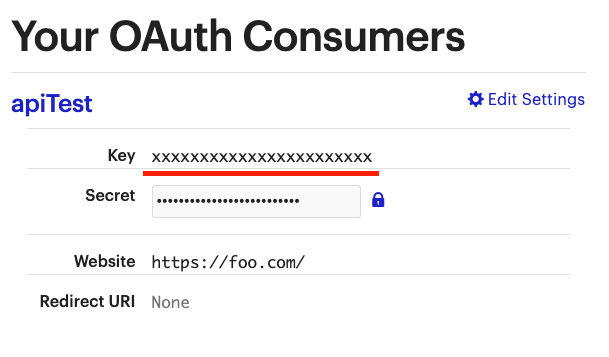
|
Hi Denis, No, that "Key" that you underlined is not the OAuth token -- that's actually the client_id of the "OAuth Consumer" that you have created on Meetup. You will need to follow the OAuth spec protocol to authenticate and get a token. Meetup has provided a bit of info here. I use Requests-OAuthlib for the authentication. The workflow for OAuth 2 is shown here, where I use the "Web Application Flow" for my purpose. You will need to have a server to host the redirect URI, where an authenticated client will send the response to, so you need to actually own and host the URI to capture that response. (Or I guess the redirect URI can send the user to a non-existent server, but the user will then need to manually tell you what the full URI is, as it contains the authorization code that you need, in order to request for the actual token from Meetup!) Please see some simple sample code below. from requests_oauthlib import OAuth2Session
client_id = r'this_is_the_underlined_Key_from_your_screenshot'
client_secret = r'this_is_the_Secret_that_is_hidden_in_your_screenshot'
redirect_uri = r'https://youNeedToOwnAndHostThisServer.com/callback'
scopes = ['rsvp', 'ageless'] # if you need further scope; see Meetup docs
oauth = OAuth2Session(client_id, redirect_uri=redirect_uri, scope=scopes)
authorization_url, state = oauth.authorization_url('https://secure.meetup.com/oauth2/authorize')
print(authorization_url)
# Then, the user will need to visit the authorization_url, login with Meetup account details, to authorize access.
# This will then redirect the user to redirect_uri appended with the authorization code given by Meetup.
# In the example above, the redirect URI might look something like:
# https://youNeedToOwnAndHostThisServer.com/callback?code=abcdefg&state=xyzxyz
code = r'abcdefg' # this is the authorization code in the full redirect URI (see example above)
token_url = r'https://secure.meetup.com/oauth2/access'
# the following is to use the authorization code (single-use only) to request for the token from Meetup server
token = oauth.fetch_token(token_url, client_secret=client_secret, code=code, include_client_id=True)
# If successful, token will now contain the actual token code (in json format), within the access_token field.
# the following is just to test the API, as oauth is now authenticated.
r = oauth.get(r'https://api.meetup.com/self/groups?&sign=true&photo-host=secure&page=20')
# r should return a successful 200 response, with the correct content, i.e. listing the groups that the user is in. |
Thank you so much for such a detailed reply. It really works! |
|
No worries. Good to hear that you got it working. Thanks. Yijin |
|
@denis-erashov and I ran the tests locally and they are passing. I'm guessing Travis is failing because of the oAuth key as you mentioned, not sure how we could inject it in. Are you still around @pferate ? Thanks a ton! |

|
I can merge it in, but I'd like to find a way to make the Travis CI builds pass. That can be a task for another time, since these tests succeed locally. |
I'll need to do this tomorrow |

|
Currently I pull some data from the API using my API key and store in it my own little database for personal use, in this case, what would I set my |
|
You can put in any URL, like example.com/callback. In the URL that Meetup redirects you to, there will be some parameters that you can copy into the script (just |
|
Did you get round to uploading this @reustle? |
|
Edit: moved it to a public gist for better formatting / revisions https://gist.github.com/reustle/97aa4c24051472edab1f20e5d8494cdd |
I also have some notes here: https://github.com/yijinlee/meetup-api/wiki/Example-OAuth-workflow-for-Meetup-token |

|
Sorry for the delay, this change is merged in now. |
|
Is it worth updating the documentation as well? |

|
@pferate can you upload to PyPI? Can't install from the repo easily, since |
|
Not sure if there is any way we can help with the PyPi deploy 🤔 Currently still broken in our build systems. |
|
Linking this to @python273 's pull request to fix the missing api_spec folder #18 |
6 participants


…API Keys support on 15 Aug 2019). Can use Requests-OAuthlib for OAuth token workflow.