This module is published under the version 3 of GPL General Public Licence.
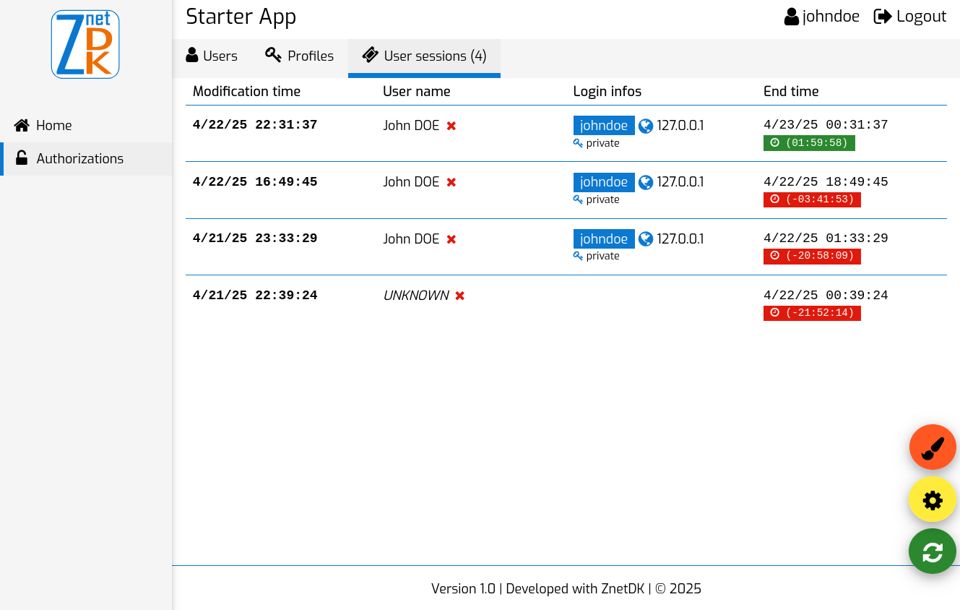
- Shows the existing user sessions of the application,
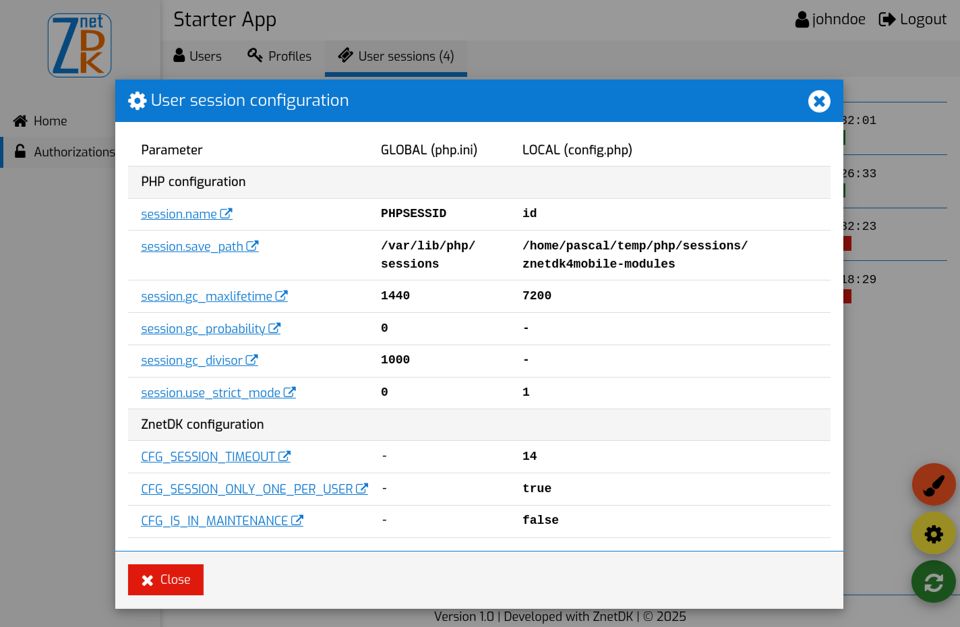
- Displays the PHP and ZnetDK session configuration,
- Kills sessions of a specific user,
- Cleans expired sessions (via UI and a web service call),
- Kills all existing sessions (via UI and a web service call).
- ZnetDK 4 Mobile version 2.9 or higher,
- A MySQL database is configured to store the application data,
- PHP version 7.4 or higher,
- Authentication is enabled
(
CFG_AUTHENT_REQUIREDisTRUEin the App'sconfig.php).
- Add a new subdirectory named
z4m_usersessionswithin the./engine/modules/subdirectory of your ZnetDK 4 Mobile starter App, - Copy module's code in the new
./engine/modules/z4m_usersessions/subdirectory, or from your IDE, pull the code from this module's GitHub repository, - Edit the App's
menu.phplocated in the./applications/default/app/subfolder and add a new menu item definition for the viewz4m_usersessions. For example:
\MenuManager::addMenuItem(NULL, 'z4m_usersessions', MOD_Z4M_USERSESSIONS_MENU_LABEL, 'fa-ticket');- Go to the User sessions menu to display the users sessions.
Once the User sessions menu item is added to the application, you can restrict
its access via a user profile.
For example:
- Create a user profile named
Adminfrom the Authorizations | Profiles menu, - Select for this new profile, the User sessions menu item,
- Finally for each allowed user, add them the
Adminprofile from the Authorizations | Users menu.
- session.name: change
PHPSESSIDto a more common name. For exampleid. - session.save_path: a dedicated directory must be created to store the PHP session files of the application.
- session.gc_maxlifetime: don't exceed if possible a value of
14400seconds (4 hours). - session.use_strict_mode: recommended value is
1for security purpose.
- CFG_SESSION_ONLY_ONE_PER_USER: value
trueto avoid the same user to log in on multiple devices with the same login name.
It is recommended to clean expired PHP sessions every hour and to remove all PHP session files every day. To do this, you can call the appropriate module web services from your crontab as shown below.
# Clean expired PHP sessions every hour
47 * * * * nice curl "https://mydomain/myapp/?control=Z4MUserSessionsCtrl&action=clean" > /home/log/session_clean.log ?>&1
# Remove all PHP session files every day
09 23 * * * nice curl "https://webserviceusr:password@mydomain/myapp/?control=Z4MUserSessionsCtrl&action=killall" > /home/log/session_kill.log ?>&1
No authentication is necessary to call the Z4MUserSessionCtrl:clean controller action.
On the other hand, authentication is required to call the Z4MUserSessionCtrl:killall controller action as it is more sensitive.
For example, to authorize the user webserviceusr (you can name your web service user as you like) to run this web service, apply the procedure below:
- Declare a new user named
webserviceusrin the App. This user does not need any rights so be sure the option "Full menu access" is unchecked and no User profile is selected. - Define
CFG_HTTP_BASIC_AUTHENTICATION_ENABLEDconstant toTRUEin theconfig.phpof your App.
define('CFG_HTTP_BASIC_AUTHENTICATION_ENABLED', TRUE);- Configure access to the
Z4MUserSessionCtrl:killallcontroller action through theCFG_ACTIONS_ALLOWED_FOR_WEBSERVICE_USERSconstant also defined in theconfig.phpof your App.
define('CFG_ACTIONS_ALLOWED_FOR_WEBSERVICE_USERS', serialize([
    'webserviceusr|Z4MUserSessionCtrl:killall'
]));This module is translated in French, English and Spanish languages.
To translate this module in another language or change the standard
translations:
- Copy in the clipboard the PHP constants declared within the
locale_en.phpscript of the module, - Paste them from the clipboard within the
locale.phpscript of your application, - Finally, translate each text associated with these PHP constants into your own language.
See CHANGELOG.md file.
Your contribution to the ZnetDK 4 Mobile project is welcome. Please refer to the CONTRIBUTING.md file.