Lambda layers was announced during re:Invent 2018 and is "a way to centrally manage code and data that is shared across multiple functions." The list of instructions below will guide you to create your first λ layer
In this section we'll create a λ layer containing the Pendulum Python library
An easy way is starting from an EC2 instance running Ubuntu ..
- Launch the EC2 instance and connect with SSH. Substitute the correct IP address and keypair associated with the instance in the command below:
~$ ssh ubuntu@{ip-address-instance} -i {your-keypair}.pem-
Run all updates using
sudo apt-get updateand verify which version of Python3 is available usingpython3 -V. The expected output should start with Python 3.6 -
If not previously installed, install the pip package manager for Python3 as well as AWS CLI :
~$ sudo apt install python3-pip
~$ sudo apt install awscli- Create the required directory structure, install the Pendulum library, create a zip archive and copy the zip archive to an S3 bucket :
~$ mkdir -p build/python/lib/python3.6/site-packages
~$ pip3 install pendulum -t build/python/lib/python3.6/site-packages/ --system
~$ cd build
~$ zip -r library-pendulum.zip .
~$ aws s3 --region eu-west-3 cp library-pendulum.zip s3://{bucket-name}
Some remarks with the commands listed above:
- if the
zip -rcommand fails, Zip may not be installed. To install use:sudo apt install zip - make sure to have a S3 bucket available to copy the zip file to, ref.
{bucket-name} - to avoid issues, explicitly include a reference to the region in which the S3-bucket resides. In this example the bucket was created in the eu-west-3 region, hence
--region eu-west-3in the copy command.
If you copied the zip file successfully to your S3 bucket, open de S3 management console, navigate to the file and copy its URL: eg. https://s3.eu-west-3.amazonaws.com/{bucket-name}/library-pendulum.zip. You will need this reference when creating the Lambda Layer.
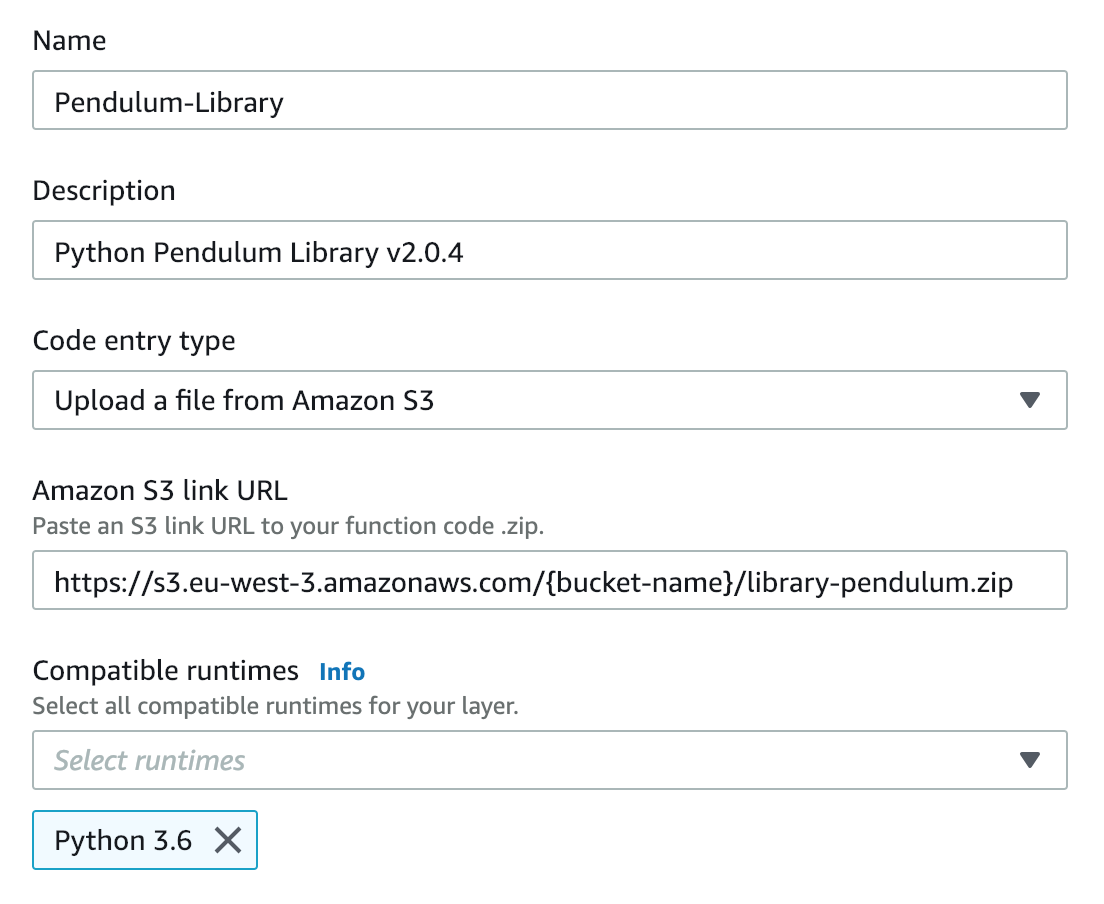
Head over to the Lambda console, in the sidebar select Layers and proceed by clicking Create layer. Complete the required fields as illustrated in the screenshot below and click Create to execute.
As soon as the Layer has been created, the console will return a Layer version ARN, which you need to refer to if you include the layer in a Lambda function.. That's it, you've just created you first Lambda Layer !