This is a detached fork of https://github.com/Mictronics/readsb
It's continually under development, expect bugs, segfaults and all the good stuff :)
THIS SOFTWARE IS PROVIDED BY THE COPYRIGHT HOLDERS AND CONTRIBUTORS "AS IS" see the LICENSE file for details
I'd recommend this script to automatically install it:
See the Debian Package section if you want to build the package yourself.
Or check here on how to further install a webinterface and other useful stuff:
- https://github.com/wiedehopf/adsb-wiki/wiki/Building-readsb-from-source
- https://github.com/wiedehopf/adsb-wiki/wiki/Raspbian-Lite:-ADS-B-receiver
For macOS build and info, check the macOS section
Based on code written by the following authors:
- 2012 by Salvatore Sanfilippo antirez@gmail.com (original dump1090)
- Malcom Robb (work on his dump1090 fork)
- 2014-2016 Oliver Jowett oliver@mutability.co.uk (forked to dump1090-mutability and further to dump1090-fa)
- 2019 Michael Wolf michael@mictronics.de (readsb as a fork of dump1090-fa)
- 2020 Matthias Wirth matthias.wirth@gmail.com (this fork of Mictronics readsb)
- 2025 Balthasar Indermuehle balt@inside.net (GDL90/EFB integration, viewadsb enhancements)
readsb connects to a listening server.
Sending beast data (beast_out):
--net-connector 192.168.2.22,30004,beast_out
Receiving beast data (beast_in);
--net-connector 192.168.2.28,30005,beast_in
Selectively forwards beast messages if the received data hasn't been forwarded in the last 125 ms (or --net-beast-reduce-interval).
Data not related to the physical aircraft state are only forwarded every 500 ms (4 * --net-beast-reduce-interval).The messages of
this output are normal beast messages and compatible with every program able to receive beast messages.
This is used by some aggregators to aggregate ADS-B data, an example net connector would be:
--net-connector=feed.airplanes.live,30004,beast_reduce_plus_out,uuid=0033062d-e17e-4389-91a9-79ebb967fb4c
The uuid is optional, if none is given, the uuid from --uuid-file is used, if that isn't present no uuid is sent. The beast_reduce_out net-connector will never send an uuid. The aggregator enables --net-receiver-id and --net-ingest on their readsb server, it's made to work with beast_reduce_plus_out.
- Build and install with rtlsdr support:
sudo apt update
sudo apt install --no-install-recommends --no-install-suggests -y \
    git build-essential debhelper libusb-1.0-0-dev pkg-config fakeroot \
    libncurses-dev zlib1g-dev libzstd-dev librtlsdr-dev help2man
git clone --depth 20 https://github.com/wiedehopf/readsb.git
cd readsb
export DEB_BUILD_OPTIONS=noddebs
rm -f ../readsb_*.deb
dpkg-buildpackage -b -ui -uc -us --build-profiles=rtlsdr
sudo dpkg -i ../readsb_*.deb
- Build package with no additional receiver library dependencies:
dpkg-buildpackage -b -ui -uc -us. - Build with RTLSDR support:
dpkg-buildpackage -b -ui -uc -us --build-profiles=rtlsdr - Build with all the support:
dpkg-buildpackage -b -ui -uc -us --build-profiles=with_sdrs
required build deps (omit last line if you're not building with the various SDR support)
git build-essential debhelper pkg-config fakeroot help2man \
libncurses-dev zlib1g-dev libzstd-dev libusb-1.0-0-dev \
librtlsdr-dev libsoapysdr-dev libhackrf-dev libbladerf-dev libad9361-dev libiio-dev
You can probably just run "make". By default "make" builds with no specific library support. See below. Binaries are built in the source directory; you will need to arrange to install them (and a method for starting them) yourself.
"make RTLSDR=yes" will enable rtl-sdr support and add the dependency on librtlsdr.
On Raspbian 32 bit, mostly rpi2 and older you might want to use this to compile if you're running into CPU issues:
make RTLSDR=yes OPTIMIZE="-Ofast -mcpu=arm1176jzf-s -mfpu=vfp"
In general if you want to save on CPU cycles, you can try building with these options:
make AIRCRAFT_HASH_BITS=11 RTLSDR=yes OPTIMIZE="-O3 -march=native"
The difference of using -Ofast or -O3 over the default of -O2 is likely very minimal. -march=native also usually makes little difference but it might, so it's worth a try.
If required, edit /etc/default/readsb to set the service options, device type, network ports etc.
For rtl-sdr devices a software gain algorithm is the default, it's optimized for ADS-B.
On the command line it's activated using --gain=auto an is silent by default.
--gain=auto-verbose can be used to enable log messages for gain changes.
To tweak the internals, more parameters can be passed:
--gain=auto-verbose,<lowestGain>,<noiseLowThreshold>,<noiseHighThreshold>,<loudThreshold>
The defaults are:
--gain=auto-verbose,0,27,31,243
The thresholds are numbers 0 to 256, tweaking them requires some understanding of how it works. One option would be to change the noise thresholds up or down and then observe the log. There should be no need to tweak these parameters.
Use this utility independent of readsb: https://github.com/wiedehopf/adsb-wiki/wiki/RTL-Bias-Tee
One of this forks main uses is to be the backend of a global map. For that purpose it's used in conjunction with tar1090 with some extra options to cope with the number of aircraft and also record a history of flight paths: https://github.com/wiedehopf/tar1090#0800-destroy-sd-card
Websites using this software:
- https://adsb.lol/
- https://globe.airplanes.live/
- https://globe.adsb.fi/
- https://globe.adsbexchange.com/
Projects using this softare:
- https://sdr-enthusiasts.gitbook.io/ads-b/
- https://github.com/sdr-enthusiasts/docker-adsb-ultrafeeder
- https://adsb.im/ (indirectly via an SDR-E container)
Projects that use or have used data generated by this software:
- https://gpsjam.org/
- https://adsb.exposed/
- https://tech.marksblogg.com/global-flight-tracking-adsb.html
History function as used by several online aggregators using tar1090.
Warning: the following will generate several thousand files a day and can use significant amounts of disk space depending on your data source.
The following command line options need to be added to for example the decoder options in /etc/default/readsb
--write-globe-history /var/globe_history --heatmap 30
To increase time resolution to maximum, you can add --json-trace-interval=0.1 which will add every
position received to traces. The heatmap interval can also be reduced from the default of 30
seconds, i wouldn't recommend less than 5 seconds for that though.
Aggregators will generally use --write-json-globe-index as well but that's not necessary if you don't have more than 500 concurrent planes.
/var/globe_history needs to be a directory writeable by the user readsb.
sudo mkdir /var/globe_history and sudo chown readsb /var/globe_history are useful for that.
You should also download
wget -O /usr/local/share/tar1090/aircraft.csv.gz https://github.com/wiedehopf/tar1090-db/raw/csv/aircraft.csv.gz
and add this command line option (for exaple via /etc/default/readsb):
--db-file /usr/local/share/tar1090/aircraft.csv.gz
This will obviously write data to the hard drive, be aware of that. The data format is subject to change, don't expect this to be stable. Be aware of that when upgrading either tar1090 or readsb to a new commit.
If you're using --write-json-globe-index, it's also recommended to use --tar1090-use-api It will use the readsb API to get data, it's less requests and usually more efficient, for details see the file nginx-readsb-api.conf (this needs adding to your existing nginx tar1090 configuration, this is only for people who really know their stuff anyway)
If configuring this stuff seems complicated, consider just using the sdr-enthusiasts ultrafeeder container. Just don't configure feeds for aggregated data or if you don't want to feed data from there.
If you don't want readsb to read data from the SDR, you'll also need to change the receiver options line to something like this:
RECEIVER_OPTIONS="--net-only --net-connector 192.168.2.7,30005,beast_in"
If you have another dump1090/readsb running on the same machine, you'll also need to change all the ports to avoid conflicts.
For current reference please see the speed_check function.
hex
SQ means same quality (ADS-B vs MLAT and stuff) LQ means lower quality
fail / ok ok means speed check passed (displayed only with cpr-focus)
A means airborne and S means surface.
reliable is my reliability counter every good position increases each aircrafts position reliability, if it gets to zero, speed check is no longer applied and it's allowed to "JUMP", "JUMP" is also allowed if we haven't had a position for 2 minutes.
tD is the trackDifference 170 or 180 means the new position goes in the opposite direction of the ground track broadcast by the aircraft.
then we have actual distance / allowed distance. the allowed distance i tweak depending on the trackDifference high trackDifference makes the allowed distance go slightly negative as i don't want aircraft to jump backwards.
elapsed time
actual / allowed speed (allowed speed based on allowed distance)
old --> new lat, lon -> lat, lon
oh if you want that display: --debug=S you'll have to update, just disabled the MLAT speed check from displayign stuff ... because usually it's not interesting
Thank you to https://github.com/ind006/readsb_macos/ for all the shims needed to make this work.
readsb should be (largely) compatible with macOS, on both Intel and ARM architectures.
There is a recipe for homebrew avalailable: https://formulae.brew.sh/formula/readsb
Run brew install readsb to install readsb using homebrew.
Or compile manually roughly like this: You may need to modify the Makefile to point at where on your mac you have the standard libs and includes installed. This in turn depends on whether you're using macports or homebrew for those libs and includes. The Makefile has paths pre-set for homebrew.
These packages are needed, possibly more:
git librtlsdr libusb ncurses
Build using:
make -j4 RTLSDR=yes
You can run it from the command line (try screen -S readsb and run it in there, press ctrl-A to detach the terminal)
Example command line:
./readsb --quiet --net --device-type rtlsdr --gain auto
# add console table of planes for a quick test:
--interactive
# optionally add coordinates:
--lat -33.874 --lon 151.206
# add --interactive for testing, it will show a list of planes in the terminal
# optional output of json and other regularly updated files:
--write-json-every 0.5 --write-json=~/tar1090/html/data/
# optional database info
--db-file ~/tar1090/aircraft.csv.gz
# optional listen ports:
--net-ri-port 30001 --net-ro-port 30002 --net-sbs-port 30003 --net-bi-port 30004,30104 --net-bo-port 30005
# optional sending of data to an aggregator:
--net-connector feed.flyrealtraffic.com,30004,beast_reduce_plus_out,7817bd08-f226-11ef-ba9e-072eee452592
For a graphical interface, the tar1090 webinterface is recommended: https://github.com/wiedehopf/tar1090 The install script won't work so i'd recommend the following basic webserver configuration:
- serve the html directory as /tar1090
- serve the write-json directory as /tar1090/data
git clone --depth 1 https://github.com/wiedehopf/tar1090 ~/tar1090
wget -O ~/tar1090/aircraft.csv.gz https://github.com/wiedehopf/tar1090-db/raw/csv/aircraft.csv.gz
Simple http server using python reachable using http://localhost:8081
cd ~/tar1090/html
python3 -m http.server 8081
Using nginx this would look something like this (replace USER appropriately):
location /tar1090/data/ {
    alias /home/USER/tar1090/data/;
    add_header Cache-Control "no-cache";
    location /tar1090/data/traces/ {
        gzip off;
        add_header Content-Encoding "gzip";
        add_header Cache-Control "no-cache";
    }
}
location /tar1090/globe_history/ {
    alias /home/USER/readsb_history/;
    gzip off;
    add_header Content-Encoding "gzip";
    add_header Cache-Control "no-cache";
}
location /tar1090 {
    alias /home/USER/tar1090/html/;
    add_header Cache-Control "no-cache";
}
An easy way to add some traces when selecting a plane (with nginx):
Add --write-globe-history=/home/USER/readsb_history to the readsb command line.
You can also serve this folder as /tar1090/globe_history but that's only required for the history going back further
than 24h.
The classical tar1090 uses traces created via a shell script and served at /tar1090/chunks but running that shell script is probably a hassle, so just use the above.
This build allows forwarding of the traffic data to electronic flight bag (EFB) applications such as Foreflight or Garmin Pilot (and doubtlessly a host of others).
You can pass the --gdl90 option to enable automatic EFB discovery of any GDL90 compatible EFBs (e.g. Foreflight) in your LAN, or you can set the EFB's IP address explicitly by passing --gdl90-ip 1.2.3.4 where 1.2.3.4 obviously is the actual IP address of your EFB.
EFBs that support XGPS and XTRAFFIC messages (e.g. Garmin Pilot) are supported by setting the ownship and EFB IP address, as well as telling readsb what to send. For example, passing --ownship 7c45ab --sendxgps --sendxtraffic --efb-ip 1.2.3.4 will send XGPS and XTRAFFIC messages to 1.2.3.4 on the default port 49002 and sets the ownship to the aircraft with the hex id 7c45ab. To only send traffic without setting the ownship, omit the --ownship and --sendxgps command line parameters.
If you're running this in your own airplane (or as a passenger in an airliner), simply run readsb in a screen or separate terminal, then run viewadsb in another screen or another terminal. This is a great solution in aircraft like the 787 where GPS devices inside the cabin won't work due to the electronic window dimming that creates a faraday cage too good for GNSS signals, but the transponder signal of the aircraft still makes it into the cabin. Simply start readsb in one terminal or screen:
./readsb --device-type rtlsdr --gain auto --ppm 0 --net --net-heartbeat 60 --net-ro-size 1250 --net-ro-interval 0.05 --net-ri-port 30001 --net-ro-port 30002 --net-sbs-port 30003 --net-bi-port 30004,30104 --net-bo-port 30005 --net-connector feed.flyrealtraffic.com,30004,beast_reduce_plus_out,uuid=7eff6a72-f1ad-11ef-b4bc-d7b975414c18 --dump-beast=/tmp/beast.dump,60 --quiet --gdl90
and in another terminal or screen run viewadsb:
./viewadsb
Once up and running and you can see your own aircraft in viewadsb, set the ownship in viewadsb to your flight (press 'o' and enter your callsign or hex id), and that will be sent to readsb to set the ownship, which in turn sends this to Foreflight as the ownship, giving you full visibility of where in the world you are (and independent of your inflight entertainment screen).
Also, if your laptop is connected to inflight internet, you'll be feeding your position into the flyrealtraffic.com system, making many a simulator pilot very happy! Omit the --net-connector feed.flyrealtaffic.com... option in the command if you don't want to do that.
viewadsb has some enhanced features now and displays range and bearing to traffic based on the position you're giving it on startup, or based on the ownship position. It also displays the number of targets being decoded, as well as the current receiver gain setting. This can help in optimising the gain setting you pass to readsb.
viewadsb also lets you set the ownship interactively, either by entering the callsign or the hex id. Press 'o' to set the ownship (case insensitive), 's' to select which parameter to sort by, and 'q' to reverse the sort order.
viewadsb also displays the (almost) full complement of information received via ADS-B, to include NIC, NACp, transmitter category, and in places where enhanced interrogation is active, IAS, TAS, Mach, OAT, track rate, roll, and autopilot selected intent.

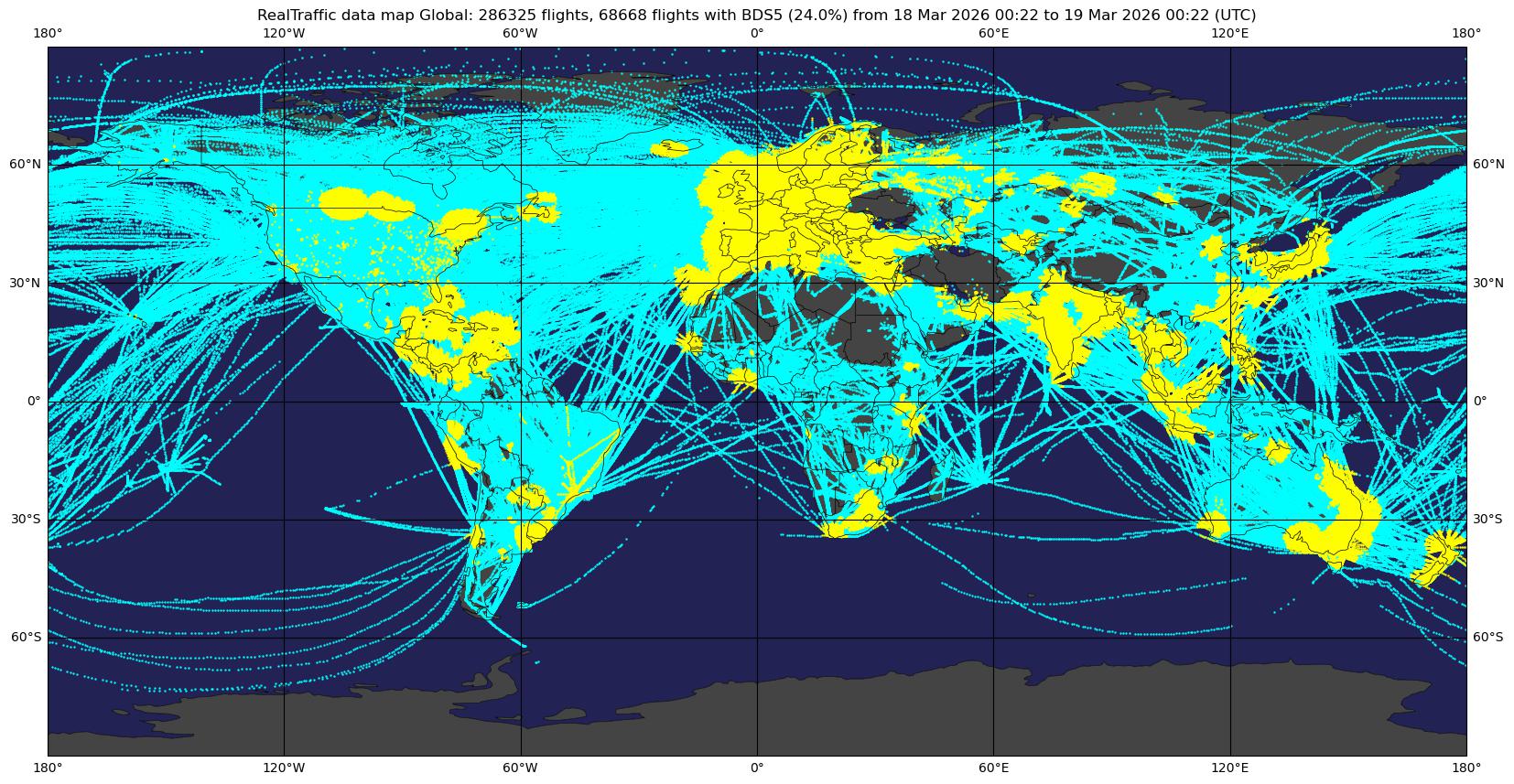
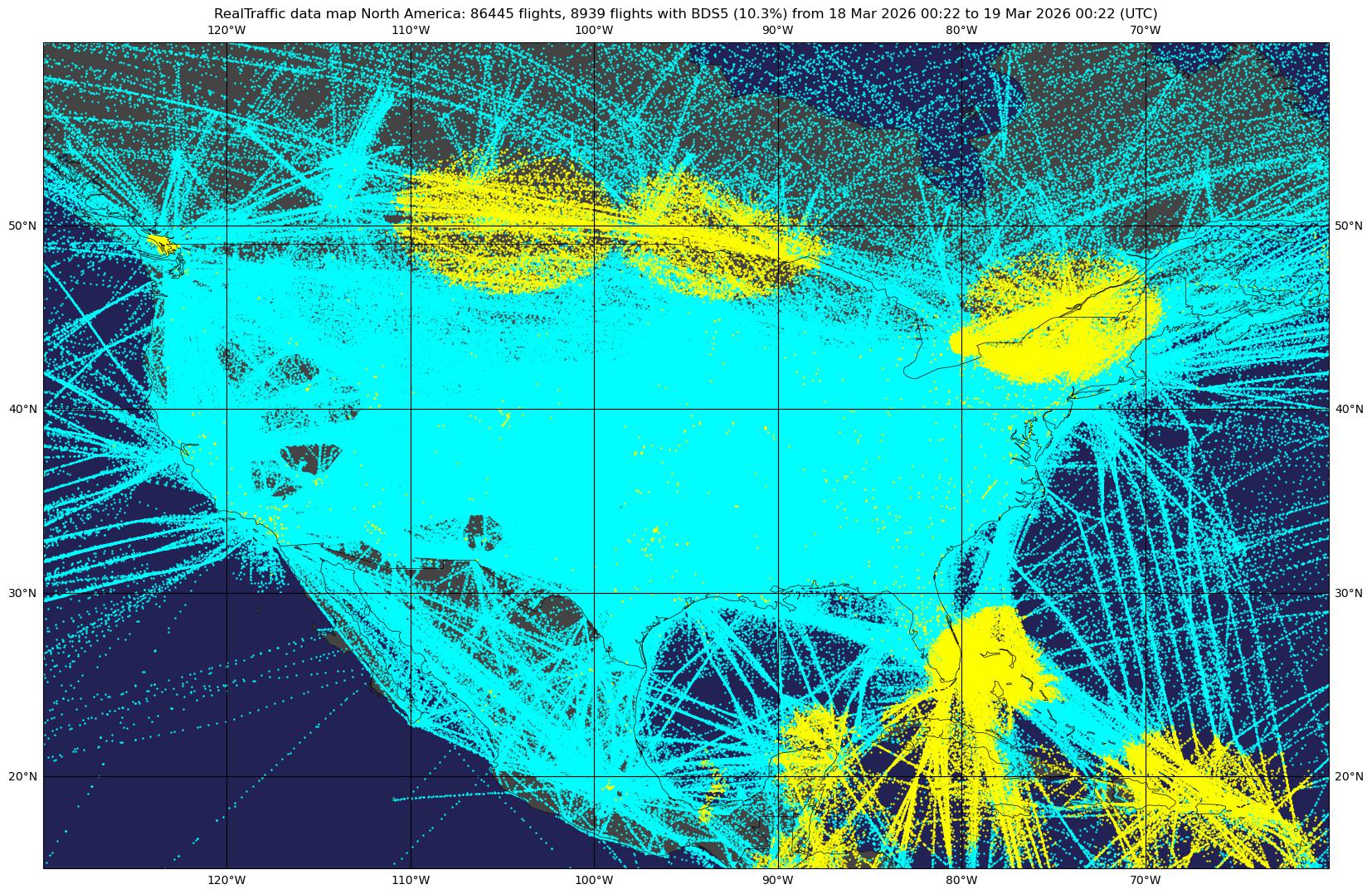
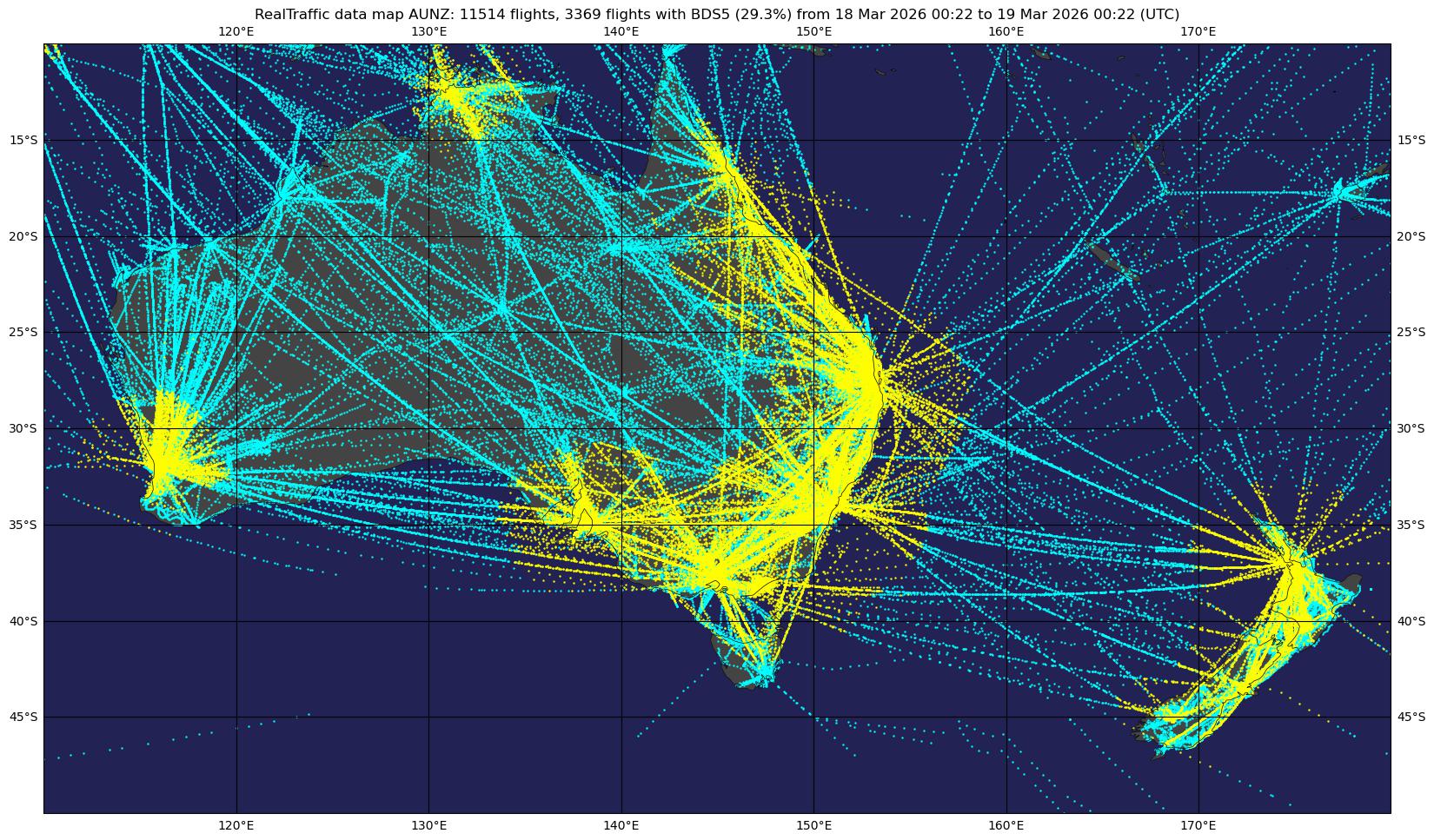
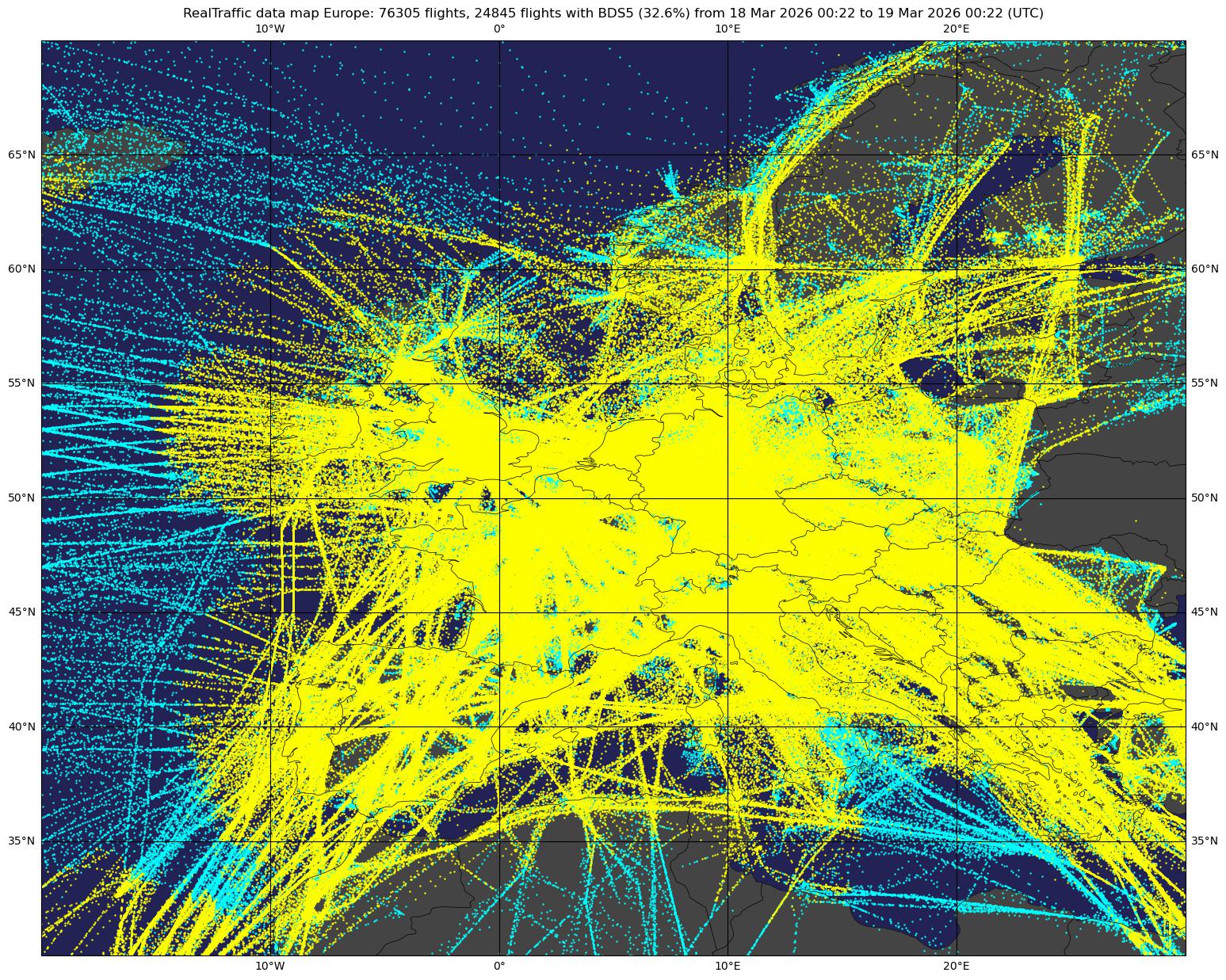
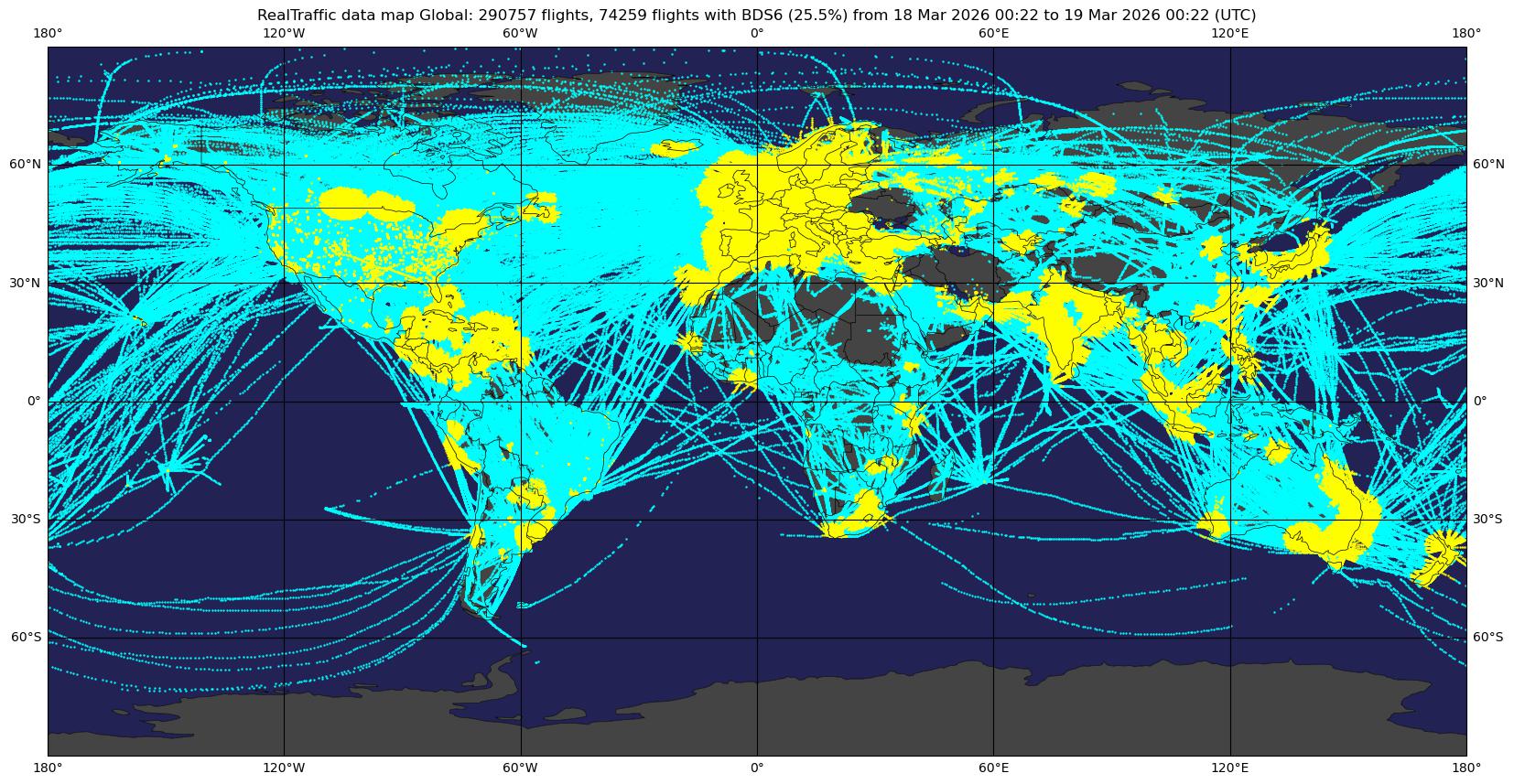
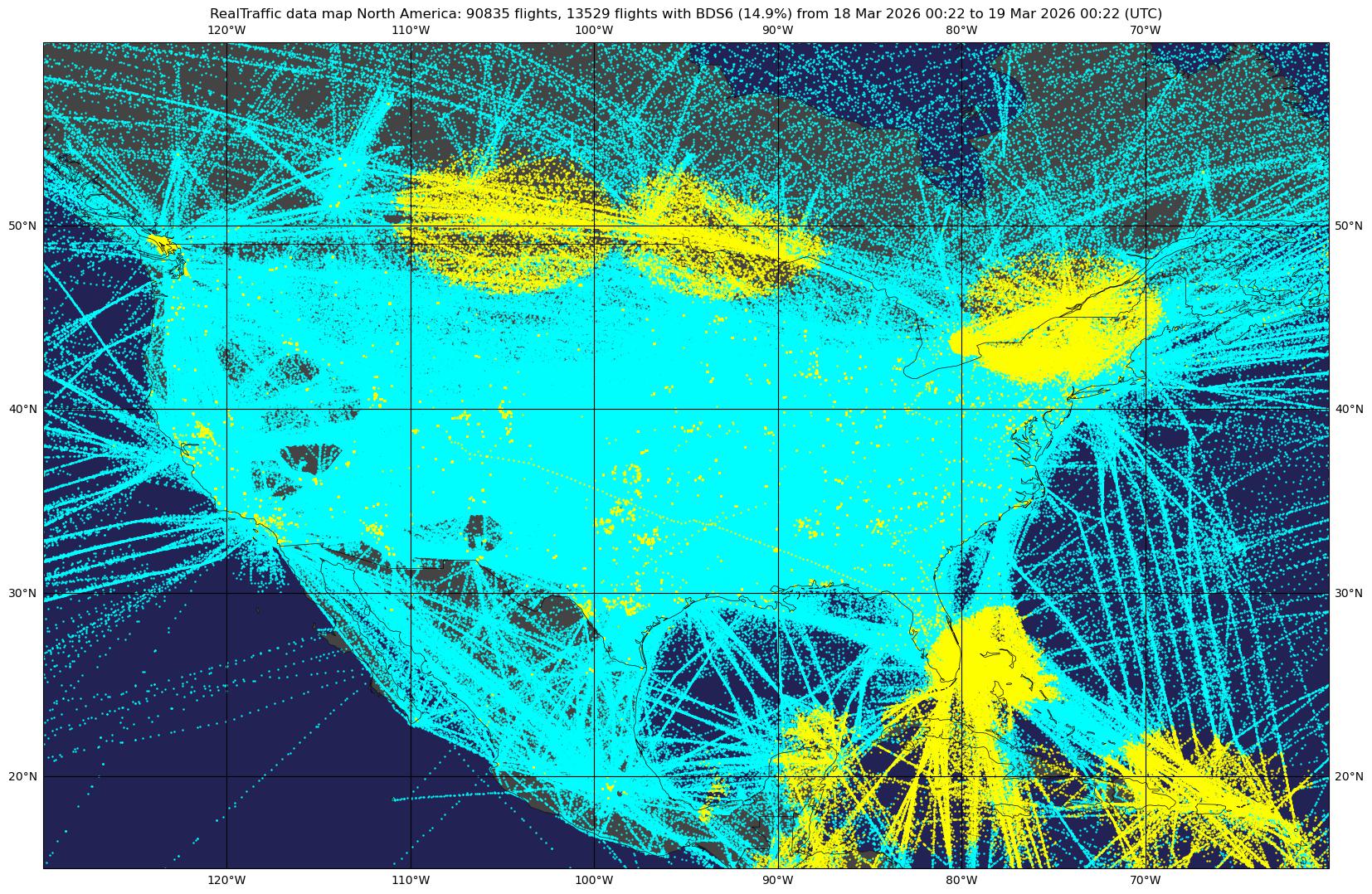
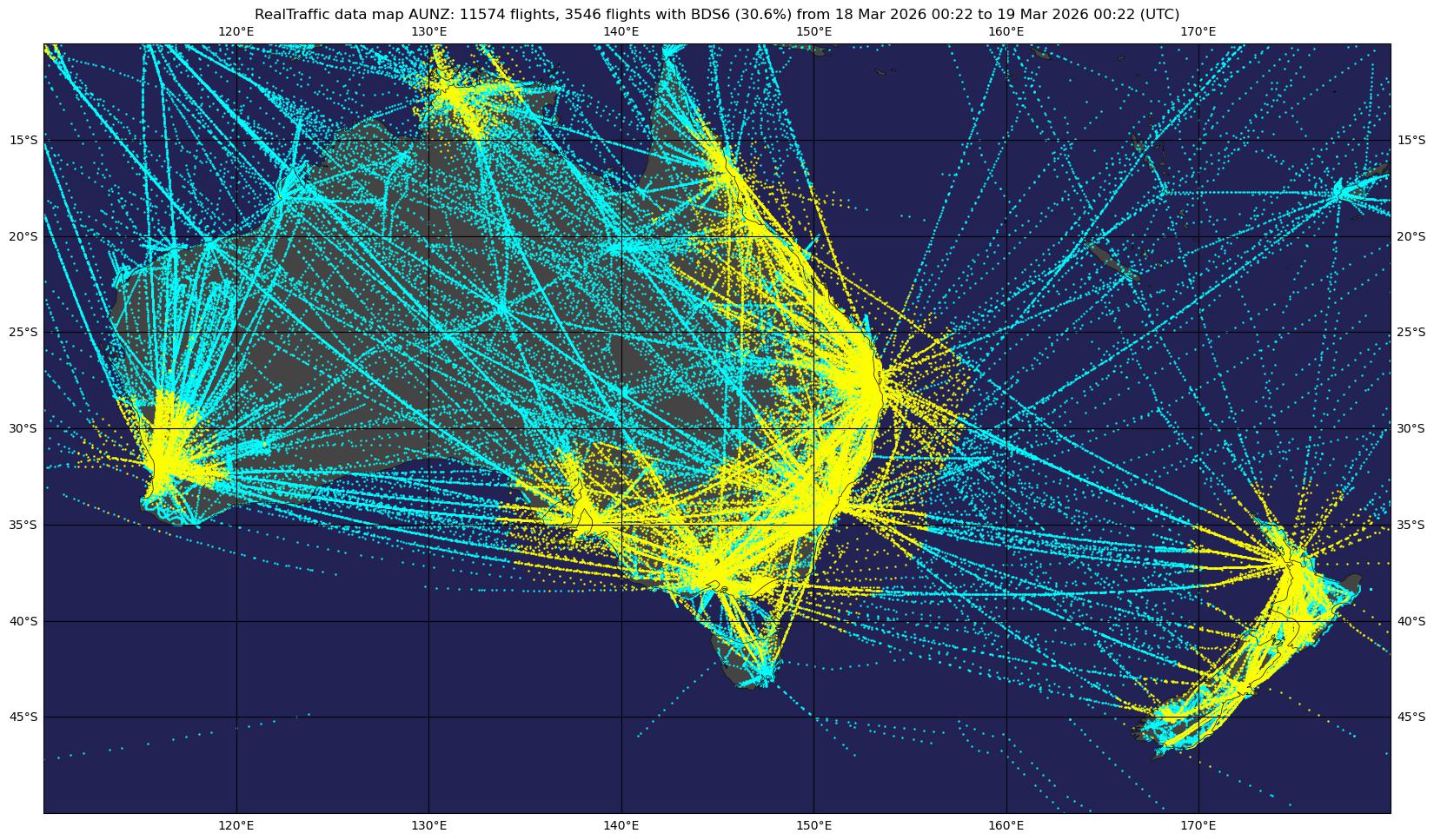
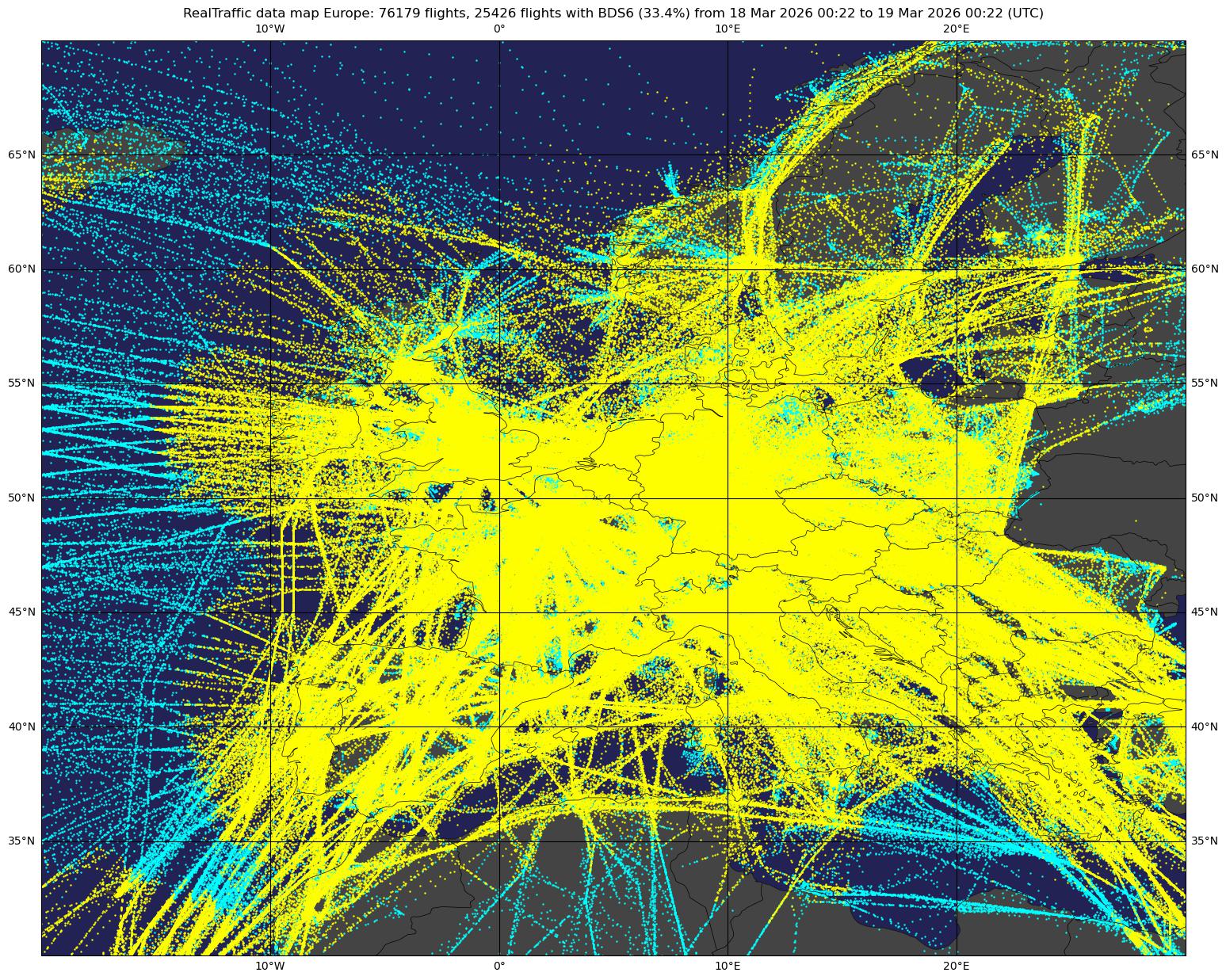
The content of ADS-B messages depends on the ground radar EHS mode (enhanced interrogation). You can check where in the world these enhanced interrogation modes are active in these maps:
BDS 4,0 — Selected Vertical Intention
- MCP/FCU selected altitude
- FMS selected altitude
- Barometric pressure setting (QNH/QFE)
- VNAV mode engaged (status)
- Altitude hold mode engaged (status)
- Approach mode engaged (status)
- Target altitude source
Global BDS4 coverage USA BDS4 coverage Australia / New Zealand BDS4 coverage Europe BDS4 coverage
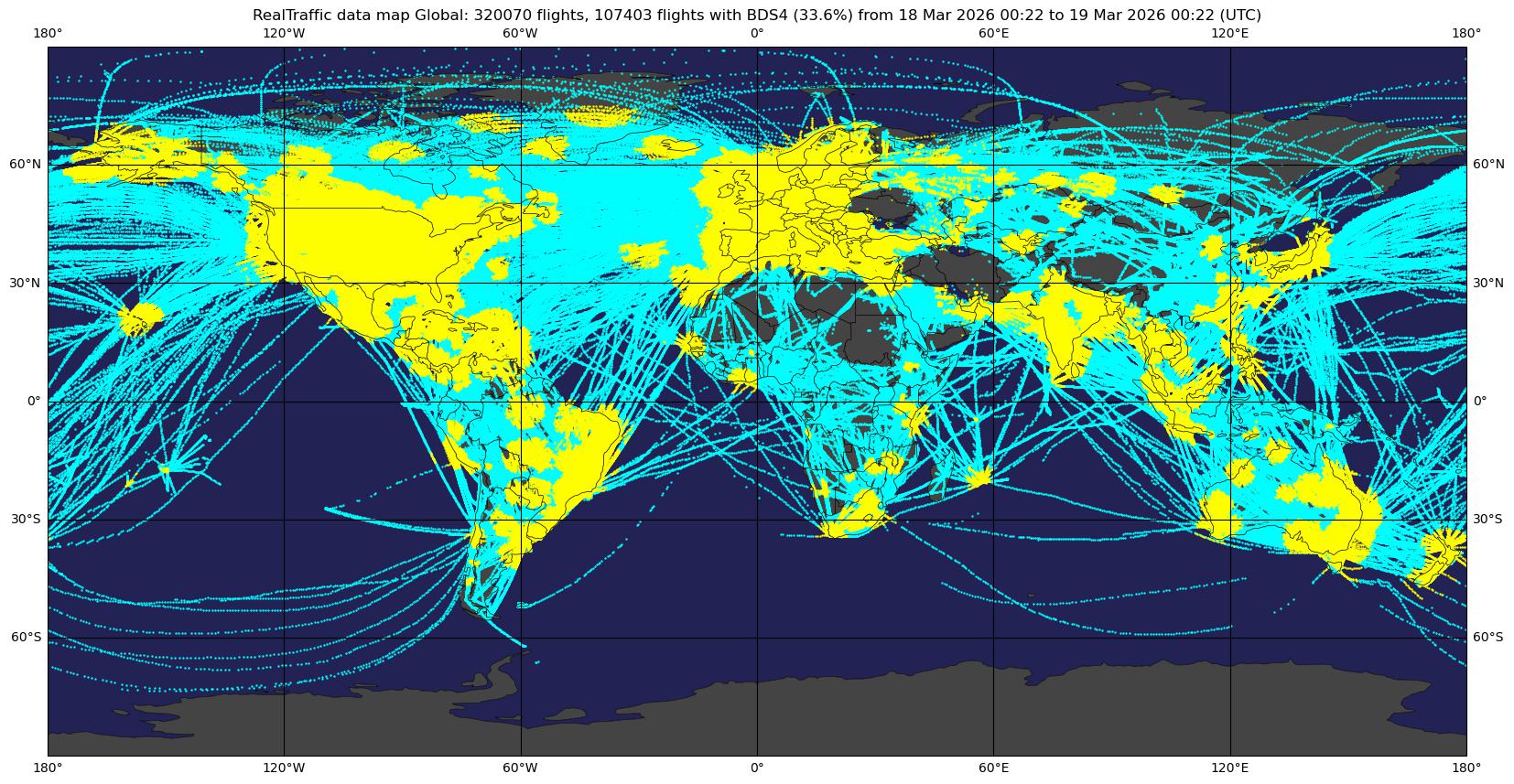
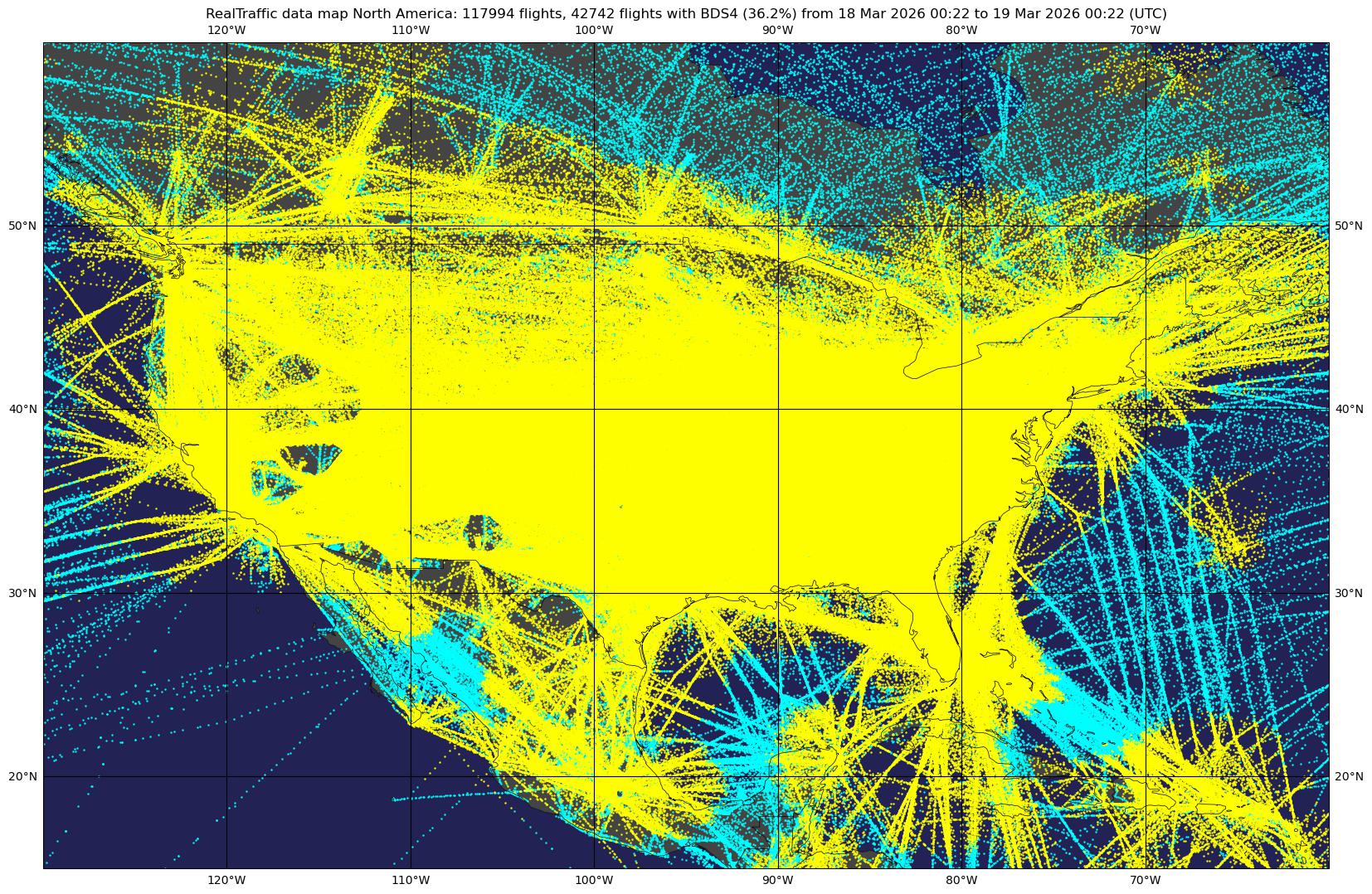
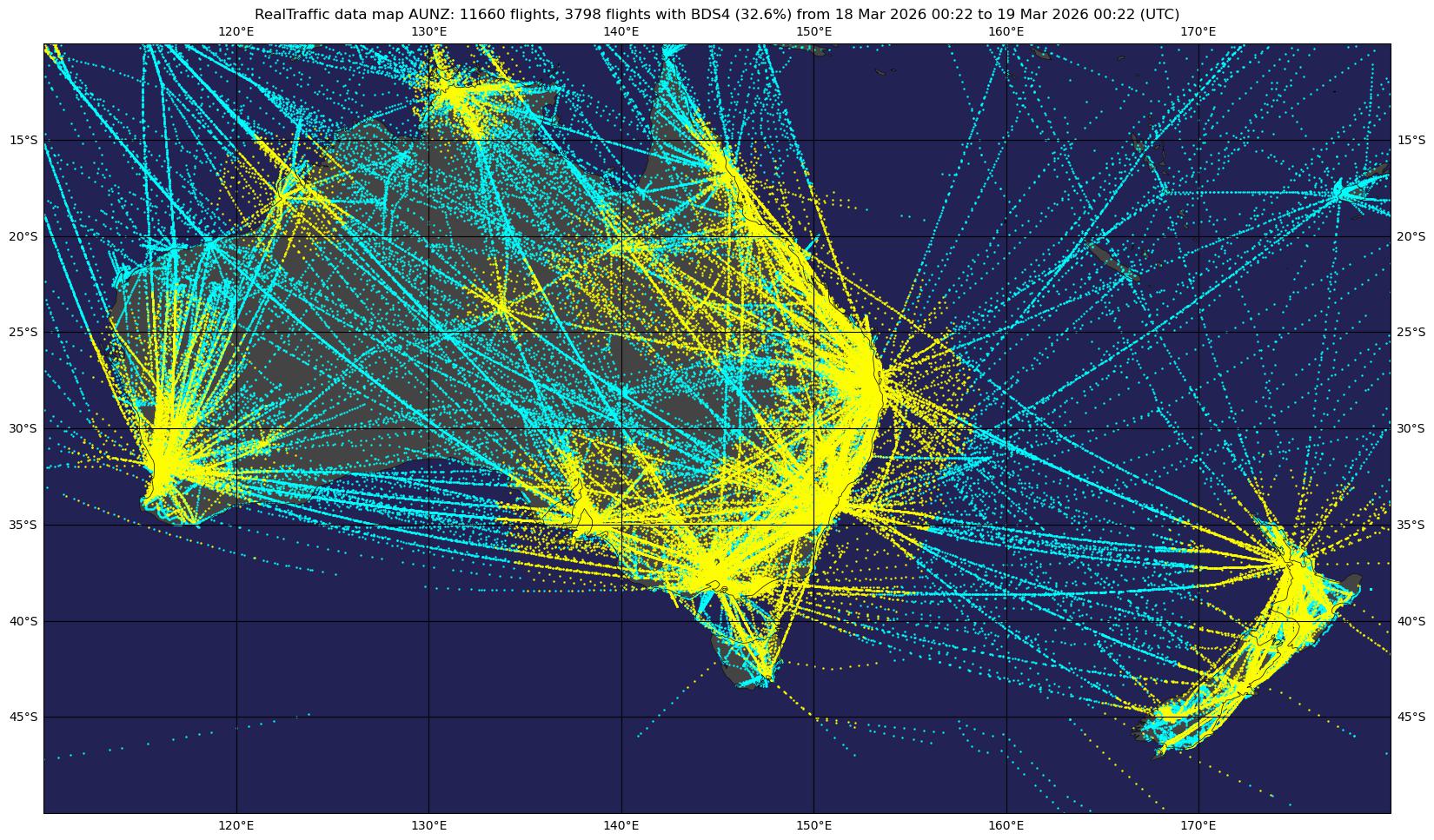
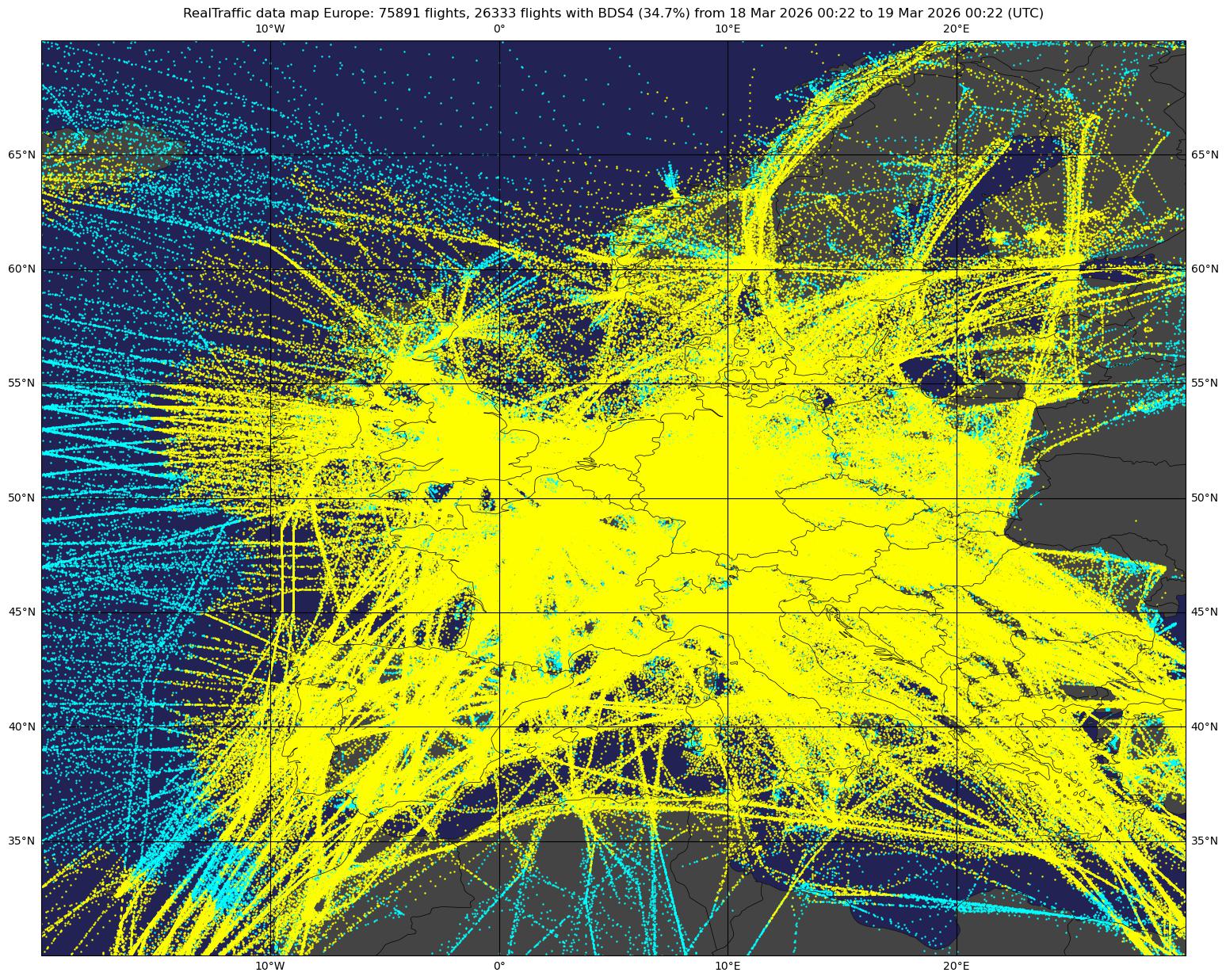
BDS 5,0 — Track and Turn Report
- Roll angle
- True track angle
- Ground speed
- Track angle rate (turn rate)
- True airspeed (TAS)
Global BDS5 coverage USA BDS5 coverage Australia / New Zealand BDS5 coverage Europe BDS5 coverage
BDS 6,0 — Heading and Speed Report
- Magnetic heading
- Indicated airspeed (IAS)
- Mach number
- Barometric altitude rate (vertical rate from barometric source)
- Inertial vertical velocity (vertical rate from INS/IRS)
Global BDS6 coverage USA BDS6 coverage Australia / New Zealand BDS6 coverage Europe BDS6 coverage
You can use the dump_playback.py script to feed recorded beast data into an instance of readsb:
Run readsb in synthetic mode:
./readsb --devel=accept_synthetic --net-only --net-bi-port 30004,30104 --quiet --net-bo-port 30005 --net-bi-port 30015,30115
and then play back the data either from the same host or to another host (using the --host parameter) - default is localhost:
./dump_playback.py beast.dump/*.zst --stream -v
might be out of date, check the command on a freshly compiled version
Usage: readsb [OPTIONS...]
readsb Mode-S/ADSB/TIS Receiver
Build options: ENABLE_RTLSDR
General options:
--lat=<lat> Reference/receiver surface latitude
--lon=<lon> Reference/receiver surface longitude
--no-interactive Disable interactive mode, print to stdout
--interactive-ttl=<sec> Remove from list if idle for <sec> (default: 60)
--modeac Enable decoding of SSR Modes 3/A & 3/C
--modeac-auto Enable Mode A/C if requested by a Beast connection
--max-range=<dist> Absolute maximum range for position decoding (in nm, default: 300)
--fix Enable CRC single-bit error correction (default)
--no-fix Disable CRC single-bit error correction
--no-fix-df Disable CRC single-bit error correction on the DF type to produce more DF17 messages (disabling reduces CPU usage)
--metric Use metric units
--show-only=<addr> Show only messages by given ICAO on stdout
--process-only=<addr> Process only messages by given ICAO
--filter-DF=<type> When displaying decoded ModeS messages on stdout only show this DF type
--device-type=<type> Select SDR type (this needs to be placed on the command line before any SDR type specific options)
--gain=<db> Set gain (default: auto gain, possible values for rtl-sdr devices: auto auto-verbose 0.0 0.9 1.4 2.7 3.7 7.7 8.7 12.5 14.4 15.7 16.6 19.7 20.7 22.9 25.4 28.0 29.7 32.8 33.8 36.4 37.2 38.6 40.2 42.1 43.4 43.9 44.5 48.0 49.6 58)
--freq=<hz> Set frequency (default: 1090 MHz)
--interactive Interactive mode refreshing data on screen. Implies --throttle
--raw Show only messages hex values
--preamble-threshold=<40-400> lower threshold --> more CPU usage (default: 58, pi zero / pi 1: 75, hot CPU 42)
--forward-mlat Forward received beast mlat results to beast output ports
--forward-mlat-sbs Forward received mlat results to sbs output ports
--stats Print stats at exit. No other output
--stats-range Collect/show range histogram
--stats-every=<sec> Show and reset stats every <sec> seconds (rounded to the nearest 10 seconds due to implementation, first inteval can be up to 5 seconds shorter)
--auto-exit=<sec> Run for X seconds, then exit (default: run indefinitely)
--range-outline-hours=<hours> Make the range outline retain data for the last X hours (float, default: 24.0)
--onlyaddr Show only ICAO addresses
--gnss Show altitudes as GNSS when available
--snip=<level> Strip IQ file removing samples < level
--debug=<flags> Debug mode (verbose), n: network, P: CPR, S: speed check
--devel=<mode> Development debugging mode, see source for options, can be specified more than once
--receiver-focus=<receiverId> only process messages from receiverId
--cpr-focus=<hex> show CPR details for this hex
--leg-focus=<hex> show leg marking details for this hex
--trace-focus=<hex> show traceAdd details for this hex
--quiet Disable output (default)
--write-json=<dir> Periodically write json output to <dir>
--write-prom=<file> Periodically write prometheus output to <file>
--write-globe-history=<dir> Write traces to this directory, 1 gz compressed json per day and airframe
--write-state=<dir> Write state to disk to have traces after a restart
--write-state-every=<seconds> Continuously write state to disk every X seconds (default: 3600)
--write-state-only-on-exit Don't continously update state.
--heatmap-dir=<dir> Change the directory where heatmaps are saved (default is in globe history dir)
--heatmap=<interval in seconds> Make Heatmap, each aircraft at most every interval seconds (creates historydir/heatmap.bin and exit after that)
--dump-beast=<dir>,<interval>,<compressionLevel> Dump compressed beast files to this directory, start a new file evey interval seconds
--write-json-every=<sec> Write json output and update API json every sec seconds (default 1)
--json-location-accuracy=<n> Accuracy of receiver location: 0: no location / internal use only, 1: 2 decimals, 2: exact (default), 3: 1 decimals, 4: 0 decimals
--ac-hash-bits=<n> Main hash map size: 2^n entries (default: AIRCRAFT_HASH_BITS)
--write-json-globe-index Write specially indexed globe_xxxx.json files (for tar1090)
--write-receiver-id-json Write receivers.json
--json-trace-interval=<seconds> Interval after which a new position will guaranteed to be written to the trace and the json position output (default: 30)
--json-trace-hist-only=1,2,3,8 Don't write recent(1), full(2), either(3) traces to /run, only archive via write-globe-history (8: irregularly write limited traces to run, subject to change)
--full-trace-dir=<dir> when using globe-index, write full traces to this directory instead of --write-json dir (typically /run/readsb), this can be used to reduce memory usage at the cost of roughly 100 IOPS for global traffic
--write-json-gzip Write aircraft.json also as aircraft.json.gz
--write-json-binCraft-only=<n> Use only binary binCraft format for globe files (1), for aircraft.json as well (2)
--write-binCraft-old write old gzipped binCraft files
--json-reliable=<n> Minimum position reliability to put it into json (default: 1, globe options will default set this to 2, disable speed filter: -1, max: 4)
--position-persistence=<n> Position persistence against outliers (default: 4), incremented by json-reliable minus 1
--jaero-timeout=<n> How long in minutes JAERO positions remain valid and on the map in tar1090 (default:33)
--db-file=<file.csv.gz> Default: "none" (as of writing a compatible file is available here: https://github.com/wiedehopf/tar1090-db/tree/csv)
--db-file-lt aircraft.json: add long type as field desc, add field ownOp for the owner, add field year
Network options:
--net-connector=<IP,PORT,PROTOCOL> connect as TCP client to listen port / TCP server at IP and PORT, can be specified multiple times (e.g. 127.0.0.1,23004,beast_out) Protocols: beast_out, beast_in, raw_out, raw_in, sbs_in, sbs_in_jaero, sbs_out, sbs_out_jaero, vrs_out, json_out, gpsd_in, uat_in, uat_replay_out, planefinder_in, asterix_in, asterix_out (one failover ip/address,port can be specified: primary-address,primary-port,protocol,failover-address,failover-port) (any position in the comma separated list can also be either silent_fail or uuid=<uuid>)
--net Enable networking
--net-only Legacy Option, Enable networking, use --net instead
--net-bind-address=<ip> IP address to bind to (default: Any; Use 127.0.0.1 for private)
--net-bo-port=<ports> TCP Beast output listen ports / TCP server(default: 0)
--net-bi-port=<ports> TCP Beast input listen port / TCP server (default: 0)
--net-ro-port=<ports> TCP raw output listen port / TCP server (default: 0)
--net-ri-port=<ports> TCP raw input listen port / TCP server (default: 0)
--net-uat-replay-port=<ports> UAT replay output listen port / TCP server (default: 0)
--net-uat-in-port=<ports> UAT input listen port / TCP server (default: 0)
--net-sbs-port=<ports> TCP BaseStation output listen port / TCP server (default: 0)
--net-sbs-in-port=<ports> TCP BaseStation input listen port / TCP server (default: 0)
--net-sbs-jaero-port=<ports> TCP SBS Jaero output listen port / TCP server (default: 0)
--net-sbs-jaero-in-port=<ports> TCP SBS Jaero input listen port / TCP server (default: 0)
--net-asterix-out-port=<ports> TCP Asterix output listen port / TCP server (default: 0)
--net-asterix-in-port=<ports> TCP Asterix input listen port / TCP server (default: 0)
--net-asterix-reduce Apply beast reduce logic and interval to ASTERIX outputs
--net-vrs-port=<ports> TCP VRS json output listen port / TCP server (default: 0)
--net-vrs-interval=<seconds> TCP VRS json output interval (default: 5.0)
--net-json-port=<ports> TCP json position output listen port / TCP server, sends one line with a json object containing aircraft details for every position received (default: 0) (consider raising --net-ro-size to 8192 for less fragmentation if this is a concern)
--net-json-port-interval=<seconds> Set minimum interval between outputs per aircraft for TCP json output, default: 0.0 (every position)
--net-json-port-include-noposition TCP json position output: include aircraft without position (state is sent for aircraft for every DF11 with CRC if the aircraft hasn't sent a position in the last 10 seconds and interval allowing)
--net-api-port=<port> http API listen port (in contrast to other listeners, only a single port is allowed) (update frequency controlled by write-json-every parameter) (default: 0)
--api-shutdown-delay=<seconds> Shutdown delay to server remaining API queries, new queries get a 503 response (default: 0)
--tar1090-use-api when running with globe-index, signal tar1090 use the readsb API to get data, requires webserver mapping of /tar1090/re-api to proxy_pass the requests to the --net-api-port, see nginx-readsb-api.conf in the tar1090 repository for details
--net-beast-reduce-out-port=<ports> TCP BeastReduce output listen port / TCP server (default: 0)
--net-beast-reduce-interval=<seconds> BeastReduce data update interval, longer means less data (default: 0.250, valid range: 0.000 - 14.999)
--net-beast-reduce-optimize-for-mlat BeastReduce output: keep all messages relevant to mlat-client
--net-beast-reduce-filter-dist=<distance in nmi> beast-reduce: remove aircraft which are further than distance from the receiver
--net-beast-reduce-filter-alt=<pressure altitude in ft> beast-reduce: remove aircraft which are above altitude
--net-sbs-reduce Apply beast reduce logic and interval to SBS outputs
--net-receiver-id forward receiver ID
--net-ingest primary ingest node
--net-garbage=<ports> timeout receivers, output messages from timed out receivers as beast on <ports>
--decode-threads=<n> Number of decode threads, either 1 or 2 (default: 1). Only use 2 when you have beast traffic > 200 MBit/s, expect 1.4x speedup for 2x CPU
--uuid-file=<path> path to UUID file
--net-ro-size=<size> TCP output flush size (maximum amount of internally buffered data before writing to network) (default: 1280)
--net-ro-interval=<seconds> TCP output flush interval in seconds (maximum delay between placing data in the output buffer and sending)(default: 0.05, valid values 0.0 - 1.0)
--net-ro-interval-beast-reduce=<seconds> TCP output flush interval in seconds for beast-reduce outputs (default: value from --net-ro-interval, valid values 0.0 - 1.0)
--net-connector-delay=<seconds> Outbound re-connection delay (default: 15)
--net-heartbeat=<rate> TCP heartbeat rate in seconds (default: 60 sec; 0 to disable)
--net-buffer=<n> control some buffer sizes: 8KB * (2^n) (default: n=1, 16KB)
--net-verbatim Forward messages unchanged
--sdr-buffer-size=<KiB> SDR buffer / USB transfer size in kibibytes (default: 256 which is equivalent to around 54 ms using rtl-sdr, option might be ignored in future versions)
--ownship=<hex|callsign> Ownship aircraft identifier: ICAO hex ID or flight ID/callsign (used by --sendxgps and GDL90)
--efb-ip=<ip[:port]> IP address to send XGPS/XTRAFFIC data to (default port: 49002)
--sendxgps Send XGPS messages for ownship to --efb-ip (requires --ownship)
--sendxtraffic Send XTRAFFIC messages for traffic to --efb-ip
--gdl90 Enable GDL90 protocol output. Listens for EFB announcements and sends via UDP unicast.
--gdl90-ip=<ip[:port]> Send GDL90 data to this IP address (default port: 4000). Overrides ForeFlight discovery.
--gdl90log=<logfile> Log all GDL90 events to file (discovery, disconnect, packets sent)
RTL-SDR options:
use with --device-type rtlsdr
--device=<index|serial> Select device by index or serial number
--enable-agc Enable digital AGC (not tuner AGC!)
--ppm=<correction> Set oscillator frequency correction in PPM
Modes-S Beast options, use with --device-type modesbeast:
--beast-serial=<path> Path to Beast serial device (default /dev/ttyUSB0)
--beast-df1117-on Turn ON DF11/17-only filter
--beast-mlat-off Turn OFF MLAT time stamps
--beast-crc-off Turn OFF CRC checking
--beast-df045-on Turn ON DF0/4/5 filter
--beast-fec-off Turn OFF forward error correction
--beast-modeac Turn ON mode A/C
--beast-baudrate=<baud> Override Baudrate (default rate 3000000 baud, try 1000000 / 921600 as alternatives)
GNS HULC options, use with --device-type gnshulc:
Beast binary and HULC protocol input with hardware handshake enabled.
--beast-serial=<path> Path to GNS HULC serial device (default /dev/ttyUSB0)
ifile-specific options, use with --device-type ifile:
--ifile=<path> Read samples from given file ('-' for stdin)
--iformat=<type> Set sample format (UC8, SC16, SC16Q11)
--throttle Process samples at the original capture speed
Help options:
--help Give this help list
--usage Give a short usage message
Based on code written by the following authors:
2012 by Salvatore Sanfilippo <antirez@gmail.com> (original dump1090)
Malcom Robb (work on his dump1090 fork)
2014-2016 Oliver Jowett <oliver@mutability.co.uk> (forked to dump1090-mutability and further to dump1090-fa)
2019 Michael Wolf <michael@mictronics.de> (readsb as a fork of dump1090-fa)
2020 Matthias Wirth <matthias.wirth@gmail.com> (this fork of Mictronics readsb)
2025 Balthasar Indermuehle <balt@inside.net> (GDL90/EFB integration, viewadsb enhancements)
Report bugs to Matthias Wirth <matthias.wirth@gmail.com>
Usage: viewadsb [OPTIONS...]
vieadsb Mode-S/ADSB/TIS commandline viewer

By default, viewadsb will TCP connect to 127.0.0.1:30005 as a data source.
Typical readsb / dump1090 installs will provide beast data on port 30005.


General options:
  --lat=<lat>                               Reference/receiver surface latitude
  --lon=<lon>                               Reference/receiver surface longitude
  --alt=<alt>                               Receiver altitude in meters (or feet with 'ft' suffix, e.g. 1000ft)
  --no-interactive                          Disable interactive mode, print to stdout
  --interactive-ttl=<sec>                   Remove from list if idle for <sec> (default: 60)
  --modeac                                  Enable decoding of SSR Modes 3/A & 3/C
  --max-range=<dist>                        Absolute maximum range for position decoding (in nm, default: 300)
  --fix                                     Enable CRC single-bit error correction (default)
  --no-fix                                  Disable CRC single-bit error correction
  --metric                                  Use metric units
  --show-only=<addr>                        Show only messages by given ICAO on stdout
  --filter-DF=<type>                        Only network forward and display decoded ModeS messages on stdout only show this DF type
  --receiver-focus=<receiverId>             only process messages from receiverId
  --cpr-focus=<hex>                         show CPR details for this hex
  --ownship=<hex|callsign>                  Set ownship by ICAO hex ID or callsign (highlighted in display, sent to readsb for EFB)
  --quiet                                   Disable output (default)
  --debug=<flags>                           Debug mode (verbose), n: network, P: CPR, S: speed check

Network options:
  --net-connector=<IP,PORT,protocol>        connect as TCP client to listen port / TCP server at IP and PORT, can be specified multiple times (viewadsb default: --net-connector 127.0.0.1,30005,beast_in viewadsb first usage overrides default, second usage adds another input/output) Protocols: beast_out, beast_reduce_out, beast_reduce_plus_out, beast_in, raw_out, raw_in, sbs_in, sbs_in_jaero, sbs_out, sbs_out_jaero, vrs_out, json_out, gpsd_in, uat_in, uat_replay_out, planefinder_in, asterix_in, asterix_out (one failover ip/address,port can be specified: primary-address,primary-port,protocol,failover-address,failover-port) (any position in the comma separated list can also be either silent_fail or uuid=<uuid>)

Help options:
  --help                                    Give this help list
  --usage                                   Give a short usage message

Based on code written by the following authors:
2012 by Salvatore Sanfilippo <antirez@gmail.com> (original dump1090)
Malcom Robb (work on his dump1090 fork)
2014-2016 Oliver Jowett <oliver@mutability.co.uk> (forked to dump1090-mutability and further to dump1090-fa)
2019 Michael Wolf <michael@mictronics.de> (readsb as a fork of dump1090-fa)
2020 Matthias Wirth <matthias.wirth@gmail.com> (this fork of Mictronics readsb)
2025 Balthasar Indermuehle <balt@inside.net> (GDL90/EFB integration, viewadsb enhancements)

Report bugs to Matthias Wirth <matthias.wirth@gmail.com>