Generate custom labels for your electronic components with their value and/or color code
Clone the repo wherever you would like, then run pip install -r requirements.txt from the repo's root directory
Note that examples images have been shortened to save space.
--
Draw the default labels for a set of data (assumes that the components are resistors)

python eclb.py PATH_TO_COMPONENT_DATA
--
Change the units to something else (handy to use with the --no-color-codes flag)

python eclb.py --units Ohm PATH_TO_COMPONENT_DATA or
python eclb.py -u Ohm PATH_TO_COMPONENT_DATA
--
Display debug gridlines

python eclb.py --debug PATH_TO_COMPONENT_DATA
--
Don't display the tolerance band
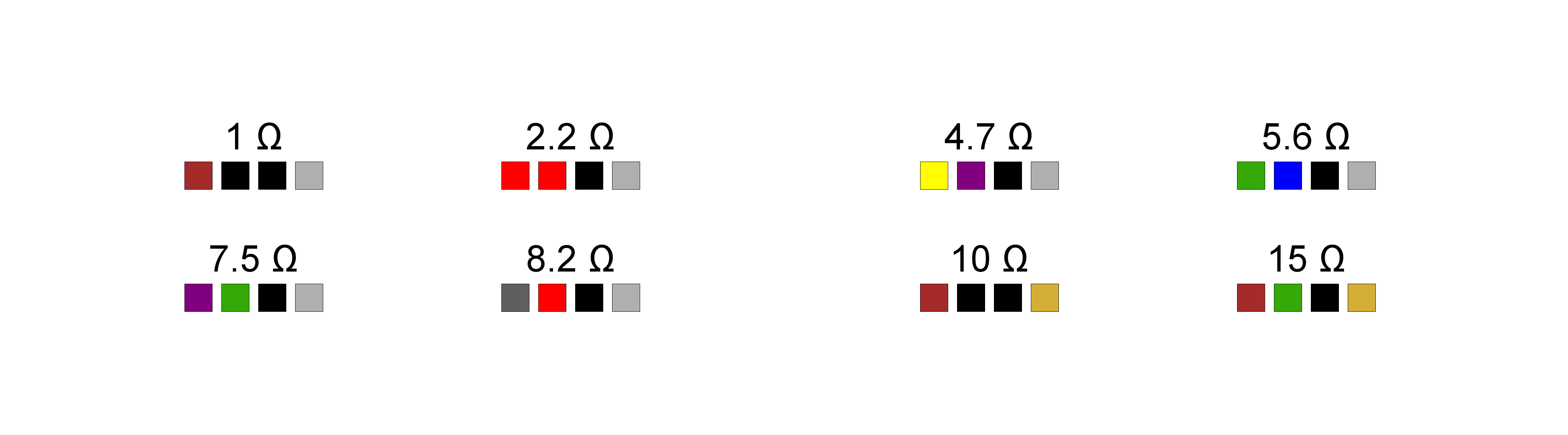
python eclb.py --no-tolerance PATH_TO_COMPONENT_DATA
--
Place three labels on each sticker

python eclb.py --labels-per-sticker 3 PATH_TO_COMPONENT_DATA or
python eclb.py -l 3 PATH_TO_COMPONENT_DATA
--
Make the text's font size bigger

python eclb.py --font-size 125 PATH_TO_COMPONENT_DATA or
python eclb.py -f 125 PATH_TO_COMPONENT_DATA
--
Don't display the color code, just the text with a bigger font size

python eclb.py --font-size 150 --no-color-codes PATH_TO_COMPONENT_DATA or
python eclb.py -f 150 --no-color-codes PATH_TO_COMPONENT_DATA
--
Change the color code so that it works for resistors with four bands (or, two significant digits)

python eclb.py --bands 2 PATH_TO_COMPONENT_DATA or
python eclb.py -b 2 PATH_TO_COMPONENT_DATA
--
Assign a temperature value to the component data, and then display each one with two significant digits in the color code (assumes that the component is a capacitor, since temperature is specified)
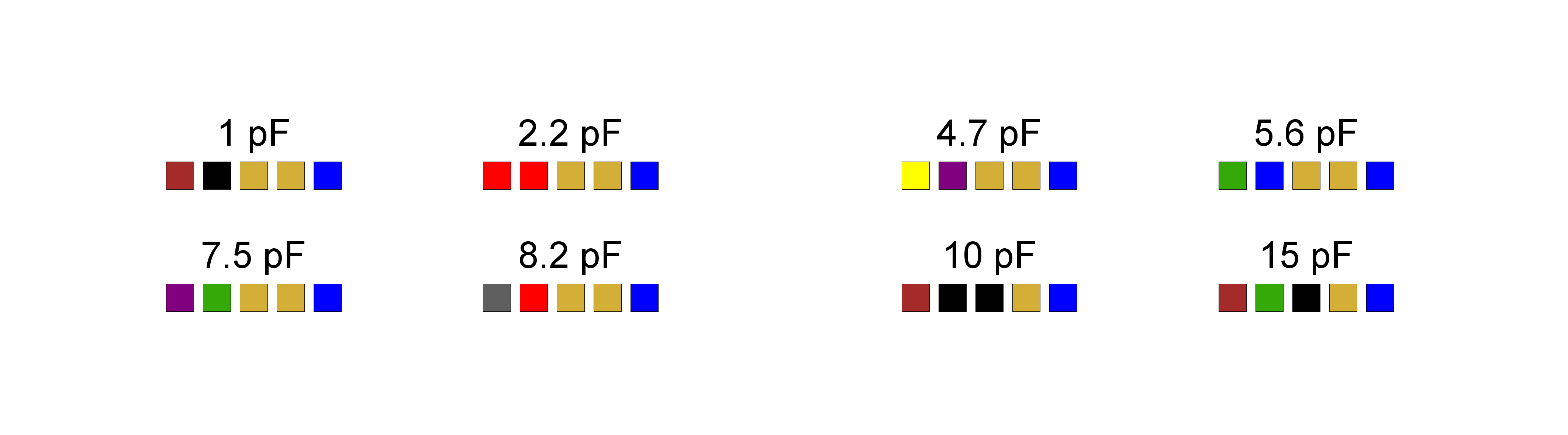
python eclb.py --bands 2 --temperature 150 PATH_TO_COMPONENT_DATA or
python eclb.py -b 2 --temperature 150 PATH_TO_COMPONENT_DATA
or, if you want to manually specify the component:
python eclb.py --component capacitor --bands 2 --temperature 150 PATH_TO_COMPONENT_DATA or
python eclb.py -c capacitor -b 2 --temperature 150
--
Display labels for an inductor with two significant digits in the color code

python eclb.py --bands 2 --component inductor PATH_TO_COMPONENT_DATA or
python eclb.py -b 2 -c inductor PATH_TO_COMPONENT_DATA
--sheet-height - FLOAT - The height of the label sheet (inches).
--sheet-width - FLOAT - The width of the label sheet (inches).
--upper-margin - FLOAT - The vertical size of the top-most margin (inches).
--left-margin - FLOAT - The horizontal size of the left-most margin (inches).
--middle-padding - FLOAT - The size of the padding between columns of sticker, if any (inches).
--label-height - FLOAT - The height of an individual sticker (inches).
--label-width - FLOAT - The width of an individual sticker (inches).
--rows - INT - The number of rows on the sticker sheet.
--columns - INT - The number of columns on the sticker sheet.
--units, -u - The units of the component to be labeled (Ohm, Ω, Farad, etc).
--tolerance, -t - FLOAT - The tolerance of the component to be labeled (in percentage).
--bands, -b - INT - The number of bands to use for displaying the significant digits of the component value.
--condense/--no-condense - Choose whether or not to condense the component value down (ex. 1000 -> 1k). Defaults to True.
--color-codes/--no-color-codes - Choose to show the color code or not. Defaults to True.
--show-tolerance/--no-tolerance - Choose to show a tolerance band in the color code. Defaults to True.
--voltage - INT - The voltage rating for the capacitors.
--temperature - INT - The temperature coefficient of the capacitors.
--component, -c - Overrides any other options, and tries to make components of that type.
--scale, -s - INT - The scale for rendering the sticker sheet. Bigger scale means higher resolution. Might have to play around with this to get the units to work.
--output-format, -o - Image type to save the sticker sheet as.
--font - Path to the font to use in label text.
--font-size, -f - INT - The size of the font used on the labels (as a percentage, ex. 100 is default).
--box-size - FLOAT - The size of the boxes that hold color bands (inches).
--box-spacer-width - FLOAT - The size of the spacer between the color band boxes (inches).
--labels-per-sticker, -l - INT - The number of labels to place in each sticker.
--label-text-offset - FLOAT - The veritcal distance to offset label text (pixels) (Positive values offset it down, and negatives offset it up.)
--label-colorcode-offset - FLOAT - The vertical distance to offset label color codes (pixels) (Positive values offset it down, and negatives offset it up.)
--debug/--no-debug - Choose to render debug gridlines on the sticker sheet (Helps with alignment). Defaults to False.
--show/--no-show - Choose to show a preview of the resulting image. Defaults to True.
--dry-run/--no-dry-run - Choose to save the resulting images or not. Defaults to False.