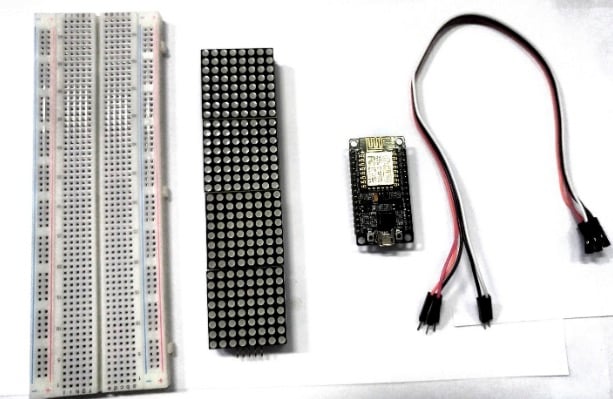
- NodeMCU ESP8266
- MAX7219 dot matrix
- Jumper Wires
- Breadboard (optional)
There are several MAX7219 breakout boards available, two of which are more popular – one is the generic module and the other is the FC-16 module.


- Arduino IDE
- MAX72xx library (https://github.com/markruys/arduino-Max72xxPane)
| LED Matrix | ESP8266 |
|---|---|
| Vcc | 3V |
| GND | G |
| DIN | D7 |
| CS | D4 |
| CLK | D5 |
Controlling the MAX7219 module is a bunch of work. Fortunately, MD_Parola library was written to hide away the complexities of the MAX7219 so that we can issue simple commands to control the display.
To install the library navigate to the Sketch > Include Library > Manage Libraries… Wait for Library Manager to download libraries index and update list of installed libraries.

Filter your search by typing ‘max72xx‘. There should be a couple entries. Look for MD_MAX72XX by MajicDesigns. This MD_MAX72XX library is a hardware-specific library which handles lower-level functions.
It needs to be paired with MD_Parola Library to create many different text animations like scrolling and sprite text effects. Install this library and it will ask you to install the MD_MAX72XX library due to the dependency.

We will print a simple text on the display without any animation.
But before you proceed to upload the sketch, you need to make some changes to make it work for you. You must modify the following two variables.

The first variable, HARDWARE_TYPE, tells the arduino which version of the module you are using.
- Set the
HARDWARE_TYPEtoGENERIC_HW, if you are using a module that usually comes with a green PCB and a through hole MAX7219 IC, as shown below.

- Set the
HARDWARE_TYPEtoFC16_HW, if you are using a module that usually comes with a blue PCB and a SMD MAX7219 IC as shown below.

With the second variable, MAX_DEVICES, you set the number of 8×8 dot matrix displays being used. An 8×8 matrix counts as 1 device, so if you want to control an 8×32 module you must set MAX_DEVICES to 4 (an 8×32 display contains 4 MAX7219 ICs).
// Program to demonstrate the MD_Parola library
//
// Simplest program that does something useful - Hello World!
//
// MD_MAX72XX library can be found at https://github.com/MajicDesigns/MD_MAX72XX
//

#include <MD_Parola.h>
#include <MD_MAX72xx.h>
#include <SPI.h>

// Define the number of devices we have in the chain and the hardware interface
// NOTE: These pin numbers will probably not work with your hardware and may
// need to be adapted
#define HARDWARE_TYPE MD_MAX72XX::FC16_HW
#define MAX_DEVICES 4
#define CLK_PIN   D5
#define DATA_PIN  D7
#define CS_PIN    D4

// Hardware SPI connection
MD_Parola P = MD_Parola(HARDWARE_TYPE, CS_PIN, MAX_DEVICES);
// Arbitrary output pins
// MD_Parola P = MD_Parola(HARDWARE_TYPE, DATA_PIN, CLK_PIN, CS_PIN, MAX_DEVICES);

void setup(void)
{
  P.begin();
  P.setIntensity(0);
  P.displayClear();
  P.displayScroll("Hello World", PA_CENTER, PA_SCROLL_LEFT, 100);

}

void loop(void)
{
  if (P.displayAnimate())
    P.displayReset();
}