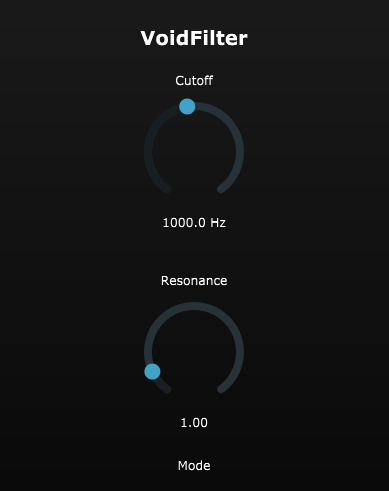
A stable highpass/lowpass/bandpass filter VST plugin built with JUCE, featuring smooth parameter automation, zero-delay feedback (ZDF) state variable filter topology, and professional-grade stability guarantees.
Link to the VST
- Three Filter Modes: Lowpass, Highpass, and Bandpass
- Smooth Parameter Automation: One-pole smoothing prevents zipper noise during automation
- Stable at Any Setting: Zero-Delay Feedback (ZDF) State Variable Filter topology ensures stability at extreme resonance and cutoff values
- Sample Rate Agnostic: Properly handles 44.1kHz, 48kHz, 96kHz, and other sample rates
- Low CPU Usage: Optimized DSP implementation with denormal protection
- Modern GUI: Clean, responsive interface with real-time value display
VoidFilter uses a TPT (Topology Preserving Transform) State Variable Filter based on Vadim Zavalishin's Zero-Delay Feedback method. This provides:
- Stable operation at any resonance level (no filter blow-ups)
- Accurate frequency response at all sample rates
- Linear behavior suitable for real-time modulation
- Parameter Clamping: Cutoff (20 Hz - 20 kHz) and Resonance (0.0 - 10.0) are automatically clamped
- Denormal Protection: Uses
juce::ScopedNoDenormalsto prevent CPU spikes - Smooth Automation: 50ms time-constant smoothing for cutoff and resonance parameters
- Per-Sample Coefficient Updates: Ensures smooth parameter changes without artifacts
- CMake 3.22 or higher
- C++17 compatible compiler
- JUCE 7.0+ (will be automatically downloaded if not specified)
-
Clone the repository:
git clone <repository-url>
cd voidfilter
-
Create build directory:
mkdir build cd build -
Configure with CMake:
Option A - Let CMake download JUCE automatically:
cmake ..
Option B - Use your local JUCE installation:
cmake -DJUCE_ROOT=/path/to/JUCE ..
-
Build the plugin:
Windows (Visual Studio):
cmake --build . --config ReleasemacOS/Linux:
cmake --build . --config Release -j -
Plugin Location:
- Windows:
build/VoidFilter_artefacts/Release/VST3/VoidFilter.vst3 - macOS:
build/VoidFilter_artefacts/Release/VST3/VoidFilter.vst3 - Linux:
build/VoidFilter_artefacts/Release/VST3/VoidFilter.vst3
- Windows:
-
Copy the
.vst3file to your VST3 plugin directory:- Windows:
C:\Program Files\Common Files\VST3\ - macOS:
~/Library/Audio/Plug-Ins/VST3/ - Linux:
~/.vst3/or/usr/local/lib/vst3/
- Windows:
-
Rescan plugins in your DAW
-
Cutoff: Frequency in Hz (20 - 20,000 Hz)
- Logarithmic scale for natural frequency sweep feel
- Smoothly automatable without zipper noise
-
Resonance: Q factor (0.0 - 10.0)
- Higher values create a resonant peak at the cutoff frequency
- Stable at maximum values
-
Mode: Filter type
- Lowpass: Passes frequencies below cutoff, attenuates above
- Highpass: Passes frequencies above cutoff, attenuates below
- Bandpass: Passes frequencies around the cutoff, attenuates others
- The filter is designed to be stable even with rapid automation
- High resonance values create a pronounced peak - use gain compensation if needed
- The logarithmic cutoff scale makes it easier to sweep musically relevant frequency ranges
voidfilter/
├── CMakeLists.txt              # CMake build configuration
├── Source/
│   ├── FilterDSP.h            # TPT SVF filter implementation
│   ├── PluginProcessor.h      # AudioProcessor with parameter management
│   ├── PluginProcessor.cpp    # Audio processing and smoothing
│   ├── PluginEditor.h         # GUI component
│   └── PluginEditor.cpp       # GUI implementation with throttled repaint
├── README.md                  # This file
└── LICENSE                    # MIT License
When testing the plugin, verify:
- Sample Rates: Test at 44.1kHz, 48kHz, and 96kHz - filter behavior should remain consistent
- Edge Cases:
- Minimum cutoff (20 Hz)
- Maximum cutoff (20 kHz)
- Maximum resonance (10.0)
- Automation: Rapid parameter changes should be smooth without artifacts
- Stability: No filter blow-ups or NaN/Inf values even with extreme settings
- Currently supports VST3 format only (Standalone also available)
- No oversampling (can be added for future enhancement)
- No soft saturation/warmth controls (planned for future release)
Potential additions for future versions:
- Soft saturation/tanh distortion for analog warmth
- Oversampling for improved high-resonance quality
- Additional filter modes (notch, allpass)
- Visual frequency response display
- Drive and dry/wet controls
MIT License - see LICENSE file for details
- Filter design based on Vadim Zavalishin's Zero-Delay Feedback method
- Built with JUCE Framework
Plugin doesn't appear in DAW:
- Ensure the
.vst3file is in the correct VST3 directory - Rescan plugins in your DAW
- Check that the plugin was built for the correct architecture (64-bit)
Filter sounds unstable:
- This should not happen with the ZDF implementation, but if it does:
- Check sample rate (should be > 0)
- Verify parameters are within valid ranges
- Report as a bug with your system specifications
High CPU usage:
- Denormal protection should prevent this
- If experiencing issues, check that compiler optimizations are enabled