




A high-performance, production-ready ray tracing renderer with hybrid CPU/GPU rendering
Features • Quick Start • Architecture • Performance • Gallery
RayTrophi is a state-of-the-art physically-based ray tracing engine designed for architectural visualization, product rendering, and real-time graphics. It combines the flexibility of CPU rendering with the raw power of GPU acceleration through NVIDIA OptiX.
-
Hybrid Rendering: Seamlessly switch between CPU (Embree/Custom BVH) and GPU (OptiX) acceleration
-
Production-Ready: Principled BSDF, advanced materials, volumetrics, subsurface scattering
-
High Performance: Optimized BVH construction (<1s for 3.3M triangles), 75% memory-optimized triangle structure
-
Real-time Preview: Modern interactive UI with ImGui, animation timeline
-
Industry Standard: AssImp loader supports 40+ 3D formats (GLTF, FBX, OBJ, etc.)
-
Materials
- ✅ Principled BSDF (Disney-style uber-shader)
- ✅ Lambertian, Metal, Dielectric
- ✅ Volumetric rendering with noise-based density
- ✅ Subsurface Scattering (SSS)
- ✅ Clearcoat, Anisotropic materials
- ✅ Hair System: GPU-accelerated hair rendering and simulation
-
Lighting
- ✅ Point lights, Directional lights
- ✅ Area lights (mesh-based)
- ✅ Emissive materials
- ✅ HDR/EXR Environment Maps (equirectangular projection)
- ✅ Global Volumetric Clouds:
- Any Sky Mode: Decoupled rendering works seamlessly with HDRI, Solid Color, or Nishita Sky.
- Physical Scattering: Henyey-Greenstein phase function with controllable Anisotropy (Silver Lining).
- High Quality: Adaptive ray marching (up to 128 steps) and jittered sampling to eliminate banding artifacts.
- Dynamic Control: Wind/Seed offsets, Coverage, Density, and Altitude layers.
- Soft Horizon: Smart density fading prevents black horizon artifacts.
- ✅ Advanced Nishita Sky Model:
- Physical atmosphere (Air, Dust, Ozone, Altitude) matching Blender concepts.
- Day/Night Cycle: Automatic transition with procedural stars and moon.
- Moon Rendering: Horizon size magnification, redness, atmospheric dimming, and phases.
- Sun Glow: High Mie Anisotropy (0.98) for realistic sun halos.
- Light Sync: Automatically synchronizes Scene Directional Light with Sky Sun position.)
- ✅ Soft shadows with multiple importance sampling
-
Advanced Features
- ✅ Accumulative Rendering: Progressive path tracing for noise-free, high-quality output
- ✅ Adaptive Sampling: Intelligent sampling engine focusing on noisy areas
- ✅ Depth of Field (DOF)
- ✅ Motion Blur
- ✅ Intel Open Image Denoise (OIDN) integration
- ✅ Tone mapping & post-processing
- ✅ Advanced Animation:
- Bone animation with quaternion interpolation
- Multi-track timeline with keyframe editing (Location/Rotation/Scale/Material)
- Batch Animation Rendering: Export animation sequences to image files with material keyframe support
- Cancellable renders with "Stop Animation" button
- Real-time playback preview with scrubbing
- ✅ Advanced Cloud Lighting Controls:
- Light Steps control for volumetric cloud quality
- Shadow Strength for realistic cloud shadows
- Ambient Strength for cloud base illumination
- Silver Intensity (Silver Lining) for sun-edge effects
- Cloud Absorption for light penetration control
- ✅ Full Undo/Redo System (v1.2):
- Object transforms (move, rotate, scale)
- Object deletion and duplication
- Light transforms (move, rotate, scale)
- Light add/delete/duplicate
- Keyboard shortcuts: Ctrl+Z (Undo), Ctrl+Y (Redo)
- ✅ Advanced Selection System (NEW v1.3):
- Box Selection: Right-click drag to select multiple objects
- Mixed Selection: Select lights + objects together
- Ctrl+Click: Add/remove from selection
- Select All/None buttons: Quick selection in Scene panel
- Multi-object transform: Move multiple selected items at once
- ✅ Idle Preview (NEW v1.3):
- During gizmo manipulation, pause mouse for 0.3s to preview position
- See render result before releasing - adjust if needed
- Blender-like UX for precise positioning
-
Multi-BVH Support
- Embree BVH (Intel, production-grade)
- Custom ParallelBVH (SAH-based, OpenMP parallelized)
- OptiX GPU acceleration structure
-
Optimizations
- SIMD vector operations
- Multi-threaded tile-based rendering
- Progressive refinement
- Memory Optimization: Triangular footprint reduced from 612 to 146 bytes (75% reduction)
- Robust Texture System: Crash-proof loader for Unicode paths and corrupted formats
- Cached Texture Management (Optimized Hit/Miss logic)
- Deferred BVH Update (NEW v1.3): Gizmo manipulation doesn't block - BVH updates only when needed
- O(n) Multi-Delete (NEW v1.3): Delete 100+ objects instantly (was O(n²))
- Modern ImGui-based Dark UI with Docking
- Animation Timeline:
- Multi-track visualization with group hierarchy (Objects/Lights/Cameras/World)
- Per-Channel Keyframing: Separate Location/Rotation/Scale keyframes
- Expandable L/R/S sub-channels with color coding
- Context menu for insert/delete/duplicate operations
- Drag-to-move keyframes, zoom/pan/scrub navigation
- Render Quality Presets (Low, Medium, High, Ultra)
- Dynamic Resolution Scaling
- Scene hierarchy viewer and Material editor
- Performance metrics (FPS, rays/s, memory usage)
- Box Selection: Right-click drag for multi-selection
- Transform Gizmo Idle Preview: Pause during drag to preview position

- Sculpting Brushes: Intuitive brushes for raising, lowering, smoothing, and flattening terrain geometry in real-time.
- Hydraulic & Fluvial Erosion:
- Simulate realistic water flow and sediment transport
- Create natural-looking riverbeds and valleys automatically
- Control erosion strength, rain amount, and solubility
- Heightmap Support: Import/Export 16-bit heightmaps for external workflows (World Machine, Gaea).
- Node-Based Workflow:
 Non-destructive terrain generation using a powerful node graph editor. Combine noise, filters, and masks.


- GPU Instancing: Render millions of grass blades, trees, and rocks with zero performance cost using OptiX hardware acceleration.
- Smart Scattering:
- Rule-based placement (slope, height, texture mask)
- Collision avoidance to prevent overlapping instances
- Paint Mode: Manually paint forests or specific details using brush tools.
- Dynamic Wind: All foliage responds to global wind parameters (strength, direction, gust).

- GPU Simulated & Rendered: Fully accelerated by NVIDIA OptiX for real-time performance.
- Grooming Brushes:
- Comb: Style hair direction naturally
- Cut/Grow: Adjust length interactively
- Smooth: Relax hair strands
- Physics Integration: Hair strands collide with character meshes and respond to gravity/forces.
- Material Support: Melanin-based hair BSDF for realistic rendering.

- FFT Ocean Simulation: Fast Fourier Transform based deep ocean waves with foam generation.
- Caustics: Realistic light refraction and caustic patterns on the seabed.
- Underwater Volumetrics: Fog density and absorption based on depth.

- Spline-Based Generation: Draw rivers using intuitive bezier curves.
- Auto-Carving: Rivers automatically carve their path into the terrain.
- Flow Mapping: Water texture flows along the spline direction naturally.
- Physics Interaction: Objects float and drift according to river flow velocity.
Required:
- Visual Studio 2022 (MSVC v143) - RECOMMENDED BUILD SYSTEM
- Windows 10/11 (x64)
- CMake 3.20+ (optional, VS2022 preferred)
Optional (for GPU rendering):
- NVIDIA GPU (SM 5.0+): GTX 9xx, 10xx, 16xx, or RTX series
- CUDA Toolkit 12.0+
- OptiX 7.x SDK
GPU Compatibility:
| GPU Series | Architecture | Mode | Performance |
|---|---|---|---|
| RTX 40xx | Ada Lovelace | Hardware RT | ⚡ Fastest |
| RTX 30xx | Ampere | Hardware RT | ⚡ Very Fast |
| RTX 20xx | Turing | Hardware RT | ⚡ Fast |
| GTX 16xx | Turing | Compute | 🔶 Good |
| GTX 10xx | Pascal | Compute | 🔶 Moderate |
| GTX 9xx | Maxwell | Compute | 🔶 Slower |
All dependencies are managed automatically:
- SDL2 (graphics output)
- Embree 4.x (CPU BVH)
- AssImp 5.x (model loading)
- ImGui (UI)
- OpenMP (parallelization)
- stb_image (HDR/texture loading)
- TinyEXR (EXR format support)
- Intel OIDN (denoising)
- CUDA/OptiX (GPU rendering - optional)
# 1. Clone the repository
git clone https://github.com/maxkemal/RayTrophi.git
cd RayTrophi/raytrac_sdl2

# 2. Open the solution
# Double-click raytrac_sdl2.vcxproj or open in Visual Studio 2022

# 3. Build
# Set configuration to "Release" and platform to "x64"
# Build > Build Solution (Ctrl+Shift+B)

# 4. Run
# The executable will be in: x64/Release/raytracing_render_code.exeNote: All dependencies (DLLs, resources) are automatically copied to the output directory by the build system.
mkdir build && cd build
cmake .. -G "Visual Studio 17 2022" -A x64
cmake --build . --config Releasecd x64/Release
raytracing_render_code.exeThe UI will appear. Use File > Load Scene to import models (GLTF recommended).
RayTrophi/
├── raytrac_sdl2/                  # Main project
│   ├── source/
│   │   ├── src/                   # Source files by module
│   │   │   ├── Core/              # Main entry (Main.cpp), Project Management
│   │   │   ├── Render/            # Renderer, OptiX Wrapper, BVH Builders
│   │   │   ├── Scene/             # Scene Objects, Lights, Materials
│   │   │   ├── Physics/           # Terrain, Water, Gas, VDB, Physics Engines
│   │   │   ├── Device/            # CUDA Kernels (.cu) & GPU Logic
│   │   │   ├── UI/                # ImGui Panels & Editor Logic
│   │   │   ├── Utils/             # Helper Utilities (Loaders, Math)
│   │   │   └── ...
│   │   ├── include/               # Header files (.h)
│   │   │   ├── Renderer.h
│   │   │   ├── Material.h
│   │   │   └── ...
│   │   ├── raygen.ptx             # Compiled OptiX kernels
│   │   └── ...
│   ├── raytrac_sdl2.vcxproj       # Visual Studio project
│   ├── CMakeLists.txt             # CMake build configuration
│   └── raygen.ptx                 # OptiX shader
└── README.md                      # This file
-
Renderer (
src/Render/Renderer.cpp)- Tile-based multi-threaded rendering
- Progressive refinement
- Denoising integration
-
BVH Systems
- EmbreeBVH (
src/Render/EmbreeBVH.cpp): Industry-standard, optimized for speed - ParallelBVHNode (
src/Render/ParallelBVHNode.cpp): Custom SAH-based, OpenMP parallel build - OptiX BVH (
src/Render/OptixWrapper.cpp): GPU-accelerated structure
- EmbreeBVH (
-
Material System (
src/Scene/PrincipledBSDF.cpp)- Modular property-based materials
- Texture support (albedo, roughness, metallic, normal, emission)
- sRGB/Linear color space handling
-
OptixWrapper (
src/Render/OptixWrapper.cpp,src/Device/*.cu)- CUDA/OptiX backend
- SBT (Shader Binding Table) management
- Texture object caching
-
Physics & Procedural (
src/Physics/*)- TerrainManager: Hydraulic erosion, sculpting
- WaterManager: FFT Ocean simulation
- EmitterSystem: Particle systems & forces
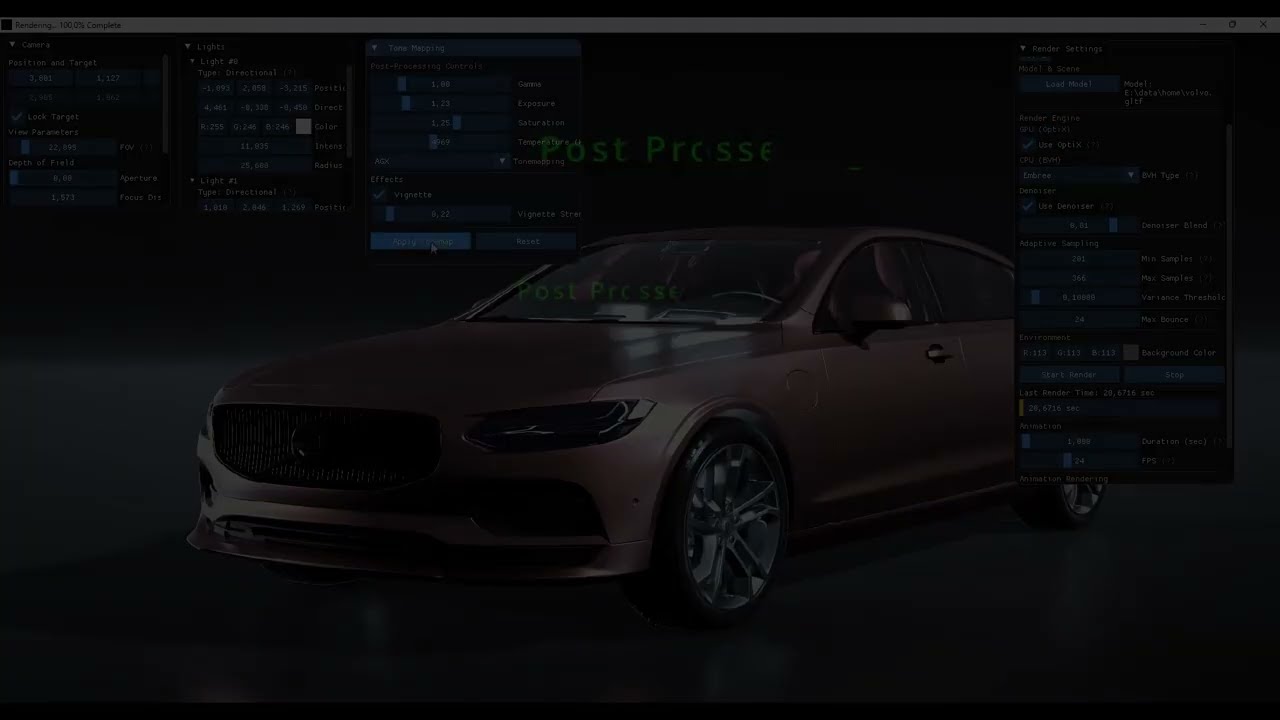

Complex architectural scene with advanced lighting - 3.3M triangles, Embree BVH

Interior design with volumetric lighting and subsurface scattering

Real-time GPU rendering with OptiX - 500M+ rays/second

Stylized dragon with custom materials and procedural textures

Pure CPU path tracing with progressive refinement

Principled BSDF materials with PBR textures

Outdoor environment with natural lighting

Interactive ImGui interface with live parameter adjustments
Automatic (recommended): The Visual Studio project manages dependencies via vcpkg or manual paths.
Manual:
- Download SDL2, Embree, AssImp from official sources
- Update include/library paths in project properties
- Debug: Full symbols, slower (~10x)
- Release: Optimized, production use
- RelWithDebInfo: Optimized + symbols (profiling)
| Feature | VS2022 .vcxproj | CMake |
|---|---|---|
| CPU Rendering (SDL) | ✅ Working | |
| GPU Rendering (OptiX) | ✅ Working | ✅ Working |
| Dependency Management | ✅ Excellent | |
| Build Speed | Fast | Slower |
| Recommendation | USE THIS | Experimental |
Why VS2022?
- All dependencies are pre-configured
- Resource files (icons, PTX) auto-copied
- No SDL refresh bugs in CPU rendering
- Better debugging experience
#include "Renderer.h"
#include "SceneData.h"

int main() {
    Renderer renderer(1920, 1080, 8, 128);
    SceneData scene;
    OptixWrapper optix;

    // Load scene
    renderer.create_scene(scene, &optix, "path/to/model.gltf");

    // Render
    SDL_Surface* surface = /* ... */;
    renderer.render_image(surface, scene, /* ... */);

    return 0;
}// Use Embree (fastest)
renderer.rebuildBVH(scene, true); // use_embree = true
// Use custom ParallelBVH
renderer.rebuildBVH(scene, false); // use_embree = falseauto mat = std::make_shared<PrincipledBSDF>();
mat->albedoProperty.constant_value = Vec3(0.8, 0.1, 0.1); // Red
mat->roughnessProperty.constant_value = Vec3(0.3, 0.3, 0.3);
mat->metallicProperty.constant_value = Vec3(1.0, 1.0, 1.0); // Metallic⚠️ CMake build has SDL screen update bug in CPU rendering → Use VS2022 instead- DLL dependencies must be in same folder as .exe
- OptiX requires NVIDIA GPU with SM 5.0+ (GTX 9xx or newer)
- RTX GPUs use hardware RT cores; GTX GPUs use compute-based ray tracing (slower)
- Very large scenes (>10M triangles) may cause memory issues
- Denoising uses Intel OIDN with CUDA acceleration on NVIDIA GPUs
- Currently Windows-only (SDL2, DirectX dependencies)
- Linux/macOS support would require porting
- Binned SAH for faster BVH construction
- Index-based BVH (remove vector copying)
- SBVH (Spatial BVH splits)
- Linux/macOS support
- Vulkan backend (alternative to OptiX)
- Network rendering (distributed ray tracing)
- USD format support
- Light path visualization/debugging
Contributions are welcome! Areas of interest:
- Performance optimizations
- New material models
- Additional 3D format support
- Bug fixes
- Documentation improvements
How to contribute:
- Fork the repository
- Create a feature branch (
git checkout -b feature/amazing-feature) - Commit your changes (
git commit -m 'Add amazing feature') - Push to the branch (
git push origin feature/amazing-feature) - Open a Pull Request
This project is licensed under the MIT License - see the LICENSE file for details.
- Embree - Intel's high-performance ray tracing kernels
- OptiX - NVIDIA's GPU ray tracing engine
- AssImp - Open Asset Import Library
- ImGui - Dear ImGui for user interface
- SDL2 - Simple DirectMedia Layer
- Intel OIDN - Open Image Denoise
- stb - Sean Barrett's public domain libraries (stb_image for HDR)
- TinyEXR - Syoyo Fujita's EXR loader library
Kemal - @maxkemal
- Issues: GitHub Issues
- Discussions: GitHub Discussions
⭐ Star this repository if you find it useful!
Made with ❤️ and lots of ☕