A Vercel API that returns an SVG diagram of a keyboard with specified keys highlighted. Supports MacBook Air 13" JIS and HHKB Professional US layouts. Primary use case: embedding keybinding diagrams in Markdown (GitHub READMEs, blogs).
Vim motion keys (hjkl) on MacBook Air JIS:
Vim motion keys on HHKB US:
HHKB Fn layer:
Embed in Markdown:
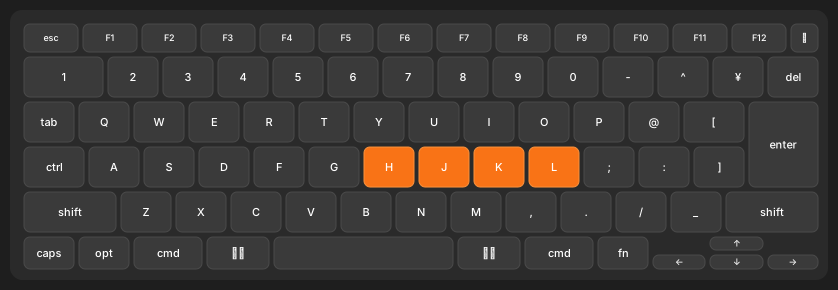
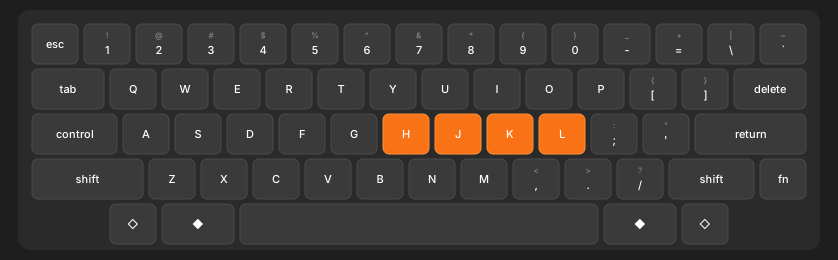Or with curl:
curl "https://keymap-fetcher.vercel.app/api/keymap?keys=h,j,k,l&layout=hhkb-us" -o keymap.svg| Parameter | Description | Default | Example |
|---|---|---|---|
keys |
Comma-separated Vim key notation | (empty) | h,j,k,l or <C-a>,<Esc> |
layout |
Keyboard layout | mba-jis |
mba-jis, hhkb-us |
fn |
Show HHKB Fn layer (hhkb-us only) | 0 |
fn=1 |
76-key JIS layout. Includes 英数, かな, and JIS-specific symbol keys.
60-key ANSI layout. Features:
- Dual legends (primary + shift) on symbol keys (e.g.
1/!) ◇= Option,◆= Command- Fn layer (
?fn=1): renders F1–F12, arrows, media controls, and more in place of the base labels
Keys follow Vim conventions:
| Notation | Key |
|---|---|
a–z |
Letter keys |
1–0 |
Number keys |
<Esc> |
Escape |
<CR>, <Enter>, <Return> |
Return/Enter |
<BS>, <Backspace>, <Del> |
Delete/Backspace |
<Tab> |
Tab |
<Space>, space |
Space bar |
<Comma>, comma |
, (comma) |
<Up>, <Down>, <Left>, <Right> |
Arrow keys |
<F1>–<F12> |
Function keys |
<C-x> |
Ctrl + x |
<S-x> |
Shift + x |
<D-x> |
Command (⌘) + x |
<M-x>, <A-x> |
Option (⌥) + x |
ctrl, shift, cmd, opt, alt, fn, caps |
Modifier keys alone |
shift-l, shift-r, cmd-l, cmd-r, opt-l, opt-r |
Modifier with side |
-, =, [, ], ;, ', \, ` |
Symbol keys (HHKB US) |
git clone https://github.com/masaki39/keymap-fetcher.git
cd keymap-fetcher
pnpm install
vercel deployPlease report issues at GitHub Issues.