A production-ready authentication backend template built with Hono, Better Auth, Drizzle ORM, and Cloudflare Workers. Spin up secure, scalable APIs in minutes.
-
Authentication - Complete auth system via Better Auth
- Email/password authentication
- OAuth providers (Google, GitHub, LinkedIn)
- Email verification
- Password reset
- Session management
- Organizations/teams support
- Admin panel
-
Database - Type-safe PostgreSQL with Drizzle ORM
- Auto-generated migrations
- Relations and types
- Connection pooling ready
-
API - Modern REST API with OpenAPI docs
- Automatic Swagger documentation
- Request validation with Zod
- Health check endpoints
- Rate limiting
-
Developer Experience
- TypeScript throughout
- Hot reload development
- Powerful CLI scaffolding tool
- Code generators for routes, schemas, middleware
- Comprehensive error handling
-
Production Ready
- Cloudflare Workers deployment
- Environment-based configuration
- CORS configured
- Secure by default
- Package Manager: Bun (recommended), pnpm, Yarn, or npm
- Wrangler CLI
- PostgreSQL database (we recommend Neon)
# Install hono-cf CLI globally
curl -fsSL https://raw.githubusercontent.com/kurtiz/hono-cloudflare-starter/main/install.sh | bash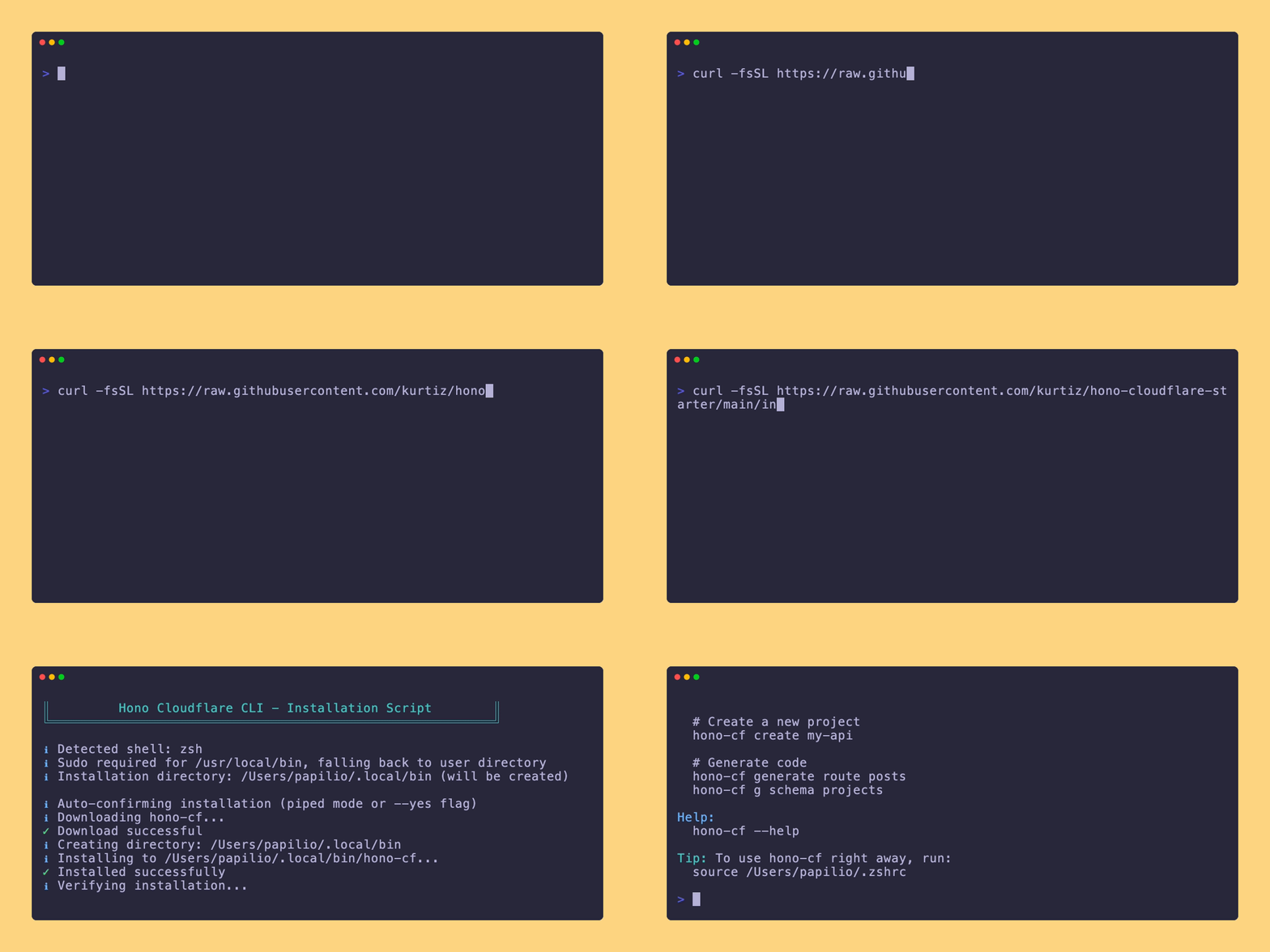
What the installer does:
- Downloads the latest
hono-cfCLI from GitHub - Detects your shell (bash, zsh, fish)
- Installs to
/usr/local/bin(with sudo if available) or~/.local/bin(user directory) - Automatically falls back to user directory when running via
curl | bash(no sudo password prompt) - Adds installation directory to your PATH
- Verifies the installation
After installation:
# Restart your terminal or source your shell config
source ~/.zshrc  # or ~/.bashrc, ~/.config/fish/config.fish

# Verify installation
hono-cf --version# Create a new project
hono-cf create my-api
# Or specify a package manager
hono-cf create my-api --pm pnpm
hono-cf create my-api --pm yarn
hono-cf create my-api --pm npmThe CLI will:
- Clone the template from GitHub
- Detect or use your preferred package manager
- Install all dependencies
- Initialize a git repository
- Generate Cloudflare types
- Show you the next steps
cd my-api

# Copy environment template
cp .env.example .env

# Edit .env with your credentials:
# - BETTER_AUTH_SECRET (generate: openssl rand -base64 32)
# - DATABASE_URL (from Neon or other Postgres provider)

# Setup the database
hono-cf run auth:generate  # Or: <pm> run auth:generate
hono-cf run db:push        # Or: <pm> run db:push

# Start the dev server
hono-cf run dev            # Or: <pm> run dev
Your API will be running at http://localhost:8787
The hono-cf CLI is your all-in-one tool for project management and code generation.
# Show help
hono-cf --help

# Check version and for updates
hono-cf --version

# Update to latest version
hono-cf self-update

# Uninstall hono-cf
hono-cf uninstall

# Work offline (skip update checks)
hono-cf --offline create my-apiWhen using the install script, you can pass options:
# Default installation (auto-detects, falls back to user dir if needed)
curl -fsSL https://raw.githubusercontent.com/kurtiz/hono-cloudflare-starter/main/install.sh | bash

# Force non-interactive mode (auto-confirm all prompts)
curl -fsSL https://raw.githubusercontent.com/kurtiz/hono-cloudflare-starter/main/install.sh | bash -s -- --yes
# or
./install.sh --yes# Create a new project
hono-cf create my-project
hono-cf create my-project --pm pnpm
# Work offline
hono-cf --offline create my-projectGenerate boilerplate code within your project:
# Routes (full CRUD)
hono-cf generate route posts
hono-cf g route users

# Database schemas
hono-cf generate schema projects
hono-cf g schema organizations

# Middleware
hono-cf generate middleware logger
hono-cf g mw auth

# TypeScript types
hono-cf generate types product
hono-cf g types customer

# Services (business logic)
hono-cf generate service orders
hono-cf g svc billingRoute Generator (hono-cf g route <name>)
Creates src/routes/{name}.ts with:
- Full CRUD endpoints (GET, POST, PATCH, DELETE)
- Zod validation schemas
- Authentication middleware
- TypeScript types
- TODO comments
Schema Generator (hono-cf g schema <name>)
Creates:
src/db/schema/{name}.ts- Drizzle table definitionsrc/db/schema/types/{name}.ts- TypeScript types- Updates
src/db/schema/index.tswith exports
Middleware Generator (hono-cf g middleware <name>)
Creates src/middleware/{name}.ts with:
- Standard middleware structure
- Required and optional variants
- Error handling
Types Generator (hono-cf g types <name>)
Creates src/types/{name}.ts with:
- Entity interfaces
- Input/output types
- Response types with pagination support
Service Generator (hono-cf g service <name>)
Creates src/services/{name}.ts with:
- Service class with CRUD methods
- Factory function
- Database integration stubs
# 1. Create project
hono-cf create my-shop --pm pnpm
cd my-shop

# 2. Setup database (edit .env first)
# cp .env.example .env
# # ... edit .env ...
pnpm run auth:generate
pnpm run db:push

# 3. Generate code for your feature
hono-cf g schema products
hono-cf g route products
hono-cf g types product
hono-cf g service products

# 4. Register route in src/routes/index.ts
# import productsRouter from "./products";
# apiRouter.route("/products", productsRouter);

# 5. Start developing
pnpm run dev.
├── src/
│ ├── auth/ # Better Auth configuration
│ │ ├── index.ts # Auth server setup
│ │ └── auth-client.ts # Auth client for frontend
│ ├── db/ # Database layer
│ │ ├── index.ts # Database connection
│ │ ├── schema/ # Drizzle schema definitions
│ │ │ ├── auth.ts
│ │ │ ├── organizations.ts
│ │ │ └── types/
│ │ └── migrations/ # Migration files
│ ├── middleware/ # Hono middleware
│ │ ├── auth.ts # Authentication middleware
│ │ ├── cors.ts # CORS configuration
│ │ └── error.ts # Error handling
│ ├── openapi/ # OpenAPI documentation
│ │ ├── schemas.ts
│ │ └── spec.ts
│ ├── routes/ # API routes
│ │ ├── docs.ts # Swagger UI
│ │ ├── health.ts # Health endpoints
│ │ └── index.ts # Route aggregator
│ ├── services/ # Business logic (generated)
│ ├── types/ # TypeScript types (generated)
│ ├── utils/ # Utility functions
│ │ └── index.ts
│ └── index.ts # Application entry point
├── public/ # Static assets
├── .env.example # Environment template
├── install.sh # CLI installer
├── hono-cf # CLI tool (source)
├── drizzle.config.ts # Drizzle configuration
├── package.json
├── tsconfig.json
└── wrangler.jsonc # Cloudflare Workers config
All auth routes are automatically available at /api/auth/*:
| Method | Endpoint | Description |
|---|---|---|
| POST | /api/auth/sign-up/email |
Register with email/password |
| POST | /api/auth/sign-in/email |
Login with email/password |
| POST | /api/auth/sign-out |
Logout |
| GET | /api/auth/session |
Get current session |
| POST | /api/auth/forget-password |
Request password reset |
| POST | /api/auth/verify-email |
Verify email address |
| POST | /api/auth/sign-in/social |
OAuth login (Google, GitHub, LinkedIn) |
| Method | Endpoint | Description |
|---|---|---|
| GET | /api/v1/health |
Health check |
| GET | /api/v1/health/ready |
Readiness check (DB connection) |
| GET | /api/v1/openapi.json |
OpenAPI specification |
| GET | /docs |
Swagger UI (basic auth protected) |
Access the Swagger UI at http://localhost:8787/docs (default credentials: admin/admin)
Copy .env.example to .env and configure:
# Required
BETTER_AUTH_SECRET=your_32_char_secret
BETTER_AUTH_URL=http://localhost:8787
DATABASE_URL=postgresql://user:pass@host/db?sslmode=require

# Optional - OAuth Providers
GOOGLE_CLIENT_ID=your_google_client_id
GOOGLE_CLIENT_SECRET=your_google_client_secret
GITHUB_CLIENT_ID=your_github_client_id
GITHUB_CLIENT_SECRET=your_github_client_secret

# Frontend URLs (for CORS)
FRONTEND_URL=http://localhost:3000

# Swagger Auth
SWAGGER_USERNAME=admin
SWAGGER_PASSWORD=your_password- Create a free account at neon.tech
- Create a new project
- Copy the connection string
- Add it to your
.envfile
# Generate migrations from schema changes
<pm> run db:generate

# Push schema to database (development)
<pm> run db:push

# Run migrations (production)
<pm> run db:migrate

# Open Drizzle Studio
<pm> run db:studio# Generate Better Auth tables
<pm> run auth:generate
# Or use the Better Auth CLI
<pm> run auth:migrate-
Install Wrangler and authenticate:
# Using your package manager
bun install -g wrangler    # or: pnpm add -g wrangler

# Or with npm
npm install -g wrangler

# Authenticate
wrangler login
-
Set up secrets:
wrangler secret put BETTER_AUTH_SECRET wrangler secret put DATABASE_URL # Add other secrets as needed -
Deploy:
<pm> run deploy
Add a custom domain in the Cloudflare Dashboard:
- Go to Workers & Pages
- Select your worker
- Click "Triggers" → "Custom Domains"
- Add your domain
import { authClient } from "lib/auth-client";

// Sign in
await authClient.signIn.email({
  email: "user@example.com",
  password: "password",
});

// Get session
const { data: session } = await authClient.getSession();const response = await fetch("/api/v1/protected-route", {
method: "GET",
credentials: "include", // Important for cookies
headers: {
"Content-Type": "application/json",
},
});All scripts work with Bun, pnpm, Yarn, or npm:
| Command | Bun | pnpm | Yarn | npm |
|---|---|---|---|---|
| Start dev server | bun dev |
pnpm dev |
yarn dev |
npm run dev |
| Deploy | bun run deploy |
pnpm run deploy |
yarn deploy |
npm run deploy |
| Generate migrations | bun run db:generate |
pnpm run db:generate |
yarn db:generate |
npm run db:generate |
| Run migrations | bun run db:migrate |
pnpm run db:migrate |
yarn db:migrate |
npm run db:migrate |
| Push to DB | bun run db:push |
pnpm run db:push |
yarn db:push |
npm run db:push |
| Drizzle Studio | bun run db:studio |
pnpm run db:studio |
yarn db:studio |
npm run db:studio |
| Auth schema | bun run auth:generate |
pnpm run auth:generate |
yarn auth:generate |
npm run auth:generate |
| Generate types | bun run cf-typegen |
pnpm run cf-typegen |
yarn cf-typegen |
npm run cf-typegen |
| Type check | bun run lint |
pnpm run lint |
yarn lint |
npm run lint |
The CLI automatically checks for updates (twice daily). You'll see a notification when a new version is available:
━━━━━━━━━━━━━━━━━━━━━━━━━━━━━━━━━━━━━━━━━━━━━━━━━━━━━━━━━━
  Update available: 1.0.0 → 1.1.0
  Run: hono-cf self-update
━━━━━━━━━━━━━━━━━━━━━━━━━━━━━━━━━━━━━━━━━━━━━━━━━━━━━━━━━━
Use --offline flag to skip update checks:
hono-cf --offline create my-api
hono-cf --offline g route postshono-cf self-updateThis will:
- Download the latest version from GitHub
- Verify the download
- Create a backup of the current version
- Install the new version
hono-cf uninstall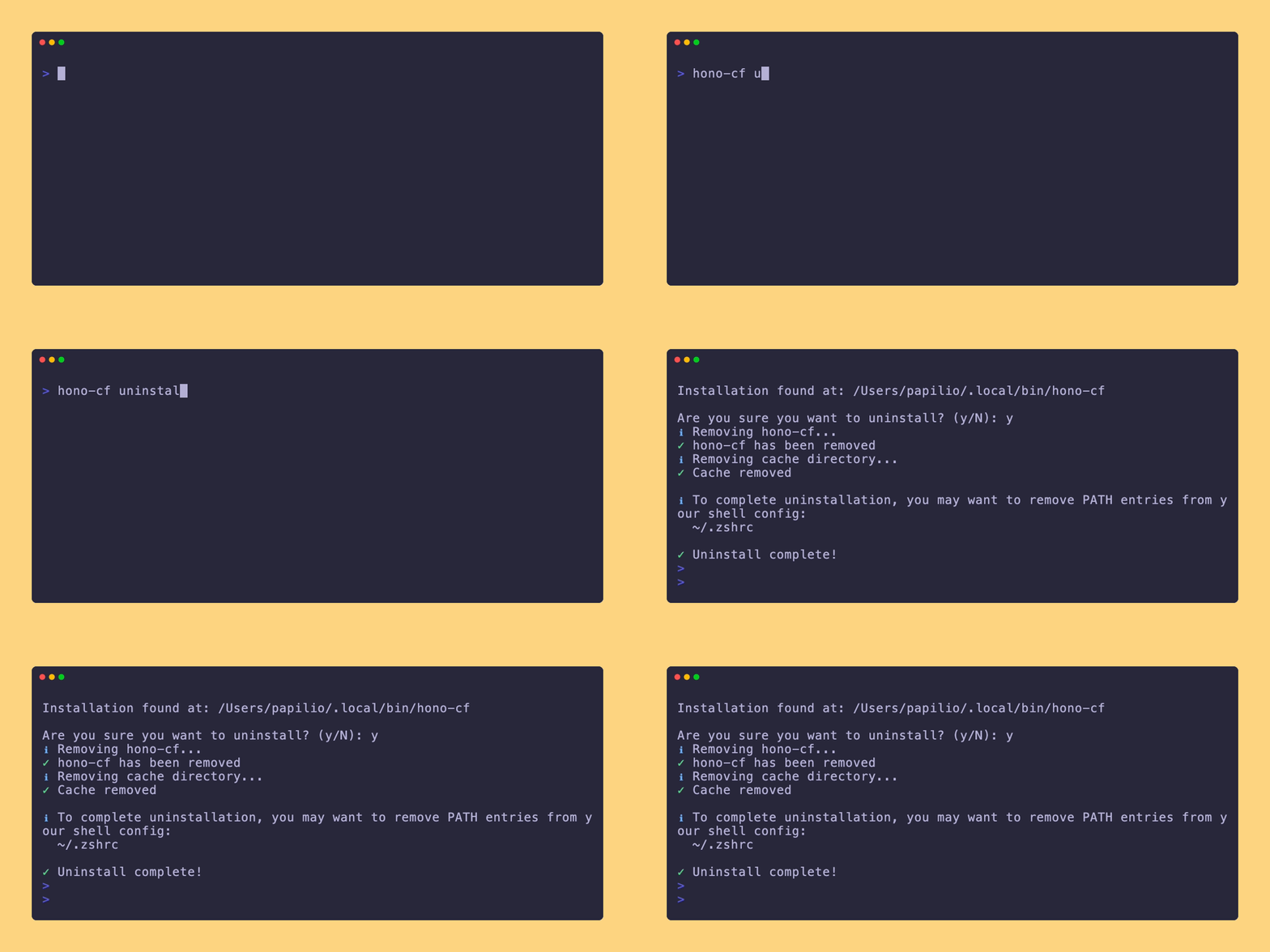
This removes:
- The CLI binary
- Cache directory (~/.cache/hono-cf)
You'll need to manually remove the PATH entry from your shell config if desired.
Create a new route file in src/routes/:
// src/routes/users.ts
import { Hono } from "hono";
import type { HonoContext } from "../types";

const usersRouter = new Hono<HonoContext>();

usersRouter.get("/", async (c) => {
  const db = c.get("db");
  // Your logic here
  return c.json({ users: [] });
});

export default usersRouter;
Register it in src/routes/index.ts:
import usersRouter from "./users";

apiRouter.route("/users", usersRouter);Edit src/auth/index.ts:
socialProviders: {
  google: {
    clientId: process.env.GOOGLE_CLIENT_ID!,
    clientSecret: process.env.GOOGLE_CLIENT_SECRET!,
  },
  // Add more providers
  github: {
    clientId: process.env.GITHUB_CLIENT_ID!,
    clientSecret: process.env.GITHUB_CLIENT_SECRET!,
  },
},
Don't forget to set up the client to on the client side of the project (see Frontend Integration).
Create a new schema file in src/db/schema/:
// src/db/schema/projects.ts
import { pgTable, text, timestamp, uuid } from "drizzle-orm/pg-core";
import { user } from "./auth";

export const projects = pgTable("projects", {
  id: uuid("id").defaultRandom().primaryKey(),
  name: text("name").notNull(),
  userId: text("user_id").references(() => user.id),
  createdAt: timestamp("created_at").defaultNow().notNull(),
});
Export it from src/db/schema/index.ts and generate migrations.
- CSRF Protection: Enabled by default
- Secure Cookies: Automatically set in production
- Rate Limiting: 100 requests/minute per IP
- CORS: Configured for your frontend URLs
- Password Hashing: Argon2id via Better Auth
- Session Management: Secure, HTTP-only cookies
# If hono-cf is not found after installation
source ~/.bashrc  # or: source ~/.zshrc

# Check if installation directory is in PATH
echo $PATH | grep -E "(\.local/bin|/usr/local/bin)"

# Reinstall with verbose output
curl -fsSL https://raw.githubusercontent.com/kurtiz/hono-cloudflare-starter/main/install.sh | bash# Test your connection string
psql "postgresql://..."
# Check SSL requirements
# Neon requires sslmode=require# Regenerate types
<pm> run cf-typegen
# Clear node_modules and reinstall
rm -rf node_modules bun.lock pnpm-lock.yaml yarn.lock package-lock.json
<pm> install- Check
wrangler.jsoncconfiguration - Verify secrets are set:
wrangler secret list - Check logs:
wrangler tail
- Hono - Web framework
- Better Auth - Authentication
- Drizzle ORM - Database ORM
- Cloudflare Workers - Edge runtime
- Neon - Serverless Postgres
- Zod - Schema validation
- Scalar - API documentation
- Fork the repository
- Create your feature branch (
git checkout -b feature/amazing-feature) - Commit your changes (
git commit -m 'Add amazing feature') - Push to the branch (
git push origin feature/amazing-feature) - Open a Pull Request
MIT License – feel free to use this for personal and commercial projects.
Built with ❤️ using Hono, Better Auth, and Cloudflare Workers.