The most efficient, reliable, and developer-friendly way to use the OpenTable Reviews API.
Actor page: apify.com/johnvc/opentable-reviews-api Input schema: apify.com/johnvc/opentable-reviews-api/input-schema
Get OpenTable restaurant reviews as structured JSON. Give the API a restaurant and get its reviews, each with the full review text, the dates the diner visited and posted, the diner's public profile, and the complete rating breakdown: overall, food, service, ambience, value, and noise. It is review intelligence for hospitality analytics, restaurant competitive research, and food-media sentiment analysis. If you need to book a table, use a booking Actor; if you need the review data, this is the one.

- Python 3.11 or higher
- An Apify account and API key (get a free key here)
-
Clone the repository
git clone https://github.com/johnisanerd/Apify-OpenTable-Reviews-API.git cd Apify-OpenTable-Reviews-API -
Install dependencies with UV
# Install UV if you do not have it:
curl -LsSf https://astral.sh/uv/install.sh | sh

# Install project dependencies:
uv sync
-
Configure your API key
cp .env.example .env
# Edit .env and add your Apify API key
# Get your free API key at: https://apify.com?fpr=9n7kx3
-
Run the example
uv run python opentable-reviews-api-example.py
export APIFY_API_TOKEN="your_api_key_here"
uv run python opentable-reviews-api-example.pyReview data, not booking. Get the reviews and ratings for analytics, the same reviews your competitors are reading.
Clean, structured output. Every review is one row with the full rating breakdown, ready to load into a dataframe, a database, or an AI pipeline.
Built for batch work. Pass several restaurants and pull them all in one run.
MCP-ready. AI agents can call it as a tool through the hosted Apify MCP server to summarize a restaurant's reviews.
- A restaurant's reviews with the full rating breakdown
- Diner profile, dined and submitted dates per review
- Optional restaurant summary with aggregate ratings
- Batch several restaurants in one run
- One clean row per review, tagged with the restaurant ID
- Stable JSON shape, easy to load anywhere
{
  "restaurantId": "r/central-park-boathouse-new-york-2"
}{
"restaurantIds": ["r/central-park-boathouse-new-york-2", "r/your-other-restaurant"],
"maxResultsPerRestaurant": 100,
"includeRestaurantSummary": true
}| Parameter | Type | Required | Default | Description |
|---|---|---|---|---|
restaurantId |
str |
one of | - | An OpenTable restaurant ID (the r/... URL slug). A full URL also works. |
restaurantIds |
list[str] |
one of | - | A batch of restaurant IDs. Merged with restaurantId and de-duplicated. |
maxResultsPerRestaurant |
int |
no | 30 |
Reviews per restaurant (maximum 500). |
includeRestaurantSummary |
bool |
no | false |
Also return an aggregate restaurant summary row (charged once per restaurant). |
Each item in the dataset is one review:
{
  "result_type": "review",
  "restaurant_id": "r/central-park-boathouse-new-york-2",
  "position": 1,
  "review_id": "OT-1294132-168206-130084588143",
  "content": "Beautiful restaurant, lovely setting and great service ...",
  "dined_at": "2026-04-01T20:30:00Z",
  "submitted_at": "2026-04-02T17:43:04Z",
  "rating": { "overall": 5, "food": 4, "service": 5, "ambience": 5, "value": 4, "noise": "Moderate" },
  "user": { "name": "PAULINA", "number_of_reviews": 28, "location": "New York Area" }
}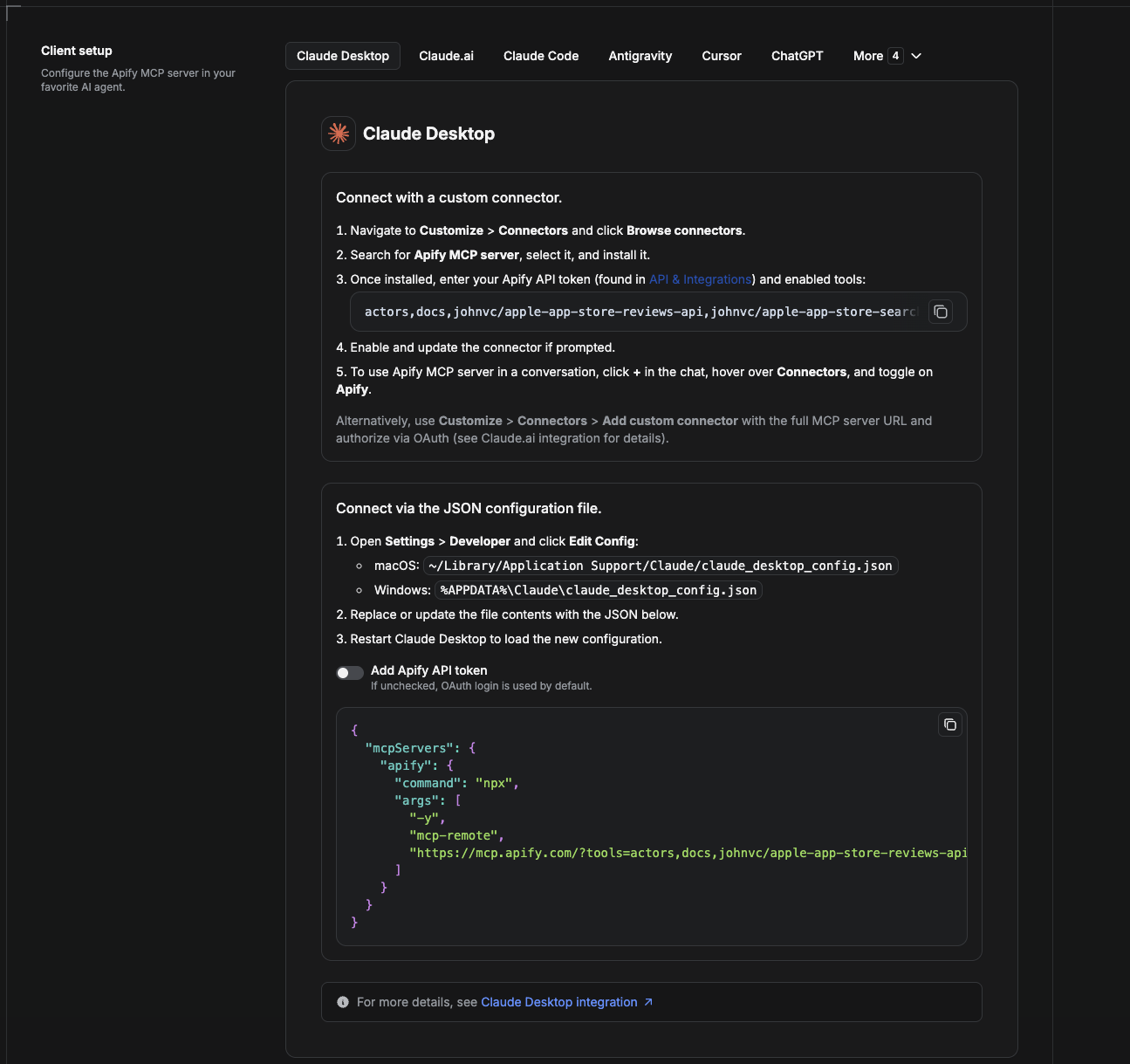
Cowork is the desktop app's automation mode. To give it the OpenTable Reviews API as a tool, add the Apify MCP server as a connector.
- Open the Claude desktop app and go to Settings → Connectors (or Settings → Developer → Edit Config to edit
claude_desktop_config.jsondirectly).- macOS:
~/Library/Application Support/Claude/claude_desktop_config.json - Windows:
%APPDATA%\Claude\claude_desktop_config.json
- macOS:
- Add the Apify MCP server, preloaded with only this Actor:
{
  "mcpServers": {
    "apify": {
      "command": "npx",
      "args": [
        "-y",
        "mcp-remote",
        "https://mcp.apify.com/?tools=actors,docs,johnvc/opentable-reviews-api"
      ]
    }
  }
}- Restart the app. When Cowork first calls the tool, complete the OAuth prompt in your browser, or add your Apify API token in the connector settings to skip OAuth.
- In a Cowork chat, confirm the tool is available and ask it to run the OpenTable Reviews API.
Download the desktop app and start a free trial: https://claude.ai/referral/uIlpa7nPLg More help: https://docs.apify.com/platform/integrations/claude-desktop
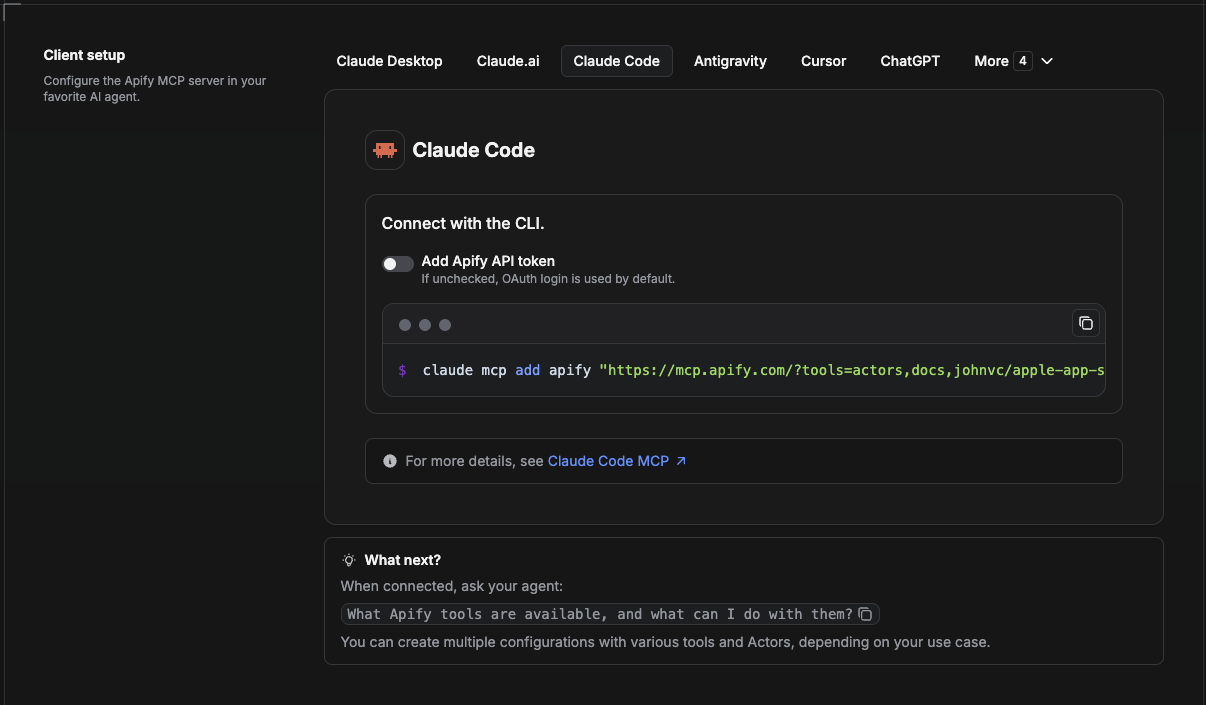
Claude Code is the command-line tool. Add the Actor's MCP server with one command:
claude mcp add --transport http apify \
  "https://mcp.apify.com/?tools=actors,docs,johnvc/opentable-reviews-api"
To use a token instead of browser OAuth:
claude mcp add --transport http apify \
  "https://mcp.apify.com/?tools=actors,docs,johnvc/opentable-reviews-api" \
  --header "Authorization: Bearer YOUR_APIFY_TOKEN"
Then verify with claude mcp list, or run /mcp inside a session. Ask Claude Code to call the OpenTable Reviews API.
Try Claude Code free: https://claude.ai/referral/uIlpa7nPLg Claude Code MCP docs: https://code.claude.com/docs/en/mcp
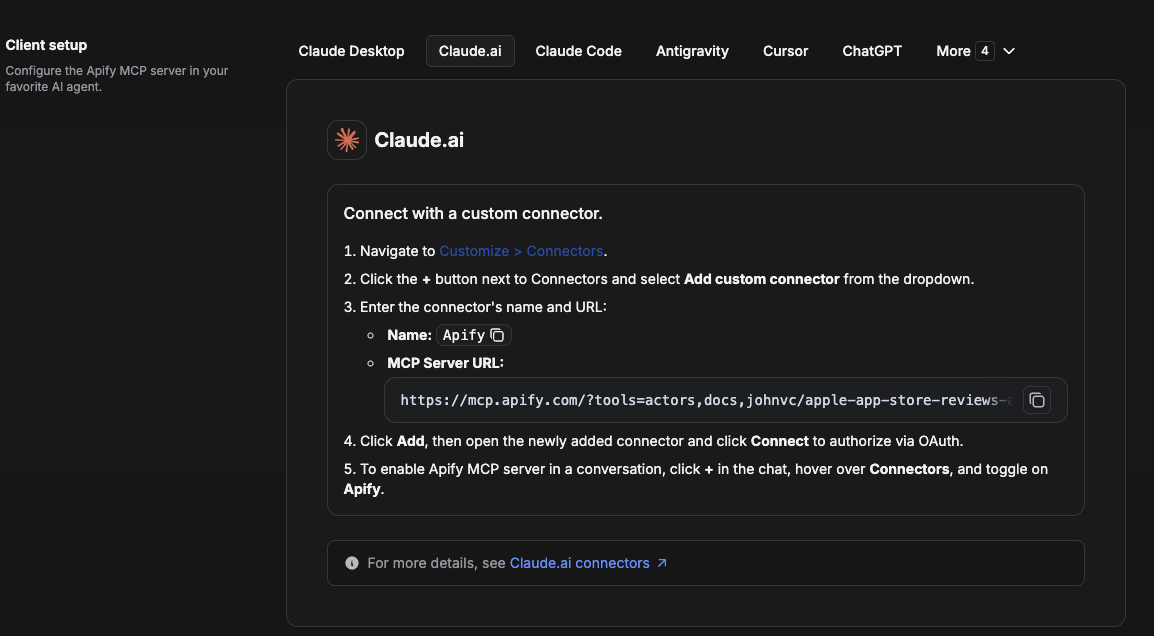
On claude.ai you add Apify as a connector, then enable just this Actor's tool.
- Go to Settings → Connectors → Browse connectors and search for Apify MCP server. Install it (enable or update if prompted).
- When connecting, authenticate with your Apify API token, and enable the tool
johnvc/opentable-reviews-api. - In any chat, open + → Connectors and turn on Apify.
- Alternatively, choose Add custom connector and paste the full MCP URL
https://mcp.apify.com/?tools=actors,docs,johnvc/opentable-reviews-api, using OAuth when prompted. - Ask Claude to run the OpenTable Reviews API.
Open Claude on the web: https://claude.ai
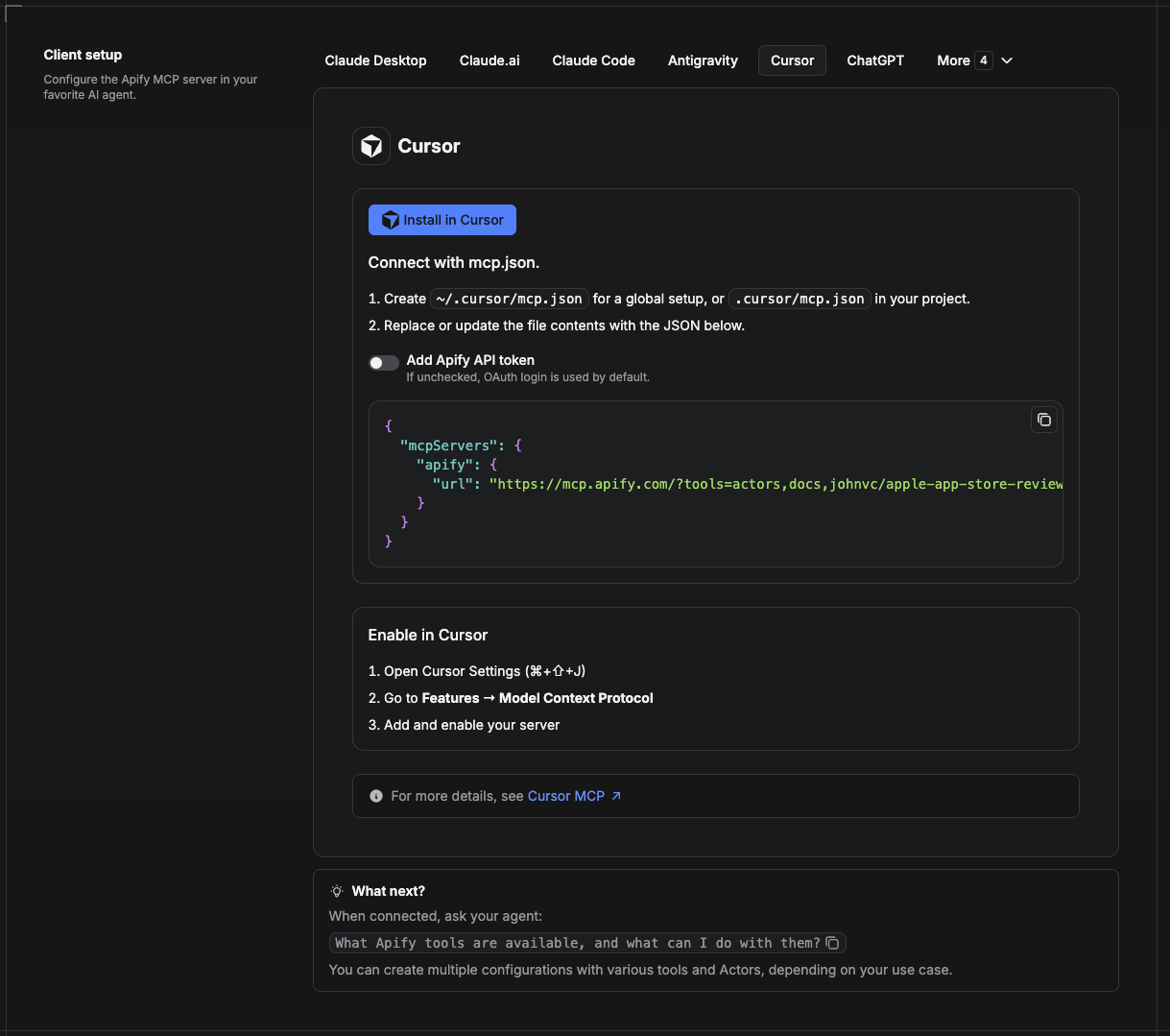
Cursor reads MCP servers from a project file at .cursor/mcp.json.
- In your project, create
.cursor/mcp.json:
{
  "mcpServers": {
    "apify": {
      "url": "https://mcp.apify.com/?tools=actors,docs,johnvc/opentable-reviews-api"
    }
  }
}- If you prefer token auth over browser OAuth, add a header:
{
  "mcpServers": {
    "apify": {
      "url": "https://mcp.apify.com/?tools=actors,docs,johnvc/opentable-reviews-api",
      "headers": { "Authorization": "Bearer YOUR_APIFY_TOKEN" }
    }
  }
}- Open Cursor → Settings → MCP and confirm the apify server is connected (green dot).
- In Composer or Chat, ask Cursor to call the OpenTable Reviews API.
New to Cursor? Get it here: https://cursor.com/referral?code=XQP4VBLI3NNX
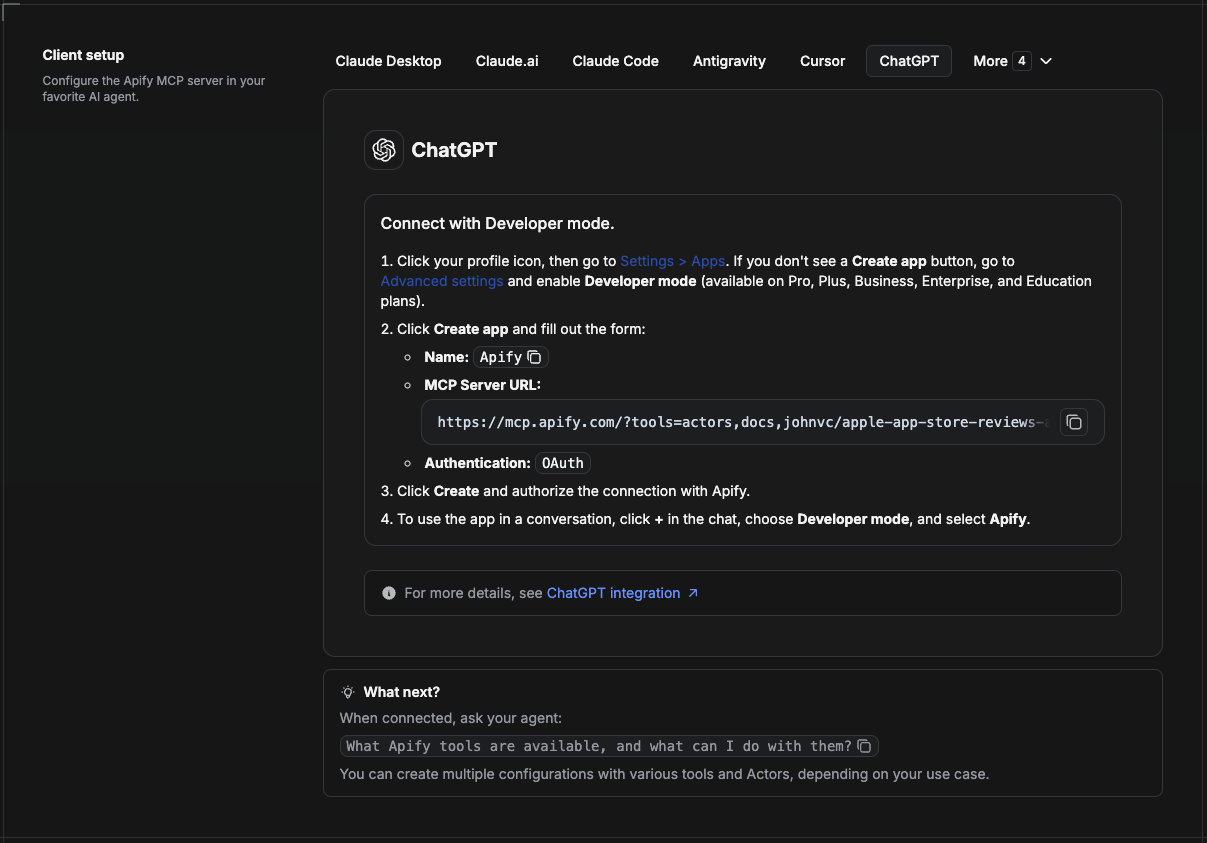
ChatGPT connects to the Apify MCP server through Developer mode (available on ChatGPT Pro, Plus, Business, Enterprise, and Education plans).
- Click your profile icon, then go to Settings > Apps. If you do not see a Create app button, open Advanced settings and enable Developer mode.
- Click Create app and fill out the form:
- Name: Apify
- MCP Server URL:
https://mcp.apify.com/?tools=actors,docs,johnvc/opentable-reviews-api - Authentication: OAuth
- Click Create and authorize the connection with Apify.
- To use the app in a conversation, click + in the chat, choose Developer mode, and select Apify.
More help: https://docs.apify.com/platform/integrations/mcp
Use the OpenTable Reviews API to power restaurant review intelligence in your product or AI agent.
Ready-to-run examples on the Apify Store.
Last Updated: 2026.06.15