LLM-powered diagnostic tool for power flow simulation failures. Injects fault scenarios into IEEE test networks (via pandapower), runs diagnosis through baseline and agentic pipelines, and produces structured reports with root causes, affected components, and corrective actions.
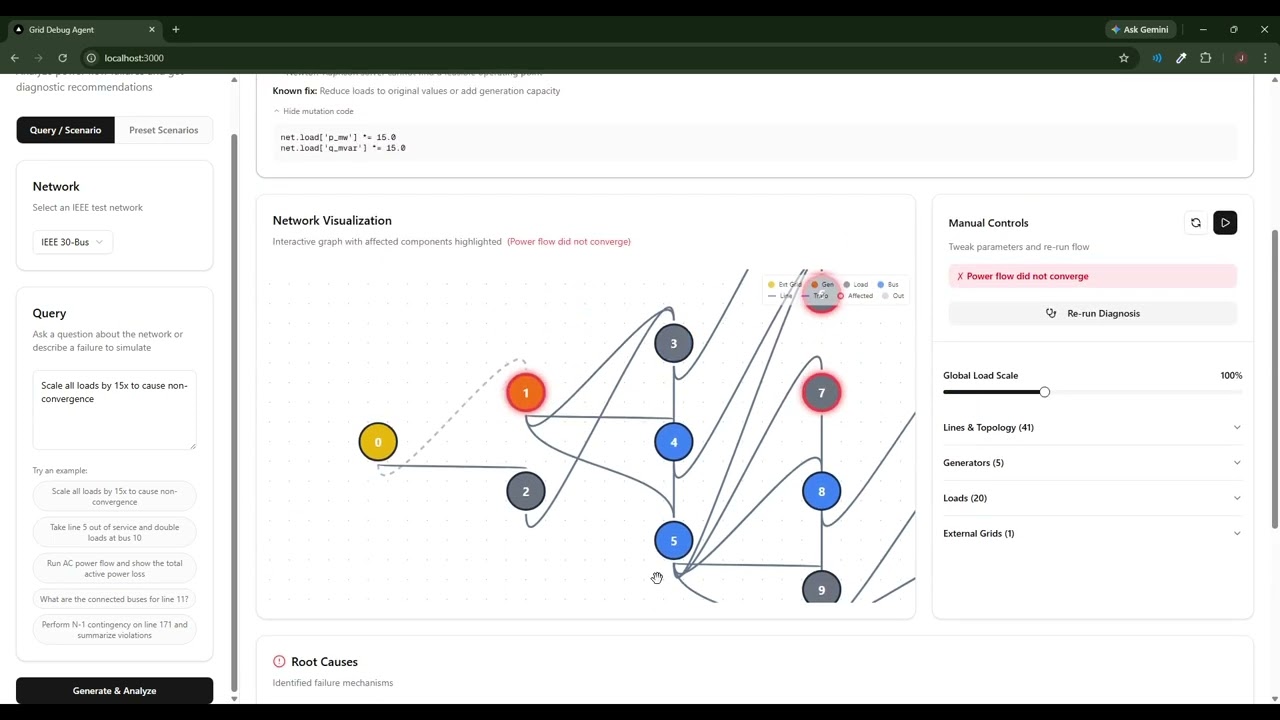
- Baseline Pipeline: Single LLM call with evidence from power flow results. Uses OpenAI function calling for reliable structured output.
- Agentic Pipeline: ReAct loop with tools for querying network state, running simulations, and checking violations.
- Network Visualization: Interactive React Flow graph with affected component highlighting.
- Natural Language Input: Describe failures in plain English (e.g., "Scale all loads by 15x") — the system generates and executes the scenario.
# Add your OpenAI key to a .env in the project root
echo "OPENAI_API_KEY=sk-proj-your-key-here" > .env

# Build and start
docker compose up --build

# Without rebuilding
docker compose upBackend (Python 3.10+):
cd backend
python -m venv venv
# Windows: .\venv\Scripts\Activate.ps1
# macOS/Linux: source venv/bin/activate
pip install -r requirements.txt
echo "OPENAI_API_KEY=sk-proj-your-key-here" > .env
python app.py
Frontend (Node 20+):
cd frontend
npm install
npm run dev
Frontend: http://localhost:3000 | Backend: http://localhost:8000
griddebugagent/
├── backend/
│   ├── app.py                     # FastAPI endpoints, report parsing
│   ├── agents/
│   │   ├── baseline.py            # LLM diagnosis with function calling
│   │   ├── agentic_pipeline.py    # ReAct loop with tool access
│   │   └── iterative_debugger.py  # Diagnose + iterative fix-verify loop
│   ├── rule_engine/
│   │   ├── evidence_collector.py  # Collects power flow results
│   │   ├── preprocessor.py
│   │   └── rules.py
│   ├── scenarios/                 # Fault injection (preset + NL-generated)
│   └── tools/                     # Query, simulation, diagnostic tools
├── frontend/
│   └── src/
│       ├── components/            # React components
│       └── types/
├── docker-compose.yml
└── README.md
| Method | Endpoint | Description |
|---|---|---|
| GET | /networks |
Available test networks (case14, case30, case57, etc.) |
| GET | /scenarios |
Preset failure scenarios |
| POST | /diagnose |
Run diagnosis on preset scenario |
| POST | /diagnose_nl |
Generate scenario from natural language, then diagnose |
| POST | /diagnose_stream |
SSE streaming version of /diagnose |
| POST | /api/network_state |
Get network component data for visualization |
| POST | /api/simulate_overrides |
Apply manual overrides and re-run power flow |
| POST | /api/rediagnose |
Re-diagnose with manual overrides applied |
Both pipelines return structured output:
{
  "rootCauses": ["Excessive load scaling (20x) exceeds generation capacity"],
  "affectedComponents": ["Buses: 5, 7, 12", "Lines: 9, 28"],
  "correctiveActions": ["Reduce load at buses 5 and 7", "Add generation capacity"],
  "parsedAffectedComponents": {
    "bus": [5, 7, 12],
    "line": [9, 28]
  }
}
The parsedAffectedComponents field drives graph highlighting.
| Category | Tools |
|---|---|
| Query | get_network_summary, get_bus_data, get_voltage_profile, get_loading_profile |
| Simulation | run_power_flow, run_dc_power_flow, run_n1_contingency |
| Diagnostic | check_overloads, check_voltage_violations, find_disconnected_areas |
See backend/eval/results/README.md for evaluation results on IEEE 14-bus, 30-bus, and 57-bus networks.