Generate an OpenDocument Format .ods file from a .json or .yaml file.
When used as a script, odsgenerator parses a JSON or YAML description of
tables and generates an ODF document using the odfdo library.
When used as a library, odsgenerator parses a Python description of tables
and returns the ODF content as bytes (ready to be saved as a valid ODF document).
- The content description can be minimalist: a list of lists of lists,
- or description can be complex, allowing styles at row or cell level.
See also https://github.com/jdum/odsparsator which is doing the reverse
operation, .osd to .json.
odsgenerator is a Python package, using the odfdo library. Current version requires Python >= 3.10, see prior versions for older environments.
Project: https://github.com/jdum/odsgenerator
Author: jerome.dumonteil@gmail.com
License: MIT
Installation from Pypi (recommended):
pip install odsgeneratorInstallation from sources:
uv syncodsgenerator [-h] [--version] input_file output_file
input_file: input file containing data in JSON or YAML format
output_file: output file, .ods file generated from the input
Use odsgenerator --help for more details about input file parameters
and look at examples in the tests folder.
from odsgenerator import odsgenerator

content = odsgenerator.ods_bytes([[["a", "b", "c"], [10, 20, 30]]])
with open("sample.ods", "wb") as file:
    file.write(content)
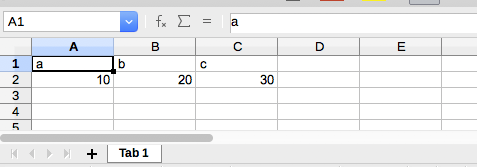
The resulting .ods file loaded in a spreadsheet:
Another example with more parameters:
import odsgenerator

content = odsgenerator.ods_bytes(
    [
        {
            "name": "first tab",
            "style": "cell_decimal2",
            "table": [
                {
                    "row": ["a", "b", "c"],
                    "style": "bold_center_bg_gray_grid_06pt",
                },
                [10, 20, 30],
            ],
        }
    ]
)
with open("sample2.ods", "wb") as file:
    file.write(content)
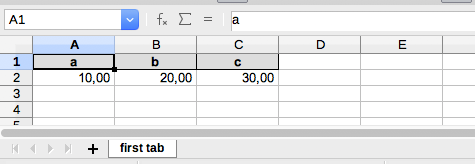
The .ods file loaded in a spreadsheet, with gray background on first line:
- A document is a list or dict containing tabs,
- a tab is a list or dict containing rows,
- a row is a list or dict containing cells.
See in the `./doc folder:
html/odsgenerator.htmltutorial.jsonortutorial.ymlandtutorial.ods
This project is licensed under the MIT License (see the
LICENSE file for details).