A Python application that uses hands detection and movement to do painting on live camera stream.
Virtual paint can be used to paint in real time with hands detection, It can be useful in drawing basic paintings or in online meetings when trying to explain something.
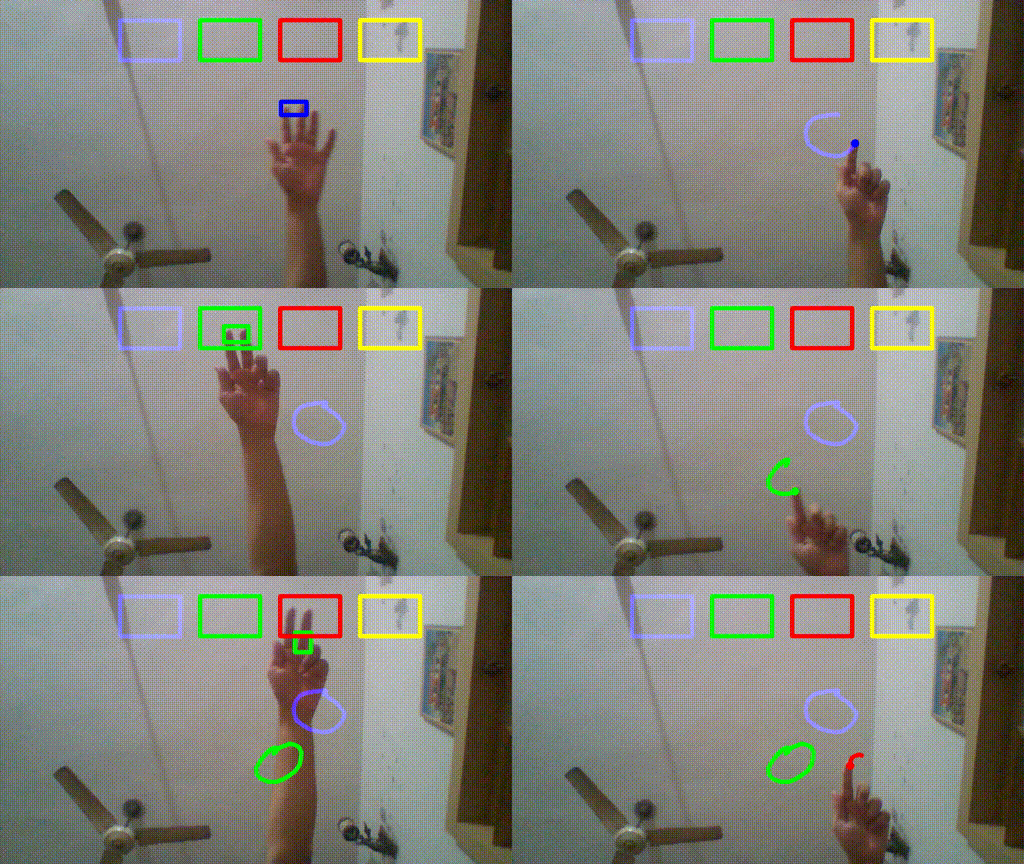
This project is built on Python 3.8.5 mainly using OpenCV and mediapipe.
I would recommend to create a new virtual environment as it's always a good practice to use seperate environements for separate projects and not mix up diffrent libraries with diffrent versions. I have used virtualenv for that purpose.
pip3 install virtualenv
python3 -m virtualenv <ENVIRONMENT_NAME>
source <ENVIRONMENT_NAME>/bin/activate- Clone the repo
git clone https://github.com/itsrandeep/virtual_paint.git
- Install Required Libraries
pip install -r requirements.txt
- Start the Python app
(use -h for info about additional parameters)
python main.py
There are two modes in this application
- Selection Mode - When two fingers(Index and middle) are up, It will show a rectangle to show that application is in selction mode and nothing will be drawn.
- Drawing Mode - When only Index finger is up, then application is in drawing mode and moving your finger will draw a line on Screen.
press q to exit.
usage: main.py [-h] [-hl] [-v FILENAME] [-i FILENAME]

optional arguments:
  -h, --help            show this help message and exit
  -hl, --hand-landmarks
                        Enable showing hand landmarks
  -v FILENAME, --output-video FILENAME
                        Name of the exported video file
  -i FILENAME, --output-image FILENAME
                        Name of the exported Image file
It is currently only a basic app. I'm planning to add many features to make it more usable.
- Enabling/Disabling showing of hand landmarks points. (Done.)
- Instead of drawing with a single color, give multiple options of colors on frame. (Done)
- Colors can be switched in selection mode. (Done)
- Option of saving the entire video of drawing session. (Done)
- Option of saving only Drawing in diffrent image formats.(Done, White background will be better)
- Currently it supports only 1 hand, Add 2 hands support.
- Integration in meeting apps like zoom.