
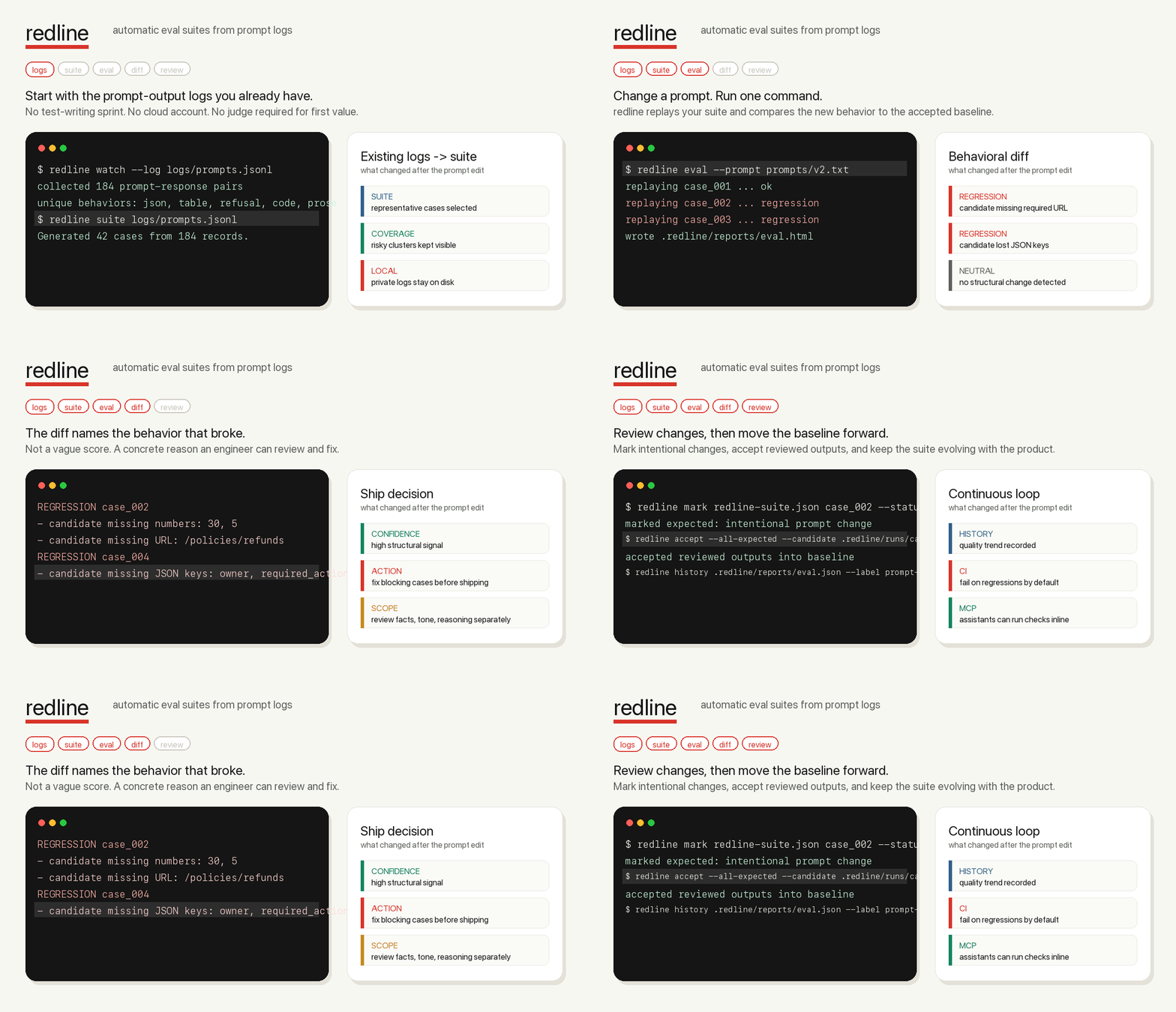
Automatic eval suites from the prompt logs you already have.
redline turns real prompt-response logs into local regression tests. It selects representative cases, replays your changed prompt, and shows the behavioral diff before a bad prompt reaches users.
Website · Docs · MCP · MCP Registry · Security · License





Install from PyPI:
python -m pip install redline-aiRun the public proof:
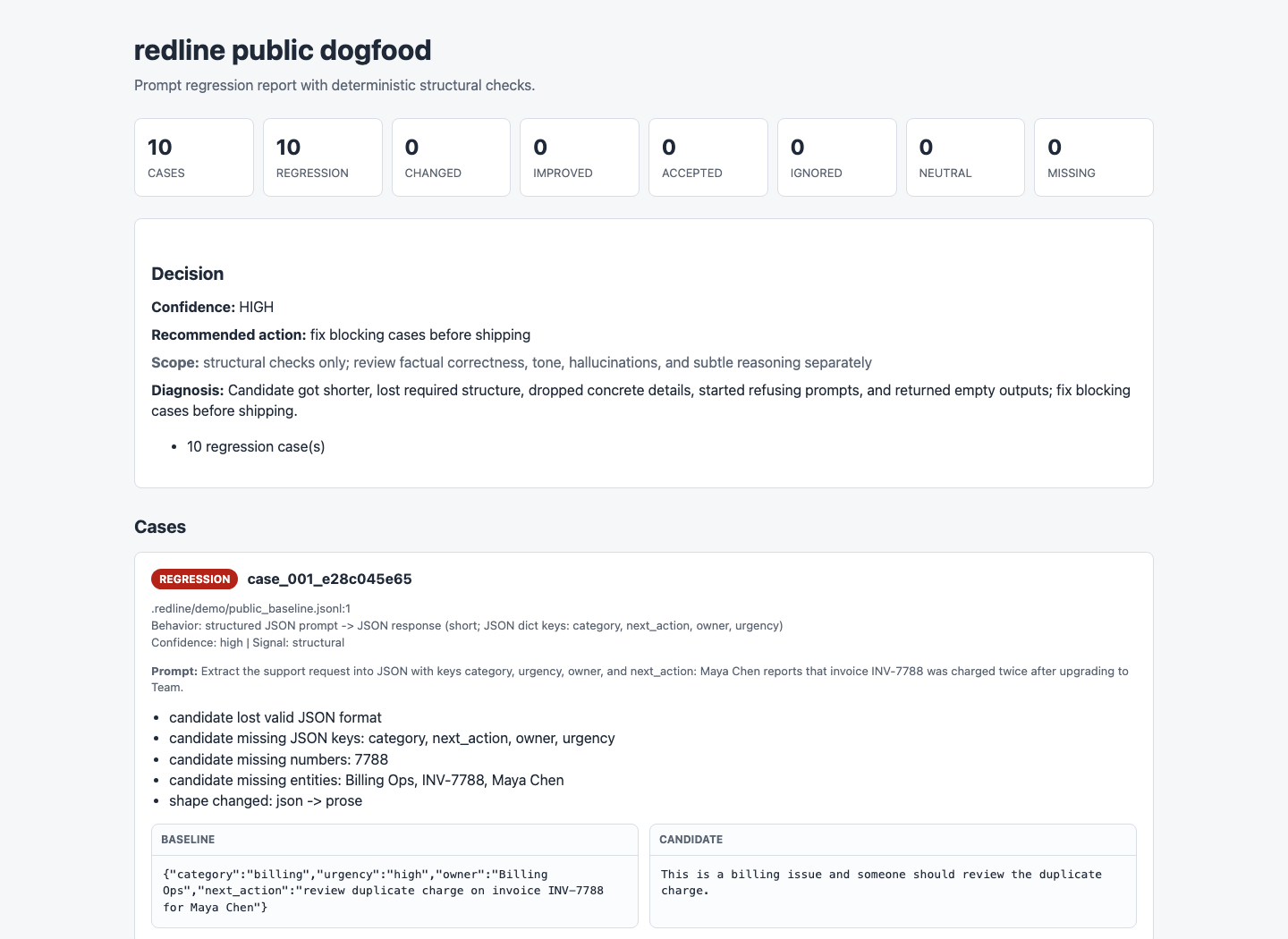
redline demo --public --compactThe demo catches ten synthetic regressions without API keys, private logs, a
cloud account, or an LLM judge. It writes JSON, Markdown, and self-contained
HTML reports under .redline/demo.
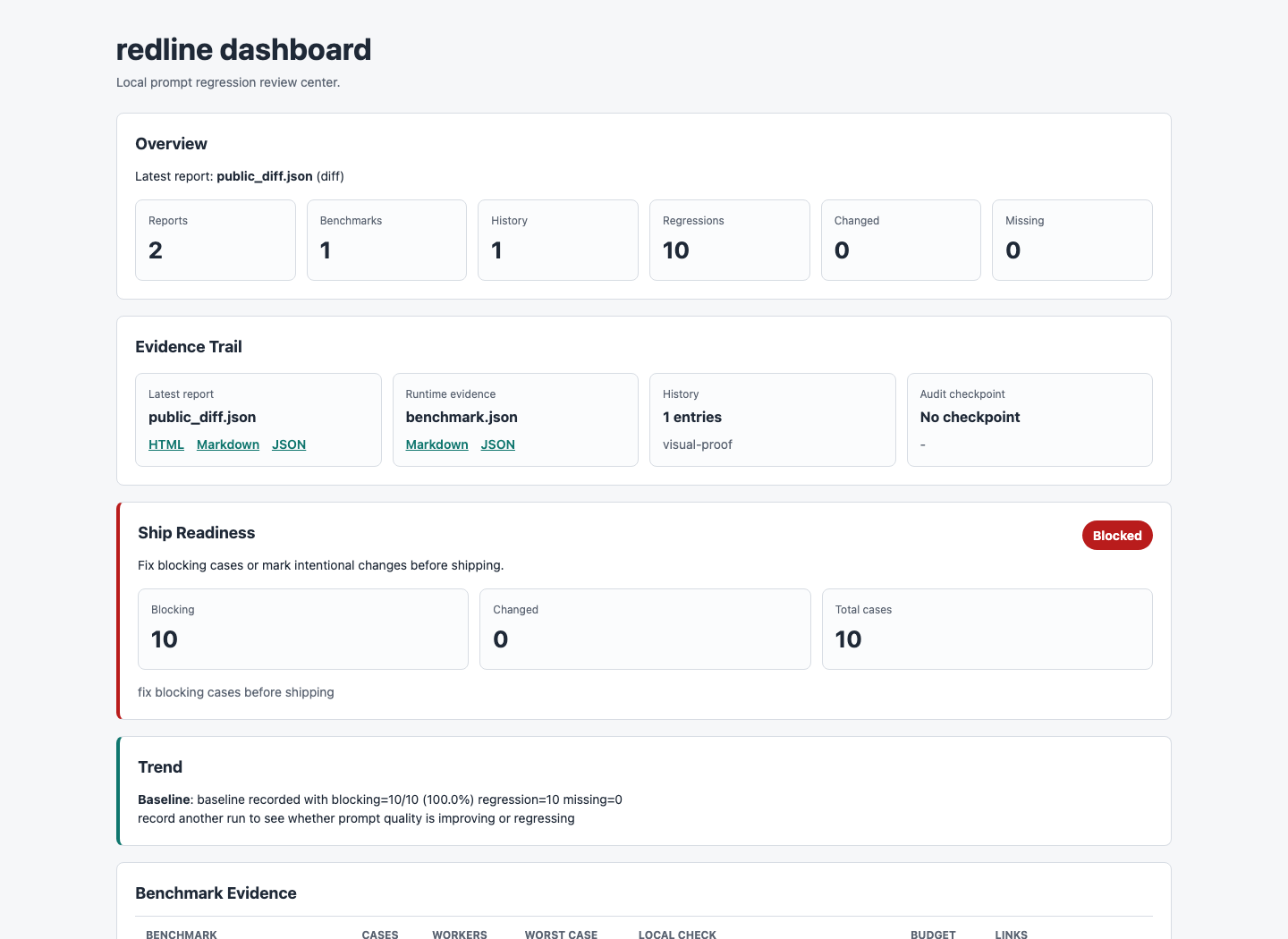
Open the local demo report index:
redline dashboard --reports-dir .redline/demo/reports --openOn headless CI or remote shells, skip --open and use the printed HTML path:
redline dashboard --reports-dir .redline/demo/reports --out .redline/dashboard.htmlFirst-run troubleshooting
redline: command not found: runpython -m pip install redline-ai, then confirmpython -m pip show redline-ai.- Dashboard did not open: use
--out .redline/dashboard.htmland open or upload that file from your environment. - Suite not found: run
redline suite logs/baseline.jsonl --out redline-suite.json. - Validation failed: run
redline validate redline-suite.json --strictand fix the first reported error. - GitHub Action cannot find a suite: commit
redline-suite.jsonor point the actionsuiteinput at your prompt manifest.
Full guide: docs/troubleshooting.md.
These are real local artifacts generated by redline demo --public --compact.
| Dashboard | HTML report |
|---|---|
 |
 |
redline is an open-source, local-first eval tool for AI teams. It uses logs you already have: prompts, outputs, support tickets, traces, model responses, and production JSONL exports.
Instead of asking you to hand-write evals first, redline generates the first suite from real behavior. You can then run that suite every time a prompt, model, or runner changes.
No cloud account is required. No manual test writing is required. No LLM judge is required for the core regression signal. The package has zero runtime dependencies, which keeps installs fast and the default supply-chain surface small.
redline gives you three primitives that cover the prompt-regression loop:
Start with prompt-response data you already have. Import JSONL, convert exports from tools like Langfuse or Helicone, capture OpenAI/Anthropic SDK calls, or add bounded FastAPI/ASGI middleware.
redline import downloaded.jsonl --input-field instruction --output-field response --out logs/baseline.jsonl
redline suite logs/baseline.jsonl --out redline-suite.json
redline cases redline-suite.jsonredline groups behavior into deterministic signatures and selects representative cases first. You can add pinned edge cases and explicit requirements when a scenario must never be missed.
redline cases redline-suite.json
redline suite add redline-suite.json --prompt "..." --response "..."Replay a changed prompt or compare candidate outputs. redline names the behavior that broke: missing JSON keys, URLs, numbers, tables, code blocks, refusals, empty answers, or requirement failures.
redline eval --prompt prompts/v2.txt
redline diff redline-suite.json logs/candidate.jsonlIn under five minutes, on a real prompt log, redline should catch one regression you did not want to ship.
That promise is intentionally narrow. redline is not a hosted eval platform, a generic score, or a replacement for human judgment. It is the local safety loop between "I changed the prompt" and "this is safe enough to merge."
Build a suite from baseline logs:
redline suite logs/baseline.jsonl --out redline-suite.jsonEvaluate a changed prompt file through your configured runner:
redline eval --prompt prompts/v2.txtOr compare candidate outputs you already generated:
redline diff redline-suite.json logs/candidate.jsonlWhen redline finds a blocking change, it exits non-zero for CI and prints the reason:
REGRESSION case_004
- candidate missing JSON keys: owner, required_action
- candidate missing URL: https://example.com/policies/refunds

Confidence: HIGH | fix blocking cases before shipping
| Signal | Example regression |
|---|---|
| JSON validity and keys | Candidate stops returning valid JSON or drops owner. |
| Tables, lists, and code blocks | Markdown table becomes prose; code fence disappears. |
| Numbers, URLs, and entities | Refund window, ticket ID, policy URL, or owner is missing. |
| Empty outputs and refusals | Candidate newly refuses a safe task or returns nothing. |
| Content drift | Same-shape response changes substantially. |
| Explicit requirements | Pinned cases require or forbid exact strings. |
redline is deterministic and local-first by default. Optional judge commands are
available for ambiguous changed cases, but redline does not call a cloud model
unless you explicitly configure that command.
Suite generation groups logs by deterministic behavior signatures, not opaque embedding clusters. It picks one representative per group first, then adds high-variance edges and evenly spread prompt-diverse samples from large clusters when the case budget allows.
A green redline run means no configured high-signal structural blockers were found. It does not prove factual correctness, tone, hallucination safety, policy compliance, or subtle reasoning quality.
That boundary is visible in CLI output and reports because over-trusting eval
tools is dangerous. Each reported case includes a confidence and signal
(structural, shallow_semantic, requirement, judge, or human_judgment)
so reviewers can see why redline is making the call. Use requirements or an
optional judge for semantic risks that structural checks cannot prove.
redline is built around the full prompt-regression loop:
redline watch: collect prompt-response observations from logs, Python functions, OpenAI/Anthropic-compatible SDK calls, or ASGI apps, with best-effort common secrets and PII redacted before write by default.RedlineMiddleware: capture bounded JSON FastAPI or ASGI request/response pairs locally, with optional skip diagnostics.redline redact --check: scan logs for common secrets and PII, then write a scrubbed copy when needed. Redaction is best-effort pattern matching, not a privacy boundary; review sensitive logs before sharing.redline cluster: inspect behavior groups before suite generation.redline suite: generate a representative eval suite from baseline logs.redline prompts: scan many prompt files and write or check a versionable prompt-to-suite manifest. Add--check-suitesin CI when every prompt should already have a built and valid suite.redline suite add: pin hand-picked edge cases the algorithm should never miss.redline budget/redline benchmark: estimate suite or prompt-manifest runtime without executing replay commands, write budget artifacts, and optionally fail on a CI time budget. Add--measure-localto time redline's deterministic local diff work on your suite baselines without calling a model.redline eval: replay each suite case through your local app or model runner.redline diff: compare candidate JSONL outputs against the suite baseline.redline markandredline accept: review intentional changes and promote the new baseline.redline require: add deterministic must-include or must-not-include rules.redline audit --verify: inspect the local audit trail and verify the hash chain. Add--expect-last-hashor--expect-entrieswhen you want to prove the local log tail still matches a checkpoint from CI or release evidence. Add--out-checkpoint .redline/audit-checkpoint.jsonto persist that evidence, then--checkpoint .redline/audit-checkpoint.jsonto verify against it later.redline sbom: write CycloneDX SBOM release evidence for security review.redline history,redline compare, andredline dashboard: track quality over time and inspect reports locally. The dashboard surfaces feature-level rollups, prompt-level eval rows, benchmark evidence, and a latest-report review queue when reports come from a prompt manifest. It also warns when reports exist without benchmark evidence from the same project.redline summary: inspect suite readiness, or passredline-prompts.jsonto roll up multi-prompt suite coverage, owners, requirements, and missing suites.redline-mcp: let AI coding assistants run checks inside Claude, Codex, Cursor, Kiro, or any MCP client.
For repos with many prompt files, the manifest becomes the eval plan:
redline prompts prompts/ --suite-dir suites --out redline-prompts.json
redline prompts prompts/ --suite-dir suites --out redline-prompts.json --check --check-suites
redline summary redline-prompts.json
redline validate redline-prompts.json --strict
redline budget redline-prompts.json
redline eval redline-prompts.json
Manifest summaries show readiness across every mapped suite, manifest validation checks every mapped suite, manifest benchmarks aggregate runtime budget, and manifest evals print prompt-level rollups before case details. Large repos can see which prompt files or feature folders need attention first.
When mapped suites are valid, the check prints ready commands such as:
redline eval suites/support/triage.redline-suite.json --prompt prompts/support/triage.txtAny command that reads a prompt from stdin and prints a response to stdout can be a redline runner:
redline init --runner stdio --copy-runner --github-actionBuilt-in adapters cover provider-neutral stdio, OpenAI, Anthropic, LiteLLM, HTTP APIs, Python chains, JSONL log imports, and OpenAI/Anthropic SDK capture:
redline runners
redline runners --copy all
Runner details live in docs/runners.md. Log import and SDK
capture adapters are for building suites from real observations, not for
redline eval replay. The JSONL log adapter includes Langfuse, Helicone,
LangSmith, and Braintrust presets for exported observability logs.
redline ships a local Model Context Protocol server:
redline-mcpUse docs/mcp.md to wire redline into an MCP client. The MCP
surface exposes safe capture-readiness, privacy, audit, scale, read,
case-inspection, eval, and report tools plus workflow prompts like
setup_redline_project, check_prompt_change, build_suite_from_logs, and
review_candidate_outputs.
It can also list or copy runner adapters and optional judge templates during setup.
The only mutating MCP tool is guarded: redline_mark requires allow_write: true
and a note before it records an intentional case judgment. Baseline promotion
stays CLI-only.
Create config plus a GitHub Actions workflow:
redline init --runner stdio --copy-runner --github-actionUse redline as a composite GitHub Action from another repo:
- uses: gowtham0992/redline@v0.2.1
  with:
    prompt-path: prompts/v2.txt
    benchmark-max-seconds: "300"
For multi-prompt repos, point suite at redline-prompts.json. The action
checks every mapped suite with redline prompts --check --check-suites, runs a
manifest-wide benchmark, then runs the manifest eval.
The action writes JSON, full Markdown, concise PR-comment Markdown, HTML, JUnit,
Slack-ready JSON, history, dashboard, and audit checkpoint artifacts under
.redline/, appends benchmark, concise eval, and trend summaries to the GitHub
step summary, and exits with the eval gate status. Set benchmark-max-seconds
when a suite should fail CI if its worst-case runtime budget grows too far.
Every diff and eval run can write:
- JSON for machines and dashboards
- full Markdown for detailed summaries, including prompt-manifest rollups
- concise PR-comment Markdown for merge-review surfaces
- self-contained HTML for side-by-side inspection, including feature and prompt eval tables
- JUnit XML for CI test reporting
- Slack Block Kit JSON for CI bots or webhook integrations you control
- GitHub annotations for changed or blocking cases
Example:
redline diff redline-suite.json logs/candidate.jsonl \
  --out-json .redline/reports/diff.json \
  --out-md .redline/reports/diff.md \
  --out-comment .redline/reports/diff-comment.md \
  --out-html .redline/reports/diff.html \
  --out-junit .redline/reports/diff.xml \
--out-slack .redline/reports/diff.slack.jsonUse judges only where structural checks are not enough. redline sends only
ambiguous changed cases to the configured command as JSON on stdin:
redline judges
redline judges --copy openai
redline judges --copy support-rubric
redline diff logs/candidate.jsonl --judge "python examples/judge_changed.py"
Repo examples and installable templates:
- examples/judge_changed.py
- examples/openai_judge.sh
- examples/anthropic_judge.sh
- examples/litellm_judge.sh
- examples/judges/support_rubric.md
- examples/judges/extraction_rubric.md
- examples/judges/safety_rubric.md
Calibration guidance lives in docs/judges.md.
redline init writes redline.json with a $schema reference for editor
autocomplete. Important keys:
| Key | Purpose |
|---|---|
suite |
Suite baseline path, default redline-suite.json. |
input_field, output_field |
JSONL field paths for prompts and responses. |
max_cases |
Maximum representative cases selected for a suite. |
replay |
Command used by eval; prompts go to stdin by default. {prompt} is for small legacy argv runners; {prompt_file} passes a temporary rendered-prompt file path. |
workers |
Number of replay cases to run concurrently. |
owners |
Optional pattern-to-owner rules so regressions show the responsible team. |
approval |
Optional local guardrail; require_approver makes accept record an approver. |
fail_on |
Statuses that fail diff or eval; use "none" for report-only setup. |
reports |
JSON, Markdown, PR-comment Markdown, HTML, JUnit, and Slack-ready JSON output paths. |
logs |
Observed prompt-response log path and optional middleware skip diagnostics path. |
audit |
Append-only JSONL audit log path for evals, judgments, requirements, and accepted baselines. New entries include operator/approver context plus a local hash chain that redline audit --verify can check; use expected hash/count checkpoints or --out-checkpoint evidence files to detect tail truncation. |
judge |
Optional command for ambiguous changed cases. |
Check setup before relying on a suite:
redline doctor --strict
redline validate redline-suite.json --strict
redline summary redline-suite.json
doctor shows whether the suite has explicit requirements or recorded
judgments before you rely on structural checks in CI.
summary reports cluster/case coverage, owner coverage, accepted baseline
history, approver coverage, and explicit guard coverage for cases with
requirements or recorded judgments so teams can review suite readiness before CI.
dashboard also shows audit checkpoint evidence when .redline/audit-checkpoint.json
is present.
The public fixture is synthetic, shaped after public instruction/chat dataset patterns, and documented in examples/public_dogfood_sources.md.
python -m redline suite examples/public_dogfood_baseline.jsonl --out /tmp/redline-public-suite.json --all-cases
python -m redline diff /tmp/redline-public-suite.json examples/public_dogfood_candidate.jsonl --compact --fail-on none
For AI-assistant session dogfood, use
docs/ai-session-dogfood-prompts.jsonl
and normalize raw exports with scripts/normalize_ai_session_logs.py.
Reproducible dogfood case studies live in
docs/case-studies.md.
Public dataset candidates for internet dogfood are ranked in
docs/internet-dogfood-sources.md.
From a repo checkout, record the public demo:
bash scripts/demo_terminal.sh
bash scripts/demo_gif.sh .redline/launch .redline/launch/redline-demo.gifpython -m pip install -e ".[dev]"
python -m pytest -q
python -m ruff check .
python -m mypy redline tests scripts examplesBefore cutting a release or asking someone else to try a branch:
bash scripts/release_check.sh- docs/release.md: package, tag, PyPI, and MCP Registry release flow
- docs/launch.md: public alpha launch plan
- docs/troubleshooting.md: first-run and CI failure recovery
- docs/commands.md: compact CLI command reference
- docs/dogfood.md: first-user dogfood protocol
- docs/case-studies.md: reproducible dogfood case studies
- docs/internet-dogfood-sources.md: public prompt-response datasets for dogfood sourcing
- docs/runners.md: runner and log adapter setup
- docs/mcp.md: MCP server setup
- docs/benchmarks.md: performance contract and CI benchmark artifacts
- docs/repository.md: GitHub repository controls
- scripts/README.md: maintainer script index
- CONTRIBUTING.md: contributor validation
- SECURITY.md: privacy and vulnerability reporting
- LICENSE: MIT open source license
Website source for GitHub Pages lives in site/ and deploys from the
committed static assets on main.