You signed in with another tab or window. Reload to refresh your session.You signed out in another tab or window. Reload to refresh your session.You switched accounts on another tab or window. Reload to refresh your session.Dismiss alert
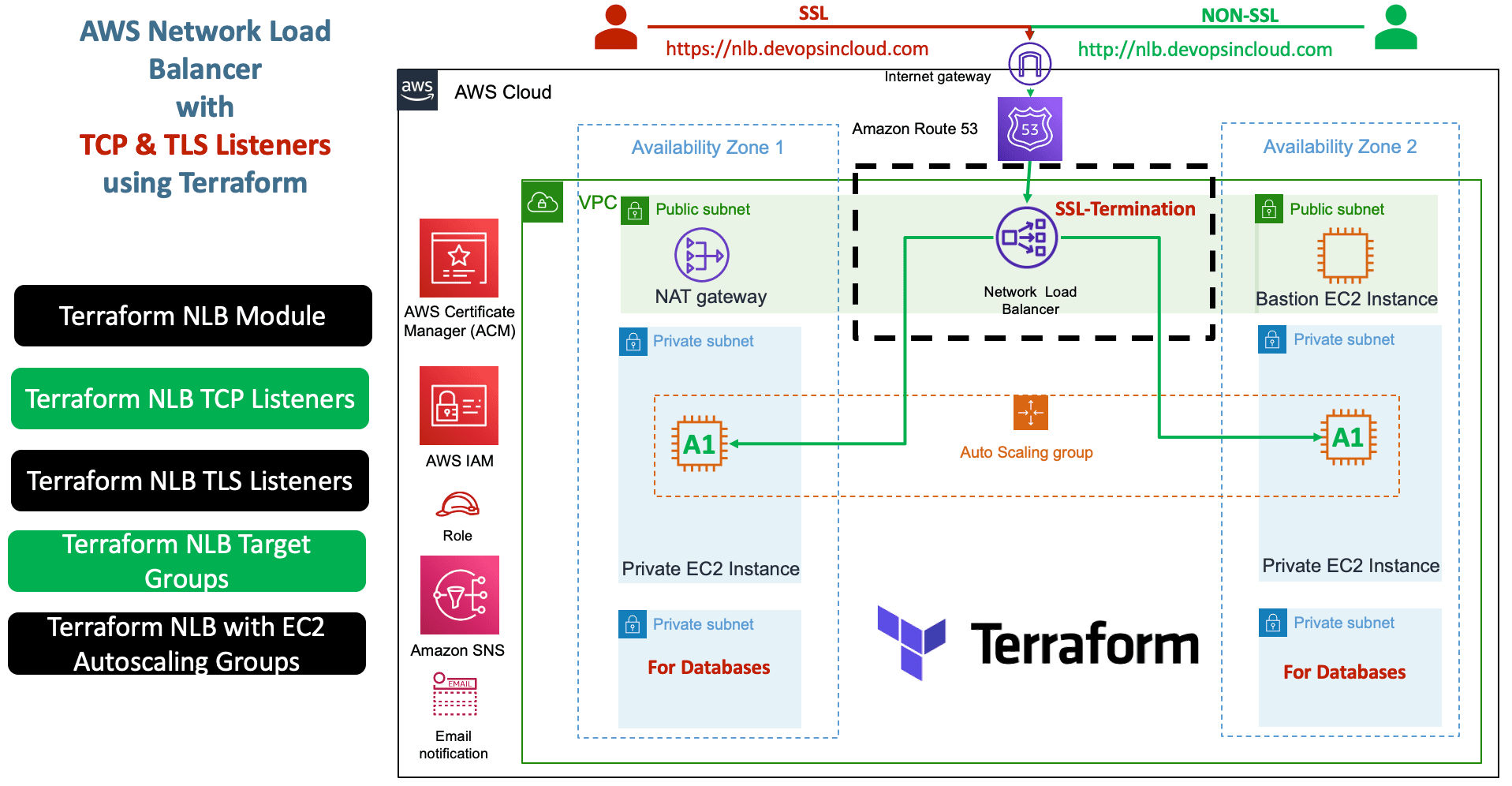
Create AWS Network Load Balancer with Terraform - Demo for both TCP and TLS Listeners. This repository contains configuration files and a step-by-step guide to creating an AWS Network Load Balancer (NLB) using Terraform. The focus is on creating both TCP and TLS Listeners, along with creating an associated Target Group. Through this project, you will be able to efficiently deploy and manage an NLB on your AWS infrastructure, providing reliable and scalable load balancing for your applications.
AWS Network Load Balancer TCP and TLS with Terraform
# Terraform AWS Network Load Balancer (NLB) Outputs################################################################################# Load Balancer################################################################################
output "id" {
description = "The ID and ARN of the load balancer we created"
value = module.nlb.id
}
output "arn" {
description = "The ID and ARN of the load balancer we created"
value = module.nlb.arn
}
output "arn_suffix" {
description = "ARN suffix of our load balancer - can be used with CloudWatch"
value = module.nlb.arn_suffix
}
output "dns_name" {
description = "The DNS name of the load balancer"
value = module.nlb.dns_name
}
output "zone_id" {
description = "The zone_id of the load balancer to assist with creating DNS records"
value = module.nlb.zone_id
}
################################################################################# Listener(s)################################################################################
output "listeners" {
description = "Map of listeners created and their attributes"
value = module.nlb.listeners
}
output "listener_rules" {
description = "Map of listeners rules created and their attributes"
value = module.nlb.listener_rules
}
################################################################################# Target Group(s)################################################################################
output "target_groups" {
description = "Map of target groups created and their attributes"
value = module.nlb.target_groups
}
################################################################################# Security Group################################################################################
output "security_group_arn" {
description = "Amazon Resource Name (ARN) of the security group"
value = module.nlb.security_group_arn
}
output "security_group_id" {
description = "ID of the security group"
value = module.nlb.security_group_id
}
################################################################################# Route53 Record(s)################################################################################
output "route53_records" {
description = "The Route53 records created and attached to the load balancer"
value = module.nlb.route53_records
}
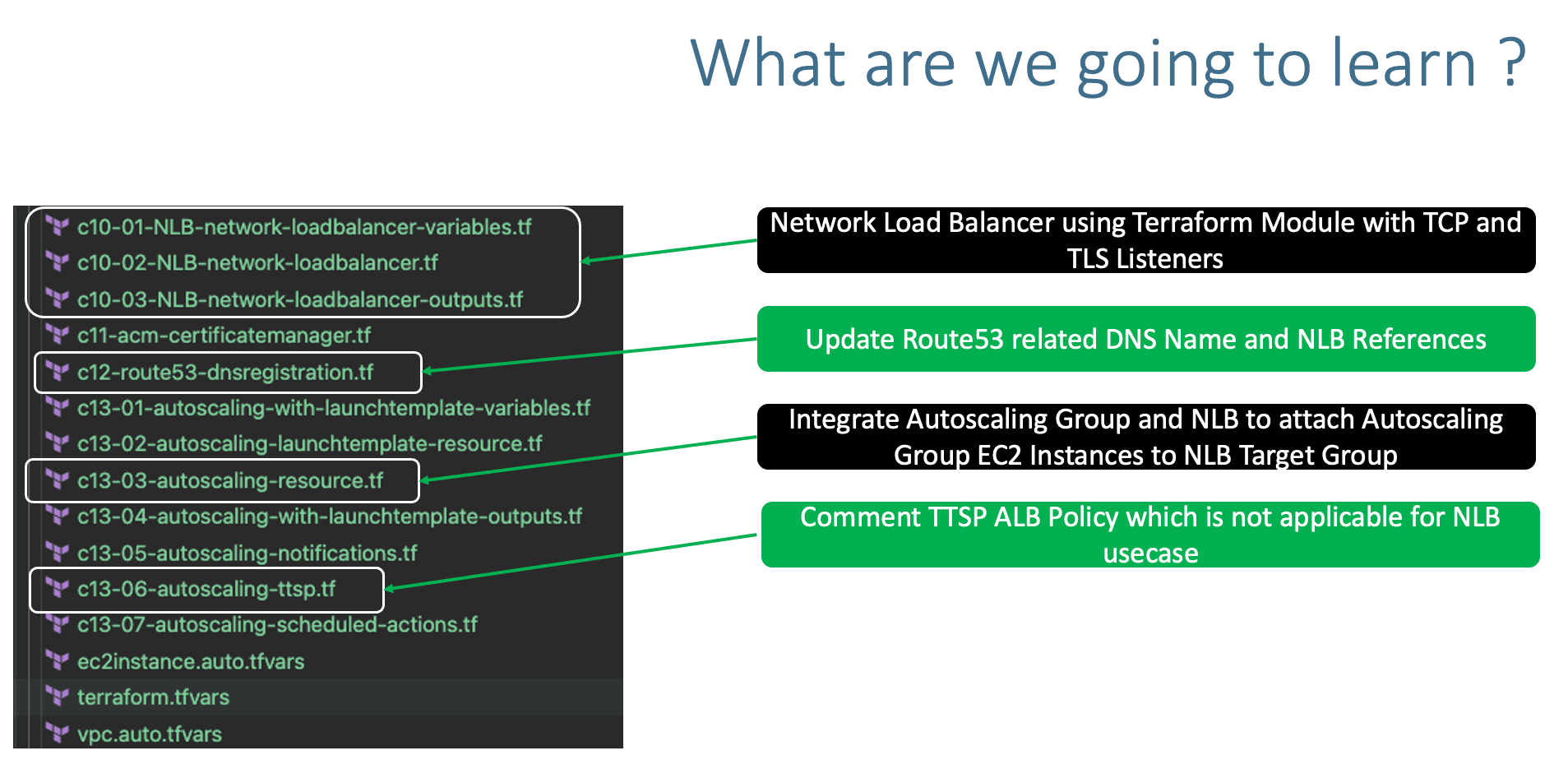
Step-06: c12-route53-dnsregistration.tf
Change-1: Update DNS Name
Change-2: Update alias name
Change-3: Update alias zone_id
# DNS Registration
resource "aws_route53_record""apps_dns" {
zone_id = data.aws_route53_zone.mydomain.zone_id
name = "nlb1.devopsincloud.com"
type = "A"
alias {
name = module.nlb.lb_dns_name
zone_id = module.nlb.lb_zone_id
evaluate_target_health = true
}
}
Step-07: c13-03-autoscaling-resource.tf
Change the module name for target_group_arns to nlb
# Before
  target_group_arns = [module.alb.target_groups["mytg1"].arn]
  # After
  target_group_arns = [module.nlb.target_groups["mytg1"].arn]
Step-08: c13-06-autoscaling-ttsp.tf
Comment TTSP ALB policy which is not applicable to NLB
# TTS - Scaling Policy-2: Based on ALB Target Requests# THIS POLICY IS SPECIFIC TO ALB and NOT APPLICABLE TO NLB/*resource "aws_autoscaling_policy" "alb_target_requests_greater_than_yy" { name = "alb-target-requests-greater-than-yy" policy_type = "TargetTrackingScaling" # Important Note: The policy type, either "SimpleScaling", "StepScaling" or "TargetTrackingScaling". If this value isn't provided, AWS will default to "SimpleScaling." autoscaling_group_name = aws_autoscaling_group.my_asg.id estimated_instance_warmup = 120 # defaults to ASG default cooldown 300 seconds if not set # Number of requests > 10 completed per target in an Application Load Balancer target group. target_tracking_configuration { predefined_metric_specification { predefined_metric_type = "ALBRequestCountPerTarget" resource_label = "${module.alb.lb_arn_suffix}/${module.alb.target_group_arn_suffixes[0]}" } target_value = 10.0 } }*/
# Access and Test with Port 80 - TCP Listener
http://nlb.devopsincloud.com
http://nlb.devopsincloud.com/app1/index.html
http://nlb.devopsincloud.com/app1/metadata.html

# Access and Test with Port 443 - TLS Listener
https://nlb.devopsincloud.com
https://nlb.devopsincloud.com/app1/index.html
https://nlb.devopsincloud.com/app1/metadata.html
Create AWS Network Load Balancer with Terraform - Demo for both TCP and TLS Listeners. This repository contains configuration files and a step-by-step guide to creating an AWS Network Load Balancer (NLB) using Terraform.