Atlas Datamap is a Python toolkit for structural and semantic database discovery. It scans an existing database, builds a navigable sigilo-style data map, exports portable metadata artifacts, and can layer local-LLM enrichment and natural-language QA on top of the same structural model.
PyPI package: atlas-datamap
Python package: atlas
For most users, the first Atlas command should be:
atlas onboardatlas onboard is the guided local workflow for a real database. It asks for
connection details, privacy mode, sigilo preferences, optional local-AI
settings, and optional local .env handling. It then writes a local workspace
and runs the full Atlas round:
- scan artifacts
- panel and standalone HTML
- health and executive reports
- structured exports
- local history snapshots
- diff report when a previous snapshot exists
- optional semantic enrichment outputs
If you are evaluating Atlas from GitHub or PyPI for the first time, start with
atlas onboard before learning the lower-level commands.
Full wizard reference:
Atlas Datamap grew out of the same sigilo and systems-thinking work behind CCT, a complete programming language and compiler project:
- CCT repository: github.com/eabusato/cct
- Atlas Datamap repository: github.com/eabusato/atlas-datamap
Atlas is not the CCT compiler and it is not implemented as a CCT runtime. Instead, it is a standalone Python product inspired by CCT's visual sigilo language, database-structure reading patterns, and native rendering ideas.
- introspects relational databases into a canonical metadata graph
- renders the graph as an interactive SVG sigilo
- exports
.sigil,.atlas, HTML, JSON, CSV, and Markdown artifacts - scores and classifies tables heuristically
- enriches tables and columns with local AI semantics
- answers natural-language questions against database metadata
- diffs snapshots and keeps local history archives
- exposes the same workflows through a CLI and a Python SDK
Atlas currently supports:
- PostgreSQL
- MySQL
- MariaDB
- SQL Server
- SQLite
- generic SQLAlchemy connections through
generic+<dialect>://...
Atlas does not bundle a model. It connects to a local provider that you run yourself. Current backends:
- Ollama
- llama.cpp
- OpenAI-compatible local endpoints
Typical semantic workflows are:
atlas enrichfor table and column semanticsatlas askfor natural-language metadata questions
Base installation:
pip install atlas-datamapInstall database and AI extras as needed:
pip install "atlas-datamap[postgresql]"
pip install "atlas-datamap[mysql]"
pip install "atlas-datamap[mssql]"
pip install "atlas-datamap[generic]"
pip install "atlas-datamap[ai]"
For local development:
make install-devCheck the installed CLI:
atlas --help
atlas --version
Guided onboarding for a real database:
atlas onboardThe onboarding wizard asks for the database type, connection details, privacy mode, sigilo options, and optional local-AI settings. It writes only local files inside your chosen workspace and then runs the full Atlas round:
- scan artifacts
- panel HTML
- standalone HTML
- health and executive reports
- structured exports
- optional semantic enrichment
- local history snapshots
- diff report against the previous local snapshot when one exists
Secrets can be stored in a local .env file managed by the onboarding flow.
Atlas does not upload those secrets, snapshots, or schema metadata to third
parties on its own. Database traffic goes only to the database you configure,
and onboarding restricts AI traffic to local endpoints such as localhost and
127.0.0.1.
Minimal connection config:
[connection]
engine = "sqlite"
database = "examples/full_showcase/generated/databases/aurora_demo_v1.db"
privacy_mode = "masked"
sample_limit = 20
Run a basic structural workflow:
atlas scan --config atlas.toml --output out
atlas open out/aurora_demo_v1.svg
atlas info --config atlas.toml --table main.payments --format json
atlas search --config atlas.toml "payment dispute"
atlas report --config atlas.toml --output out/health_report.html
Generate portable artifacts:
atlas export json --atlas out/aurora_demo_v1.atlas --output out/dictionary.json
atlas export csv --atlas out/aurora_demo_v1.atlas --entity tables --output out/tables.csv
atlas export markdown --atlas out/aurora_demo_v1.atlas --output out/dictionary.md
atlas export svg --atlas out/aurora_demo_v1.atlas --output out/standalone.htmlInstall the AI extra and pull a small local model:
pip install "atlas-datamap[ai]"
ollama pull qwen2.5:1.5b
Example AI config:
[ai]
provider = "ollama"
base_url = "http://127.0.0.1:11434"
model = "qwen2.5:1.5b"
timeout_seconds = 60
temperature = 0.1
Semantic enrichment and QA:
atlas enrich --ai-config atlas.ai.toml --sigil out/aurora_demo_v1.sigil --output out/semantic
atlas ask --ai-config atlas.ai.toml --sigil out/semantic/aurora_demo_v1_semantic.sigil "Where are payment disputes tracked?"
Atlas sends structural metadata and privacy-aware sanitized samples to the local model. It does not send the rendered SVG image to the model.
If you configure atlas enrich or atlas ask manually outside atlas onboard,
the effective trust boundary is the AI endpoint you choose. atlas onboard
restricts AI to localhost-style endpoints, while manual AI configs can point
elsewhere if you explicitly set them that way.
from atlas import Atlas, AtlasConnectionConfig

config = AtlasConnectionConfig.from_url("sqlite:///demo.db")
atlas = Atlas(config)

result = atlas.scan()
sigilo = atlas.build_sigilo(result, style="network", layout="circular")
sigilo.save("demo.svg")

snapshot = atlas.create_snapshot(result, sigilo)
snapshot.save("demo.atlas")Atlas includes a native C sigilo renderer and a Python fallback renderer.
- when the native library is available, Atlas uses it automatically
- when it is unavailable, Atlas falls back to Python without breaking the higher-level workflow
atlas --versionreports which path is active
Current commands:
scanopeninfosearchreportonboardexportenrichaskdiffhistory
- Getting started: docs/getting_started.md
- Atlas onboard manual: docs/manuals/onboarding_manual.md
- Full product showcase: docs/full_product_showcase.md
- System manual: docs/manuals/system_manual.md
- Developer manual: docs/manuals/developer_manual.md
- Phase index: docs/phase_index.md
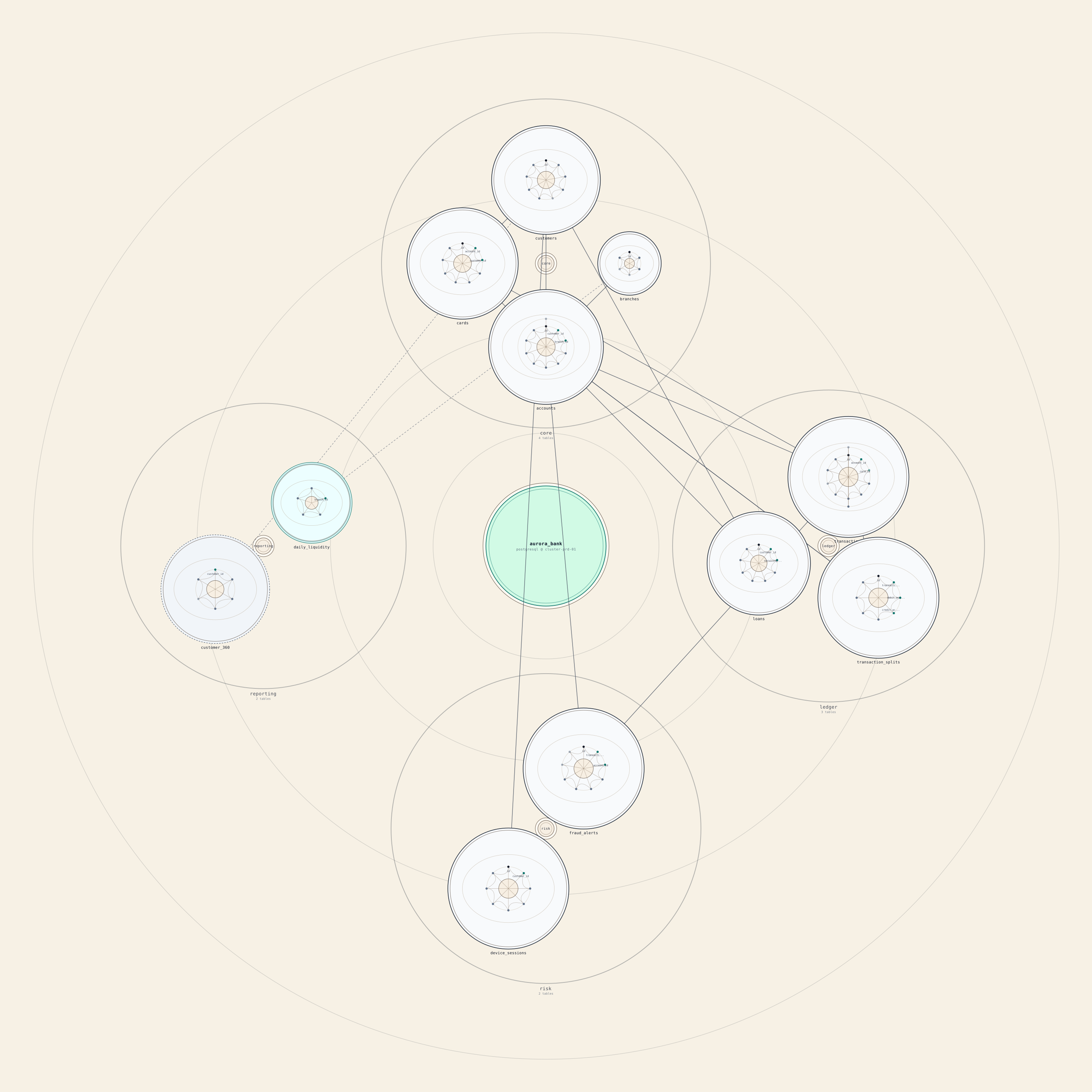
The repository contains a full end-to-end showcase with a larger fictional financial-commerce database:
python examples/full_showcase/build_full_showcase.py
python examples/full_showcase/build_full_showcase.py --enable-ollama
That showcase exercises:
- sigilo generation
- reports and exports
- semantic enrichment
- natural-language QA
- snapshot diffing
- local history
- SDK usage
The repository also includes a focused fictional-bank sigilo example that shows the datamap language more directly:
- SVG:
examples/fictional_bank.system.svg - Generator:
examples/render_fictional_bank_sigilo.py
Atlas is local-first and does not upload credentials, snapshots, or schema
metadata to third parties on its own. Still, masked is a name-based redaction
mode, not a full DLP guarantee, and generated artifacts can persist rich schema
metadata locally. For the safest default workflow, start with atlas onboard,
prefer a local AI runtime, and use stats_only or no_samples when you do not
want sample-derived prompt context. See the full guidance in
docs/privacy.md.
Common project commands:
make install-dev
make build
make build-c
make docs
make lint
make typecheck
bash tests/run_tests.shMIT