Important
This repository has been moved to ops4life/kubeseal-vscode. Please visit the new repository for the latest updates, issues, and contributions.





- Kubeseal VSCode Extension
Install from VS Code Marketplace:
- Open VS Code
- Go to Extensions (Ctrl+Shift+X)
- Search for "Kubeseal VSCode"
- Click Install
Or install directly:
Recommended Extensions:
For the best Kubernetes development experience, we recommend installing:
- Kubernetes - Provides Kubernetes cluster management, syntax highlighting, and IntelliSense for Kubernetes YAML files.
- 🔐 Encrypt Secrets: Right-click on YAML files containing Kubernetes secrets to encrypt them using kubeseal
- 🔓 Decrypt Secrets: Retrieve the original content of sealed secrets from your Kubernetes cluster
- 📝 Base64 Encoding/Decoding: Encode and decode base64 values in Kubernetes secret data fields
- 📂 Certificate Folder Management: Configure a folder containing multiple kubeseal certificates and easily switch between them
- 🔄 Active Certificate Selection: Click on the status bar to select which certificate to use for encryption
- 🎯 Context Menu Integration: Access kubeseal operations directly from the file explorer and editor context menus
This extension integrates with the Bitnami Sealed Secrets workflow for securing Kubernetes secrets:
┌─────────────────────┐
│  Plain Secret YAML  │  (your-secret.yaml)
│  kind: Secret       │
└──────────┬──────────┘
           │
           │ Right-click → "Encrypt with Kubeseal"
           │
           ▼
┌─────────────────────┐
│   kubeseal CLI      │  Uses selected certificate
│   Encryption        │  from configured folder
└──────────┬──────────┘
           │
           ▼
┌─────────────────────┐
│ SealedSecret YAML   │  (your-secret-sealed.yaml)
│ kind: SealedSecret  │  ✓ Safe to commit to Git
└─────────────────────┘
Key Points:
- Requires
kubesealbinary in PATH - Uses certificate from your configured folder
- Original secret remains unchanged
- Creates new file with
-sealedsuffix - Encrypted secrets are safe to store in version control
┌─────────────────────┐
│ SealedSecret YAML   │  (deployed to cluster)
│ kind: SealedSecret  │
└──────────┬──────────┘
           │
           │ Right-click → "Decrypt Secret"
           │
           ▼
┌─────────────────────┐
│   kubectl CLI       │  Fetches from cluster using
│   Get Secret        │  namespace and name from YAML
└──────────┬──────────┘
           │
           ▼
┌─────────────────────┐
│  Plain Secret YAML  │  (your-secret-unsealed.yaml)
│  kind: Secret       │  Retrieved from cluster
└─────────────────────┘
Key Points:
- Requires
kubectlbinary in PATH - Requires cluster access with proper permissions
- SealedSecret must be deployed to the cluster first
- Extension extracts namespace/name from SealedSecret YAML
- Creates new file with
-unsealedsuffix
Before Encoding:               After Encoding:
┌──────────────────┐          ┌──────────────────┐
│ kind: Secret     │          │ kind: Secret     │
│ data:            │  Encode  │ data:            │
│   username: admin│  ──────▶ │   username: YWRt │
│   password: 123  │          │   password: MTIz │
└──────────────────┘          └──────────────────┘

Decoding reverses the process ◀──────
Key Points:
- Works on local YAML files (no cluster needed)
- Automatically detects already-encoded values
- Preserves binary data when decoding
- Useful before encrypting secrets
Watch how to use the Kubeseal VS Code extension in action:
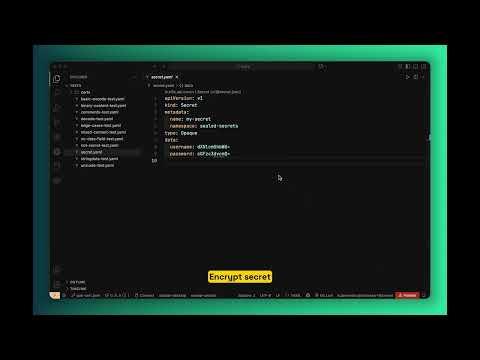
Important: You must have access to your Kubernetes cluster before using this extension, especially for decryption.
Development Requirements:
- Node.js 20+ (for development and building)
Runtime Requirements:
kubesealbinary must be installed and accessible in your PATHkubectlbinary must be installed and configured for cluster access- For encryption: A kubeseal certificate folder containing certificate files (
.pem,.crt, or.cert) - For decryption: Access to the Kubernetes cluster where the secret is deployed
- Install the
kubesealbinary from sealed-secrets releases - Install this extension from the VS Code marketplace
- Configure your certificate folder using the command palette: "Set Kubeseal Certificate Folder"
- Select an active certificate by clicking on the status bar item
Note: You must have access to your Kubernetes cluster before using the extension. Decryption will not work unless your
kubectlis configured and you have the necessary permissions.
Here's a typical workflow for managing secrets with this extension:
- Prepare your secret - Create a Kubernetes Secret YAML file with plain text values
- Encode values (optional) - Use "Encode Base64 Values" if your values are in plain text
- Set up certificate - Configure your certificate folder and select an active certificate
- Encrypt - Use "Encrypt with Kubeseal" to create a SealedSecret
- Commit safely - The encrypted SealedSecret can be safely committed to Git
- Deploy - Apply the SealedSecret to your Kubernetes cluster
- Decrypt (if needed) - Use "Decrypt Secret" to retrieve the original secret from the cluster
- Create a Kubernetes secret YAML file
- Right-click on the file in the explorer or editor
- Select "Encrypt with Kubeseal"
- The encrypted file will be saved with
-sealedsuffix
Example:
# input: my-secret.yaml
apiVersion: v1
kind: Secret
metadata:
  name: my-secret
  namespace: default
data:
  username: YWRtaW4=
  password: cGFzc3dvcmQ=

# output: my-secret-sealed.yaml
apiVersion: bitnami.com/v1alpha1
kind: SealedSecret
metadata:
  name: my-secret
  namespace: default
spec:
  encryptedData:
    username: AgBy3i4OJSWK+PiTySYZ...
password: AgAKqjbxK9...- Right-click on a sealed secret YAML file
- Select "Decrypt Secret"
- The extension will retrieve the actual secret from your Kubernetes cluster using
kubectl - The decrypted secret will be saved with
-unsealedsuffix
Example:
# input: my-secret-sealed.yaml (must be deployed to cluster)
apiVersion: bitnami.com/v1alpha1
kind: SealedSecret
metadata:
  name: my-secret
  namespace: default
spec:
  encryptedData:
    username: AgBy3i4OJSWK+PiTySYZ...
    password: AgAKqjbxK9...

# Extension extracts: namespace="default", name="my-secret"
# Runs: kubectl get secret my-secret -n default -o yaml

# output: my-secret-unsealed.yaml
apiVersion: v1
kind: Secret
metadata:
  name: my-secret
  namespace: default
data:
  username: YWRtaW4=
  password: cGFzc3dvcmQ=
Requirements:
- The sealed secret has been deployed to your cluster
- Your
kubectlis configured to access the correct cluster - You have permissions to read secrets in the target namespace
- Use Command Palette:
Ctrl+Shift+P→ "Set Kubeseal Certificate Folder" - Or configure in VS Code settings:
kubeseal.certsFolder
- Look at the status bar at the bottom of VS Code
- Click on the certificate name (or "(not selected)" if none is active)
- Choose from the list of available certificates in your configured folder
- The selected certificate will be used for all encryption operations
Note: If no certificate folder is configured, clicking the status bar will prompt you to set one up.
The extension provides utilities for working with base64 encoded values in Kubernetes secrets:
- Right-click on a Kubernetes secret YAML file
- Select "Encode Base64 Values"
- All plain text values in the
datafield will be base64 encoded
Example:
# Before encoding:
apiVersion: v1
kind: Secret
metadata:
  name: my-secret
data:
  username: admin        # plain text
  password: password123  # plain text

# After encoding:
apiVersion: v1
kind: Secret
metadata:
  name: my-secret
data:
  username: YWRtaW4=           # base64 encoded
password: cGFzc3dvcmQxMjM= # base64 encoded- Right-click on a Kubernetes secret YAML file
- Select "Decode Base64 Values"
- All base64 encoded values in the
datafield will be decoded to plain text
Note: The extension automatically detects which values are already encoded/decoded and skips them to prevent double encoding/decoding.
The extension provides the following settings:
kubeseal.certsFolder: Path to the folder containing kubeseal certificate files (*.pem, *.crt, *.cert)kubeseal.activeCertFile: Filename of the currently active certificate in the certs folder
kubeseal.encrypt: Encrypt with Kubesealkubeseal.decrypt: Decrypt Secretkubeseal.setCertFolder: Set Kubeseal Certificate Folderkubeseal.selectCertificate: Select Certificatekubeseal.encodeBase64: Encode Base64 Valueskubeseal.decodeBase64: Decode Base64 Values
If you encounter any issues or have questions, feel free to:
- Open an issue on GitHub
- Start a discussion in the Discussions tab
- Email us at support@example.com
- Decryption may fail if the
kubectlcontext is not properly configured. - Ensure the
kubesealbinary is compatible with your Kubernetes cluster version.
For a complete list of changes, see the Changelog.
Contributions are welcome! Please feel free to submit a Pull Request.
This project is licensed under the MIT License - see the LICENSE file for details.
