
AI-first dbt adoption, contracts, diagrams, and manifest publishing.
DataLex is a local-first OSS workflow for teams that already use dbt. It scans your existing dbt project, lets AI propose business domains and contracts from dbt evidence, and writes reviewed DataLex artifacts back to Git.
DataLex does not replace dbt. dbt remains the source of truth for SQL, model YAML, semantic metrics, tests, exposures, and enforced physical contracts. DataLex adds the business/domain layer above dbt.



DataLex is the contract layer of the DuckCode Analytics Platform — a three-layer governed analytics stack built on dbt, running on Snowflake, Databricks, and DuckDB.
| Layer | Tool | Role |
|---|---|---|
| Domain contracts | DataLex ← you are here | AI proposes domain contracts from dbt evidence; humans certify; publishes datalex-manifest.json |
| Transformation | dbt | SQL models, tests, semantic metrics, physical contracts — source of truth |
| Analytics & AI | DQL | Certified blocks reference DataLex contracts; lineage, dashboards, governed AI answers on Snowflake, Databricks, and DuckDB |
Full platform demo: jaffle-shop-duckdb — DataLex + dbt + DQL end-to-end walkthrough.
DataLex turns dbt evidence into certified business contracts. AI accelerates the draft, but Git-reviewed contracts remain the trust boundary.
Click the diagram to open the full-size SVG in a browser tab, where you can zoom or use full-screen mode.

Why users care: DataLex gives AI enough context to draft useful governance assets, but only reviewed and certified definitions enter the manifest that downstream tools can trust.
pipx installs DataLex into its own isolated
environment and puts a single datalex on your PATH — so it can't be
shadowed by a stale copy in conda/system Python (a common cause of
"command not found" or "version is wrong" confusion).
python3 -m pip install --user pipx && python3 -m pipx ensurepath
pipx install 'datalex-cli[serve]'
datalex --version
datalex serve
One-line installer (does the above for you):
curl -fsSL https://raw.githubusercontent.com/duckcode-ai/DataLex/main/scripts/install.sh | bashUpgrade any time (DataLex also tells you when a new release is out):
datalex upgrade            # upgrades in place, however you installed it
datalex upgrade --check # just check PyPI, don't installUse this inside an existing virtualenv or dbt repo. If you hit the wrong
version or a shadowed binary, run datalex doctor — it reports every
datalex on your PATH and which one is actually running.
python3 -m pip install -U 'datalex-cli[serve]'
datalex --version
datalex serve
Open http://localhost:3030.
To open DataLex directly on an existing dbt repo:
cd ~/path/to/your-dbt-project
datalex serve --project-dir .
For warehouse drivers, add the matching extra:
python3 -m pip install -U 'datalex-cli[serve,duckdb]'
python3 -m pip install -U 'datalex-cli[serve,postgres]'
python3 -m pip install -U 'datalex-cli[serve,snowflake]'
python3 -m pip install -U 'datalex-cli[serve,all]'
With pipx, pass the same extras at install time, e.g.
pipx install 'datalex-cli[serve,snowflake]'.
Requirements: Python 3.9+ and Git. The [serve] extra includes a portable Node
runtime for the local UI.
Use Docker when you do not want to install Python packages on the host.
git clone https://github.com/duckcode-ai/DataLex.git
cd DataLex
docker build -t datalex:local .
docker run --rm -p 3030:3001 datalex:local
To use Docker with an existing dbt repo:
cd ~/path/to/your-dbt-project
docker run --rm -p 3030:3001 \
  -v "$PWD":/workspace \
  -e REPO_ROOT=/workspace \
  -e DM_CLI=/app/datalex \
  datalex:local
In the UI, choose /workspace as the dbt project path.
Connect dbt repo -> AI Setup -> Readiness -> Generate -> Review -> Contracts -> Publish
- Connect your dbt repo.
- Set up AI with OpenAI, Claude, or Ollama.
- Scan readiness from dbt manifest, YAML, metrics, tests, exposures, owners, and contracts.
- Generate focused proposal packs for one domain, model group, or metric family.
- Review and certify proposals before anything becomes trusted.
- Publish
datalex-manifest.jsonfrom certified contracts.
Generation requires a tested AI provider. Readiness works without AI, but DataLex will not create fake domains or placeholder contracts.
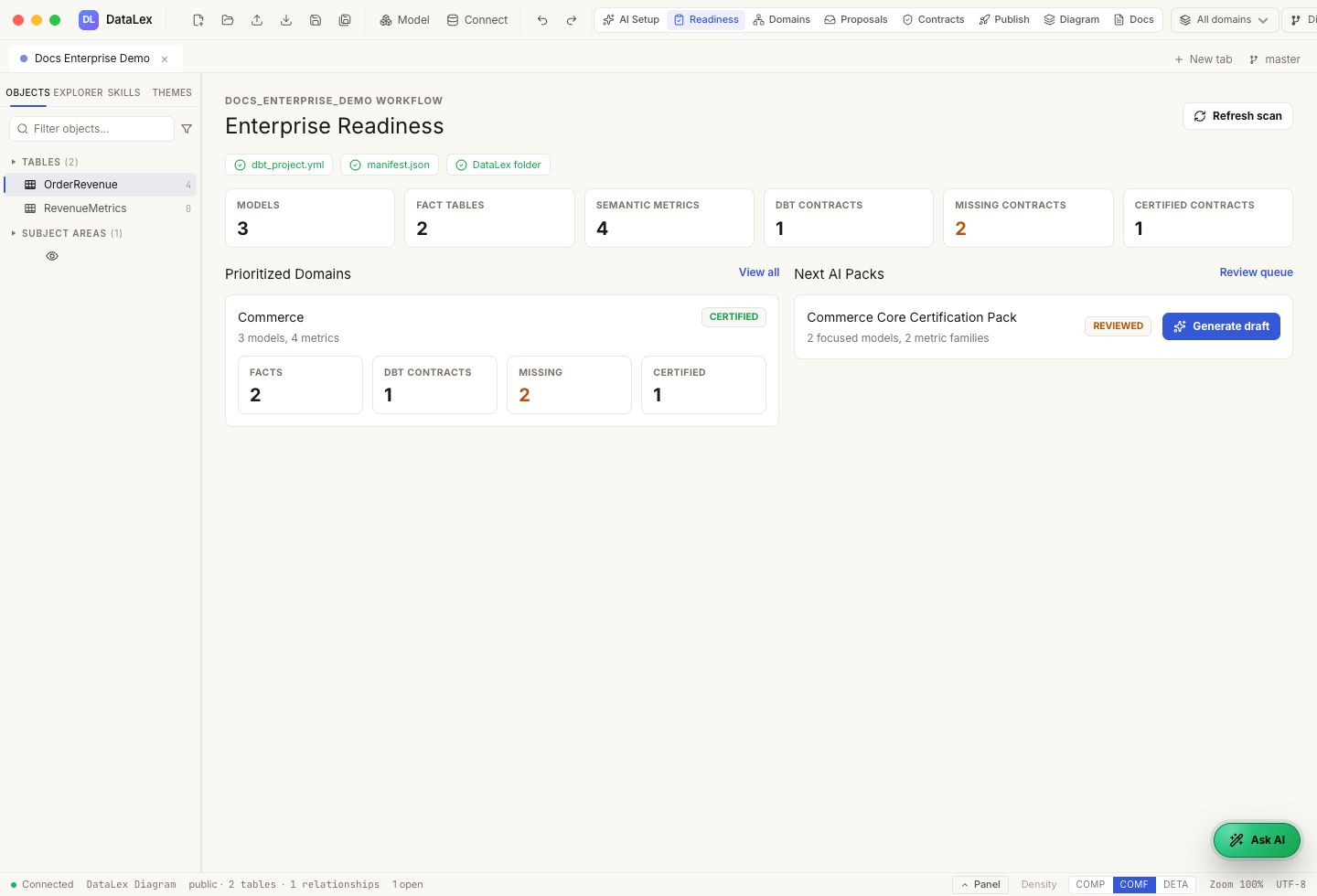
DataLex uses your dbt evidence to generate proposals:
target/manifest.json- dbt model YAML
- semantic models and metrics
- tests and relationships
- exposures
- owners and descriptions
- existing dbt contracts
- existing DataLex artifacts
Provider settings are project-private and stored under:
<your-dbt-project>/.datalex/agent/provider-settings.json
They are not written under versioned DataLex/, and API responses redact
secrets.
ollama pull gemma4:12b
ollama serve
In DataLex, open AI Setup, choose Ollama, set:
Base URL: http://localhost:11434
Model: gemma4:12b
Then click Save and Test.
New OSS artifacts use this domain-first layout:
DataLex/
  datalex.yaml
  domains/
    commerce.yaml
  commerce/
    conceptual/
    logical/
    physical/
    contracts/
    proposals/
    glossary/
    semantic/
  imported/
    dbt/
  generated/
    dbt/
  generated-sql/
  Skills/
DataLex still reads older layouts for compatibility, but new UI actions write lowercase canonical paths.
Only certified contracts and metric contracts enter datalex-manifest.json.
Draft, reviewed, and rejected proposals stay out of the publish manifest.
datalex datalex manifest build DataLex --out DataLex/datalex-manifest.jsonThe manifest is the stable OSS handoff for downstream tools and future cloud flows. DQL is not required in the OSS repo. DataLex only shows DQL readiness when a project explicitly enables that integration.
Start here:
- Install and run DataLex
- Connect an existing dbt repo
- Configure AI with OpenAI, Claude, or Ollama
- Generate, review, and certify a proposal pack
- Publish the DataLex manifest
- Run DataLex with Docker
For the full flow in one place, read Getting started.
This repo stays product-focused and does not ship a full sample project. To see DataLex and DQL together, use the separate duckcode-ai/jaffle-shop-duckdb repo.
That example contains a dbt + DuckDB project, a reviewed DataLex/ contract
pack, a DQL workspace, Paper-theme screenshots, and the full
Jaffle Shop tutorial.
git clone https://github.com/duckcode-ai/DataLex.git
cd DataLex
python3 -m venv .venv
source .venv/bin/activate
pip install -e '.[serve,duckdb]'
npm --prefix packages/api-server install
npm --prefix packages/web-app install
datalex serve
Useful checks:
npm --prefix packages/api-server test
npm --prefix packages/web-app run build
python3 -m pytest tests/datalex packages/readiness_engine/tests- Docs: docs/index.md
- CLI reference: docs/cli.md
- Enterprise OSS workflow: docs/enterprise-oss-workflow.md
- DataLex layout: docs/datalex-layout.md
- Issues: GitHub Issues
- Community: Discord