











- Recommend songs based on user input and play them on discord voice channel
- Can be used by teams/friends to listen to the same songs together
- Acts as an amplifier - can be used to play same music on multiple speakers to give a surround sound effect and increase volume output
- Ability to toggle music pause/resume
- Ability to play custom song without having to search the song on youtube
- Ability to switch back and forth between songs
- Added a new data set [this](https://www.kaggle.com/datasets/saurabhshahane/music-dataset-1950-to-2019) which has approximately 24000 songs
- Added a new functionality to shuffle the songs within the queue
- Added a new functionality to add a custom song to the queue
- Fixed the issue of fetching songs from Youtube
- Extended the application to be deployed on Microsoft Azure
- New Poll Command
- New Recommendation Algorithm
- Use web scraping and EDA to get a better database for the discord bot
- Improved Queue System
- Search song from different sources
- Search optimation using spotify
- Give your own songs to playlist
- Improved audio quality and playback
- Add loggin
See the installation instructions listed in Install
enigma.mp4
Demo.mp4
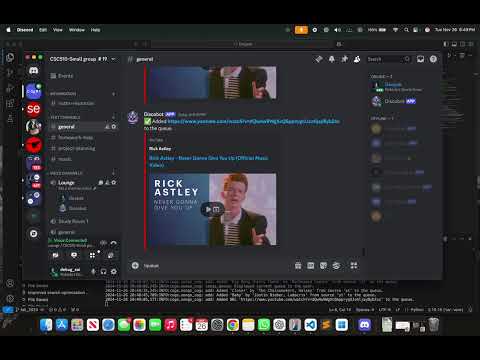
- Created a Discord Bot via the Discord Developer Portal.
- Incorporated a dataset to our application.
- Added functionalities to the Discord bot (explained in the Features section above.
- Use the Discord Bot to play music based on the user's recommendations.
- Can also use the Bot to play custom songs without having to search for it on YouTube.
- Extend the application to be deployed online (via a website or an application).
- Alternatively, use this as the primary data source to make better recommendations.
- Added some more functionality to the discord bot:
- Add a custom song to the queue
- Shuffle songs within the queue
- New Poll Command: This new poll command allows you to select up to 10 songs you like in order to curate a custom playlist for you to listen to
- New Recommendation Algorithm: Our new and improved recommendation algorithm now uses cosine similarity to identify songs similar to songs you have indicated that you like.
- Use web scraping and EDA to get a better database for the discord bot.
- Improved Queue System:
- Queue command: Now outputs the queue in a much nicer format compared to last version where it was just a list of song names
- New Move Command: Users now have the ability to move songs within a queue by specifying the song and the position in queue
- New Clear Queue Command: New ability to clear queue of all songs
- Next Song Played Automatically: The next song in queue automatically starts playing once the current song stops instead of having to call next song command
🎧 Choose Your Source: Stream from YouTube (yt) or SoundCloud (sc) with ease!
🔗 Add Songs Instantly: Simply paste the URL to queue your favorite tracks.
🎶 Accurate Song Titles: Played songs automatically update with official titles from websites for easy recognition.
🔍 Spotify-Powered Searches: Find the exact song you want using Spotify’s accurate search info!
🔊 Volume Control: Take full control of the volume for the perfect listening experience.
✨ Enhanced Music Quality: Enjoy superior sound for every beat and melody.
📋 Improved Code Logging and Debugging: Streamlined and efficient logging for seamless troubleshooting and performance monitoring.
✅ Enhanced Code Coverage and Testing: Comprehensive test cases ensure reliability and maintainability of the bot.
- Description: Displays a list of all available commands with their descriptions.
- Usage:
!help
- Description: Provides a quick overview of all commands.
- Usage:
!showCommands
- Description: Provides detailed help about a specific command.
- Usage:
!help <command>
Example:!help add
- Description: Displays the current song queue.
- Usage:
!queue
- Description: Adds a song to the queue from various sources. Supported sources:
yt: YouTubesc: SoundCloudurl: Direct URL
- Usage:
!add yt <song_name>
Example:!add yt shape of you!add sc <song_name>
Example:!add sc closer chainsmokers!add url <song_url>
Example:!add url https://www.youtube.com/watch?v=dQw4w9WgXcQ
- Description: Adds up to 10 specific songs directly to the queue using accurate Spotify metadata.
- Usage:
!myrecommend <song1> [<song2> ...]
Example:!myrecommend "closer chainsmokers" "shape of you"
- Description: Skips the currently playing song and moves to the next one in the queue.
- Usage:
!skip
- Description: Clears all songs from the queue.
- Usage:
!clear
- Description: Randomizes the order of songs in the queue.
- Usage:
!shuffle
- Description: Starts playback of the first song in the queue. If the bot is not in a voice channel, it joins the user's current channel.
- Usage:
!start
- Description: Pauses the current playback.
- Usage:
!pause
- Description: Resumes paused playback.
- Usage:
!resume
- Description: Adjusts the playback volume.
- Usage:
!volume
(Further volume adjustments may require an additional parameter based on your bot's setup.)
- Description: Plays a specific song directly from the specified source.
- Usage:
!play yt <song_name>
Example:!play yt shape of you
- Description: Creates a poll with 10 random songs for users to vote on.
- Usage:
!poll
- Description: Generates personalized song recommendations based on poll results or previous preferences.
- Usage:
!recommend
-
Adding Songs to the Queue:
!add yt shape of you !add sc closer chainsmokers !add url https://www.youtube.com/watch?v=dQw4w9WgXcQ -
Managing Playback:
!start !pause !resume -
Curating Your Playlist:
!myrecommend "closer chainsmokers" "baby justin bieber" !shuffle -
Generating Recommendations:
!poll
!recommend
- Integrating dislikes (taking into account the feedback of users) in the recommendation logic.
- Playlists: Add a new feature to upload a list of songs in a .csv or .txt file to create a playlist that can be saved and played.
- Improved Polling: Instead of having the bot select 10 random songs for the user to choose from, have the user input the songs they like to send to the recommend algorithm
- Integrate Spotify/Apple Music: Instead of getting songs from YouTube (which has issues with playing audio that isn’t always songs) use other services such as Spotify or Apple Music to get audio.
Documentation for the code available at - Enigma Docs
 Sneha Madle |
 Yugalee Patil |
 Chirrag Nangia |
 Saswat Priyadarshan |
Nico Field |
Riley Joncas |
Biruk Tadesse |
 YiTing Hou |
 Deepak Sai Pendyala |
 Leslie Liu |
Please see CONTRIBUTING for contributing to this project.
The data for this project is present here