
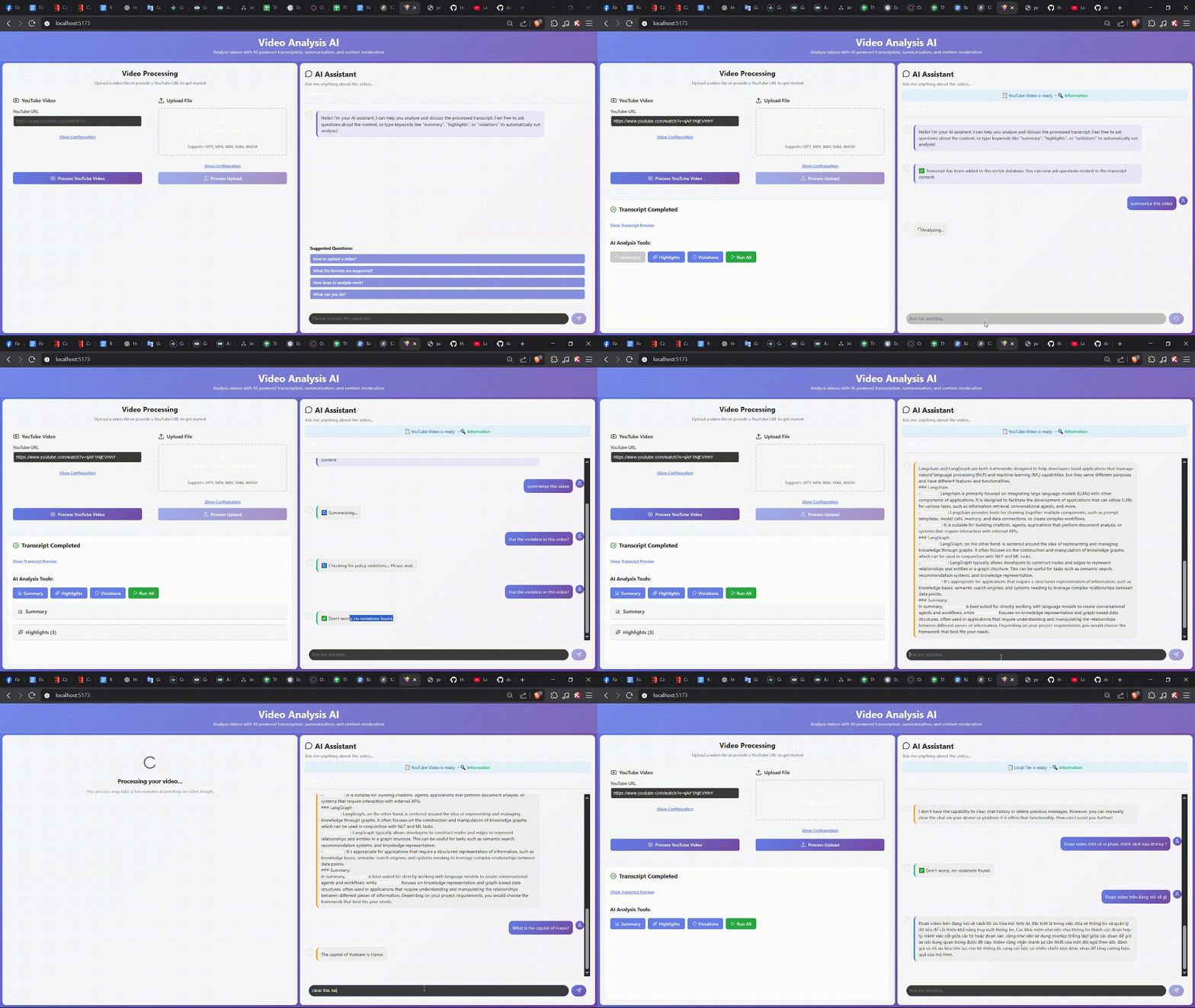
This project is a complete web application that enables users to deeply analyze video content. By providing a video URL (e.g., from YouTube), the system automatically transcribes, performs AI-driven analysis, and allows users to “chat” with the video content through an intelligent chatbot.
- Video Processing from URL: Easily input video URLs from popular platforms to start the analysis.
- Automatic Transcription: Integrated with OpenAI Whisper to convert speech in videos into text with high accuracy.
- Multi-task AI Analysis:
- Content Summarization: Automatically generate concise summaries of the video’s main ideas.
- Highlight Extraction: Identify and list the most important or noteworthy quotes and ideas.
- Policy Violation Detection: Use RAG (Retrieval-Augmented Generation) to compare video content against a set of rules (e.g., YouTube policies) and flag potential violations.
- Interactive Chatbot (Q&A with RAG): Ask natural language questions about the video content and receive accurate answers, directly grounded in the video context.
- Modern Web Interface: A user-friendly React-based interface for smooth and intuitive user experience.
│   requirements.txt
├───app
│   │   app.py
│   │   main.py
│   │   test.py
│   ├───agents
│   │   │   chatbot.py
│   │   │   highlighter.py
│   │   │   summarizer.py
│   │   │   violence_detector.py
│   ├───api
│   │   │   db.py
│   │   │   routes.py
│   │   │   schemas.py
│   │   │   services.py
│   ├───core
│   │   │   build_store.py
│   │   │   embeddings.py
│   │   │   langgraph_flow.py
│   │   │   multi_llms.py
│   │   │   init.py
│   ├───data
│   ├───prompts
│   │   │   highlight_prompt.py
│   │   │   summarize_prompt.py
│   │   │   violation_prompt.py
│   ├───saved_transcripts
│   ├───transcript
│   │   │   transcription.py
│   │   │   whisper.py
│   │   ├───sources
│   │   │   │   audio_base.py
│   │   │   │   filelocal.py
│   │   │   │   youtube.py
│   ├───utils
│   │   │   config.py
│   │   │   crawl_law_data.ipynb
│   │   │   ffmpeg_utils.py
│   │   │   formatting.py
│   │   │   nlp_utils.py
│   │   │   splitter.py
│   ├───vectorstore
│   │   │   chroma.sqlite3
The system follows a Client-Server architecture with two main components:
-
Backend (Python/FastAPI):
- Framework: FastAPI.
- AI Core: Uses LangChain and LangGraph to build and orchestrate AI Agents.
- Language Models: Powered by OpenAI models (e.g.,
gpt-4o-mini). - Knowledge Base: ChromaDB as the vector database to store embeddings and support RAG.
- Multimedia Processing:
yt-dlpfor video downloading andffmpegfor audio processing.
-
Frontend (React/Vite):
- Framework: React.
- Build Tool: Vite.
- Interface: Components designed for displaying analysis results and interacting with the chatbot.
- User provides a video URL via the Frontend.
- Frontend sends a request to the Backend’s
/process_videoAPI. - Backend downloads the audio and uses Whisper to transcribe it.
- Transcript text is split, embedded into vectors, and stored in ChromaDB.
- A LangGraph flow orchestrates multiple Agents (Summarizer, Highlighter, ViolenceDetector) to perform the analysis.
- Analysis results are sent back to the Frontend for display.
- For chat, Frontend calls the
/chatAPI. The Backend uses RAG to query ChromaDB and generate context-grounded answers.
- Python 3.9+
- Node.js 18+
- FFmpeg: Must be installed and added to the system
PATH.
# 1. Navigate to backend folder
cd backend

# 2. Create and activate a virtual environment
python -m venv venv
# On Windows:
.\venv\Scripts\activate
# On macOS/Linux:
# source venv/bin/activate

# 3. Install dependencies
pip install -r requirements.txt

# 4. Create .env file with your API key
# Inside backend folder, create a file named .env with content:
# OPENAI_API_KEY="your_openai_api_key_here"

# 5. Start the backend server
uvicorn app.app:app --reload --port 8000# 1. Open a new terminal and navigate to frontend
cd frontend/video-app
# 2. Install dependencies
npm install
# 3. Start the frontend app
npm run devOnce both servers are running, open your browser at: http://localhost:5173
Multimodal Analysis: Extend to visual analysis (images/frames) for action/object detection.
Performance Optimization: Speed up transcription and analysis pipelines.
Expand Agent Set: Add agents for sentiment analysis, entity recognition, etc.
Cloud Deployment: Package with Docker and deploy on cloud platforms.