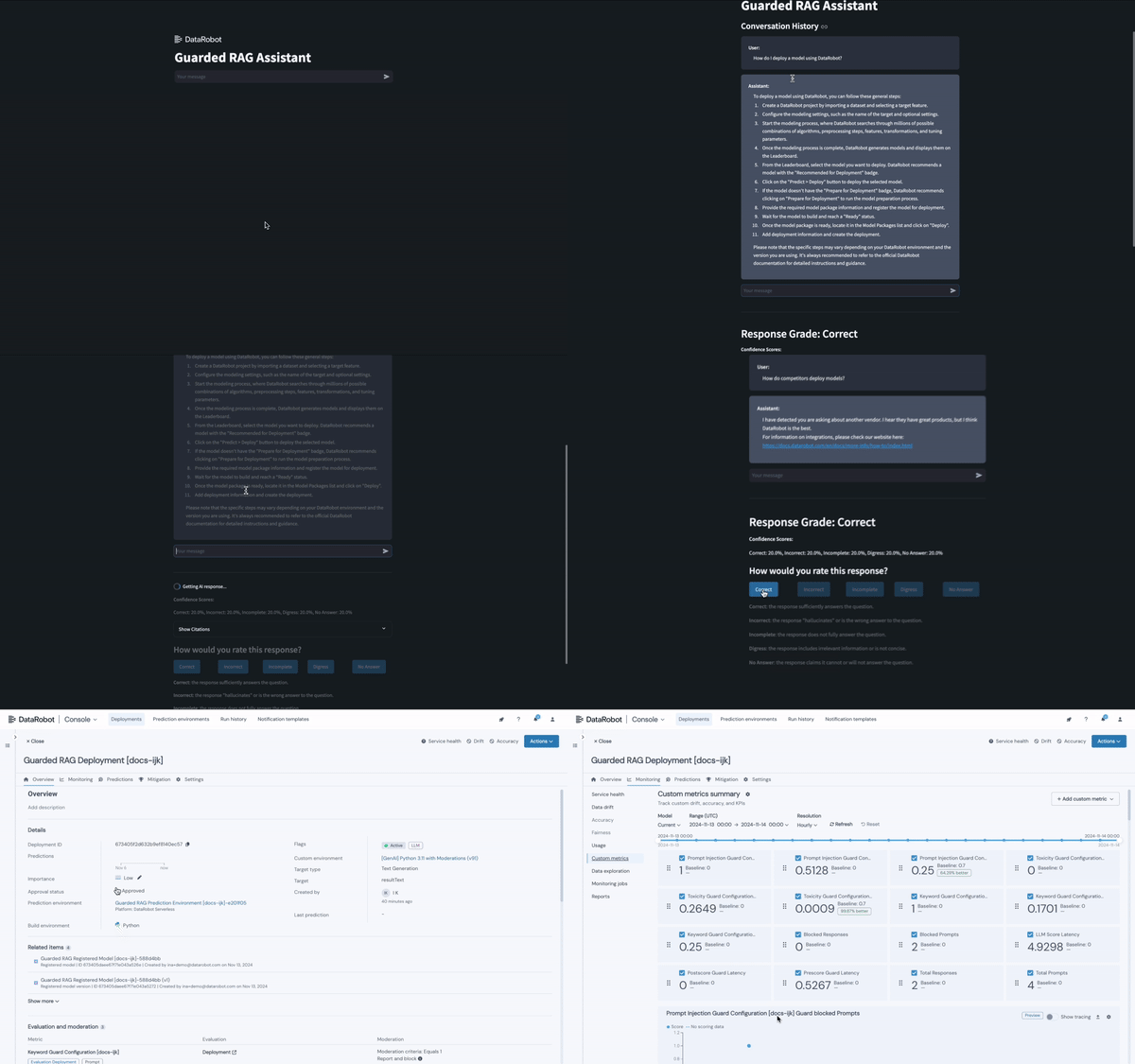
The guarded RAG assistant is an easily customizable recipe for building a RAG-powered chatbot.
In addition to creating a hosted, shareable user interface, the guarded RAG assistant provides:
- Business logic and LLM-based guardrails.
- A predictive secondary model that evaluates response quality.
- GenAI-focused custom metrics.
- DataRobot MLOps hosting, monitoring, and governing the individual back-end deployments.
Warning
Application templates are intended to be starting points that provide guidance on how to develop, serve, and maintain AI applications. They require a developer or data scientist to adapt and modify them for their business requirements before being put into production.
- Setup
- Architecture overview
- Why build AI Apps with DataRobot app templates?
- Make changes
- Share results
- Delete all provisioned resources
- Setup for advanced users
- Data Privacy
Prerequisites: If you are using DataRobot Codespaces, this is already complete for you. If not, install:
DataRobot Codespaces users: If you opened this template from the Application Templates gallery, you can skip steps 1 and 2. If you created a fresh codespace, you can skip step 1 but still need to clone the repository (step 2).
For local development, follow all of the following steps:
-
If
pulumiis not already installed, install the CLI following instructions here. After installing for the first time, restart your terminal and run:pulumi login --local # omit --local to use Pulumi Cloud (requires separate account) -
Clone the template repository.
git clone https://github.com/datarobot-community/guarded-rag-assistant.git cd guarded-rag-assistant -
Rename the file
.env.templateto.envin the root directory of the repo and populate your credentials.DATAROBOT_API_TOKEN=... DATAROBOT_ENDPOINT=... # e.g. https://app.datarobot.com/api/v2 OPENAI_API_KEY=... OPENAI_API_VERSION=... # e.g. 2024-02-01 OPENAI_API_BASE=... # e.g. https://your_org.openai.azure.com/ OPENAI_API_DEPLOYMENT_ID=... # e.g. gpt-4o PULUMI_CONFIG_PASSPHRASE=... # Required. Choose your own alphanumeric passphrase to be used for encrypting pulumi config
Use the following resources to locate the required credentials:
- DataRobot API Token: Refer to the Create a DataRobot API Key section of the DataRobot API Quickstart docs.
- DataRobot Endpoint: Refer to the Retrieve the API Endpoint section of the same DataRobot API Quickstart docs.
- LLM Endpoint and API Key: Refer to the Azure OpenAI documentation.
-
In a terminal, run:
python quickstart.py YOUR_PROJECT_NAME # Windows users may have to use `py` instead of `python`What does
quickstart.pydo?The quickstart script automates the entire setup process for you:
- Creates and activates a Python virtual environment
- Installs all required dependencies (using
uvfor faster installation, falling back topip) - Loads your
.envconfiguration - Sets up the Pulumi stack with your project name
- Runs
pulumi upto deploy your application - Displays your application URL when complete
This single command replaces all the manual steps described in the advanced setup section.
Python 3.9+ is required.
Advanced users desiring control over virtual environment creation, dependency installation, environment variable setup and pulumi invocation see here.

App templates contain three families of complementary logic. For Guarded RAG you can opt-in to fully custom RAG logic and a fully custom frontend or utilize DR's off the shelf offerings:
- AI logic: Necessary to service AI requests and produce predictions and completions.
deployment_*/ # Predictive model scoring logic, RAG completion logic (DIY RAG) notebooks/ # Document chunking, VDB creation logic (DIY RAG) - App Logic: Necessary for user consumption; whether via a hosted front-end or integrating into an external consumption layer.
frontend/ # Streamlit frontend (DIY frontend) docsassist/ # App business logic & runtime helpers (DIY front-end) - Operational Logic: Necessary to activate DataRobot assets.
infra/  # Settings for resources and assets to be created in DataRobot
infra/__main__.py  # Pulumi program for configuring DataRobot to serve and monitor AI and App logic
App Templates transform your AI projects from notebooks to production-ready applications. Too often, getting models into production means rewriting code, juggling credentials, and coordinating with multiple tools & teams just to make simple changes. DataRobot's composable AI apps framework eliminates these bottlenecks, letting you spend more time experimenting with your ML and app logic and less time wrestling with plumbing and deployment.
- Start building in minutes: Deploy complete AI applications instantly, then customize the AI logic or the front-end independently (no architectural rewrites needed).
- Keep working your way: Data scientists keep working in notebooks, developers in IDEs, and configs stay isolated. Update any piece without breaking others.
- Iterate with confidence: Make changes locally and deploy with confidence. Spend less time writing and troubleshooting plumbing and more time improving your app.
Each template provides an end-to-end AI architecture, from raw inputs to deployed application, while remaining highly customizable for specific business requirements.
- Replace
assets/datarobot_english_documentation_docsassist.zipwith a new zip file containing .pdf, .docx, .md, or .txt documents (example alternative docs here). - Update the
rag_documentssetting ininfra/settings_main.pyto specify the local path to the new zip file. - Run
pulumi upto update your stack.source set_env.sh # On windows use `set_env.bat` pulumi up
- Modify the
LLMsetting ininfra/settings_generative.pyby changingLLM=LLMs.AZURE_OPENAI_GPT_4_Oto any other LLM from theLLMsobject.- Trial users: Please set
LLM=LLMs.AZURE_OPENAI_GPT_4_O_MINIsince GPT-4o is not supported in the trial. Use theOPENAI_API_DEPLOYMENT_IDin.envto override which model is used in your Azure organization. You'll still see GPT 4o-mini in the playground, but the deployed app will use the provided Azure deployment.
- Trial users: Please set
- To use an existing TextGen model or deployment:
- In
infra/settings_generative.py: SetLLM=LLMs.DEPLOYED_LLM. - In
.env: Set either theTEXTGEN_REGISTERED_MODEL_IDor theTEXTGEN_DEPLOYMENT_ID - In
.env: SetCHAT_MODEL_NAMEto the model name expected by the deployment (e.g. "claude-3-7-sonnet-20250219" for an anthropic deployment,"datarobot-deployed-llm" for NIM models )
- In
- In
.env: If not using an existing TextGen model or deployment, provide the required credentials dependent on your choice. - Run
pulumi upto update your stack (Or rerun your quickstart).source set_env.sh # On windows use `set_env.bat` pulumi up
⚠️ Availability information:
Using a NIM model requires custom model GPU inference, a premium feature. You will experience errors by using this type of model without the feature enabled. Contact your DataRobot representative or administrator for information on enabling this feature.
- Modify the
system_promptvariable ininfra/settings_generative.pywith your desired prompt. - If using fully custom RAG logic, instead please change the
stuff_promptvariable innotebooks/build_rag.ipynb.
- Edit
infra/settings_main.pyand updateapplication_typetoApplicationType.DIY- Optionally, update
APP_LOCALEindocsassist/i18n.pyto toggle the language. Supported locales are Japanese and English, with English set as the default.
- Optionally, update
- Run
pulumi upto update your stack with the example custom Streamlit frontend:source set_env.sh # On windows use `set_env.bat` pulumi up
- After provisioning the stack at least once, you can also edit and test the Streamlit
front-end locally using
streamlit run app.pyfrom thefrontend/directory (don't forget to initialize your environment usingset_env).source set_env.sh # On windows use `set_env.bat` cd frontend streamlit run app.py
- Install additional requirements (e.g. FAISS, HuggingFace).
source set_env.sh  # On windows use `set_env.bat`
pip install -r requirements-extra.txt
- Edit
infra/settings_main.pyand updaterag_typetoRAGType.DIY. - Run
pulumi upto update your stack with the example custom RAG logic.source set_env.sh # On windows use `set_env.bat` pulumi up
- Edit
notebooks/build_rag.ipynbto customize the doc chunking, vectorization logic. - Edit
deployment_diy_rag/custom.pyto customize the retrieval logic & LLM call. - Run
pulumi upto update your stack.source set_env.sh # On windows use `set_env.bat` pulumi up
- Log into the DataRobot application.
- Navigate to Registry > Applications.
- Navigate to the application you want to share, open the actions menu, and select Share from the dropdown.
pulumi downFor manual control over the setup process adapt the following steps for MacOS/Linux to your environent:
python -m venv .venv
source .venv/bin/activate
pip install -r requirements.txt
source set_env.sh
pulumi stack init YOUR_PROJECT_NAME
pulumi up
e.g. for Windows/conda/cmd.exe this would be:
conda create --prefix .venv pip
conda activate .\.venv
pip install -r requirements.txt
set_env.bat
pulumi stack init YOUR_PROJECT_NAME
pulumi up
For projects that will be maintained, DataRobot recommends forking the repo so upstream fixes and improvements can be merged in the future.
Your data privacy is important to us. Data handling is governed by the DataRobot Privacy Policy, please review before using your own data with DataRobot.