English | 中文指南



The native macOS archive manager that feels like Finder — fast, private, and
smart. Open archives like folders and edit files inside without
unpacking, make / convert / split ZIP · 7z · RAR · TAR · DMG · gz · bz2 · xz in a
couple of clicks, paste a download link to stream-extract a remote archive
without saving the whole thing first — and, if you want it, let an optional
on-device AI suggest relevant actions. Need to open more?
tar.zst, ISO, CAB, CPIO and installer PKGs open read-only too, and you can sign
& verify archives so the people you send them to know they're really from you.
No subscriptions, no telemetry, no clutter. Just a fast, native window — built on the official 7-Zip engine, which ships inside the app.
➡️ Download the latest release · Project page
 |
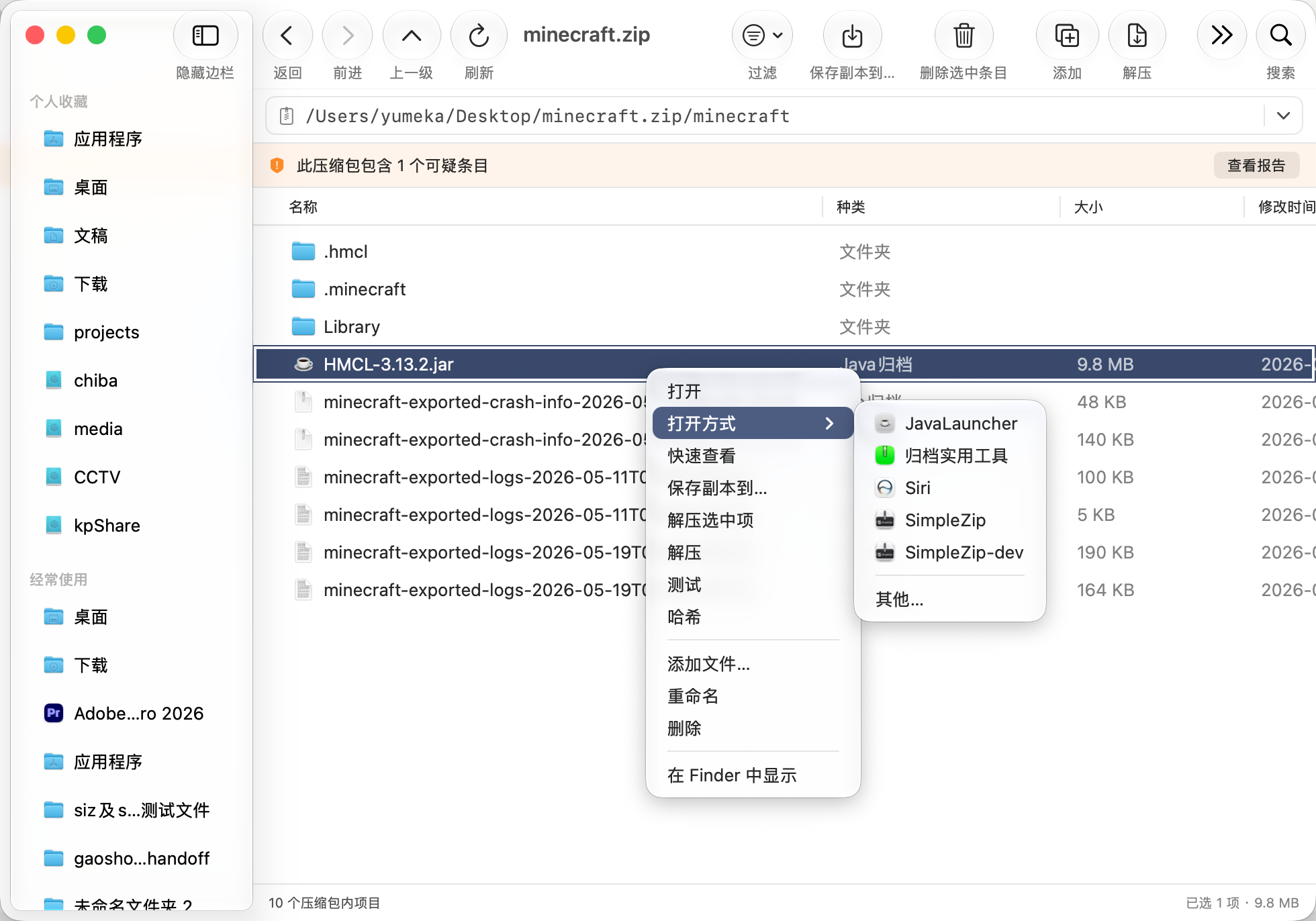 |
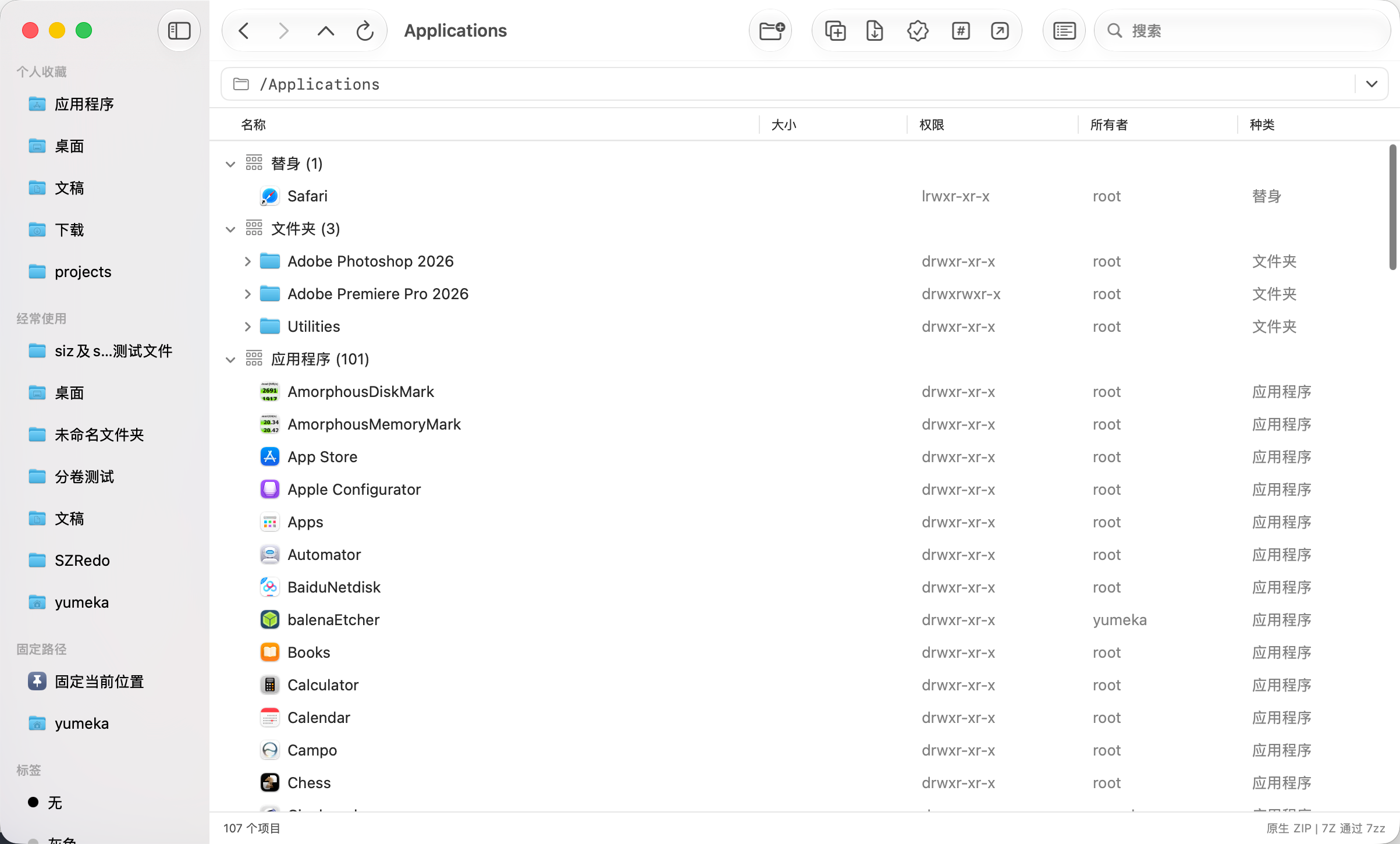
| Browse like Finder — your files, a modern native window. | Open an archive like a folder — walk the tree, no unpacking. |
 |
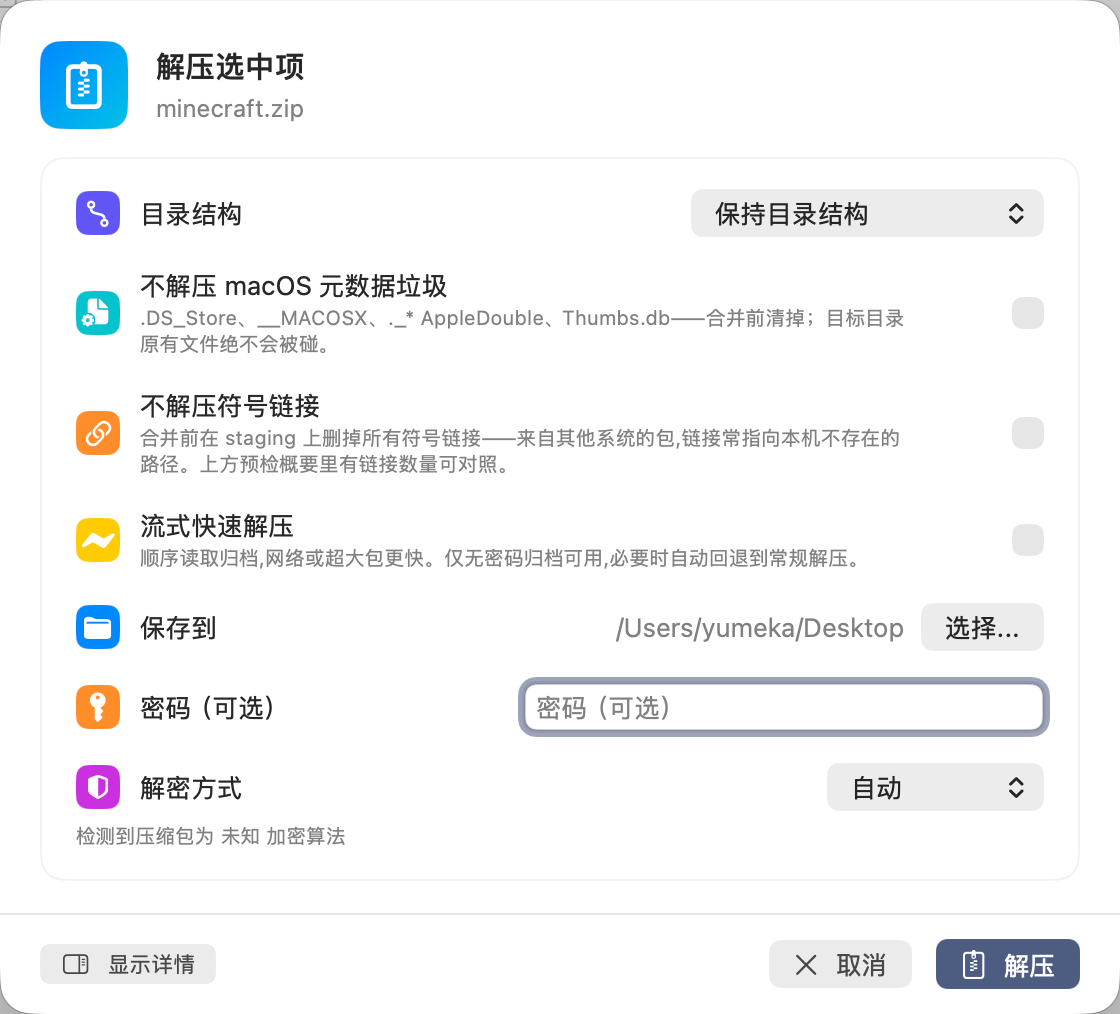 |
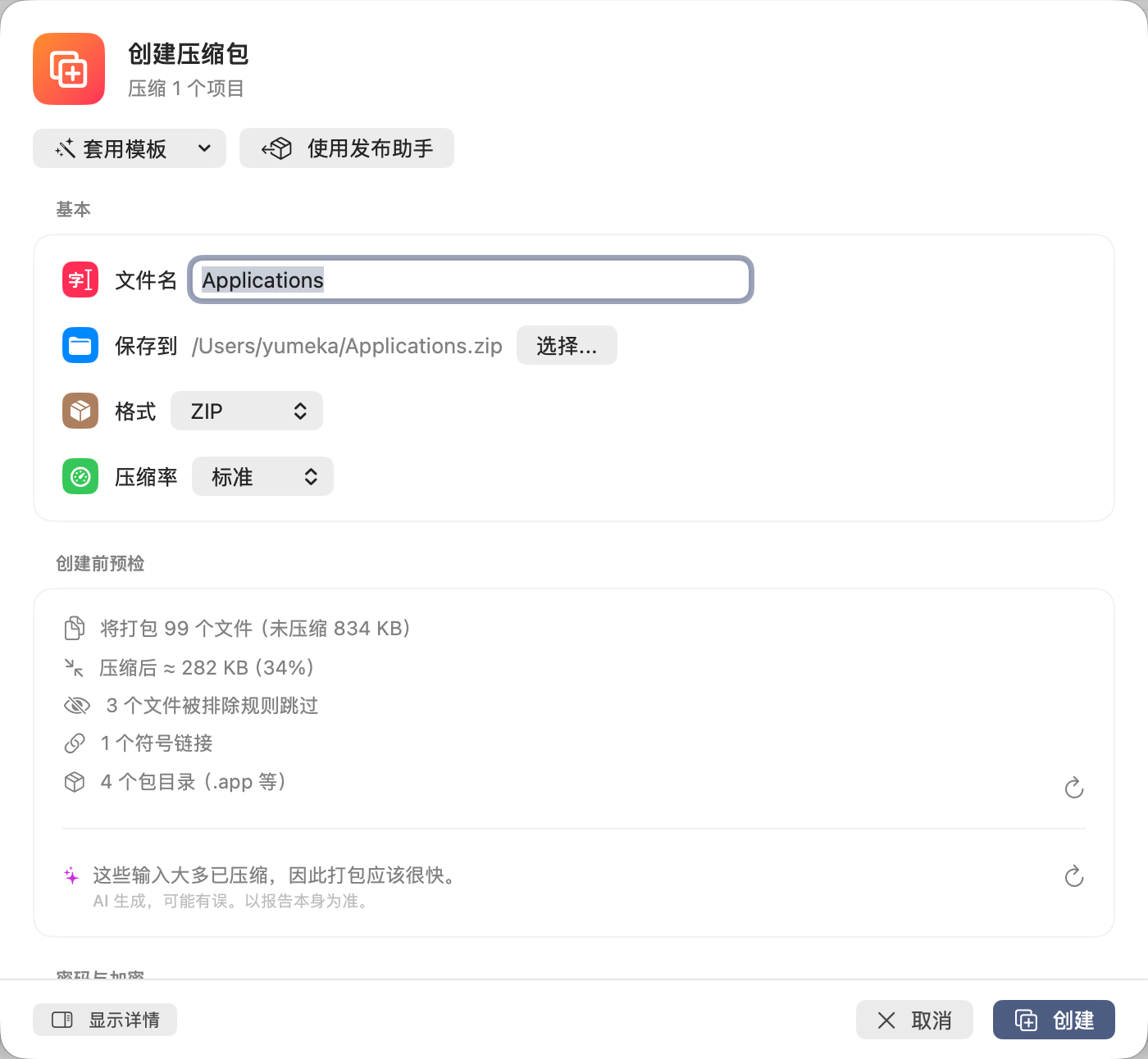
| Create — format, password, templates, a live dry-run. | Extract — pre-flight summary before anything touches disk. |
 |
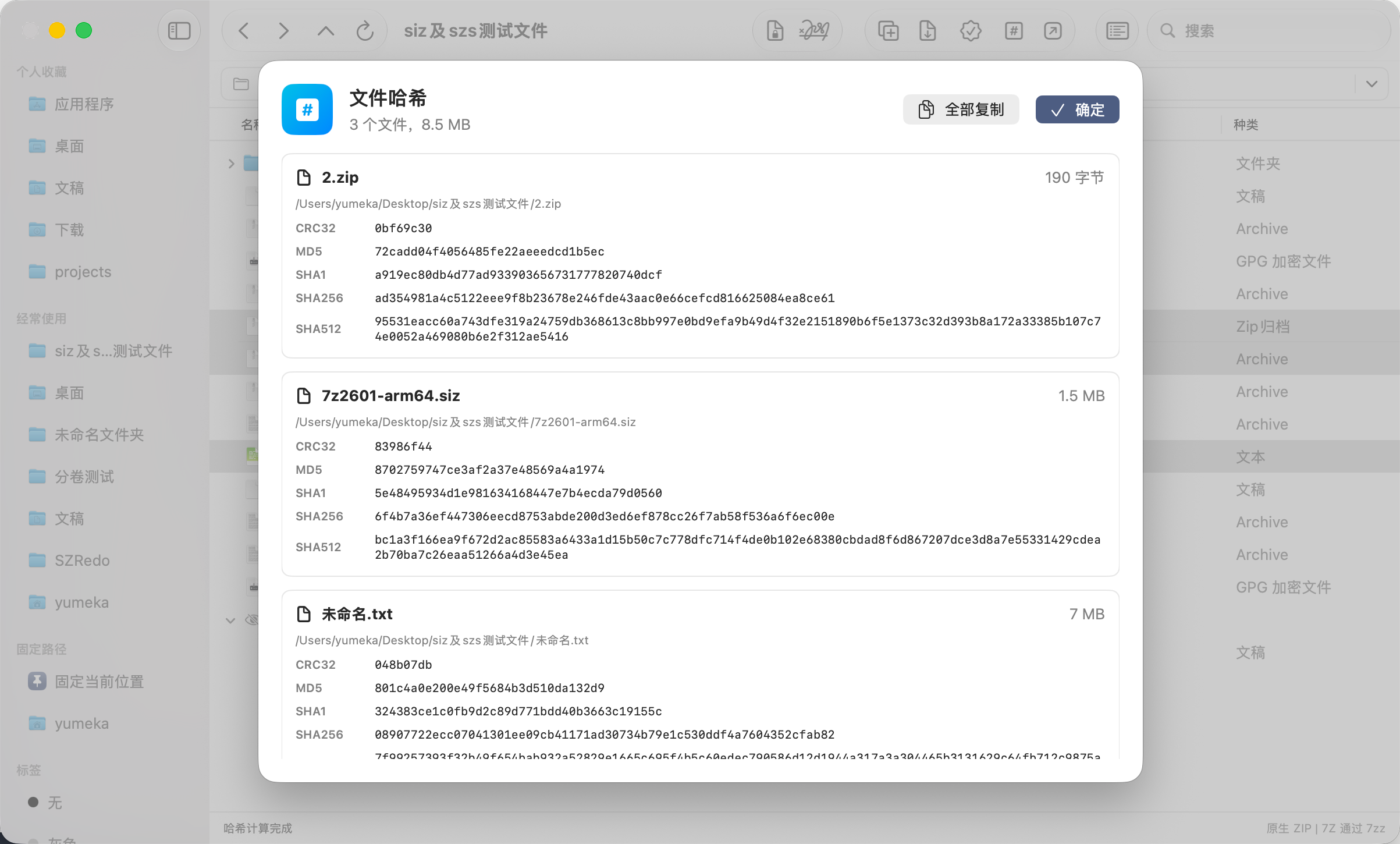 |
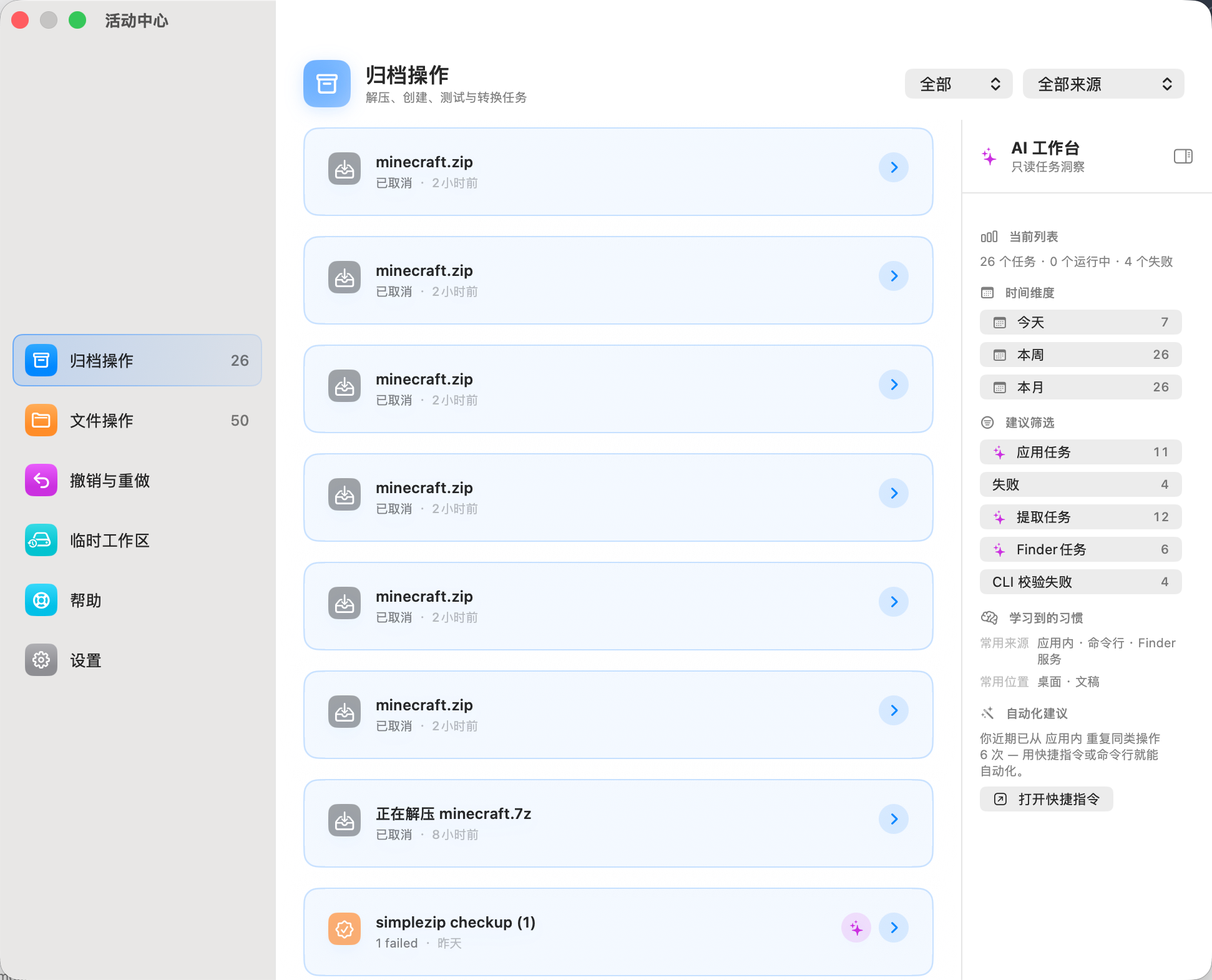
| Activity Center — every operation, with live progress. | Checksums — hash files in a click, copy results. |
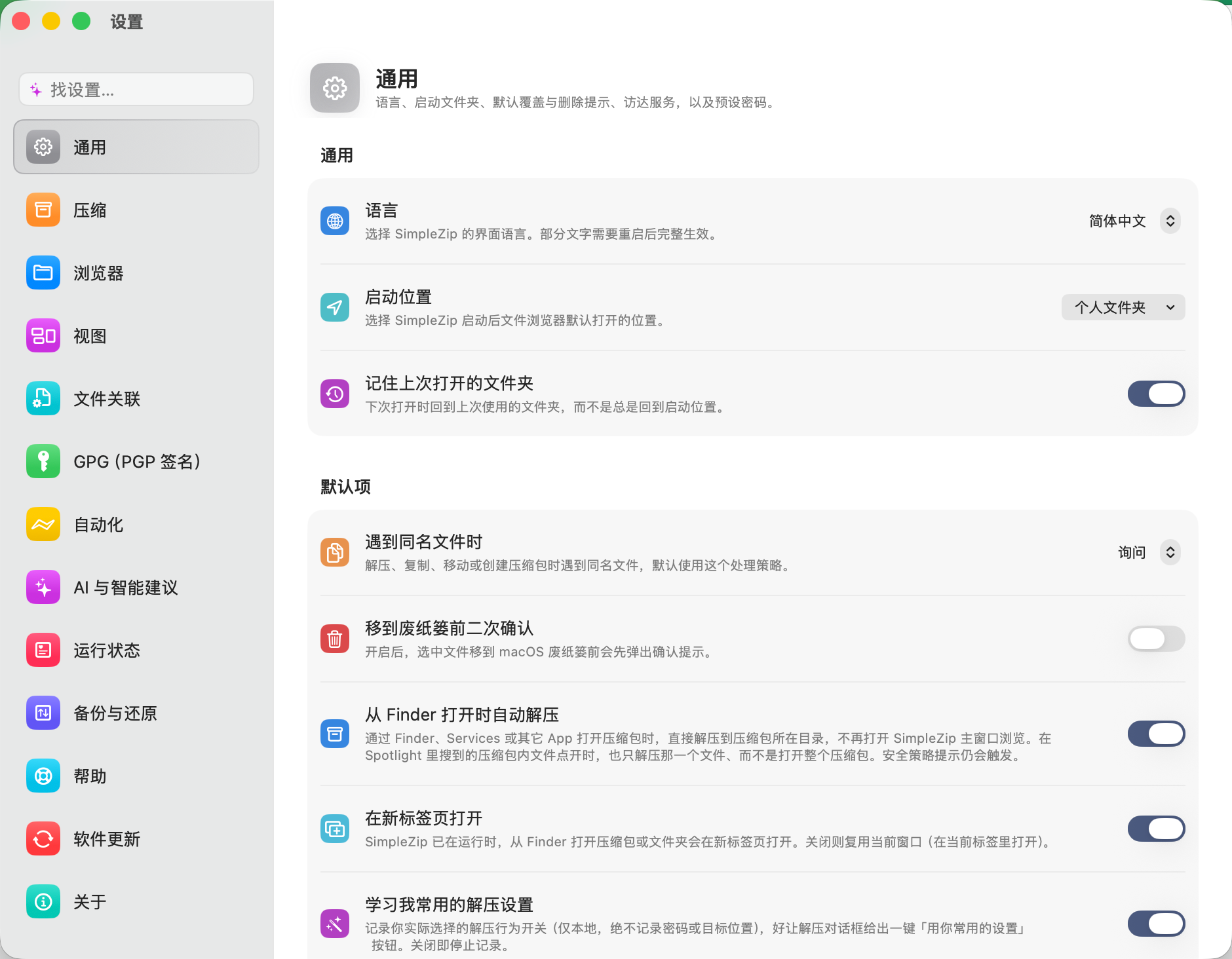
Settings — everything in one tidy, native window.
- 📂 Browse an archive like a folder. Double-click a
.zipor.7zand walk through it as a normal file tree — no "extract everything first" step. Folders in the local file browser expand in place too, Finder list-view style. - 👁 Open files without unpacking. Double-click a document inside an archive and it opens in its usual app, on a temporary copy. Done with it? Nothing was left lying around.
- ✍️ Edit inside an archive. Open a file from a ZIP/7z, edit it, and the change is written back into the archive — no unpack/repack dance. You can also add, rename, or delete entries, or drag files straight into an open archive.
- 🗜 Make, convert, split. Select files → choose a format → done (ZIP with a
password, a tidy 7z, a
.tar.gz). Convert an archive to another format, or split a large file into volumes and recombine them later — byte for byte. - 🖐 Drag straight to Finder. Drag a file out of an archive onto your Desktop; it's extracted only when you drop it.
- ↩️ Undo / redo. Move, rename, copy, duplicate, delete, split, combine, convert, even permission changes — ⌘Z takes them back (safely; it never silently clobbers your data).
- 🔍 Search, filter, compare. Search with power tokens (
*.swift size:>1MB encrypted:true modified:<7d regex:…), save your favorite filters, and diff two archives — or a folder against an archive — exporting the result as JSON / CSV / Markdown. - 🔄 The list keeps itself fresh. Add or remove files in Finder and SimpleZip's view updates on its own — no manual refresh, and your selection stays put.
- 🙈 Hidden files, out of your way. Show hidden files when you need them; they're tucked into a collapsible group instead of cluttering the list.
- 🔤 Group, resize, rename, chmod. Group a folder by kind or date, pick a comfortable row size, rename in the list (select + Return), and view or change Unix permissions / owner from the right-click menu.
- 🔐 Sign & verify (optional). Wrap an archive into a single signed
.sizfile so its signature travels with it, or sign a folder's contents in place with a.szsmanifest. Encrypt to specific people and/or a password, and hand someone a self-explaining Secure Bundle. - 🍎 Finder integration. Right-click any file in Finder to hash it or zip it up, without even opening the main window.
- 🌍 Speaks your language. English, 简体中文, 繁體中文, 日本語, 한국어, Русский, Deutsch, Français, Español, ไทย.
- Find a file inside an archive — straight from Spotlight. Open an archive once and its (non-encrypted) entries are remembered locally, so later you type a document's name into Spotlight and the file itself shows up, labelled with the archive it lives in — open it and SimpleZip jumps right to it, scrolled into view. Past releases and finished tasks are searchable too; tap a result to land on it.
- Describe a setting to find it. Type "stop asking before delete" or "turn off the GPG stuff" into the Settings search and SimpleZip jumps to the right switch — in any language. Ask Siri (or run a Shortcut) to flip a safe toggle without opening the app at all; security-sensitive settings are never reachable this way.
- An on-device AI assistant that only ever explains. When Apple Intelligence is
available, a read-only "explain this" rides nearly every report — summarize an
archive's risk, explain a signature check, draft a
VERIFY.mdor release notes, suggest issue labels, explain a failure. It runs entirely on your Mac, writes into an editable box you review (Writing Tools work on it), and never changes a file, a setting or a task — and never sees the contents of an encrypted archive or any passphrase. Toggle it in Settings → Automation; hidden when unavailable. - Live pre-flight hints. The create and extract dialogs add a one-line AI heads-up grounded in your actual files — packing a folder into a single-file format, a name conflict, suspicious paths, low disk space — next to a deterministic compression-size estimate.
- AI suggestions, right in the file browser. Expand a file or archive row and an optional on-device assistant offers an at-a-glance summary and fitting actions — compute a checksum, open with the right app, pull a single file out of an archive, surface a link it found inside. It only ever suggests; if the model has nothing to say, the row stays empty. Whitelisted folders only, read while your Mac is idle, never uploaded, encrypted contents never read.
- Settings and a toolbar that adapt. The create and extract dialogs can apply recommended settings in one tap, and the toolbar reorders its actions for the file at hand so your likely next step comes first — habit-based when AI is off, smarter when it's on. Passwords, encryption strength and destinations are never auto-changed.
- Convert formats — re-pack a
.raras.7z, a.zipas an encrypted.siz, in one step (right-click → Convert…). Batch runs get a unified output folder, skip-when-identical (fingerprint-compared, so re-runs don't pile up copies), automatic retry, and an optional post-conversion test. - Split & combine — break a large file into
partNvolumes and rejoin them, byte-for-byte, matching 7-Zip's Split / Combine. - Archive comments — read and edit the whole-archive comment of a ZIP, right in the browser.
- Templates & presets — start from a ready-made recipe (GitHub Release ZIP,
max-compression 7z, encrypted delivery, source tarball without
node_modules…) or save your own named default. - Pre-flight checks — a creation dry-run (file count, size, what gets excluded),
a pre-extraction summary with a disk-space warning, and a one-click
Release Check (integrity test, suspicious paths, junk, empty dirs, SHA-256,
plus a structural fingerprint that stays stable across repacks). Inspecting
a
.appchecks Info.plist, the code signature and Gatekeeper; DMGs check the drag-install layout; XIPs report signature trust. - Extraction presets — one-click recipes in the extract dialog (clean unpack / cautious / extract & tidy) built from new switches: extract into a folder named after the archive, unwrap a single wrapper directory, auto-rename conflicts (existing files untouched), reveal in Finder when done, and optionally move the archive to the Trash after a fully successful run.
- Download & extract from a URL — paste an
http(s)link to an archive into the address bar and SimpleZip streams it straight to disk as it downloads, so the whole archive never has to be saved first. Streamable formats and servers only — it checks first whether the server supports streaming content. - Streaming fast extraction — for ZIP and tar-family archives, an opt-in streaming mode reads sequentially: noticeably quicker for big archives and over network volumes.
- Release Assistant — pack (reproducible, junk excluded) → inspect →
SHA256SUMS → optional signing, in one resumable flow; workspace presets save
the whole setup under a name. It keeps a release ledger (every run recorded
with version, hash and structural fingerprint), lets you compare a release
against the previous one, can drop a machine-readable
release-manifest.json, and a configurable quality gate warns or blocks on suspicious paths, junk, missing checksums or unsigned output before you ship. - Reproducible archives — a switch in the create dialog makes the same input produce a byte-identical ZIP/7z (same SHA-256) on every run. Made for GitHub releases and verifiable builds; pairs with Export SHA256SUMS.
- At-a-glance security grade (A / B / C) — the path-safety report leads with a plain-language risk grade, so you know at a glance whether an archive is safe to open. Pure rule-based (no AI judges safety) — graded by the single most serious issue found, so a pile of cosmetic notes never inflates to "high risk".
- Data rescue for damaged archives — keep extracting past CRC errors and scan
local headers when a ZIP's central directory is gone. Everything readable lands
in a
name (rescued)folder, the original is never touched, and the safety checks still run (damaged archives are prime hostile input). - Batch checkup — open, integrity-test and scan a whole selection (or a folder's top level) in one pass: suspicious paths, macOS junk, encrypted entries, missing volumes, read-only formats and duplicates across the batch.
- Find sensitive & config files — a fast, name-based scan that groups what stands out inside an archive — private keys / credentials / secrets, license files, configs and scripts. It reads file names only, never contents.
- Near-duplicate finder — beyond byte-identical duplicates, group versions /
renames / copies (
report.docx,report (1).docx,report_v2.docx,报告 副本.docx) into one group, marked "identical copies" or "similar versions". - Reproducibility deep report — pack a folder twice and prove the two archives are byte-for-byte identical, with a breakdown of which factors carry across re-packs (timestamps stripped, entry order deterministic) and which don't.
- Release-directory check & Quick Verify — confirm a release folder is complete
and verifiable: SHA256SUMS coverage and real hashing, the
.szsmanifest checked file-by-file, an independent clean-room check that the shipped public key really verifies the shipped signature (your own keyring untouched), DMG content, and orphan files. Quick Verify does an instant name-only completeness pass. - Stay in the loop — a banner if another app moves or rewrites the archive you're viewing, and an optional system notification when a long task finishes while SimpleZip is in the background.
- Space analysis & duplicate hunting — see an archive's largest files and folder/extension breakdown at a glance; scan a folder for suspected duplicate archives (fingerprint-grouped, even across formats); and search file contents inside an archive — text files only, in a temp area deleted right after.
- Checksum files — generate GNU-compatible
SHA256SUMSfor a selection, and verifySHA256SUMS/.sha256/.md5/.sfvfiles someone sent you, with per-file pass/fail in the Activity Center. - A real CLI — install
simplezipfrom Settings → Automation and runcheck/compare/create/verify/open/doctorin the terminal with real exit codes — plus--jsonmachine output,--quiet/--verbose, "did you mean" typo hints, shell completions and a man page.createlearns--level/--exclude-junk/--reproducible/--encrypt(password via theSIMPLEZIP_PASSWORDenv var or a no-echo prompt, never an argument). Same bundled engines; finished commands land in the Activity Center too. - Shortcuts & Siri — drive SimpleZip from the Shortcuts app or Siri: extract,
create, verify checksums, compare archives, search inside an archive, inspect
without extracting, and run the Release Assistant headlessly. Every run is tagged
in the Activity Center;
.szssigning stays interactive-only and never runs unattended. - URL actions — other apps and scripts can ask SimpleZip to act via
simplezip://check?path=…/compare/open; a confirmation dialog naming the action and full paths always comes first. - Verified writes, recoverable failures — every archive rewrite is tested before it atomically replaces the original, and a rewrite stopped at the last gate (external change, failed verification) parks its work copy in a Recovery area instead of burning it. Big operations check disk space up front.
- Session passwords — an archive's password is asked once per session: tests, batch jobs and Finder auto-extract silently reuse passwords you've already proven (memory only — forgotten the moment the app quits; only the optional preset password persists, in the macOS Keychain).
- Long tasks are protected — running tasks hold off idle sleep, quitting with work in flight asks first (or quits by itself when the last task ends), heavy jobs queue behind a configurable concurrency limit (with a visible Waiting group), and a one-shot sleep when done toggle puts the Mac to sleep after the last task.
- Batch tools — test, convert, or rename many entries at once, find duplicate
files, and clean macOS metadata junk (
.DS_Store/__MACOSX). - Split-set awareness —
.001 / .002 / partN.rarrecognized as a group, with missing-volume warnings before you combine — and a missing-volume search that scans a folder you pick, copies found parts back, then auto-combines and tests the result. - Permissions & owner — a Unix-permissions column and right-click chmod / chown for local files.
- Benchmark — measure the 7-Zip engine's compression / decompression speed on your Mac.
- Activity Center — every operation, re-runnable, with copyable equivalent commands and an exportable diagnostics bundle. Pause and resume the whole queue in one click, filter by source (in-app / CLI / Shortcuts / URL / Finder), reopen any report (they survive a restart), and carve out a view of your tasks just by describing it on macOS 26.
- Tabs & multiple windows — open archives and folders in native window tabs.
- Quick Look, Get Info, Open With — the Finder essentials, right in the list.
- Download the latest DMG from Releases and drag SimpleZip into your Applications folder.
- First open: double-click the app — it's Developer ID signed and notarized, so Gatekeeper lets it through.
- A short Welcome Assistant walks you through a few preferences and checks that the archive engine is ready. You can skip anything and change it later.
Drag an archive onto the window, or open one with File → Open.
| Format | Open | Extract | Create | Notes |
|---|---|---|---|---|
| ZIP | ✓ | ✓ | ✓ | Optional AES-256 password |
| 7z | ✓ | ✓ | ✓ | Strong compression |
| RAR | ✓ | ✓ | ✓* | Opening always works; creating needs RARLAB's rar (an optional add-on) |
| TAR | ✓ | ✓ | ✓ | |
| gz / bz2 / xz | ✓ | ✓ | ✓ | Single-file compression |
| tgz / tar.gz | ✓ | ✓ | ✓ | Opens straight into the inner tar |
| zst / tar.zst | ✓ | ✓ | — | Zstandard, read-only — the bundled 7-Zip decodes it but has no zstd encoder |
| ISO / CAB / CPIO / XAR / PKG | ✓ | ✓ | — | Read-only — browse and extract disk images, cabinets and installer packages |
| DMG | ✓ | ✓ | ✓ | Apple disk images (mounted read-only when browsing) |
| XIP | ✓ | ✓ | — | Apple-signed archives (Xcode etc.) — extraction goes through Apple's own xip tool, which verifies the signature |
.gpg / .pgp / .asc / .key |
✓ | ✓ | ✓ | GPG-encrypted files decrypt and open in place; key material offers to import into a keyring. "Create" = right-click → Encrypt to .gpg |
.siz |
✓ | ✓ | ✓ | Signed container — an archive with its signature attached |
.szs |
✓ (verify) | in place | ✓ | Signed manifest — verifies a folder's files where they sit and browses them as a virtual folder; nothing unpacks, because nothing was packed |
Split sets (.001, .z01, .r00, partN.rar) |
✓ | ✓ | — | Just open the first piece |
Anything SimpleZip can't modify in place (tar family, RAR, the read-only family above) wears a Read-Only badge in the status bar that explains why — and conversion to ZIP/7z is one right-click away.
Most people never need this — but if you share files and want recipients to be sure they came from you and weren't tampered with, SimpleZip has two options built on standard GPG/OpenPGP:
.siz— a signed archive in one file. Your archive plus its signature, bundled together. The recipient opens it and immediately sees who signed it and whether the signature checks out. You can also encrypt the contents to one or more people's public keys and/or a shared password..szs— sign files where they sit. Signs a folder's contents without packing them up: a small signature file travels alongside, and SimpleZip can later confirm every file still matches. Right-click a selection → Create Signed Manifest….- Secure Bundle — a
.sizyou hand to someone carries human-readable, tamper-proof recipient instructions, so the person on the other end knows what they received and how to verify it.
You manage keys in Settings → GPG: a five-group keyring (your local secret
keys, your smartcard / OpenPGP-token keys, and others' public keys), per-key
trust levels, add-a-subkey, and optional hardware-token support. SimpleZip keeps
any keys it creates in its own private keyring, separate from your system
~/.gnupg, and never stores your passphrase — the standard macOS prompt handles
that. The full cryptographic design and threat model live in
SECURITY.md.
Using signing requires GPG. SimpleZip's GPG settings pane shows a one-line
brew install gnupg pinentry-macwhen it's missing, and runs a live health check so you know everything's wired up.
- Nothing is uploaded. No accounts, no analytics, and the archive workflows
never touch the network. The only network activity is what you explicitly ask
for: the optional update check (Sparkle), GPG key-server search / publish from
the key-server section (performed by GnuPG's own
dirmngr, and publishing a key always confirms first), and the optional RAR backend installer you run yourself. - Nothing is silently overwritten. Extracting, pasting, dropping, or creating an archive over an existing name all use the same conflict dialog — replace, keep both, merge (Finder-style) or replace the whole folder (tar-style), skip, or replace only if the contents differ. Overwrites write to a temp file and atomically swap on success, so a failed operation can't lose both copies.
- Editing inside an archive is non-destructive. Saving a change back into a ZIP/7z stages a copy and atomically replaces the original; if anything fails, your archive is left byte-for-byte intact.
- Untrusted archives are treated as untrusted. Suspicious paths, symlinks, hardlinks, and executable/active content each prompt before they can touch your disk — and you can set any of them to always block on a shared machine.
- Temporary extractions live in a per-session encrypted scratch volume and are cleaned up the moment you close the archive.
- Saved passwords live in the macOS Keychain, and revealing one in the open requires Touch ID / your login password. Session-remembered archive passwords are memory-only and vanish when the app quits. SimpleZip never stores GPG passphrases.
- Rewrites are verified before they land. An edited archive is integrity-tested on its work copy before the atomic swap; if the original changed externally in the meantime, the write stops and your finished work copy is preserved in a visible Recovery area.
The full threat model, the
.siz/.szscryptographic design, the encrypted scratch volume, and the Sparkle update-signature scheme are documented in SECURITY.md.
- SimpleZip is Developer ID signed and notarized — Gatekeeper passes it through on first launch, no right-click workaround needed.
- It is not sandboxed intentionally — a file manager needs to mount disk images, run the archive engine, and accept drag-and-drop across your disk.
- The official 7-Zip engine is bundled — ZIP/7z/TAR/etc. work out of the box with nothing else to install. GPG and RAR-creation are optional add-ons.
- General — startup location, language, preset password, re-run the welcome assistant, back up / restore your preferences.
- Compression / Archive — engine choices, what to do on overwrite, Finder auto-extract, and the safety prompts above.
- Browser — show hidden files (and what counts as hidden), symlinks.
- View — list size (compact / standard / comfortable), which columns show, and optional grouping defaults.
- File Associations — make SimpleZip the default opener for archive types.
- Automation — one home for everything that drives SimpleZip from outside: the
command-line tool, the Shortcuts actions, Spotlight indexing, the
simplezip://URL commands, the archive-content cache, per-source usage stats, and the "allow automation to use the preset password" security switch. - Software Update — check for new versions and read the release notes in-app.
- GPG — turn signing on, manage keys, pick a default signing key.
- Health — a quick "is everything working?" dashboard with one-click Copy Diagnostics.
Please open an issue — there are quick templates for bug reports and feature requests. The in-app Help → Report a Bug… takes you straight there. For anything security-related, see SECURITY.md first.
- 中文指南 (Chinese Guide)
- What's new (Changelog) · 中文更新日志
- Security & signing details · 中文安全策略
- Automation — Command-line tool · URL scheme · Shortcuts & Siri
MIT — see LICENSE. SimpleZip is independent, single-maintainer
software and bundles the official 7-Zip (7zz) binary; see
bundled tools notes for licensing details.