A local dashboard for keeping agent skills under control across Codex, Claude Code, OpenClaw, Hermes, and public skill folders.
中文 | English
I built Agent Skill Manager because my local skills folder kept growing, and at some point it became hard to answer simple questions: which skills are still useful, which ones are duplicated, which ones are built in, which ones have not been used for a long time, and which copies are safe to update or remove.
This tool scans local skill directories, groups the same skill across platforms, shows usage and health information, and gives you a small local admin page for day-to-day cleanup.
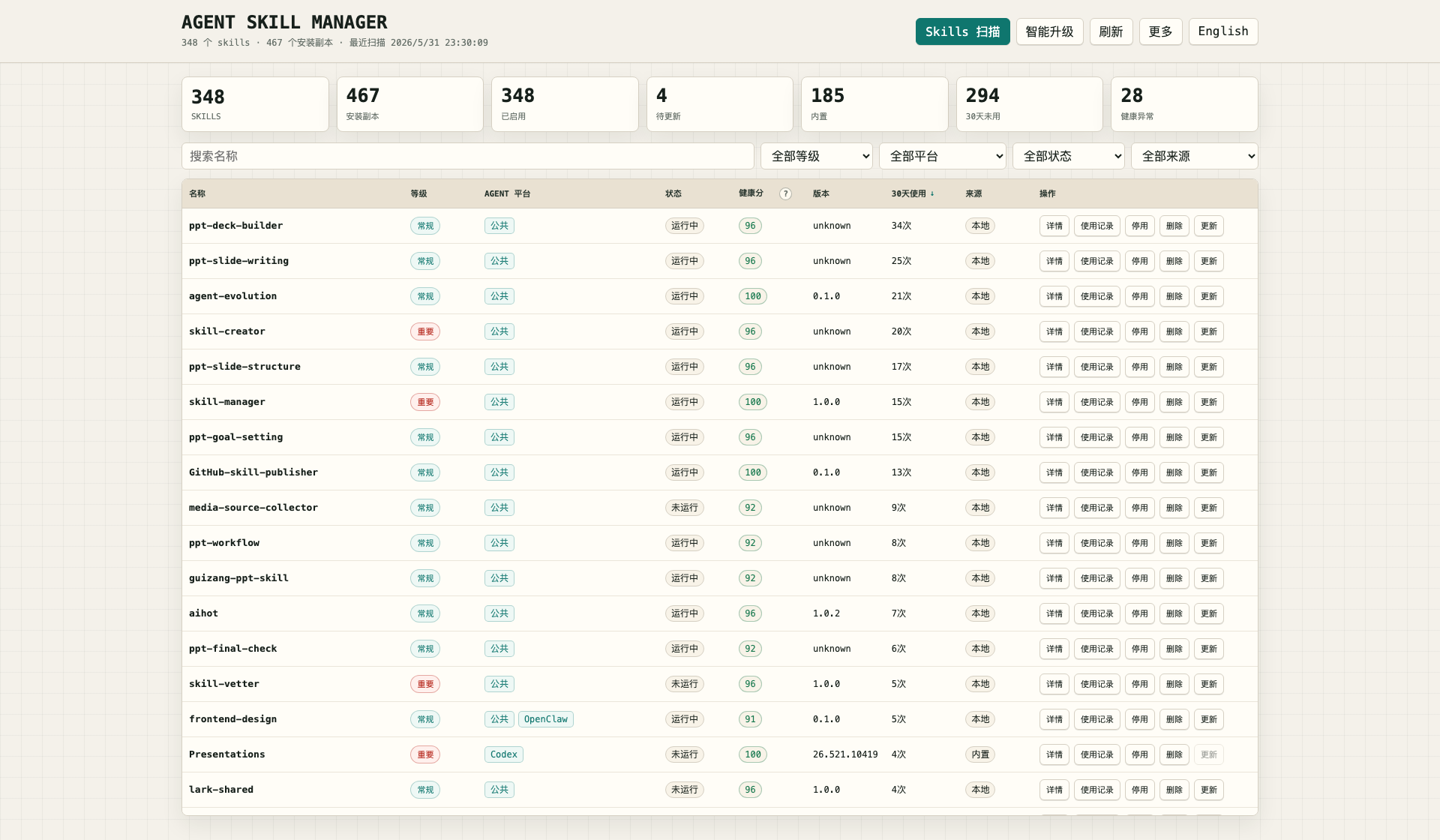
- See all local skills in one table instead of opening several hidden folders.
- Check which Agent platform a skill belongs to: Codex, Claude Code, OpenClaw, Hermes, or public.
- Find duplicate skills and inconsistent local versions.
- See 30-day usage counts imported from local session logs when those logs are available.
- Check health scores based on status, metadata, and file structure.
- Add your own skill source folders.
- Install new skills from GitHub, GitLab, Gitee, skills.sh, or zip links.
- Export a simple management report.
- Review update candidates and unify local copies when versions differ.
- Disable or delete skills with confirmation and backup.
This is mainly for people who already have a growing local skill library.
It is useful if you:
- use more than one Agent platform;
- install or write skills often;
- want to clean old skills without guessing;
- need a quick way to see where a skill is installed;
- want a Chinese/English local management UI.
If you only have a handful of skills, a file browser may be enough.
Agent Skill Manager keeps its own local registry. A scan reads known local skill folders, detects skill-like folders, groups copies by name, imports usage records where possible, and stores the result in SQLite.
The dashboard is just a view over that local registry. When you scan again, it refreshes the installed copies, usage counts, health scores, source labels, and update hints. Actions such as disable, update, and delete are handled from the same registry so the table and reports stay in sync.
Default roots include:
- public:
~/.agents/skills - Codex:
~/.codex/skills,~/.codex/plugins/cache - Claude Code:
~/.claude/commands,~/.claude/agents, project.claude/commands, project.claude/agents - OpenClaw:
~/.openclaw/skills,~/.openclaw/plugins,~/.openclaw/tools,~/.openclaw/workflows - Hermes:
~/.hermes
You can change these from the local dashboard after the first run.
Install it like a normal local skill:
git clone https://github.com/chemny/agent-skill-manager.git ~/.agents/skills/skill-managerAfter installation, start a new agent session and use it like any other skill.
Ask your agent:
Use skill-manager to scan my local skills and open the admin dashboard.
If you want to run it directly from the terminal:
python3 ~/.agents/skills/skill-manager/scripts/agent_skill_manager.py scan
python3 ~/.agents/skills/skill-manager/scripts/agent_skill_manager.py web --host 127.0.0.1 --port 8765 --open
The first command scans your local skills. The second command opens the dashboard.
python3 scripts/agent_skill_manager.py scan
python3 scripts/agent_skill_manager.py list
python3 scripts/agent_skill_manager.py search skill-manager
python3 scripts/agent_skill_manager.py show skill-manager
python3 scripts/agent_skill_manager.py usage --days 30
python3 scripts/agent_skill_manager.py health
python3 scripts/agent_skill_manager.py report
python3 scripts/agent_skill_manager.py web --open
On Unix-like systems:
bin/asm scan
bin/asm web --open
On Windows:
powershell -ExecutionPolicy Bypass -File ".\scripts\skill-manager.ps1" -Action Scan
powershell -ExecutionPolicy Bypass -File ".\scripts\skill-manager.ps1" -Action Web
The local HTML dashboard is the easiest way to use the tool. It includes:
- Chinese and English UI switching;
- skill scan and refresh;
- filters for grade, platform, status, and source;
- name-only search;
- details and usage records;
- custom source management;
- skill installation from GitHub, GitLab, Gitee, skills.sh, or zip links;
- smart upgrade checks with a 24-hour cache;
- local version unification;
- soft enable/disable status;
- delete with confirmation and backup;
- report export.
When you click update or run Smart Upgrade, the manager looks for newer versions in this order:
- Read the local 24-hour cache first.
- Check the skill's bound repository source: GitHub, GitLab, Gitee, or the GitHub repository behind a skills.sh link.
- If no bound source exists, or that source is temporarily unavailable, search SkillsMP.
- If SkillsMP has no usable result or fails, continue with
find-skills/ skills.sh. - If no remote version can be found, compare local copies with the same name and offer local version unification.
A failing remote source is treated as a source problem, not a skill problem. For example, GitHub rate limits or SkillsMP timeouts do not become "incomplete metadata" recommendations.
Start it with:
python3 scripts/agent_skill_manager.py web --host 127.0.0.1 --port 8765 --openRuntime data is not stored in this repository.
- database:
~/.agent-skill-manager/skills.db - config:
~/.agent-skill-manager/config.json - reports:
~/.agent-skill-manager/reports/ - backups:
~/.agent-skill-manager/backups/ - logs:
~/.agent-skill-manager/logs/
Use ASM_HOME if you want a separate runtime directory:
ASM_HOME=/tmp/asm-test python3 scripts/agent_skill_manager.py listAgent Skill Manager is designed to work across Codex, Claude Code, OpenClaw, Hermes, and public skill directories.
It uses local filesystem scans, SKILL.md metadata, SQLite, and the Python standard library. Platform paths are defaults, not hard requirements.
The tool is intentionally conservative:
- builtin and plugin-cache skills are treated as observe-only;
- disable is a soft registry status, not a direct rewrite of every platform's runtime config;
- delete asks for confirmation and backs up editable files first;
- remote update checks use a 24-hour cache;
- if no remote update is found, local copies can still be compared and unified;
- local databases, reports, backups, logs, and usage records are ignored by Git.
If you installed with Git:
cd ~/.agents/skills/skill-manager
git pull
Then open a new agent session.
skill-manager/
├── README.md
├── README.zh.md
├── CHANGELOG.md
├── LICENSE
├── SKILL.md
├── assets/
│   └── agent-skill-manager-dashboard.png
├── bin/
│   └── asm
└── scripts/
    ├── agent_skill_manager.py
    ├── release_check.sh
    └── skill-manager.ps1
./scripts/release_check.shThis checks Python syntax, embedded JavaScript when Node.js is available, temporary runtime creation, and leftover Python cache files.
MIT