Install and configure Datadog on your systems.
| GitHub | Issues | Pull Requests | Version | Downloads |
|---|---|---|---|---|
 |
 |
 |
 |
 |
This example is taken from molecule/default/converge.yml and is tested on each push, pull request and release.
---
- name: Converge
  hosts: all
  vars:
    datadog_api_key: "11111111111111111111111111111111"
    datadog_enabled: false
    datadog_agent_major_version: 7
    # avoid checking that the agent is stopped for centos
    datadog_skip_running_check: true
    datadog_config:
      tags: "mytag0, mytag1"
      log_level: INFO
      apm_enabled: "true" # has to be set as a string
    datadog_config_ex:
      trace.config:
        env: dev
      trace.concentrator:
        extra_aggregators: version
    system_probe_config:
      sysprobe_socket: /opt/datadog-agent/run/sysprobe.sock
    network_config:
      enabled: true
    runtime_security_config:
      enabled: true
    datadog_checks:
      process:
        init_config:
        instances:
          - name: agent
            search_string:
              - agent
              - sshd

  tasks:
    - name: "Include buluma.datadog"
      ansible.builtin.include_role:
        name: "buluma.datadog"
The machine needs to be prepared. In CI this is done using molecule/default/prepare.yml:
---
- name: Prepare
  hosts: all
  gather_facts: false
  become: true

  roles:
    - role: buluma.bootstrap
    - role: buluma.ca_certificates
Also see a full explanation and example on how to use these roles.
The default values for the variables are set in defaults/main.yml:
---
role_version: "4.21.0"

# define if the datadog-agent services should be enabled
datadog_enabled: true

# Whether the datadog.conf / datadog.yaml, system-probe.yaml, security-agent.yaml and checks config under conf.d are managed by Ansible
datadog_manage_config: true

# default datadog.conf / datadog.yaml options
datadog_config: {}
# default system-probe.yaml options
system_probe_config: {}
network_config: {}
service_monitoring_config: {}
# default checks enabled
datadog_checks: {}
# custom Python checks
datadog_custom_checks: {}
# set this to `true` to delete untracked checks
datadog_disable_untracked_checks: false

# Add additional checks to keep when `datadog_disable_untracked_checks` is set to `true`
datadog_additional_checks: []
# set this to `true` to delete default checks
datadog_disable_default_checks: false

# set this to `true` to delete example checks
datadog_disable_example_checks: false

# default user/group
datadog_user: dd-agent
datadog_group: dd-agent

# agent integration variables
integration_command_user_linux: "dd-agent"
integration_command_user_windows: "administrator"
integration_command_user_macos: "dd-agent"
datadog_agent_binary_path_linux: /opt/datadog-agent/bin/agent/agent
datadog_agent_binary_path_windows: "C:\\Program Files\\Datadog\\Datadog Agent\\bin\\agent.exe"
datadog_agent_binary_path_macos: "/opt/datadog-agent/bin/agent/agent"

# list of additional groups for datadog_user
datadog_additional_groups: {}
# Major version of the Agent that will be installed.
# Possible values: 5, 6, 7
# By default, version 7 will be installed.
# If datadog_agent_version is defined, the major version will be deduced from it.
datadog_agent_major_version: ""

# Pin agent to a version. Highly recommended.
# Defaults to the latest version of the major version chosen in datadog_agent_major_version
# If both datadog_agent_major_version and datadog_agent_version are set, they must be
# compatible (ie. the major version in datadog_agent_version must be datadog_agent_major_version)
datadog_agent_version: ""

# Default Package name for APT and RPM installs - can override in playbook for IOT Agent
datadog_agent_flavor: "datadog-agent"

# Default Package name for APM Library Injection APT and RPM installs.
datadog_inject_apm_flavor: "datadog-apm*"

# Default apt repo and keyserver

# By default, the role uses the official apt Datadog repository for the chosen major version
# Use the datadog_apt_repo variable to override the repository used.
datadog_apt_repo: ""

datadog_apt_cache_valid_time: 3600

# DATADOG_RPM_KEY.public (4172A230) is only useful to install old (< 6.14) Agent packages.
# We false longer add it and we explicitly remove it.
datadog_rpm_remove_keys: [4172A230]
# Default yum repo and keys

# By default, the role configures a yum repository for installing the Datadog agent package
# Use the datadog_yum_repo_setup_enabled toggle to disable this configuration
# WARNING: if you use this option, you will have to manually maintain the list of GPG
# signing keys used to sign the packages and update it as necessary by yourself
datadog_yum_repo_config_enabled: true

# By default, the role uses the official yum Datadog repository for the chosen major version
# Use the datadog_yum_repo variable to override the repository used.
datadog_yum_repo: ""

# Set these variables if the Datadog yum repo should be accessed via proxy
datadog_yum_repo_proxy: ""
datadog_yum_repo_proxy_username: ""
datadog_yum_repo_proxy_password: ""

datadog_yum_repo_gpgcheck: ""
datadog_yum_gpgcheck: true
# NOTE: we don't use URLs starting with https://keys.datadoghq.com/, as Python
# on older CentOS/RHEL/SUSE doesn't support SNI and get_url would fail on them

# the CURRENT key always contains the key that is used to sign repodata and latest packages
datadog_yum_gpgkey_current: "https://s3.amazonaws.com/public-signing-keys/DATADOG_RPM_KEY_CURRENT.public"
# this key expires in 2022
datadog_yum_gpgkey_e09422b3: "https://s3.amazonaws.com/public-signing-keys/DATADOG_RPM_KEY_E09422B3.public"
datadog_yum_gpgkey_e09422b3_sha256sum: "694a2ffecff85326cc08e5f1a619937999a5913171e42f166e13ec802c812085"
# this key expires in 2024
datadog_yum_gpgkey_20200908: "https://s3.amazonaws.com/public-signing-keys/DATADOG_RPM_KEY_FD4BF915.public"
datadog_yum_gpgkey_20200908_sha256sum: "4d16c598d3635086762bd086074140d947370077607db6d6395b8523d5c23a7d"
# this key expires in 2028
datadog_yum_gpgkey_20280418: "https://s3.amazonaws.com/public-signing-keys/DATADOG_RPM_KEY_B01082D3.public"
datadog_yum_gpgkey_20280418_sha256sum: "d309232f05bcfb5df7fce1a22b0920476254135083058206978aa57910698101"

# By default, we fail early & print a helpful message if an older Ansible version and Python 3
# interpreter is used on CentOS < 8. The 'yum' module is only available on Python 2, and the 'python3-dnf'
# package is not available before CentOS 8.
# If set to true, this option removes this check and allows the install to proceed. Useful in specific setups
# where an old CentOS host using a Python 3 interpreter does have 'dnf' (eg. through backports).
datadog_ignore_old_centos_python3_error: false

# By default, the role uses the official zypper Datadog repository for the chosen major version
# Use the datadog_zypper_repo variable to override the repository used.
datadog_zypper_repo: ""

# Define if the official zypper Datadog repository services should be installed
datadog_manage_zypper_repofile: true

datadog_zypper_repo_gpgcheck: ""
datadog_zypper_gpgcheck: true
datadog_zypper_gpgkey_current: "https://s3.amazonaws.com/public-signing-keys/DATADOG_RPM_KEY_CURRENT.public"
datadog_zypper_gpgkey_e09422b3: "https://s3.amazonaws.com/public-signing-keys/DATADOG_RPM_KEY_E09422B3.public"
datadog_zypper_gpgkey_e09422b3_sha256sum: "694a2ffecff85326cc08e5f1a619937999a5913171e42f166e13ec802c812085"
datadog_zypper_gpgkey_20200908: "https://s3.amazonaws.com/public-signing-keys/DATADOG_RPM_KEY_FD4BF915.public"
datadog_zypper_gpgkey_20200908_sha256sum: "4d16c598d3635086762bd086074140d947370077607db6d6395b8523d5c23a7d"
datadog_zypper_gpgkey_20280418: "https://s3.amazonaws.com/public-signing-keys/DATADOG_RPM_KEY_B01082D3.public"
datadog_zypper_gpgkey_20280418_sha256sum: "d309232f05bcfb5df7fce1a22b0920476254135083058206978aa57910698101"

# Avoid checking if the agent is running or not. This can be useful if you're
# using sysvinit and providing your own init script.
datadog_skip_running_check: false

# Set this to `true` to allow agent downgrades on apt-based platforms.
# Internally, this uses `apt-get`'s `--force-true` option. Use with caution.
# On centos this will only work with ansible 2.4 and up
datadog_agent_allow_downgrade: false

# Default windows latest msi package URL

# By default, will use the official latest msi package for the chosen major version.
# Use the datadog_windows_download_url option to override the msi package used.
datadog_windows_download_url: ""

# The default msi package for each major Agent version is specified in the following variables.
# These variables are for internal use only, do not modify them.
datadog_windows_agent6_latest_url: "https://s3.amazonaws.com/ddagent-windows-stable/datadog-agent-6-latest.amd64.msi"
datadog_windows_agent7_latest_url: "https://s3.amazonaws.com/ddagent-windows-stable/datadog-agent-7-latest.amd64.msi"

# If datadog_agent_version is set, the role will use the following url prefix instead, and append the version number to it
# in order to get the full url to the msi package.
datadog_windows_versioned_url: "https://s3.amazonaws.com/ddagent-windows-stable/ddagent-cli"

# url of the 6.14 fix script. See https://dtdg.co/win-614-fix for more details.
datadog_windows_614_fix_script_url: "https://s3.amazonaws.com/ddagent-windows-stable/scripts/fix_6_14.ps1"
# whether or not to download and apply the above fix
datadog_apply_windows_614_fix: true

# Override to change the name of the windows user to create
datadog_windows_ddagentuser_name: ""
# Override to change the password of the created windows user.
datadog_windows_ddagentuser_password: ""

# Override to change the binary installation directory (instead of default c:\program files\datadog\datadog agent)
datadog_windows_program_files_dir: ""

# Override to change the root of the configuration directory
datadog_windows_config_files_dir: ""

# Default configuration root.  Do not modify
datadog_windows_config_root: "{{ ansible_facts.env['ProgramData'] }}\\Datadog"

# do not modify.  Default empty value for constructing the list of optional
# arguments to supply to the windows installer.
win_install_args: " "

# Configure APM host injection. Possible values are: "all", "host" or "docker".
datadog_apm_instrumentation_enabled: ""

# List of APM libraries to install if host or Docker injection is enabled.
# You can see the available values in our official docs: https://docs.datadoghq.com/tracing/trace_collection/library_injection_local
datadog_apm_instrumentation_languages: ["all"]
# Configure Docker APM injection.
# See: https://docs.datadoghq.com/tracing/trace_collection/library_injection_local/?tab=agentandappinseparatecontainers#configure-docker-injection
datadog_apm_instrumentation_docker_config:
  library_inject: true
  log_level: info
  output_paths:
    - stderr
  config_sources: BASIC

#
# Internal variables
# The following variables are for internal use only, do not modify them.
#

datadog_apt_trusted_d_keyring: "/etc/apt/trusted.gpg.d/datadog-archive-keyring.gpg"
datadog_apt_usr_share_keyring: "/usr/share/keyrings/datadog-archive-keyring.gpg"
datadog_apt_key_current_name: "DATADOG_APT_KEY_CURRENT"
# NOTE: we don't use URLs starting with https://keys.datadoghq.com/, as Python
# on older Debian/Ubuntu doesn't support SNI and get_url would fail on them
datadog_apt_default_keys:
  - key: "{{ datadog_apt_key_current_name }}"
    value: https://s3.amazonaws.com/public-signing-keys/DATADOG_APT_KEY_CURRENT.public
  - key: A2923DFF56EDA6E76E55E492D3A80E30382E94DE
    value: https://s3.amazonaws.com/public-signing-keys/DATADOG_APT_KEY_382E94DE.public
  - key: D75CEA17048B9ACBF186794B32637D44F14F620E
    value: https://s3.amazonaws.com/public-signing-keys/DATADOG_APT_KEY_F14F620E.public
  - key: 5F1E256061D813B125E156E8E6266D4AC0962C7D
    value: https://s3.amazonaws.com/public-signing-keys/DATADOG_APT_KEY_C0962C7D.public

# The default apt repository for each major Agent version is specified in the following variables.
datadog_agent5_apt_repo: "deb [signed-by={{ datadog_apt_usr_share_keyring }}] https://apt.datadoghq.com/ stable main"
datadog_agent6_apt_repo: "deb [signed-by={{ datadog_apt_usr_share_keyring }}] https://apt.datadoghq.com/ stable 6"
datadog_agent7_apt_repo: "deb [signed-by={{ datadog_apt_usr_share_keyring }}] https://apt.datadoghq.com/ stable 7"

# The default yum repository for each major Agent version is specified in the following variables.
datadog_agent5_yum_repo: "https://yum.datadoghq.com/rpm/{{ ansible_facts.architecture }}"
datadog_agent6_yum_repo: "https://yum.datadoghq.com/stable/6/{{ ansible_facts.architecture }}"
datadog_agent7_yum_repo: "https://yum.datadoghq.com/stable/7/{{ ansible_facts.architecture }}"

# The default zypper repository for each major Agent version is specified in the following variables.
datadog_agent5_zypper_repo: "https://yum.datadoghq.com/suse/rpm/{{ ansible_facts.architecture }}"
datadog_agent6_zypper_repo: "https://yum.datadoghq.com/suse/stable/6/{{ ansible_facts.architecture }}"
datadog_agent7_zypper_repo: "https://yum.datadoghq.com/suse/stable/7/{{ ansible_facts.architecture }}"

# Default macOS latest dmg package URL

# By default, will use the official latest dmg package for the chosen major version.
# Use the datadog_macos_download_url option to override the dmg package used.
datadog_macos_download_url: ""

# The default dmg package for each major Agent version is specified in the following variables.
# These variables are for internal use only, do not modify them.
datadog_macos_agent6_latest_url: "https://s3.amazonaws.com/dd-agent/datadog-agent-6-latest.dmg"
datadog_macos_agent7_latest_url: "https://s3.amazonaws.com/dd-agent/datadog-agent-7-latest.dmg"

# If datadog_agent_version is set, the role will use the following url prefix instead, and append the version number to it
# in order to get the full url to the dmg package.
datadog_macos_versioned_url: "https://s3.amazonaws.com/dd-agent/datadog-agent"

datadog_macos_user: "{{ ansible_user }}"
datadog_macos_service_name: "com.datadoghq.agent"
datadog_macos_user_plist_file_path: "Library/LaunchAgents/{{ datadog_macos_service_name }}.plist"
datadog_macos_system_plist_file_path: "/Library/LaunchDaemons/{{ datadog_macos_service_name }}.plist"
datadog_macos_etc_dir: "/opt/datadog-agent/etc"
datadog_macos_logs_dir: "/opt/datadog-agent/logs"
datadog_macos_run_dir: "/opt/datadog-agent/run"- pip packages listed in requirements.txt.
The following roles are used to prepare a system. You can prepare your system in another way.
| Requirement | GitHub |
|---|---|
| buluma.bootstrap |  |
| buluma.ca_certificates |  |
This role is part of many compatible roles. Have a look at the documentation of these roles for further information.
Here is an overview of related roles:
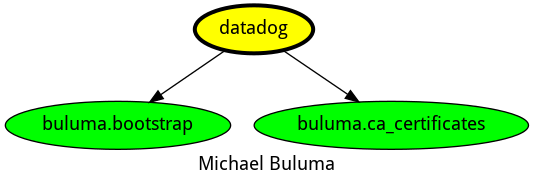
This role has been tested on these container images:
| container | tags |
|---|---|
| EL | all |
The minimum version of Ansible required is 2.12, tests have been done on:
- The previous version.
- The current version.
- The development version.
If you find issues, please register them on GitHub.