Automated exploratory QA testing for web applications — powered by Playwright and, optionally, LLMs (Claude or GPT-4o).
qa-agent example.com


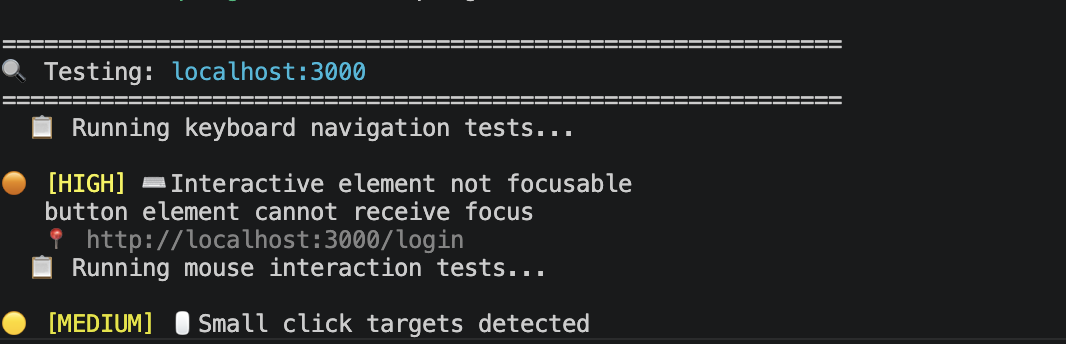
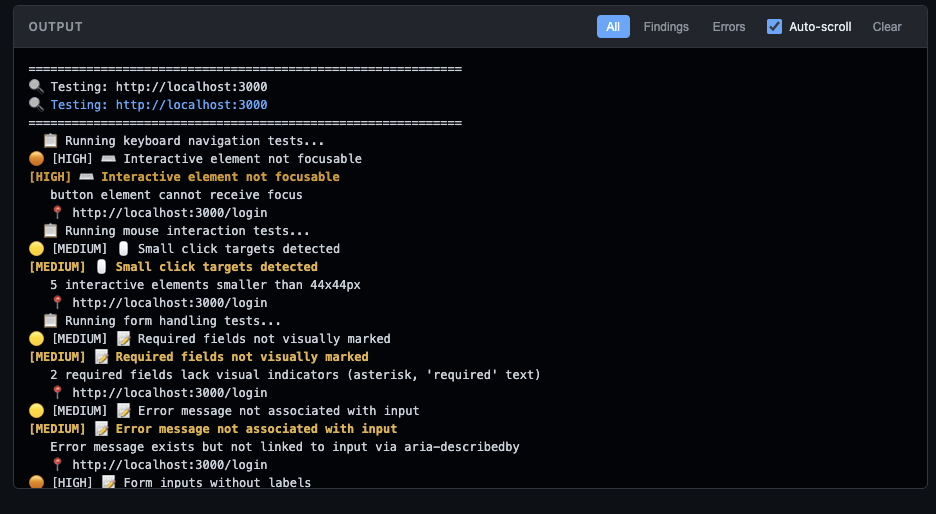
Point QA Agent at a URL and it explores your application like a real user: clicking buttons, filling forms, navigating with the keyboard, and checking for accessibility issues. Then it reports what it finds. No test scripts to write or maintain.
Need targeted tests? Pass plain-English instructions and an LLM generates custom Playwright steps that run alongside the standard suite.
Table of Contents
- Features
- Installation
- Quick Start
- Programmatic Usage
- Agentic Testing
- Web Interface & API
- CLI Reference
- Test Categories
- Output Formats
- CI/CD Integration
- Exit Codes
- Troubleshooting
- Further Documentation
- License
| Category | What it does |
|---|---|
| Agentic testing | Give Claude or GPT-4o a bug report or feature spec; it generates custom Playwright test steps automatically |
| Two modes | focused tests only given URLs; explore crawls and discovers pages |
| Six test suites | Keyboard · mouse · forms · accessibility · error detection (on by default) + WCAG 2.1 AA compliance (opt-in) |
| Auth support | Username/password, cookies, Bearer tokens, custom headers |
| Four output formats | Console, Markdown, JSON, PDF |
| Screenshots & video | On-error or every-interaction screenshots; full session recording |
| Web UI | Dashboard for launching runs, live output, and browsing past sessions |
| CI/CD ready | Exit codes map to pass/fail; JSON output integrates with any pipeline |
Requires Python 3.10+. Check with
python --version.
pip install qa-agent # standard testing (Playwright only)Chromium is installed automatically on first run. Optional extras:
pip install "qa-agent[pdf]"    # PDF reports (adds WeasyPrint)
pip install "qa-agent[web]"    # web UI (adds Flask)
pip install "qa-agent[all]"    # everything above
Agentic testing requires an API key for your chosen provider:
export ANTHROPIC_API_KEY=sk-ant-...   # Anthropic (default)
export OPENAI_API_KEY=sk-...          # OpenAI
Chromium is installed automatically on the first run. If you need to reinstall it manually, run
playwright install chromium.
# Test a single URL
qa-agent https://example.com

# Test multiple URLs
qa-agent https://example.com https://example.com/about

# Crawl and test discovered pages
qa-agent --mode explore --max-depth 2 https://example.com

# Generate reports in a custom directory
qa-agent --output json,markdown --output-dir ./reports https://example.com

# Run via module
python -m qa_agent https://example.comfrom qa_agent import QAAgent, TestConfig, TestMode, OutputFormat
config = TestConfig(
urls=["https://example.com"],
mode=TestMode.EXPLORE,
output_formats=[OutputFormat.CONSOLE, OutputFormat.JSON],
max_depth=2,
max_pages=10,
instructions="Verify the password reset flow.", # optional
)
agent = QAAgent(config)
session = agent.run()
print(f"Pages tested: {len(session.pages_tested)}")
print(f"Total findings: {session.total_findings}")Set workers to test pages in parallel, and use BatchRunner to run several
independent sessions concurrently with a bounded pool:
from qa_agent import BatchRunner, TestConfig

configs = [
    TestConfig(urls=["https://example.com"], workers=4),
    TestConfig(urls=["https://other.test"]),
]

with BatchRunner(pool_size=4) as runner:
    for result in runner.run_all(configs):
        if isinstance(result, Exception):
            print(f"session failed: {result}")
        else:
            print(f"{result.session_id}: {result.total_findings} findings")
→ Full Python API Reference — all classes, methods, and configuration options.
Pass natural-language instructions and an LLM generates custom test steps that run alongside the standard suite. Supports Anthropic (Claude) and OpenAI (GPT-4o and others). No third-party AI packages are required — all API calls use Python's built-in urllib.
# From a bug report (Anthropic, default)
qa-agent --instructions "The login button does nothing when email is blank" \
  https://example.com/login

# Using OpenAI instead
qa-agent --llm openai --instructions "The login button does nothing when email is blank" \
  https://example.com/login

# From a feature spec
qa-agent --instructions "The 'Remember me' checkbox should be unchecked by default \
  and persist the session across browser restarts." \
  https://example.com/login

# From a file
qa-agent --instructions-file feature-spec.txt https://example.com- The LLM receives your instructions and the target URL.
- It returns a structured plan: summary, focus areas, and custom Playwright test steps.
- The agent runs those steps on every tested page alongside the standard suites.
- Assertion failures become findings in the report with the severity the LLM assigned.
If the API call fails (or the key is missing), a warning is printed and the run continues with standard tests only.
# Choose provider (default: anthropic)
qa-agent --llm anthropic --instructions "Test checkout" https://shop.example.com
qa-agent --llm openai    --instructions "Test checkout" https://shop.example.com

# Override model (defaults: anthropic → claude-sonnet-4-6, openai → gpt-4o)
qa-agent --llm openai --ai-model gpt-4o-mini --instructions "Test checkout" https://shop.example.com

# Bypass the plan cache
qa-agent --no-cache --instructions "..." https://example.com
Plans are cached to ~/.qa_agent/cache/ (24-hour TTL). Pass --no-cache to force a fresh API call.
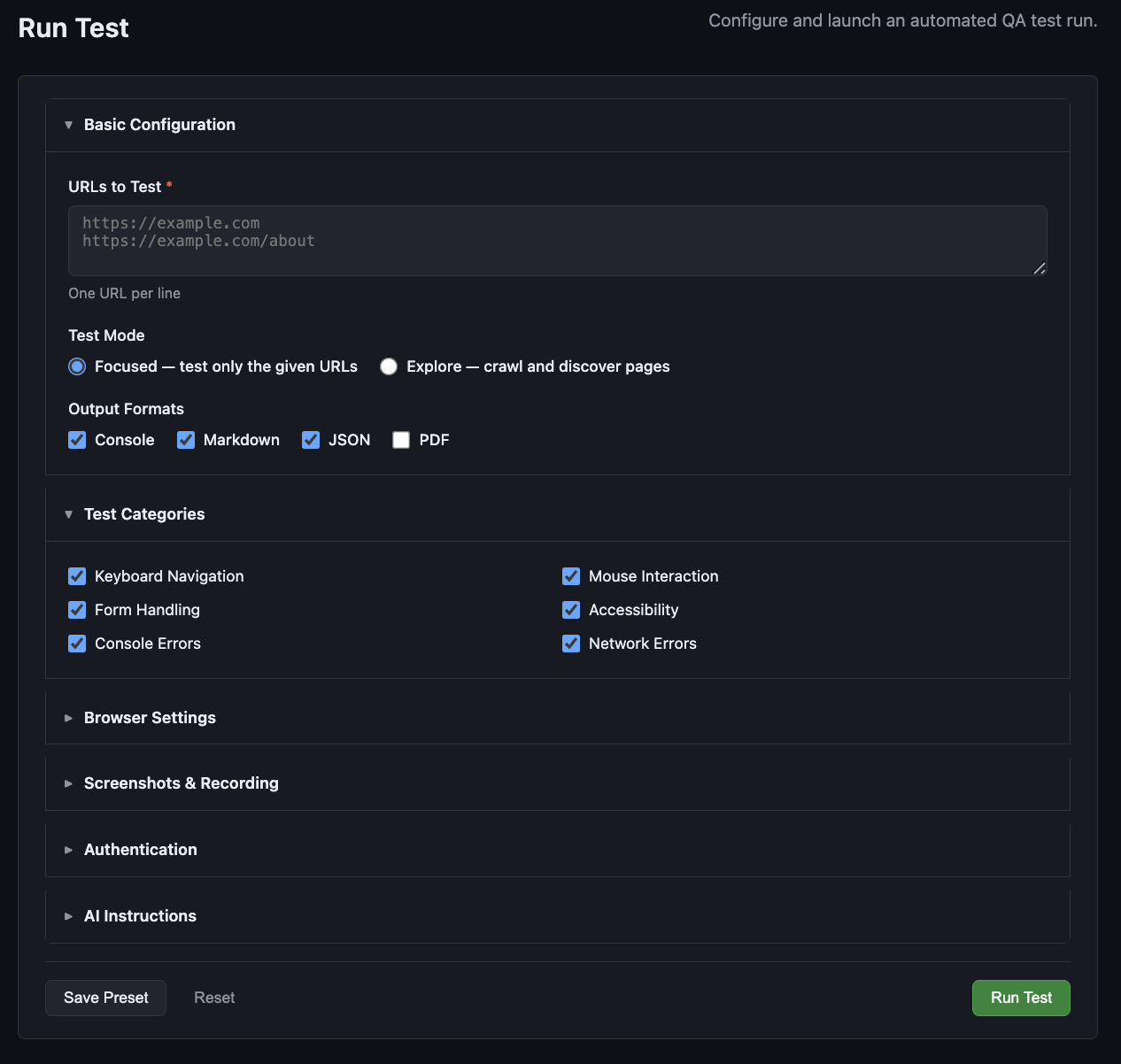
python -m qa_agent web              # http://127.0.0.1:5000
qa-agent-web --host 0.0.0.0 --port 8080 # custom bind- Configuration form with all CLI options
- Real-time streaming output (Server-Sent Events)
- Stop a running test mid-run
- Browse past sessions grouped by domain
- Session detail: findings table, severity breakdown, screenshot gallery, report downloads
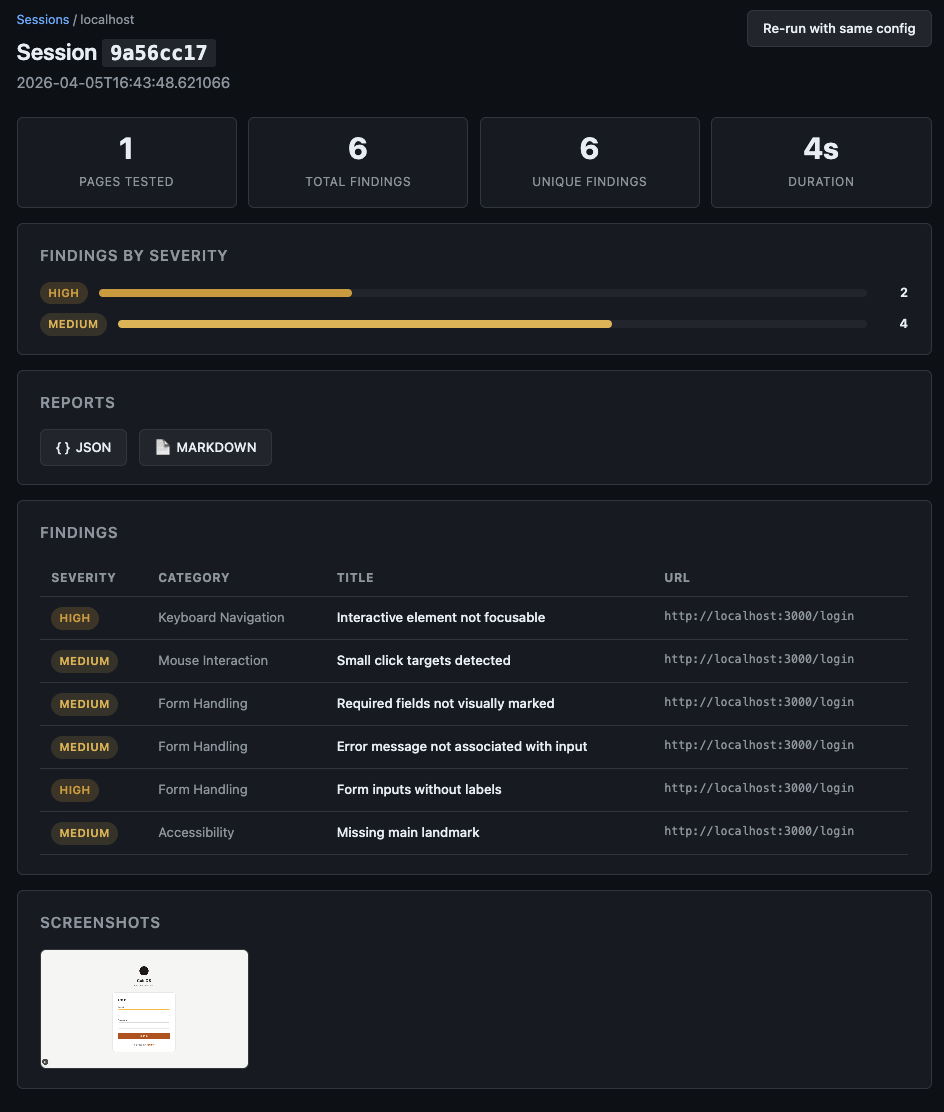
No authentication — intended for local or internal use only.
Output is written to output/ by default. CLI sessions appear in the web UI automatically (JSON is always written).
The web server exposes a JSON API at http://127.0.0.1:5000 (default).
# Launch a test run
curl -X POST http://127.0.0.1:5000/api/run \
  -H "Content-Type: application/json" \
  -d '{"urls": ["https://example.com"]}'
# → {"job_id": "a1b2c3d4", "status": "running", "stream_url": "/api/stream/a1b2c3d4"}

# Stream live output (Server-Sent Events)
curl -N http://127.0.0.1:5000/api/stream/a1b2c3d4

# List past sessions
curl http://127.0.0.1:5000/api/sessions?limit=10
→ Full API reference — all endpoints, request body schema, and SSE event types.
qa-agent --version
qa-agent --helpqa-agent --mode focused https://example.com # default — test only given URLs
qa-agent --mode explore https://example.com # crawl and test discovered pagesTest multiple pages in parallel with cooperating workers. Each worker drives its own browser, so memory and CPU scale with the worker count (capped at 16).
qa-agent --workers 4 --mode explore https://example.com # 4 pages at a timeRun several independent sessions concurrently from a JSON spec file. Each entry
needs urls plus optional per-run overrides (mode, max_depth, max_pages,
instructions, workers); all other settings come from the command-line flags.
qa-agent --batch-file runs.json --pool-size 4[
{"urls": ["https://example.com"], "mode": "explore", "workers": 4},
{"urls": ["https://other.test/login"], "instructions": "Check the checkout flow"}
]| Flag | Default | Description |
|---|---|---|
--workers N |
1 |
Concurrent page-workers per run (max 16) |
--batch-file FILE |
— | JSON file of multiple runs to execute concurrently |
--pool-size N |
4 |
Max concurrent runs for --batch-file (max 8) |
--rate-limit N |
3.0 |
Max page navigations/sec to any single host (0 = unlimited) |
Total live browsers ≈
pool-size × workers, so size both with that multiplicative cost in mind. The web API accepts the sameworkersvalue in thePOST /api/runbody, and the pool size is set server-side via theQA_AGENT_JOB_POOL_SIZEenvironment variable.
By default, navigations to any single host are throttled to 3 requests/second
across all workers and batch jobs, to avoid overwhelming dev/staging servers
with "too many connections" when running with many concurrent browsers. Raise
or disable this with --rate-limit (e.g. --rate-limit 10 or --rate-limit 0
for unlimited). The limit applies only to page navigations (page.goto()), not
in-page interactions like clicks or form fills. The web server uses the same
3 req/s default, overridable via the QA_AGENT_RATE_LIMIT environment variable.
| Flag | Default | Description |
|---|---|---|
--max-depth N |
3 |
Max link depth |
--max-pages N |
100 |
Max pages to test |
--max-interactions N |
50 |
Max interactions per page |
--allow-external |
off | Follow links to other domains |
--ignore PATTERN |
— | URL regex to skip (repeatable) |
qa-agent --auth "user:pass@https://example.com/login" https://example.com/dashboard
qa-agent --auth-file auth.json https://example.com
qa-agent --cookies cookies.json https://example.com
qa-agent --header "Authorization: Bearer token123" https://example.com
auth.json schema
{
  "username": "testuser",
  "password": "testpass",
  "auth_url": "https://example.com/login",
  "username_selector": "input#email",
  "password_selector": "input#password",
  "submit_selector": "button[type=submit]"
}qa-agent --output console,markdown,json,pdf https://example.com
qa-agent --output-dir ./reports https://example.comDefault: console,markdown. JSON is always written regardless of --output (for web UI discovery). Output is organized as output/{domain}/{session_id}/qa_reports|screenshots|recordings.
PDF requires the
[pdf]extra. Falls back to Markdown if WeasyPrint is not installed.
qa-agent --screenshots       https://example.com  # on errors
qa-agent --screenshots-all   https://example.com  # every interaction
qa-agent --full-page         https://example.com  # full-page captures
qa-agent --record https://example.com # session videoqa-agent --no-headless # visible browser window
qa-agent --viewport 1920x1080 # default: 1280x720
qa-agent --timeout 60000 # ms, default: 30000# Skip standard suites
qa-agent --skip-keyboard https://example.com
qa-agent --skip-mouse https://example.com
qa-agent --skip-forms https://example.com
qa-agent --skip-accessibility https://example.com
qa-agent --skip-errors https://example.com
# Enable opt-in suites
qa-agent --wcag-compliance https://example.com| Flag | Default | Description |
|---|---|---|
--llm {anthropic,openai} |
anthropic |
LLM provider for AI instructions |
--ai-model MODEL |
provider default | Model override (claude-sonnet-4-6 / gpt-4o) |
--no-cache |
off | Bypass the 24-hour plan cache |
Six built-in suites cover keyboard navigation, mouse interaction, form handling, accessibility (WCAG), runtime error detection, and an opt-in WCAG 2.1 AA compliance audit. Five run by default; enable the sixth with --wcag-compliance.
→ Detailed test-by-test reference
{
  "meta": {
    "session_id": "a1b2c3d4",
    "start_time": "2024-01-15T10:30:00",
    "duration_seconds": 45.2
  },
  "summary": {
    "pages_tested": 5,
    "total_findings": 12,
    "findings_by_severity": { "high": 2, "medium": 5, "low": 5 }
  },
  "findings": [...]
}| Level | Meaning |
|---|---|
CRITICAL |
Security issues, data loss |
HIGH |
Major usability blockers |
MEDIUM |
UX problems, accessibility issues |
LOW |
Minor improvements, best practices |
INFO |
Informational observations |
# GitHub Actions example
- name: Run QA Tests
  env:
    ANTHROPIC_API_KEY: ${{ secrets.ANTHROPIC_API_KEY }}   # or OPENAI_API_KEY
  run: |
    pip install qa-agent
    qa-agent --output json --output-dir ./qa-results https://staging.example.com

- name: Upload Results
  uses: actions/upload-artifact@v4
  with:
    name: qa-results
    path: ./qa-results/
Exits with code 1 when critical or high severity issues are found, failing the CI step automatically. See Exit Codes.
Omit
--instructions/--instructions-fileand the API key env vars if you only need standard tests.
| Code | Meaning |
|---|---|
0 |
All tests passed (no critical/high findings) |
1 |
Critical or high severity issues found |
2 |
Error running tests |
130 |
Interrupted (Ctrl+C) |
Chromium is installed automatically on first run. If reinstalling is needed:
playwright install chromiumIf automatic installation fails, run the above command manually.
pip install "qa-agent[web]"Required for qa-agent-web and python -m qa_agent web.
pip install "qa-agent[pdf]"Falls back to Markdown silently if WeasyPrint is absent.
No extra packages are needed — LLM calls use Python's built-in urllib. You only need a valid API key for your chosen provider:
export ANTHROPIC_API_KEY=sk-ant-...   # for --llm anthropic (default)
export OPENAI_API_KEY=sk-...          # for --llm openai
If the key is missing or the API call fails, qa-agent prints a warning and continues with standard tests.
Requires 3.10+. Check with python --version.
| Document | Description |
|---|---|
| Architecture | System architecture and how to extend QA Agent |
| Development Guide | Detailed development setup, testing, and build processes |
| Python API Reference | Programmatic usage for embedding QA Agent in Python code |
| Test Categories | Detailed test-by-test reference |
| Web API | Full REST API documentation |
| Contributing | Contribution guidelines and pull request process |
MIT — Copyright (c) 2026 Bill Richards. See LICENSE.