A ROS2 package for monitoring TurtleBot3 navigation performance in real time and adapting navigation behavior when the robot struggles in difficult environments.
Built with ROS2 Humble, Nav2, Gazebo, torch and Docker.
This package continuously watches the robot during navigation and collects performance metrics such as:
- navigation time
- distance to goal
- recovery frequency
- path efficiency
- estimated battery usage
Based on these metrics, the system can dynamically adjust navigation behavior during runtime and predicts navigation risk based on its current environment.
The goal is to make TurtleBot3 navigation more stable in narrow corridors, indoor maps and recovery-heavy situations.
The project comes with a Docker environment so setup stays simple and consistent across systems.
The container already includes:
- ROS2 Humble
- TurtleBot3 packages
- Gazebo
- Nav2
- RViz2
- torch
- other required Python dependencies
The Docker setup also supports GUI forwarding so Gazebo and RViz can run directly from the container.
Configuration parameters are separated into YAML files for easier tuning and experimentation.
You can check the config folder for detailed parameter descriptions.
Collects and publishes live navigation metrics.
Tracks:
- path execution time
- goal accuracy
- path length
- recovery behavior frequency
- estimated battery consumption
- robot velocity
- navigation status
Also logs all collected data into CSV files with timestamps.
Adjusts navigation parameters dynamically during runtime based on robot behavior.
Implemented adaptive behaviors:
- reducing maximum velocity when the robot frequently gets stuck
- switching to safer navigation settings in narrow areas
- corridor and narrow-passage handling
- wall escape behavior for difficult corners and local minima
- dynamic local costmap adjustments
- conservative recovery handling
Runs a small LSTM-based risk prediction model during navigation.
The model looks at recent navigation metrics and predicts whether the robot is entering a risky navigation state.
The risk label is built from simple navigation signals:
- slow goal progress
- obstacle being too close
- high environment complexity
- narrow corridor situation
- poor obstacle avoidance efficiency
Each signal contributes to a final navigation risk score.
If the score is high enough, the sample is marked as risky.
Runs a small Flask web dashboard for live monitoring.
The dashboard shows current navigation metrics, adaptive controller state and ML risk prediction output in the browser.
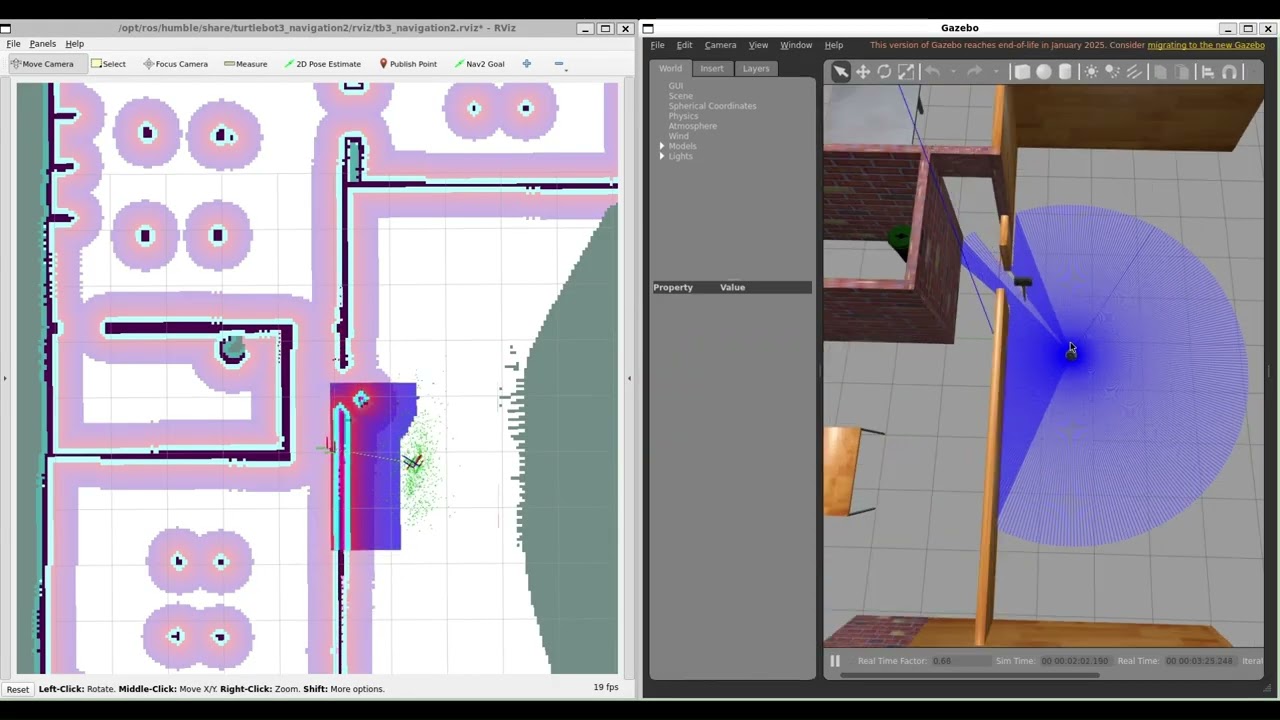
Publishes RViz markers for live monitoring.
Displays:
- current navigation status
- navigation mode
- goal information
- path visualization
- recovery and stuck states
- live metric overlays
Useful for debugging and observing adaptive behaviors in real time.
The package includes multiple environments for testing:
- TurtleBot3 House
- obstacle maps
- Maze world, used from https://github.com/AmeyaB2005/Turtlebot3_Maze_Navigator
These are useful for testing adaptive navigation behavior under different conditions.
git clone https://github.com/anilegin/TurtleBot3-Navigation-Metrics.git
cd TurtleBot3-Navigation-Metricsdocker build -t tbot3_humble .docker run -it -d \
--name tb3_container \
-p 5000:5000 \
--privileged \
-e DISPLAY=$DISPLAY \
-e LIBGL_ALWAYS_SOFTWARE=1 \
-e QT_X11_NO_MITSHM=1 \
-v /tmp/.X11-unix:/tmp/.X11-unix \
-v $(pwd):/root/tbot3_ws \
tbot3_humbleThis starts the container in detached mode and exposes the Flask dashboard on port 5000.
For each terminal, enter the running container:
docker exec -it tb3_container bashThen source ROS2 and the workspace:
source /opt/ros/humble/setup.bash
source install/setup.bash
You need to do this in every new terminal before running ROS2 commands.
docker exec -it tb3_container bash
source /opt/ros/humble/setup.bash
source install/setup.bash
ros2 launch tbot3_nav_monitor turtlebot3_world.launch.pydocker exec -it tb3_container bash
source /opt/ros/humble/setup.bash
source install/setup.bash
ros2 launch turtlebot3_navigation2 navigation2.launch.py use_sim_time:=True map:=maps/tbot3_world.yamldocker exec -it tb3_container bash
source /opt/ros/humble/setup.bash
source install/setup.bash
ros2 launch tbot3_nav_monitor monitor.launch.pydocker exec -it tb3_container bash
source /opt/ros/humble/setup.bash
source install/setup.bash
ros2 run tbot3_nav_monitor web_dashboardOpen the dashboard from your browser:
http://127.0.0.1:5000
This will show live monitoring markers and navigation state information.
- The first Gazebo launch can take some time depending on Docker and GPU setup.
- If Gazebo opens slowly on the first run, wait a bit before restarting anything.
- RViz and Gazebo require GUI forwarding to be enabled correctly on the host machine.
tbot3_nav_monitor/
├── models/
├── maps/
├── worlds/
├── src/
├   ├── tbot3_nav_monitor/
├   ├    ├── config/
├   ├    ├── launch/
├   ├    └── tbot3_nav_monitor/ # where nodes resides
├   └── tbot3_nav_monitor/
├        ├── include/
├        ├── msg/ #where message type resides
├        └── src/
├── Dockerfile
└── run_turtlebot.ps1
If you encounter library errors install these libraries again.
python3 -m pip install --upgrade pip
python3 -m pip install \
numpy==1.26.4 \
scipy==1.10.1 \
scikit-learn==1.3.2 \
joblib==1.3.2 \
torch \
torchvision \
torchaudio \
flask