






CrossMacro is a cross-platform mouse and keyboard macro recorder and player with macro editor, text expansion, shortcuts, and scheduling.
- Linux support for Wayland and X11
- Windows support (Microsoft Store, winget, portable binary)
- macOS support
- Features
- Screenshots
- Quick Start
- Installation
- CLI Usage
- Troubleshooting
- Contributing
- Security
- Contributors
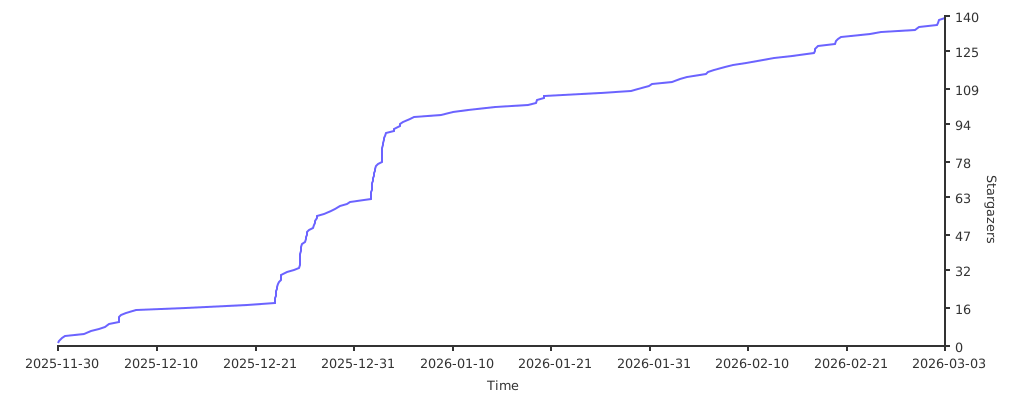
- Star History
- License
- Community
- Mouse event recording (clicks and movement)
- Keyboard event recording
- Macro playback with pause/resume
- Loop mode, repeat count, and repeat delay controls
- Playback speed control (
0.1xto10.0x) - Macro editor with undo/redo, coordinate capture, and action reordering
- Text expansion shortcuts (for example
:mail->email@example.com) - Shortcut-bound macro execution (keyboard key, mouse button, or key combo)
- Shortcut modes: toggle and run-while-held
- Shortcut loop controls: repeat count and repeat delay
- Scheduled task execution
- Save and load
.macrofiles - Optional system tray controls
- Theme support (Classic, Latte, Mocha, Dracula, Nord, Everforest, Gruvbox, Solarized, Crimson)
- Customizable global hotkeys:
F8start/stop recordingF9start/stop playbackF10pause/resume playback
- CLI and headless workflows
| Playback | Text Expansion | Shortcuts |
|---|---|---|
 |
 |
 |
| Scheduled Tasks | Editor | Settings |
 |
 |
 |
- Install CrossMacro.
- Launch the app.
- Press
F8to start/stop recording. - Press
F9to start/stop playback. - Press
F10to pause/resume playback. - Save your macro and optionally bind it to a shortcut.
Download page for all release binaries:
| Platform | Channel | Command / Link | Notes |
|---|---|---|---|
 |
Flathub | Storeflatpak install flathub io.github.alper_han.crossmacro |
Sandboxed install |
 |
.deb |
sudo apt install ./crossmacro*.deb |
Download from Releases |
 |
.rpm |
sudo dnf install ./crossmacro*.rpm |
Download from Releases |
 |
AUR | yay -S crossmacroparu -S crossmacro |
Community package |
 |
AppImage | Releases | One-time setup required |
 |
nixpkgs | nix profile install nixpkgs#crossmacro |
UI package only |
 |
flake | nix run github:alper-han/CrossMacro |
UI-only convenience run |
 |
Store | Store | Managed updates |
 |
winget | winget install AlperHan.CrossMacro |
CLI install |
 |
Portable EXE | Releases | Self-contained |
 |
.dmg |
Releases | Drag to Apps |
AppImage users: Run the quick one-time setup in AppImage Setup before first launch. Flatpak users (Wayland): On first launch, CrossMacro may show a Wayland Setup Required dialog and run Quick Setup for device permissions.
CrossMacro supports two Linux runtime modes:
- Daemon-backed mode: the preferred packaged mode. The app talks to
crossmacro.serviceover/run/crossmacro/crossmacro.sock, while the daemon service user keeps Linux device access. - Direct device mode: an intentional fallback for channels like AppImage, and for some
Wayland/sandbox scenarios when daemon-backed mode is unavailable. In this mode the app process
itself needs access to
/dev/uinputand, for recording or hotkeys, readable/dev/input/event*.
On X11, CrossMacro tries the native X11 capture and playback backends first. A supported native X11 session doesn't require the daemon or direct device fallback.
After installing daemon packages on Linux, make sure your desktop user belongs to the
crossmacro group. That group grants access to the daemon socket, not to raw input
devices:
sudo usermod -aG crossmacro $USER
# Log out and back in, or reboot, before starting CrossMacro again
Package scripts try to add the installing user to crossmacro when they can identify that
user. If the package output says auto-add couldn't be confirmed, run the command above
manually, then log out and back in or reboot so the current session gets the new group.
AUR, .deb, and .rpm packages try to enable/start crossmacro.service during install
on systemd hosts. Arch and CachyOS packaging provisions the crossmacro sysusers entry
before service start or restart. If your environment skips service setup (for example
non-systemd/chroot), run manually:
sudo systemctl enable --now crossmacro.serviceThe daemon service user keeps device access separately for /dev/input/event* and /dev/uinput
(typically via input and, on some distros, uinput supplementary groups). Normal users should
only need membership in crossmacro to use daemon-backed mode. Don't weaken the daemon socket
permissions as a workaround.
AppImage currently uses direct device mode, not the packaged daemon-backed service path. That means the user session itself needs the Linux input permissions described below.
If you use the AppImage build on Linux, complete this one-time setup before first launch:
# Add uinput rule
echo 'KERNEL=="uinput", GROUP="input", MODE="0660", OPTIONS+="static_node=uinput"' | sudo tee /etc/udev/rules.d/99-crossmacro.rules

# Reload udev rules
sudo udevadm control --reload-rules && sudo udevadm trigger

# Add your user to input group
sudo usermod -aG input $USER
Then reboot/re-login and run:
chmod +x CrossMacro-*.AppImage
./CrossMacro-*.AppImage
Note: adding a user to input grants direct access to input devices.
For Flatpak on Wayland, CrossMacro supports a hybrid startup path:
- Daemon-backed mode when the host daemon socket is exposed at
/run/crossmacro/crossmacro.sock - Direct device mode when the daemon path is unavailable and temporary device access is granted to the user session
If required permissions are missing, app startup shows Wayland Setup Required and can run Quick Setup automatically.
Quick Setup enables the direct device mode fallback by using flatpak-spawn --host pkexec to apply session ACLs on the host:
rwaccess to/dev/uinput(or/dev/input/uinputif present)raccess to/dev/input/event*
If Quick Setup is denied or fails, you can apply the same permissions manually on host:
sudo modprobe uinput
for p in /dev/uinput /dev/input/uinput; do [ -e "$p" ] && sudo setfacl -m "u:$USER:rw" "$p"; done
for p in /dev/input/event*; do [ -e "$p" ] && sudo setfacl -m "u:$USER:r" "$p"; done
If setfacl is missing, install your distro's acl package first.
In other words: packaged daemon installs prefer daemon-backed mode, while AppImage and some Flatpak/Wayland scenarios intentionally rely on direct device mode when the daemon path is unavailable.
nix run github:alper-han/CrossMacroandnix profile install nixpkgs#crossmacroprovide the UI package only.- The daemon-backed Linux model on Nix is provided by the NixOS module in
flake.nix, which provisions thecrossmacro.service, daemon user, group membership, and runtime directory policy.
Nixpkgs (unstable)
nix profile install nixpkgs#crossmacroRun directly from this repo flake
nix run github:alper-han/CrossMacroUse as flake input in your own flake.nix
{
  inputs.crossmacro.url = "github:alper-han/CrossMacro";

  outputs = { self, crossmacro, ... }:
  let
    system = "x86_64-linux";
  in {
    packages.${system}.crossmacro = crossmacro.packages.${system}.default;
  };
}
NixOS module
{
  inputs.crossmacro.url = "github:alper-han/CrossMacro";

  outputs = { nixpkgs, crossmacro, ... }: {
    nixosConfigurations.myhost = nixpkgs.lib.nixosSystem {
      system = "x86_64-linux";
      modules = [
        crossmacro.nixosModules.default
        ({ ... }: {
          programs.crossmacro = {
            enable = true;
            users = [ "yourusername" ];
          };
        })
      ];
    };
  };
}
Windows notes
Update an existing winget install:
winget upgrade -e --id AlperHan.CrossMacroFor Store and fresh-install options, use the Quick Install Matrix above.
macOS notes
- Download
.dmgfrom Releases. - Drag CrossMacro to Applications.
- Launch and grant Accessibility permissions when prompted.
If Gatekeeper blocks first launch:
xattr -cr /Applications/CrossMacro.appcrossmacro --help
crossmacro --version
crossmacro play ./demo.macro --speed 1.25 --repeat 3
crossmacro macro validate ./demo.macro
crossmacro macro info ./demo.macro
crossmacro doctor --json
crossmacro settings get
crossmacro settings get playback.speed
crossmacro settings set playback.speed 1.25
crossmacro schedule list
crossmacro schedule run <task-guid>
crossmacro shortcut list
crossmacro shortcut run <shortcut-guid>
crossmacro record --output ./recorded.macro --duration 10
crossmacro headlessFor desktop autostart, use crossmacro --start-minimized. When tray icon support is available, CrossMacro starts hidden to tray; otherwise it starts as a minimized window.
crossmacro doctor --json reports daemon-backed readiness separately from direct device
readiness. Direct input checks can pass while daemon IPC still warns or fails, for example
when /run/crossmacro/crossmacro.sock exists but your current login session isn't in the
crossmacro group yet. In that case, inspect the daemon-specific checks and details such
as socket status, required group, current session groups, and remediation text. Direct
device readiness doesn't fix daemon socket permission problems.
Run Syntax and Options
Syntax:
crossmacro run --step <step> [--step <step> ...] [--file <steps-file>] [--speed <value>] [--countdown <sec>] [--timeout <sec>] [--dry-run] [--json] [--log-level <level>]
crossmacro run <step-command> [<step-command> ...] [--file <steps-file>] [--speed <value>] [--countdown <sec>] [--timeout <sec>] [--dry-run] [--json] [--log-level <level>]
Options:
--step: Add one run step (repeatable).--file: Load steps from file (one step per line,#comments allowed).--speed: Playback speed multiplier (0.1..10.0).--countdown: Countdown before execution in seconds (>= 0).--timeout: Command timeout in seconds (>= 0).--dry-run: Parse/compile/validate only, do not send input.--json: Print machine-readable JSON result.--log-level: Override log level (Debug|Information|Warning|Error).
Run Step Commands and Examples
Step commands:
move abs <x> <y>,move rel <dx> <dy>click <button>,down <button>,up <button>click current <button>,down current <button>,up current <button>scroll <up|down|left|right> [count]key down <key>,key up <key>,tap <combo>,type <text>delay <ms>,delay random <min> <max>,delay random <min>..<max>set <name> <value>orset <name>=<value>inc <name> [amount],dec <name> [amount]repeat <count> { ... }if <left> <op> <right> { ... } else { ... }while <left> <op> <right> { ... }for <var> from <start> to <end> [step <n>] { ... }break,continue,}
Examples:
crossmacro run --step "move abs 800 400" --step "click left" --dry-run
crossmacro run --step "set n=3" --step "repeat $n {" --step "click left" --step "delay random 20 50" --step "}"
crossmacro run --step "set i=0" --step "while $i < 10 {" --step "click left" --step "inc i" --step "}"
crossmacro run --step "for i from 0 to 10 {" --step "if $i == 3 {" --step "continue" --step "}" --step "if $i == 8 {" --step "break" --step "}" --step "click left" --step "}"
crossmacro run --step "move abs 800 400" --step "click current left"
crossmacro run --file ./steps.txt --jsonDaemon not running (Linux)
systemctl status crossmacro.service
sudo systemctl start crossmacro.service
sudo systemctl enable crossmacro.service
Linux input permissions
groups | grep crossmacro
sudo usermod -aG crossmacro $USER

stat -c '%A %a %U:%G %n' /dev/uinput
id crossmacro
sudo -u crossmacro test -w /dev/uinput && echo writable || echo not-writable
Reboot or re-login after group changes.
If crossmacro doctor --json shows direct input readiness as OK but daemon access as a
warning or failure, fix the daemon-specific issue. Most often this means joining the
crossmacro group and starting a new login session. Direct uinput access and direct
fallback mode don't grant access to /run/crossmacro/crossmacro.sock.
If daemon cannot write /dev/uinput, add service user to required groups and restart:
sudo usermod -aG input crossmacro
sudo usermod -aG uinput crossmacro
sudo systemctl restart crossmacro.service
GNOME Wayland extension
GNOME Wayland needs a shell extension for absolute mouse position. Log out/in after first-time setup if prompted.
Wayland cursor positioning options
CrossMacro works on Wayland.
- Absolute cursor position is available on:
- Hyprland (IPC)
- Wayfire (IPC,
ipc+ipc-rulesplugins, v0.10+)- Wayfire IPC discovery checks
WAYFIRE_SOCKET, thenXDG_RUNTIME_DIR, then temp-directory socket candidates.
- Wayfire IPC discovery checks
- KDE Plasma (D-Bus)
- GNOME (Shell Extension)
- Niri and COSMIC are detected for screen resolution only; they do not currently expose a safe absolute cursor-position API for recording.
- If an absolute cursor provider is unavailable, CrossMacro automatically falls back to relative-position mode for recording. Macros that contain absolute-coordinate events require an absolute-capable backend for playback.
- You can force relative mode with Force Relative Coordinates.
- You can disable origin move at recording start with Skip Initial 0,0 Position.
- For the smoothest relative-position playback, disable pointer acceleration and use a flat pointer profile in your desktop or compositor settings; accelerated profiles can distort replayed movement deltas.
Absolute and relative coordinate events can be mixed in one macro. Current-position clicks do not carry coordinates and execute at the live cursor position.
Enable debug logging
sudo systemctl kill -s USR1 crossmacro.service
journalctl -u crossmacro.service -f
Send USR1 again to restore normal log level.
Polkit on minimal systems
which pkcheck
pkcheck --version
Install polkit to enable daemon mode on minimal systems.
Input capture conflicts (Linux)
Some applications can lock input devices exclusively. If capture/playback behaves inconsistently, pause conflicting tools (example: GPU Screen Recorder), test CrossMacro, then resume them.
- Contribution guide: CONTRIBUTING.md
- Issues (bugs/features): https://github.com/alper-han/CrossMacro/issues
- Discussions (questions/ideas): https://github.com/alper-han/CrossMacro/discussions
- Security policy: SECURITY.md
- Private vulnerability reporting: https://github.com/alper-han/CrossMacro/security/advisories/new
Thanks to everyone who contributes to CrossMacro.
Licensed under GPL-3.0-only. See LICENSE.
