Releases: Twombs/GOGcli-GUI
v2.4 - Full Release

Latest v2.4 update includes a bugfix & improvement.
An increase from 15 to 20 for the DOWNLOAD LIST games limit.
Bugfix for the VALIDATE NOW option, where MD5 and Size values for files in the database, were being skipped when extracting from the Manifest.
See prior releases for other information.
v2.3 - Full Release
Latest v2.3 update includes a new feature & improvements.
When validation occurs, the result is now recorded in a 'Validation.txt' file in the game folder, and it includes values for file size and checksum. NOTE - This file can be added to with future downloads for the game, including updates. This is useful where file sizes and checksums have been replaced in the manifest with new versions, though if the Database had been enabled, then those values should exist there after each download.
When validating a game folder, independently from what automatically occurs after downloading, the number and total of files being validated is now shown.

See prior releases for other information.
v2.2 - Full Release
Latest v2.2 update includes a new feature & bugfix.
Discovered the VALIDATE FILE and VALIDATE GAME button processes were skipping files found in the database, which has now been corrected.
The 'Game Files Selector' window now has some right-click 'Remove' options.

See prior releases for other information.
v2.1 - Full Release
Update includes improvements & bugfix.
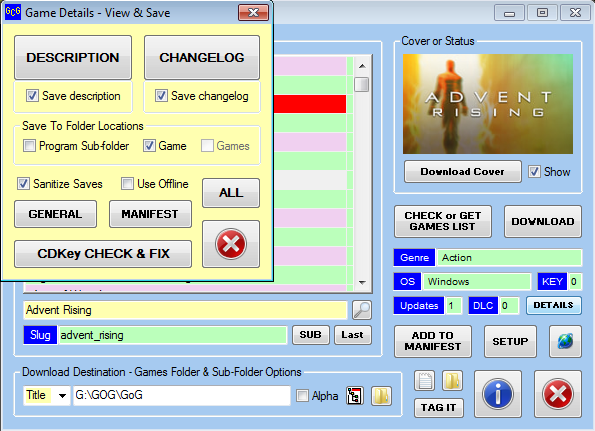
Discovered the CHANGELOG button in the DETAILS window wasn't working, so corrected that.
The ALL button in the DETAILS window can now save an 'Everything.txt' file to the program, Game or Games folder etc. This includes a new program sub-folder called 'Details'.
The 'Unicode Replacements' edit field in the DETAILS window, which was never implemented for use, has now been removed (will no longer be needed).

The 'Santitize Saves' (purge) option in the DETAILS window, has now been improved to include a proper unicode text converter. It now also strips out any HTML from the text.
Other minor changes.
v2.0 - Full Release
Major Update (ambitious features one). Many changes & improvements.
PLEASE NOTE - The tutorial has not been updated in a while, so doesn't reflect new changes listed in this version, and wasn't fully complete in any case, as regards prior versions. You can however see the following notes & screenshots as a supplementary tutorial ... somewhat so anyway.
Added an 'Exists' database.
This involves a new enabling option on the SETUP window, and new sub-option.

And another right-click menu option on the ADD TO MANIFEST button. This changes the button to ADD TO DATABASE, which enables add to database browsing etc.


One or more game titles can be processed ... individual or full list (from specified starting point). You browse to an individual game folder (with files) (COMPLETED), or select the main game folder of game title sub-folders (INCOMPLETE).


A 'Warning Alert & Advice' dialog prompt enabled for game titles added to the database, that contain a keyword (chapter, episode, part, volume) that could indicate a multi game folder title.

Downloaded files that pass validation, are added to the new 'Exists' database.
Validating a File or Game can add to the new 'Exists' database, dependent on success or a query.
The 'Games' list has a new right-click sub-menu 'Database' with two entries (Relax and View). The 'Relax' option mirrors the SETUP window one ... change one and the other is also changed.

The 'Game Files Selector' window now has a 'Relax' option, tied to that SETUP window (etc) option, but unlike them, is not a permanent change to the setting ... temporary only while the 'Selector' window remains open. This 'Relax' option if changed, reloads the files on the 'Selector' window.


What now shows on the 'Game Files Selector' window for downloading, is dependent on the new 'Enable' and 'Relax' options, and on what exists in the new 'Exists' database.
The '(Loading List)' splash now displays 'Checking Database' instead of 'Checking FIle Names'. This hopefully makes things a bit clearer. NOTE - If the download list on the 'Game Files Selector' window, is not being populated or displays fewer items than expected, then checking the Log file should explain why. Generally though, if a file has been downloaded before for a game, and no change (update) has been detected, then the file is skipped for downloading. If you want to re-download the same file, then a setting on the SETUP window needs to be disabled to allow this (the 'Enable the exists database for usage' option).
The program can now download the Changelog and Description for a game. This can occur during the game files download process, or manually via the DETAILS button options. See the SETUP window for the two new options.
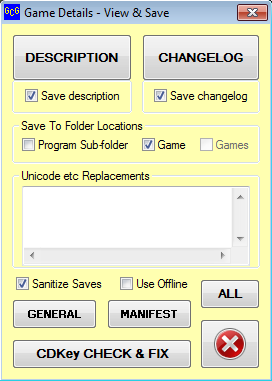
The DETAILS button now presents a 'Game Details' window, with some new & old (General) options. The new options allow viewing and or saving a Changelog.txt and Description.txt file, as well as viewing everything (ALL) about the selected game. The GENERAL button displays the previous DETAILS data etc. UPDATE - The 'Game Details' window, has now been further improved, with the addition of a MANIFEST button, to show the manifest entry for the selected game in a text file, plus a CDKey CHECK & FIX button, which rechecks the manifest for CDKeys for the current game, and saves the result if changed. The GENERAL button now also checks for further CDKey entries in the downloaded game data, and reports and saves if changes detected. NOTE - Unfortunately the manifest appears to only display one CDKey at most for a game, whereas included DLCs etc may also have CDKeys in reality. The GENERAL button process is the only method at present to overcome this issue, and it also offers to copy the 'Details.txt' file with its CDKey specifics, to the game folder.
The download progress field now displays some text related to current process (cover, changelog and description file downloading).
The program now recognizes v0.11.0 of gogcli.exe, but has had a lot of testing now. NOTE - It now recognizes up to v0.17.0, but testing is still in progress. I've only just started testing v0.12.0 ... but the others will occur soon.
BUGFIX for recent improvements related to CDKey (a wrong variable was used in one section of code, which caused a program crash ... no doubt a copy & paste adjustment issue).
The 'Game Files Selector' window for downloading now has UP and DOWN arrow buttons, for re-arranging the order of entries for a game on the list. (see the 'Game Files Selector' window image above)
Added a right-click list option, 'Check For Orphan Entries', under a new sub menu entry called 'The Manifest'. The 'Check & Fix' option has also been relocated there. Orphan entries can exist in your manifest, when GOG either remove or rename a game title in your library. If game data for the orphan title still exists via the GOG API, then the title if desired, can be restored to the 'Games List'. EDIT - Backups are now checked for the orphan entry, and restored from there if they exist, so a web connection and GOG API entry may not be required. NOTES - Even if an entry is restored, it should only be seen as short term temporary, and no guarantee of being able to retrieve data or files from GOG. If you are quick enough, you may be able to download the last listed file(s). Updating the 'Games' list will always remove restored entries, though 'Check For Orphan Entries' may be able to restore again.

The last restored entry is now selected after the 'Games' list reloads.
Added two more right-click options to the 'The Manifest' sub-menu entry. These enable viewing either the entire manifest in your web browser or just the manifest entry of selected game in a text file.
BUGFIX involving a check of the manifest at program start, to detect if Line Feeds have been replaced by Carriage Returns plus Line Feeds. If found, then corrections are made to the manifest. This issue should only possibly occur if the user has manually edited the manifest. Blank lines are checked for and removed from the manifest if found.
The right-click option for 'Lists' has now had the 'Games Updated' entry changed to a sub-menu, with two options - View List and Remove Duplicates. The 'Remove Duplicates' option is a new feature to reduce entries in the 'Updated.txt' file, if the user wants that to occur.
When the download button is in the 'DOWNLOAD LIST' state, clicking it again for a game already on the download list will remove it. NOTE - This is of course, with CTRL key held down while clicking.
If the 'Download Latest ...' option is enabled and 'DOWNLOAD LIST' button is clicked, then a query is now presented, so that the option (if not desired) can be skipped. NOTE - This has now been improved with the addition of a 'Warn' checkbox on the SETUP window. (see the 'Setup' window image above)
A 'Validate Now' option has been added for when the download button is in the 'DOWNLOAD LIST' state.

The FIND button process on the main window, now stores the last search text. To recall that search text for usage, the Title input field needs to be empty (before clicking the FIND button). It takes a second click to then do the search using that returned text.
NOTE - Because file names are dynamic to the download URL, the program was doing a double check just before downloading and where necessary amending the download list values. But now due to the additional database check (if enabled), the program needs to do the file name check earlier, before loading the download list of the 'Game Files Selector' window. User will be warned of an issue, or alerted to file name changes that will require a manifest update (entries replaced).
See prior releases for other information.
v1.9 - Full Release
Tidying up some loose ends update.
Bugfix for row color when removing a Tag.
The 'Games' list right-click menu has undergone a slight revamp. This involves reducing what is first shown, by creating more sub menus and relocating some existing entries to them.

I've added an additional sub menu called 'Lists', that gives easier access to 5 files.
(1) Latest Additions - List of games added since you first populated the 'Games' list. These are the games you see when cycling with the LAST button.
(2) Games Updated - This is the list of games, that GOG indicate as being updated, that gets new additions (including remaining old) every time you use the 'CHECK or GET GAMES LIST' button.
(3) CDKeys - List of Games and their CDKeys (Serial, Code, Redeem Link, etc) in INI file format.
(4) DLCs - List of Games with DLCs in INI file format (no DLC specifics just a count).
(5) Tags - A list of games, if any, that you have tagged, in INI file format.
The 'SUB' button has been improved to include a 'create a Patches' sub-folder option & query.


v1.8 - Full Release
New Feature Update & Some Changes.
From v1.8 onward, DLCs are detected during the adding or replacement of manifest entries, and stored in a 'DLCs.ini' file.
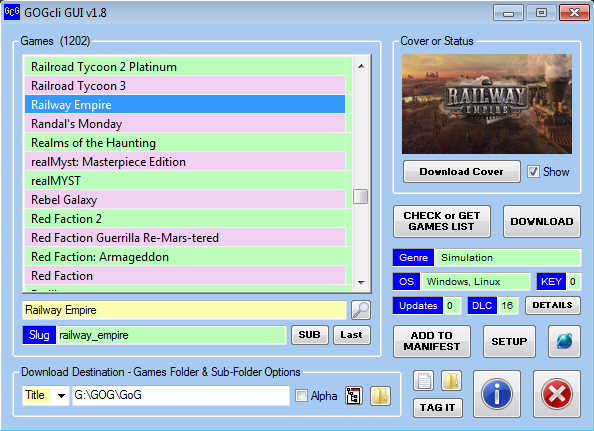
The main GUI has had the 'GAME DETAILS' button shrunk again and 'DETAILS' text is a smaller font size, to accommodate the 'KEY' field being swapped with the 'DLC' field. The 'DLC' field is wider now to show 2 digits if that is the case.
https://github.com/Twombs/GOGcli-GUI/blob/main/Screenshots/gogcli_main_12.png?raw=true
If a game is noted as having a DLC entry, the 'DLC' input field will show the count. NOTE - You may need to divide that count by the count of OS for the game, to get the true number of DLCs.
Added a once off DLC check to the 'Check & Fix The Manifest' right-click 'Games' list menu option process. This checks for DLCs in your manifest, for entries you have added, prior to using this version (v1.8) of GOGcli GUI. You can only use the DLC check once, without then needing to modify a value in the 'Settings.ini' file.
https://github.com/Twombs/GOGcli-GUI/blob/main/Tutorial/Tutor_46.png?raw=true

To see the DLCs, click the 'DETAILS' button. If shown a CDkey, then just click YES to continue and 'Get Game Details from GOG'. Either that or investigate the manifest ... or the download list window.
The 'CDkeys.ini' and 'DLCs.ini' files have been added to the backup regime, pairing with the manifest backup ... when that occurs, they occur.
v1.7 - Full Release
Overlooked Feature Update.
From v1.7 onward, CDKeys are detected during the adding or replacement of manifest entries, and stored in a 'CDkeys.ini' file.
The main GUI has had the 'GAME DETAILS' button shrunk to just 'DETAILS', and to its left is a new 'KEY' label and field.
If a game is noted as having a CDKey entry, the 'KEY' input field will show '1'.
https://github.com/Twombs/GOGcli-GUI/blob/main/Screenshots/gogcli_main_11.png?raw=true
To see the CDKey value, click the 'DETAILS' button. This shows you the key and allows copying it to the clipboard, or just continuing on with the previous 'Get Game Details from GOG' process.
https://github.com/Twombs/GOGcli-GUI/blob/main/Tutorial/Tutor_45.png?raw=true

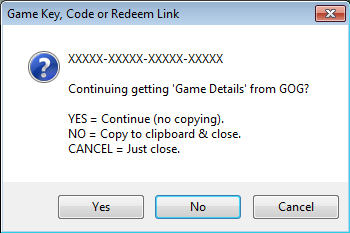
Added a once off CDKey check to the 'Check & Fix The Manifest' right-click 'Games' list menu option process. This checks for CDKeys in your manifest, for entries you have added, prior to using this version (v1.7) of GOGcli GUI. You can only use the CDKey check once, without then needing to modify a value in the 'Settings.ini' file.
https://github.com/Twombs/GOGcli-GUI/blob/main/Tutorial/Tutor_44.png?raw=true

v1.6 - 7th Full Release
New Features Update.
A backup regime has been implemented. Specific files are checked at program start, and if changed a numbered backup is created in a sub-folder called 'Backups'. Up to five backups are kept per file and cycled, with the oldest being replaced.
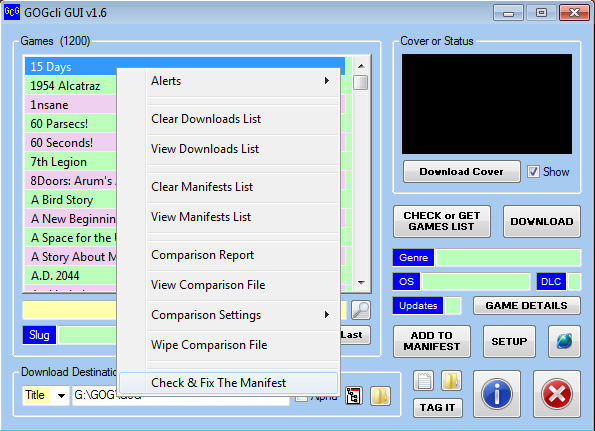
Added a 'Check & Fix The Manifest' right-click 'Games' list menu option. This checks the manifest for corruption, fixes any found and reports those instances. NOTE - No instances should be found with the current GOGcli GUI version, unless a much older version had been used (v1.0 or less).
https://github.com/Twombs/GOGcli-GUI/blob/main/Tutorial/Tutor_41.png?raw=true
https://github.com/Twombs/GOGcli-GUI/blob/main/Tutorial/Tutor_42.png?raw=true
https://github.com/Twombs/GOGcli-GUI/blob/main/Tutorial/Tutor_43.png?raw=true


v1.5 - 6th Full Release
Bugfix & Improvements Update.
Bugfix for download speed (forgot to reset the timer after a download completes).
The progress bar on the 'Game Files Selector' window, has had some improvements.
Bar is GREEN when downloading.
Bar is RED after MD5 checking.
Bar is YELLOW after zip checking.
Bar remains an incremental percentage when downloading, but changes to a green continuous scrolling marquee when MD5 or zip checking. It remains GREEN until each checking process has completed, then shows 100% and changes to either RED or YELLOW momentarily.
The count limit for 'MANIFEST LIST' has been upped from 10 to 20.
The count limit for 'DOWNLOAD LIST' has been upped from 10 to 15.
NOTE - In some ways these limits are somewhat arbitrary, except waiting time is increased while building a downloads list, before files are shown in the list on the 'Game Files Selector' window. Though in the case of the manifest list, it doesn't have that issue, so I may increase that limit again in another update ... depends on my usage desires or requirements ... probably.
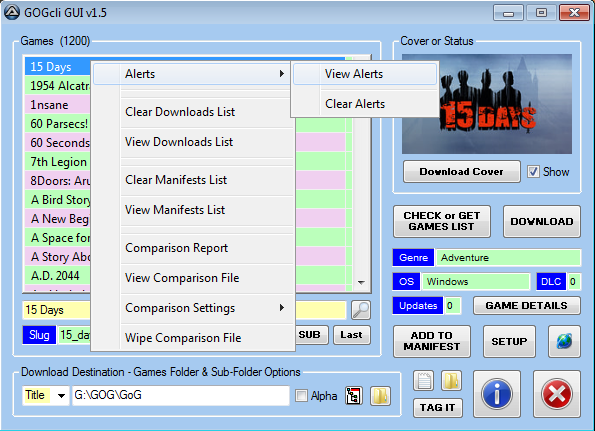
Discovered and fixed an issue with a possible file name change by GOG, that effects download reporting and checking. The program now checks for this, if the 'Download the latest game file information' option on the SETUP window is not enabled, and deals with it, and reports on it if found, which can be checked in the new 'Alerts.txt' file (also accessible via a 'Games' list right-click menu 'Alerts' option).
https://github.com/Twombs/GOGcli-GUI/blob/main/Tutorial/Tutor_40.png?raw=true
NOTE - Any alert is shown in the 'Cover or Status' field, until a game title is selected, and persists on program restart, until cleared via that right-click 'Alerts' menu option. This means you still get advised even after using a SHUTDOWN option.
https://github.com/Twombs/GOGcli-GUI/blob/main/Tutorial/Tutor_39.png?raw=true
IMPORTANT - You only ever get alerted. The 'Manifest.txt' file is not updated with the correct (changed) values. So it is recommended you do an 'ADD TO MANIFEST' for the game(s) affected, with the 'Download the latest game file information' option enabled, to replace existing.