Releases: Twombs/GOGcli-GUI
v2.0 - GetGameInfo

Improvements etc Update.

(v2.0)
Added an 'On Top' button for main program window.
Extended window minimize and disabling of controls to the 'GO' and 'Get Game ID' button processes.
If a GOG URL exists on the clipboard, it is now automatically copied to the floating input box field.
The input box has been widened.
Bugfix for bytes for Extras in manifest. Etc.
See previous releases and the GOG thread for further information etc.
v1.9 - GetGameInfo
Bugfix etc Update.

(v1.9)
Bugfix for bytes in the manifest, with the gogcli.exe query value taking priority.
Added a 'Replace' button for game images (Boxart & Cover), so that corrupted downloads can more easily be replaced.
See previous releases and the GOG thread for further information etc.
v1.8 - GetGameInfo
Major Update.


(v1.4)
Bugfix for installer file values in manifest. Program uses gogcli.exe and Cookie.txt files if found, to get file names and checksums for manifest entry.
(v1.5)
Bugfix for unicode in Type for manifest. Controls disabled while ADDing. Extended use of gogcli.exe etc for Extras.
(v1.6)
Added a 'Program Settings' window, accessed via 'Program Information' dialog. Manifest file name is now based on the game 'slug' (i.e. 15_days_manifest.txt). Slug title is now added to the manifest. NOTE - These changes add support for an adaption to my 'GOGcli GUI' program for independent downloading.
(v1.7)
Bugfix for OS for additional installer files in the manifest, same for Language and file Title.
(v1.8)
Program window can now be minimized during ADD, and DOS like Console windows can be hidden or minimized during ADD. The 'Settings.ini' file has been renamed to 'Options.ini', primarily so that the program can also work in the 'GOGcli GUI' folder, if you wish (NOTE - prior users will need to manually rename the 'Settings.ini' file). A 'Manifests' folder for created manifests is now created at startup if missing. Other minor improvements. Created manifest file can now be shown after ADD using either Notepad or a specified editor.
See previous releases and GOG thread for further information etc.
v1.3 - GetGameInfo
Top list entry is now blank for a quick way to clear all fields when selected.
If the URL field is empty and the GO button is clicked, an input query appears for using a GOG game web page URL to get the Game ID.
NOTE - There is now an experimental option to create a manifest entry for a game (disabled by default, but enabled in the 'Settings.ini' file ... change create=4 to create=1).
BUGFIX - The black image now displays for any game without a cover image.
v1.2 - GetGameInfo
Just a little side project that some might find useful.
Basically you can get details (including price and images) about a game, either via its Title or Game ID.


(v1.1)
Added an option to get ID(s) based on a full or partial game title.
(v1.2)
Added a query to set the required Country Code, plus a hidden setting to prevent the ID query at startup (see the 'Settings.ini' file entry ... skip=1 prevents). Option via the 'Program Information' dialog, to open the program folder. Other minor improvements.
BIG THANKS to WinterSnowfall etc for the required query commands.
https://www.gog.com/forum/general/ye_olde_gog_product_ids_public_api_charting_enterprise
v0.1 - ManifestToDB
This is a small supplementary program for a GOGcli GUI manifest.
It is likely the code from this program will eventually be incorporated into GOGcli GUI.
The program file, is meant to be run in the same folder as your 'Manifest.txt' file.
The program converts a manifest file into a TAB delimited text file (Manifest.log) and displays it ... though not all available fields are processed.

The number of games and total size is also shown.

You can also sort by game title or not.

NOTE - If you want to display your whole GOG library and total size of it, then you will need to ensure all game manifests have been downloaded and incorporated into the main manifest, before then running ManifestToDB.exe.
v2.8 - Full Release
Latest v2.8 update features an important BUGFIX, for the DOWNLOAD ALL process.
NOTES - First off let me apologize for a flaw in my program, especially to first time users, who would likely have all been impacted. Those already using my program likely weren't impacted, as I wasn't.
The flaw appears to be fixed, and just took renaming of one variable to do so. It seems I probably should not have used a generic name for it, as somewhere in related code I must have used that name already ... code that only runs, it seems, for first time users.
However, while that was certainly a big mistake of small proportions, perhaps my worst mistake was not running everything as a new user, before releasing the update with DOWNLOAD ALL, as doing so would have allowed me to detect the flaw.
In my defense, I can only say it had a been a long day with lots of coding, that involved tweaking and troubleshooting, and in the end I had run out of time and energy, to go that extra mile, and being so tired, my thinking at that point was no doubt a bit flawed too. In hindsight I probably should have waited another day, but my mind could not see an issue at that point ... oh sweet confidence ... ever the coder's nemesis.
See prior releases for other information.
v2.7 - Full Release
Latest v2.7 update features bugfixes, improvements & new options.
Finally remembered to remove the 'DOWNLOAD ALL is not yet fully supported!' from query text.

Improved display options for main window and 'Game Files Selector' window, including providing a 'Keep Minimized' option on that latter window.

NOTE - Even though the 'Game Files Selector' window can now be set to minimized, you will likely see a momentary flash of it each time it would have appeared. Unfortunately I am yet to find a way around that.
BUGFIX for missing elements in DOWNLOAD ALL log (i.e due to an EXE file in Extras, without a checksum value). A fix also occurs at startup for incomplete entries in the 'Downall.log' file.
The 'LOG' option for DOWNLOAD ALL has been renamed to 'LOG Viewer', and a 'View LOG' option has been added to open it as a text file instead.

Download removed, see v2.8.
See prior releases for other information.
v2.6 - Full Release
Latest v2.6 update features improvements & new options.
Added a persist query & option for disabling DOWNLOAD ALL.
Startup splash screen now appears sooner.
'Games Updated' has been relocated to its own 'Updated' right-click list menu, and a 'Mark Orange' option and process has been added.


'Database' right-click 'Games' list menu now has two more entries & processes - 'Display The Database' and 'Display The Previous'.
NOTE - The 'Display The Database' option may correct some entries in the 'Database.ini' file.


Download removed, see v2.8.
See prior releases for other information.
v2.5 - Full Release
Latest v2.5 update is a major one, that includes bugfixes & improvements.
The main element of this update is a DOWNLOAD ALL feature and options.

 --
-- 
 --
-- 
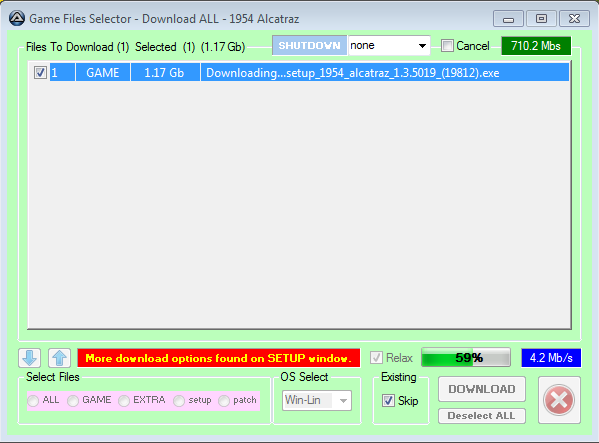
DOWNLOAD ALL includes support for Shutdown after the specified STOP session or last listed game. NOTE - The program does not try to detect different language version of files in Extras, so you will get different language manuals etc downloading, where they exist.
 --
-- 



Added several new right-click menu entries for the 'Games' list.
The 'Downloads' menu has three new entries - 'Excluded File Types', 'History Viewer' and 'Open the History file'.
The 'Excluded File Types' entry has further entries for file type extensions, which can be set to be skipped from appearing in the 'Game Files Selector' Window.
The 'History Viewer' entry runs a viewer for the new 'History.log' file that will have been created on first use of this update.
The 'History.log' file is also updated when downloading game files. NOTE - If your current 'Log.txt' file already contains download records, then they will be extracted, to populate the 'History.log' file when this update first runs. In which case a splash titled 'Creating History!' will show until complete.
Bugfix for wrong filename variable used for zip files during validation after downloading.
Now showing what game title is selected for the 'Validate Now' option query.
Several more improvements have been done to validating options and dialogs.
A 'Validations' right-click menu has been added, which has two sub items - 'History Viewer' and 'Open the History file'. This is a similar deal to that listed above for 'Downloads' history, with the 'Log.txt' file being scanned again, but for manually instigated validation process records. The resulting file 'Validations.log' will be added to when the user manually instigates a validation process, for a game file (VALIDATE FILE) or game files (VALIDATE GAME). NOTE - Currently, only files that have passed both Size and Checksum or Zip testing get added to the 'Validations.log' file. This is to prevent the accumulation of duplicates, and having to do replacements for some field entries.
An option to save CDkeys or Serials to file has been added to the SETUP window (enabled by default), and is used after downloading a game, to save to a 'Serial.txt' file where relevant. Also added a right-click list option to save CDkey to file for selected game.
 --
-- 
Added a 'Continue Query' for 9 seconds between each file being validated with the 'Validate Game' option.
Bugfix for row numbers on 'Game Files Selector' window after using right-click entry removal options.
Added a progress bar for manual validations.
DETAILS window now has an orange color.
BUGFIX for some instances where seconds did not have a leading zero.
See prior releases for other information.
Further Notes About DOWNLOAD ALL
After the last file for a game has been downloaded & (if set) validated, the 'Game Files Selector' window stays open a further 5 seconds, in case you want to see the results.
Every game on the list, regardless of settings will have its manifest entry added or updated. After that, your settings impact whether any of its files are downloaded. Only games that will be downloaded, get added to the count of processed, and impact a rest or stop. NOTE - Depending on your settings, you may note that more games are being checked than downloaded. This may especially be the case if you are only downloading Extras, as many games don't have extras.
Once a game has been checked and in most cases downloaded, its entry on the DOWNLOAD ALL list gets modified to reflect it has been processed. Basically the '0' or '1' (which you see in the 'Update' field or column in the Viewer) gets replaced by the word DONE. In subsequent starts after a stop, an entry that contains DONE gets skipped. NOTE - If you clicked 'Cancel' too early, and only some of a game's files were downloaded, you will need to replace DONE in the 'Downall.txt' file for that entry, with '0'. This will alloy that entry to be re-checked and processed on a subsequent start (restart).
Any existing files will be skipped and not re-downloaded.
The current game being checked, has its title shown in the caption bar of the program.
If STOP after a session is not set, then the DOWNLOAD ALL process continues, in abeyance with REST periods, until all the games are done or the user enables the 'Cancel' checkbox on the 'Game Files Selector' window.
ADVICE - If you want, you can open the 'Downall.txt' file prior to starting the DOWNLOAD ALL process, and prune any games you don't want downloaded (i.e. Demos or Prologues etc). Perhaps open that text file in a text editor that may make that easier using a search query. Just ensure each line has a Carriage Return plus Line Feed at the end.