This repository is a pnpm/Turborepo workspace that contains the camNC application and a collection of supporting packages.
CamNC is a simple experimental web application that visualizes CNC G-code on a live camera feed (IP camera via go2rtc, old phone, webcam, etc.). It renders an orthographic 2D top-down view of the G-code on top of the camera image, adjusted for perspective effects through camera calibration and pose estimation.
- Overlay live G-code preview on a camera feed with perspective correction
- Integrated calibration tool (OpenCV) to estimate camera intrinsics
- Perspective-n-Point (PnP) pose estimation using ArUco markers
- Interactive zeroing and jogging via integration with FluidNC WebUI v3
-
Camera, mounted so it has a clear view of the CNC table. E.g.:
- Old smartphone
- IP camera. Requires go2rtc gateway to expose stream in a compatible way. Go2rtc can run on a Raspberry Pi Zero or any local machine.
-
(Optional) CNC controller with FluidNC WebUI v3. Does not work offline ATM, so fulidNC needs to run in STA mode.
To get started, open the application at https://run.camnc.app/.
Original camera image from a Reolink E1 Zoom. Note the lens distortion and perspective - both is compensated, so you get an orthographic top down view instead for the overlays:

Example overlays:

grid.mp4
This demonstrates engraving a cross positioned via drag-and-drop in the camera stream, aiming to align three successive crosses. The results show a Y-axis deviation of 1–2 mm, while the X-axis aligns well. The setup used an old Pixel 5 and a ~120×60 cm MPCNC Lowrider V4 build, with a reprojection error of around 2:
crosses_small.mp4
Hide-machine feature: This experimental feature estimates monocular depth using the Depth Anything V2 model to mask objects above the work surface and "hide" the machine (only tested with the LowRider V4 beam). Assumes the largest depth cluster is the table and masks everything above a configurable offset:
hide-machine.mp4
Example cutting a small board:
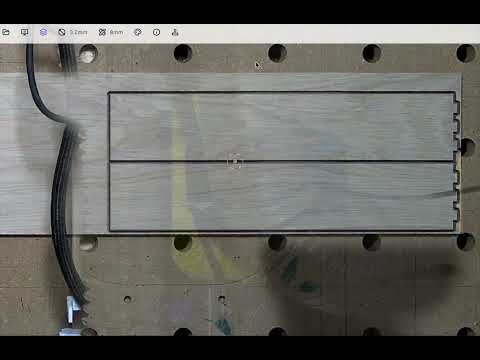
This workspace is split into two top‑level folders:
apps/– runnable applications.packages/– reusable libraries and config used by the apps.
- camNC – main camera overlay application.
- chessboard – printable chessboard pattern for camera calibration.
- demos – sandbox showcasing individual packages.
- fluidnc-integration – prototype FluidNC control UI.
- webrtc-cam – minimal browser client for go2rtc.
- camera-calibration – React components for calibrating a camera.
- eslint-config – shared eslint rules.
- fluidnc-api – small API wrapper for FluidNC.
- go2webrtc – utilities for connecting to go2rtc via WebRTC.
- load-opencv – helper for loading OpenCV in the browser.
- public-config – shared Firebase configuration.
- typescript-config – common tsconfig presets.
- ui – shared React UI components.
- webrtc-channel – abstraction over WebRTC data channels.
Install dependencies and start all apps in dev mode:
pnpm install
pnpm run dev
Other useful commands:
pnpm run lint   # run eslint across the workspace
pnpm run test   # run vitest suites