

git clone git@github.com:RoyRin/data-unlearning-bench.git
cd data-unlearning-bench
pip install -e .python unlearning_bench/run.py --c example_configs/ascent_descent_example.ymlThis benchmark provides a flexible way to run data unlearning experiments. The main workflow is:
- Configure: Define hyperparameter search spaces to generate configuration files for your experiments.
- Launch: Generate a script to run these experiments, potentially in parallel across multiple GPUs.
- Execute: Run the generated script to start the unlearning process and evaluation.
Experiments are defined by YAML files in the config/ directory. You can generate these files by defining hyperparameter search spaces in unlearning_bench/config.py.
First, open unlearning_bench/config.py and modify the parameter dictionaries (e.g., cifar_params, living_params, ascent_configs) to suit your needs.
Then, generate the configuration files:
python unlearning_bench/config.pyThis will populate the config/ directory with YAML files, each representing a unique experiment configuration. For example:
config/unlearning_method-ascent_forget_dataset-cifar10_epochs-[1,3,5,7,10]_forget_id-1_lr-1e-05_model-resnet9_optimizer-sgd_N-100_batch_size-64.yml
To run all your configured experiments, especially across multiple GPUs, use unlearning_bench/launching.py to generate a shell script.
For example, to distribute jobs across 4 GPUs, running 2 jobs per GPU, and filtering for ascent_forget experiments on cifar10:
python unlearning_bench/launching.py --gpus 0,1,2,3 --jobs-per-gpu 2 --filters ascent_forget,cifar10This will create a launch_jobs.sh script.
Now, simply run the script:
bash launch_jobs.shThis will start executing the experiments. The results (KLOM scores) will be saved as .pt files in the data/eval/<dataset>/<model>/ directory.
If you want to run a single experiment, you can directly use unlearning_bench/run.py with a specific configuration file.
python unlearning_bench/run.py --c config/your_config_file.ymlFor instance:
python data-unlearning/run.py --c "config/unlearning_method-ascent_forget_dataset-cifar10_epochs-[1,3,5,7,10]_forget_id-1_lr-1e-05_model-resnet9_optimizer-sgd_N-100_batch_size-64.yml"- (Note: Wrapping the filename in quotes can help your shell handle special characters like
[and].)*
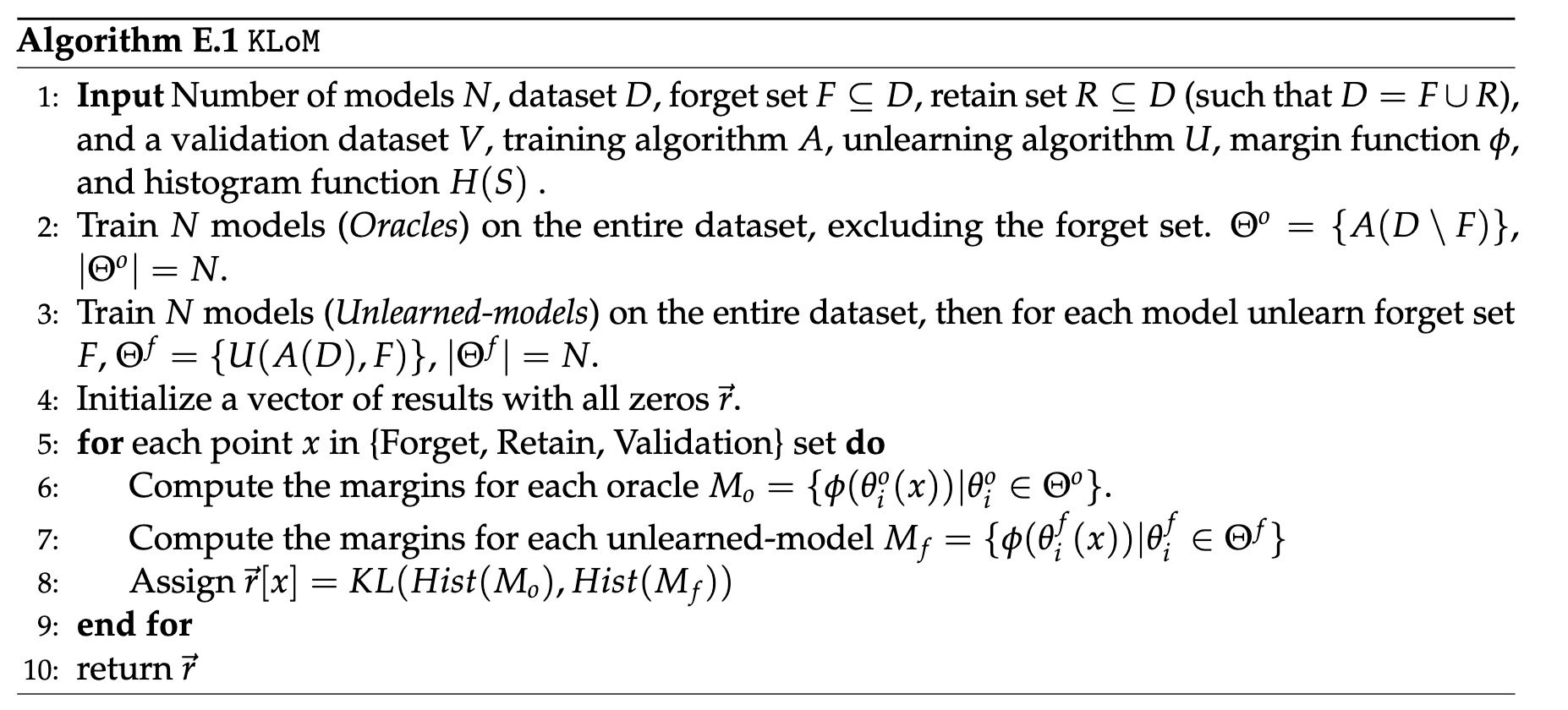
KLOM works by:
- training N models (original models)
- Training N fully-retrained models (oracles) on forget set F
- unlearning forget set F from the original models
- Comparing the outputs of the unlearned models from the retrained models on different points (specifically, computing the KL divergence between the distribution of margins of oracle models and distribution of margins of the unlearned models)
Originally proposed in the work Attribute-to-Delete: Machine Unlearning via Datamodel Matching (https://arxiv.org/abs/2410.23232), described in detail in E.1.
Outline of how KLOM works:
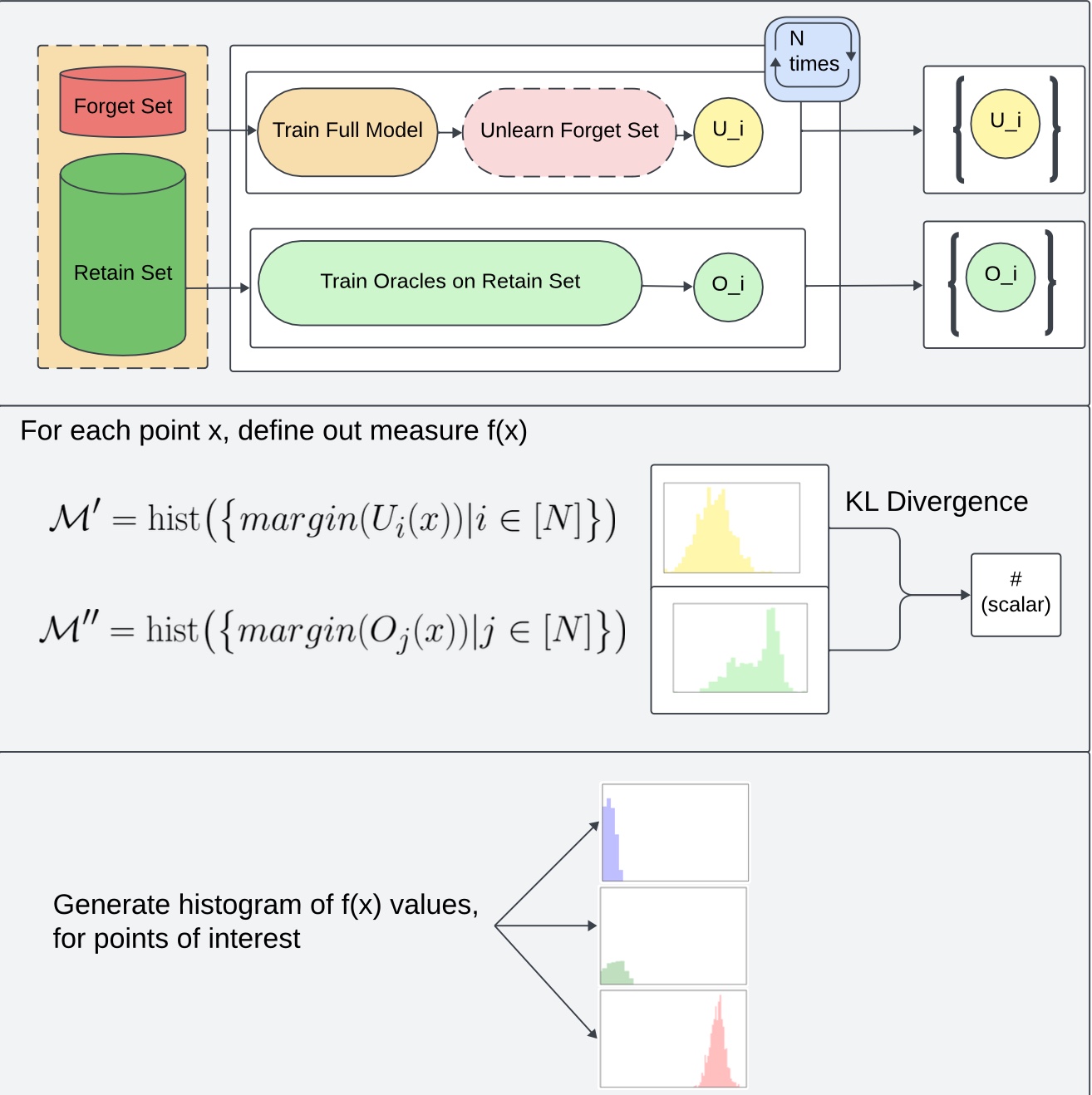
Algorithm Description:
NOTE: Required data for an experiment will be downloaded at runtime (recommended for experimentation) and margins will be cached in disk for future runs. The below instructions are useful in case you want to just download data.
Create script download_folder.sh
#!/bin/bash
REPO_URL=https://huggingface.co/datasets/royrin/KLOM-models
TARGET_DIR=KLOM-models # name it what you wish
FOLDER=$1  # e.g., "oracles/CIFAR10/forget_set_3"

mkdir -p $TARGET_DIR

git clone --filter=blob:none --no-checkout $REPO_URL $TARGET_DIR
cd $TARGET_DIR
git sparse-checkout init --cone
git sparse-checkout set $FOLDER
git checkout main
Example how to run script:
bash download_folder.sh oracles/CIFAR10/forget_set_3
We have 10 different forget sets: sets 1,2,3 are random forget sets of sizes 10,100,1000 respectively; sets 4-9 correspond to semantically coherent subpopulations of examples (e.g., all dogs facing a similar direction) identified using clustering methods.
Specifically, we take a train x train datamodels (
- Forget set 1: 10 random samples
- Forget set 2: 100 random samples
- Forget set 3: 500 random samples
- Forget set 4: 10 samples with the highest projection onto the 1st PC
- Forget set 5: 100 samples with the highest projection onto the 1st PC
- Forget set 6: 250 samples with the highest projection onto the 1st PC and 250 with lowest projection
- Forget set 7: 10 samples with the highest projection onto the 2nd PC
- Forget set 8: 100 samples with the highest projection onto the 2nd PC
- Forget set 9: 250 samples with the highest projection onto the 2nd PC and 250 with the lowest projection.
- Forget set 10: 100 samples closest in CLIP image space to training example 6 (a cassowary)
We use three different forget sets:
- Forget set 1 is random of size 500;
- Forget sets 2 and 3 correspond to 200 examples from a certain subpopulation (corresponding to a single original ImageNet class) within the Living-17 superclass.
To set up git hooks properly, please run git config core.hooksPath .githooks (once). This will enable hooks such as running yapf on all python files.