io_nats_jparse_node_support
The PathUtils class is a public class that provides utility methods for working with file paths.
private static Object walkFull(Object object, AtomicInteger i) {
    if (object instanceof Map) {
        Map map = (Map) object;
        ((Map<?, ?>) object).keySet().forEach(key -> {
            walkFull(map.get(key), i);
            i.incrementAndGet();
        });
    } else if (object instanceof List) {
        List list = (List) object;
        list.forEach(o -> {
            walkFull(o, i);
            i.incrementAndGet();
        });
    } else {
        return i.incrementAndGet();
    }
    return i;
}
The walkFull method in class io.nats.jparse.node.support.PathUtils is a recursive method that performs a full traversal of an input object and returns the total number of nodes visited.
Here is a step-by-step description of what the walkFull method does:
-
The method takes two parameters:
-
object- the input object to be traversed -
i- anAtomicIntegerused to track the number of nodes visited
-
-
The method checks if the input
objectis an instance of aMap:- If
objectis aMap, it casts it to aMapand proceeds to step 3. - If not, it checks if the input
objectis an instance of aList:- If
objectis aList, it casts it to aListand proceeds to step 4. - If not, it proceeds to step 5.
- If
- If
-
When
objectis aMap, it iterates over all the keys in the map using thekeySet().forEachmethod:- For each key, it recursively calls the
walkFullmethod passing the value associated with that key and theiparameter. - After the recursive call, it increments the value of
iby callingi.incrementAndGet().
- For each key, it recursively calls the
-
When
objectis aList, it iterates over all the elements in the list using theforEachmethod:- For each element, it recursively calls the
walkFullmethod passing the element and theiparameter. - After the recursive call, it increments the value of
iby callingi.incrementAndGet().
- For each element, it recursively calls the
-
When
objectis neither aMapnor aList, it means it is a leaf node in the traversal and cannot be further traversed.- In this case, it returns the current value of
iincremented by callingi.incrementAndGet().
- In this case, it returns the current value of
-
After traversing all the nodes in the input
object, the method returns the final value ofi.
The purpose of this method is to recursively traverse a given object and count the number of nodes (maps, lists, and leaf nodes) present in the object.

The MockTokenSubList class is a public class that extends the TokenSubList class. This class serves as a mock implementation of the TokenSubList class. It provides a subset view of a list of tokens, allowing for efficient processing and manipulation of the token data. By extending the TokenSubList class, the MockTokenSubList class inherits the behavior and functionality of the parent class, while also providing additional mock functionality for testing purposes.
The CharArrayUtils class is a utility class designed for working with character arrays. It provides various methods and functions that can be used to manipulate and perform operations on character arrays efficiently.
public static String decodeJsonString(char[] chars, int startIndex, int endIndex) {
    int length = endIndex - startIndex;
    char[] builder = new char[calculateLengthAfterEncoding(chars, startIndex, endIndex, length)];
    char c;
    int index = startIndex;
    int idx = 0;
    while (true) {
        c = chars[index];
        if (c == '\\' && index < (endIndex - 1)) {
            index++;
            c = chars[index];
            if (c != 'u') {
                builder[idx] = controlMap[c];
                idx++;
            } else {
                if (index + 4 < endIndex) {
                    char unicode = getUnicode(chars, index);
                    builder[idx] = unicode;
                    index += 4;
                    idx++;
                }
            }
        } else {
            builder[idx] = c;
            idx++;
        }
        if (index >= (endIndex - 1)) {
            break;
        }
        index++;
    }
    return new String(builder);
}
The decodeJsonString method, defined in the io.nats.jparse.node.support.CharArrayUtils class, decodes a JSON string from a character array. Here's a step-by-step description of what the method does:
-
The method takes three parameters:
charsis the character array containing the JSON string,startIndexis the starting index of the substring to decode, andendIndexis the ending index of the substring to decode. -
It calculates the length of the substring by subtracting the
startIndexfrom theendIndex. -
It creates a new character array called
builderwith a length determined by thecalculateLengthAfterEncodingmethod, passing in thechars,startIndex,endIndex, andlengthparameters. -
It initializes a variable
cto store the current character being processed, anindexvariable to keep track of the current index in thecharsarray, and anidxvariable to keep track of the current index in thebuilderarray. -
Enter a loop that continues until
breakis called:- Get the current character
cfrom thecharsarray at the currentindex. - Check if the current character
cis a single quote (') and if theindexis less than (<)(endIndex - 1). - If the above conditions are satisfied, increment the
indexby 1 and get the next charactercfrom thecharsarray.- If the next character
cis not a lowercase 'u', it means it is not a Unicode character, so it can be converted to its corresponding control character using thecontrolMaparray. The converted character is then stored in thebuilderarray at the currentidxindex, andidxis incremented by 1. - If the next character
cis a lowercase 'u', it means it is a Unicode character. Check if there are at least 4 more characters (index + 4 < endIndex) in thecharsarray to form a complete Unicode escape sequence. If so, call thegetUnicodemethod to convert the escape sequence to the corresponding Unicode character, store it in thebuilderarray at the currentidxindex, and increment bothindexandidxby 1.
- If the next character
- If the current character
cis not a single quote, store it in thebuilderarray at the currentidxindex, and incrementidxby 1. - Check if the
indexis greater than or equal to(endIndex - 1). If so, break the loop.
- Get the current character
-
Convert the
buildercharacter array to a string using theStringconstructor and return the decoded JSON string.
Note: The specific details of the calculateLengthAfterEncoding and getUnicode methods are not provided in the given code snippet, so their functionality cannot be described accurately.

private static int calculateLengthAfterEncoding(char[] chars, int startIndex, int endIndex, int length)
private static int calculateLengthAfterEncoding(char[] chars, int startIndex, int endIndex, int length) {
    char c;
    int index = startIndex;
    int controlCharCount = length;
    while (true) {
        c = chars[index];
        if (c == '\\' && index < (endIndex - 1)) {
            index++;
            c = chars[index];
            if (c != 'u') {
                controlCharCount -= 1;
            } else {
                if (index + 4 < endIndex) {
                    controlCharCount -= 5;
                    index += 4;
                }
            }
        }
        if (index >= (endIndex - 1)) {
            break;
        }
        index++;
    }
    return controlCharCount;
}
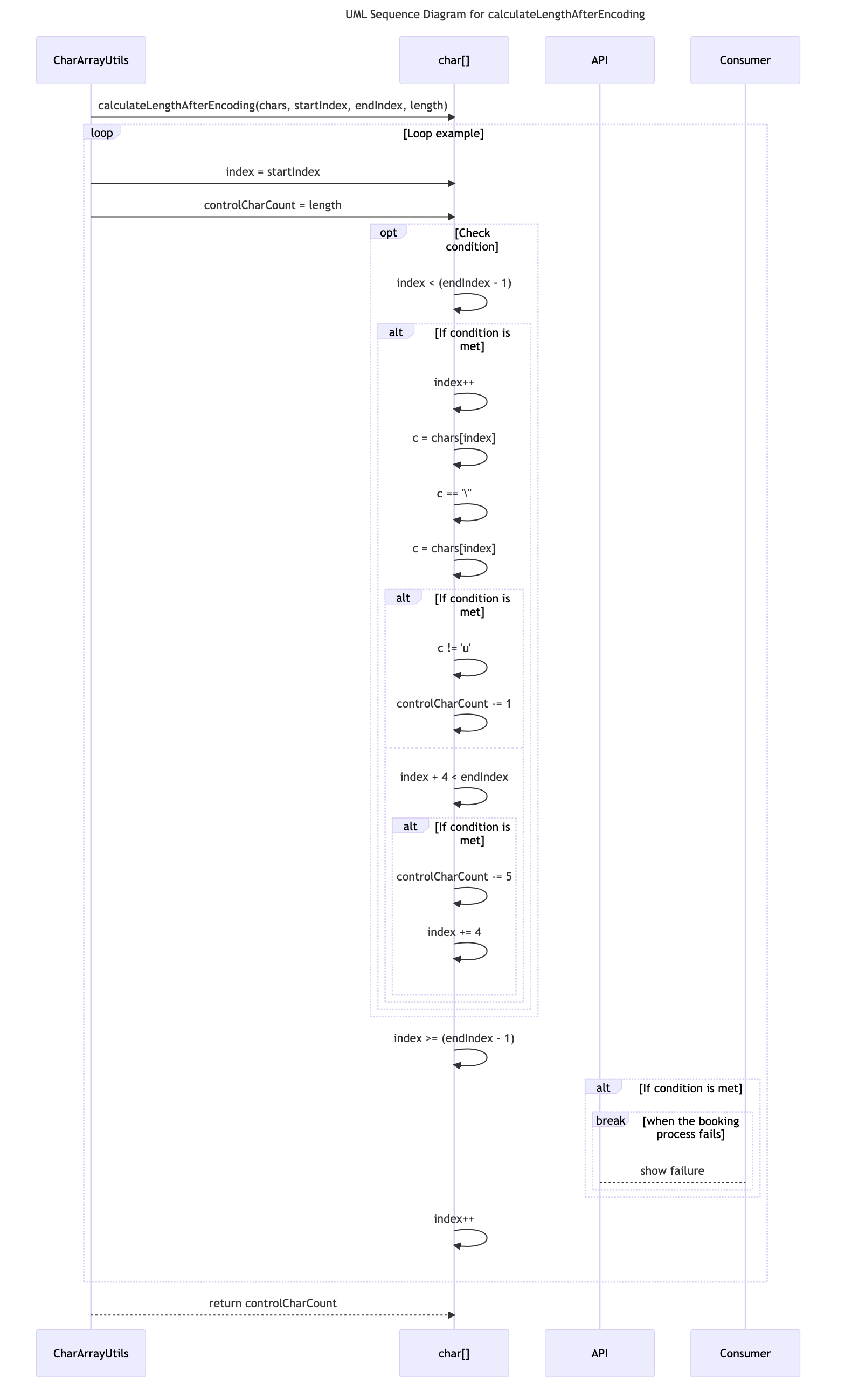
The calculateLengthAfterEncoding method in the CharArrayUtils class is used to calculate the length of a character array after encoding.
Here is a step-by-step description of what this method does:
-
Start by initializing the variables
c,index, andcontrolCharCountwith the givenstartIndex,length, andstartIndex, respectively. -
Enter an infinite while loop.
-
At each iteration of the loop, get the character
cat the current indexindexfrom thecharsarray. -
Check if the character
cis a single quote (') and if the current indexindexis less than theendIndex - 1. If both conditions are true, proceed further. -
Increment the index by 1 and get the next character
cat the updated index. -
Check if the character
cis not equal to the letter'u'. If true, decrement thecontrolCharCountby 1. -
If the character
cis equal to'u', check if the current indexindexplus 4 is less than theendIndex. If true, proceed further. -
Decrement the
controlCharCountby 5. -
Increment the index by 4 to skip over the following 4 characters.
-
Check if the index is greater than or equal to
endIndex - 1. If true, break out of the loop and exit. -
Increment the index by 1.
-
Go back to the start of the loop.
-
After exiting the loop, return the final value of
controlCharCount.
Note: This method is used to calculate the length of the character array after encoding by subtracting the length of certain special characters.
public static boolean hasEscapeChar(char[] array, int startIndex, int endIndex) {
    char currentChar;
    for (int index = startIndex; index < endIndex; index++) {
        currentChar = array[index];
        if (currentChar == ESCAPE) {
            return true;
        }
    }
    return false;
}This method, hasEscapeChar, is defined in the io.nats.jparse.node.support.CharArrayUtils class. It takes in a character array array, a start index startIndex, and an end index endIndex as parameters.
The method iterates through the array from the startIndex to the endIndex (exclusive) using a for loop. For each character currentChar in the array, it checks if it is equal to a constant called ESCAPE.
If the currentChar is equal to ESCAPE, the method returns true. Otherwise, it continues to the next character in the array.
If no character in the range from startIndex to endIndex is equal to ESCAPE, the method returns false.

A TokenSubList is a Java class that extends the AbstractList<Token> interface. It represents a sublist implementation for storing a portion of tokens from a TokenList. This class provides methods for accessing tokens within the sublist, getting the size of the sublist, creating sublists, converting the sublist to an array, and counting the number of children tokens within a specified range relative to a root token. It is designed to be used as part of tokenization or parsing processes in software engineering.
public int countChildren(final int from, final Token rootToken) {
    int idx = from;
    int count = 0;
    final Token[] tokens = this.tokens;
    final int length = this.size;
    final int offset = this.offset;
    final int rootTokenStart = rootToken.startIndex;
    final int rootTokenEnd = rootToken.endIndex;
    for (; idx < length; idx++) {
        Token token = tokens[idx + offset];
        if (token.startIndex >= rootTokenStart && token.endIndex <= rootTokenEnd) {
            count++;
        } else {
            break;
        }
    }
    return count;
}
The countChildren method in the TokenSubList class, defined in the io.nats.jparse.node.support package, counts the number of child tokens within a specified range, starting from a given index.
Here are the step-by-step details of what the method does based on its body:
- Declare two integer variables,
idxandcount, and initialize them to the values of thefromparameter, which represents the starting index, and 0 respectively. - Create a reference to the
tokensarray of the currentTokenSubListinstance. - Assign the
sizeof theTokenSubListobject to thelengthvariable for easier access. - Assign the
offsetof theTokenSubListobject to theoffsetvariable for easier access. - Get the
startIndexandendIndexof the providedrootTokenobject. - Start a loop which iterates from
idxtolength - 1. - Inside the loop:
a. Get the
Tokenobject at the currentidx + offsetindex from thetokensarray. b. Check if thestartIndexof the token is greater than or equal to therootTokenStartand theendIndexis less than or equal to therootTokenEnd. c. If the above condition is true, increment thecountvariable by one. d. If the above condition is false, break out of the loop. - Return the final value of the
countvariable, which represents the number of child tokens within the specified range and starting from the given index.

The TokenList class is an implementation of a list that stores tokens. It provides methods for adding tokens, accessing tokens by index, clearing the list, creating sub lists, and more. The class also includes methods for managing placeholder tokens and creating compact clones of the list.
public final boolean add(Token token)
@Override
public final boolean add(Token token) {
    final int length = tokens.length;
    if (index >= length) {
        final Token[] newTokens = new Token[length * 2];
        System.arraycopy(tokens, 0, newTokens, 0, length);
        tokens = newTokens;
    }
    tokens[index] = token;
    index++;
    return true;
}
The add method in class io.nats.jparse.node.support.TokenList is used to add a Token object to the list of tokens.
Here is a step-by-step description of how the method works:
-
The method is marked as
@Override, indicating that it is overriding a method from a superclass or interface. -
The method signature indicates that it returns a boolean value.
-
The method takes a single parameter,
token, which is of typeToken. This is the object that will be added to the list. -
The method begins by getting the length of the current
tokensarray. -
It checks if the
indexvariable (which presumably tracks the current index where the next token will be added) is greater than or equal to the length of the array. If it is, this means that the array is full and needs to be expanded. -
If the array needs to be expanded, a new array,
newTokens, is created with a length that is double the current length of the array. -
The
System.arraycopymethod is then used to copy the contents of thetokensarray into thenewTokensarray. This ensures that the existing tokens are retained in the new array. -
The
tokensmember variable is then updated to point to the new array. -
The
tokenparameter is added to thetokensarray at the currentindexposition. -
The
indexvariable is incremented to prepare for the next token to be added. -
Finally, the method returns
true, indicating that the token was successfully added to the list.
Overall, the add method ensures that the list of tokens has sufficient capacity to accommodate new tokens, and adds the specified token to the list, updating the index accordingly.

public void placeHolder() {
    final int length = tokens.length;
    if (index >= length) {
        final Token[] newTokens = new Token[length * 2];
        System.arraycopy(tokens, 0, newTokens, 0, length);
        tokens = newTokens;
    }
    index++;
}
The placeHolder method in the io.nats.jparse.node.support.TokenList class is used to increment the index of the TokenList object and potentially expand its internal array if the index is greater than or equal to the length of the array.
Here is a step-by-step description of what the placeHolder method does based on its body:
- Get the length of the
tokensarray using thelengthfield. - Check if the current value of the
indexfield is greater than or equal to thelengthof thetokensarray. - If the condition is true, it means that the
TokenListobject has reached the end of its internal array. - In this case, create a new array of
Tokenobjects namednewTokenswith a length of twice the current length of thetokensarray. - Use the
System.arraycopymethod to copy the elements from the existingtokensarray to thenewTokensarray.- The starting index for copying is 0 (meaning copying from the beginning of the array).
- The destination array is the
newTokensarray. - The starting index for pasting in the destination array is also 0.
- The number of elements to copy is equal to the length of the
tokensarray.
- Set the
tokensfield of theTokenListobject to thenewTokensarray. This effectively expands the internal array. - Increment the value of the
indexfield by 1.
The purpose of this method is to provide a mechanism for adding new Token objects to the TokenList object. If the index is already at the end of the array, the method will automatically expand the array to accommodate the new elements.

public TokenList compactClone() {
    final int length = index;
    final Token[] newTokens = new Token[index];
    System.arraycopy(tokens, 0, newTokens, 0, length);
    return new TokenList(newTokens);
}
The compactClone method in the TokenList class is used to create a new instance of TokenList that contains a compact clone of the tokens in the original TokenList object.
Here is a step-by-step description of what the method does:
-
It starts by creating a local variable
lengthand assigning it the value of theindexfield of the current object. Thisindexfield represents the number of tokens currently stored in theTokenListobject. -
It then creates a new array of
Tokenobjects callednewTokenswith a length equal to theindexfield. This ensures that the new array is large enough to hold all the tokens. -
It uses the
System.arraycopymethod to copy the contents of thetokensarray from the originalTokenListobject to thenewTokensarray. This ensures that thenewTokensarray contains a clone of the tokens in the original array. -
Finally, it creates a new
TokenListobject by passing thenewTokensarray to its constructor and returns this new object.
In summary, the compactClone method creates a new TokenList object that contains a compact clone of the tokens in the original TokenList object by copying the contents of the tokens array to a new array.

The CharSequenceUtils class is a utility class that provides various methods for working with CharSequence objects. It offers convenient functions to manipulate and process character sequences efficiently.
The NodeUtils class is a utility class that provides functionality for working with Node objects. It provides various methods to perform operations on nodes, making it easier to manipulate and interact with these objects.
public static Node createNode(final List tokens, final CharSource source, boolean objectsKeysCanBeEncoded)
public static Node createNode(final List<Token> tokens, final CharSource source, boolean objectsKeysCanBeEncoded) {
    final NodeType nodeType = NodeType.tokenTypeToElement(tokens.get(0).type);
    switch(nodeType) {
        case ARRAY:
            return new ArrayNode((TokenSubList) tokens, source, objectsKeysCanBeEncoded);
        case INT:
            return new NumberNode(tokens.get(0), source, NodeType.INT);
        case FLOAT:
            return new NumberNode(tokens.get(0), source, NodeType.FLOAT);
        case OBJECT:
            return new ObjectNode((TokenSubList) tokens, source, objectsKeysCanBeEncoded);
        case STRING:
            return new StringNode(tokens.get(0), source);
        case BOOLEAN:
            return new BooleanNode(tokens.get(0), source);
        case NULL:
            return new NullNode(tokens.get(0), source);
        case PATH_INDEX:
            return new IndexPathNode(tokens.get(0), source);
        case PATH_KEY:
            return new KeyPathNode(tokens.get(0), source);
        default:
            throw new IllegalStateException();
    }
}
The createNode method in the NodeUtils class is responsible for creating a Node object based on the provided list of tokens and other parameters. Here is a step-by-step explanation of what this method does:
-
The method takes three parameters:
-
tokens- a list ofTokenobjects -
source- aCharSourceobject -
objectsKeysCanBeEncoded- a boolean value indicating whether object keys can be encoded
-
-
It extracts the type of the first token in the list using the
typefield of theTokenobject and maps it to a correspondingNodeTypeusingNodeType.tokenTypeToElement(tokens.get(0).type). -
It uses a
switchstatement to determine the type ofNodeobject to create based on the mappedNodeType. -
If the
NodeTypeisARRAY, it creates a newArrayNodeobject using thetokens,source, andobjectsKeysCanBeEncodedparameters, and returns it. -
If the
NodeTypeisINT, it creates a newNumberNodeobject with the first token,source, andNodeType.INT, and returns it. -
If the
NodeTypeisFLOAT, it creates a newNumberNodeobject with the first token,source, andNodeType.FLOAT, and returns it. -
If the
NodeTypeisOBJECT, it creates a newObjectNodeobject using thetokens,source, andobjectsKeysCanBeEncodedparameters, and returns it. -
If the
NodeTypeisSTRING, it creates a newStringNodeobject with the first token andsource, and returns it. -
If the
NodeTypeisBOOLEAN, it creates a newBooleanNodeobject with the first token andsource, and returns it. -
If the
NodeTypeisNULL, it creates a newNullNodeobject with the first token andsource, and returns it. -
If the
NodeTypeisPATH_INDEX, it creates a newIndexPathNodeobject with the first token andsource, and returns it. -
If the
NodeTypeisPATH_KEY, it creates a newKeyPathNodeobject with the first token andsource, and returns it. -
If none of the above
NodeTypecases match, it throws anIllegalStateException.
That's the step-by-step description of the createNode method in the NodeUtils class.

public static Node createNodeForObject(final List theTokens, final CharSource source, boolean objectsKeysCanBeEncoded)
public static Node createNodeForObject(final List<Token> theTokens, final CharSource source, boolean objectsKeysCanBeEncoded) {
    final Token rootToken = theTokens.get(1);
    final List<Token> tokens = theTokens.subList(1, theTokens.size());
    final NodeType nodeType = NodeType.tokenTypeToElement(rootToken.type);
    switch(nodeType) {
        case ARRAY:
            return new ArrayNode((TokenSubList) tokens, source, objectsKeysCanBeEncoded);
        case INT:
            return new NumberNode(tokens.get(0), source, NodeType.INT);
        case FLOAT:
            return new NumberNode(tokens.get(0), source, NodeType.FLOAT);
        case OBJECT:
            return new ObjectNode((TokenSubList) tokens, source, objectsKeysCanBeEncoded);
        case STRING:
            return new StringNode(tokens.get(0), source);
        case BOOLEAN:
            return new BooleanNode(tokens.get(0), source);
        case NULL:
            return new NullNode(tokens.get(0), source);
        default:
            throw new IllegalStateException();
    }
}
The createNodeForObject method, defined in the NodeUtils class in the io.nats.jparse.node.support package, takes in a list of tokens, a character source, and a boolean indicating whether object keys can be encoded. It returns a Node object based on the type of the root token.
Here is a step-by-step description of what the method does:
- It retrieves the root token from the input list of tokens and assigns it to the local variable
rootToken. - It creates a new sublist of tokens (
tokens) by excluding the first token (root token) from the input list using thesubListmethod. - It determines the
NodeType(enumeration) corresponding to the type of the root token using thetokenTypeToElementmethod and assigns it to the local variablenodeType. - It uses a switch statement on the
nodeTypeto handle different cases:- If the
nodeTypeisARRAY, it creates a newArrayNodeobject passing in thetokens,source, andobjectsKeysCanBeEncodedarguments and returns it. - If the
nodeTypeisINT, it creates a newNumberNodeobject passing in the first token fromtokens,source, and theNodeType.INTenum value, and returns it. - If the
nodeTypeisFLOAT, it creates a newNumberNodeobject passing in the first token fromtokens,source, and theNodeType.FLOATenum value, and returns it. - If the
nodeTypeisOBJECT, it creates a newObjectNodeobject passing in thetokens,source, andobjectsKeysCanBeEncodedarguments and returns it. - If the
nodeTypeisSTRING, it creates a newStringNodeobject passing in the first token fromtokensandsource, and returns it. - If the
nodeTypeisBOOLEAN, it creates a newBooleanNodeobject passing in the first token fromtokensandsource, and returns it. - If the
nodeTypeisNULL, it creates a newNullNodeobject passing in the first token fromtokensandsource, and returns it. - If none of the above cases match, it throws an
IllegalStateException.
- If the
- The method ends.
This method is responsible for creating and returning different types of Node objects based on the type of the root token.

The NumberParseResult class represents the result of a number parsing operation. It provides methods to access the end index of the parsed number and to check if the parsed number was a float. The class also overrides the equals, hashCode, and toString methods for proper object comparison and string representation.