This short exercise is meant to simulate some of the day to day work we do at Pwinty.
To submit- please make a fork of this Git repo, commit and push your changes, and then share the repo with @tomgallard.
Please use a seperate commit for each task. Add any notes/comments to the bottom of this file
Assignment: Create a custom select component or control in the framework of your choosing.

The user should be able to select only a maximum of one option at a time, but the control should also allow for a no selection state. Demonstrate the use of this control by creating a settings page that takes input configuration JSON and generates a list of setting entries based on this.
For example, the following JSON:
[
  {
    "key": "resolution",
    "text": "Resolution",
    "type": "select",
    "values" : [
      { "key": "720p", "text": "1280x720" },
      { "key": "1080p", "text": "1920x1080" },
      { "key": "qhd", "text": "2560x1440" },
      { "key": "uhd", "text": "3840x2160" }
    ]
  },
  {
    "key": "aa",
    "text": "Anti-aliasing",
    "type": "select",
    "values" : [
      { "key": "true", "text": "Yes" },
      { "key": "false", "text": "No" }
    ]
  },
  {
    "key": "effects",
    "text": "Custom effects",
    "type": "select",
    "values" : [
      { "key": "low", "text": "Low" },
      { "key": "medium", "text": "Medium" },
      { "key": "high", "text": "High" }
    ]
  }
]
...would generate the following UI:
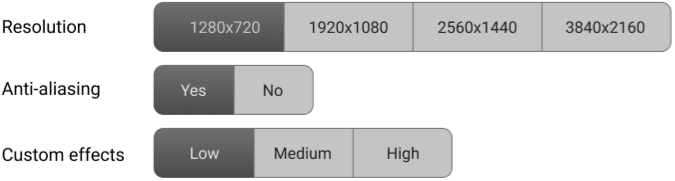
-
Design the application in a way that would make it easy to extend it with different types of settings (for example checkboxes / color picker entries etc.).
-
The frontend needs to fetch the JSON from the server. A mockapi endpoint has been provided for convenience: http://5c3ef0e3c27832001404e2ac.mockapi.io/settings
-
Tools such as create-react-app or angular-cli can be used for easy bootstrapping.