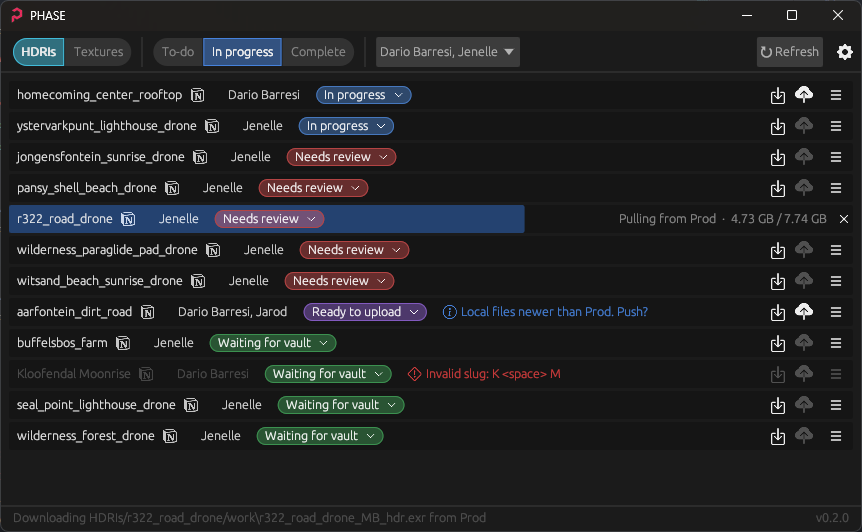
PHASE is a Windows desktop tool for managing Poly Haven asset folders between the production NAS and local working folders, while keeping the asset list and workflow status in sync with the admin system.
PHASE is designed to make common asset-handling tasks faster and safer for the team: finding the right asset, seeing its current status, pulling it locally to work on it, pushing changes back to production, and spotting issues before they become pipeline problems.
- Sign in through the browser.
- Browse HDRIs and Textures, then filter by status or author.
- Pull an asset from production to the local work folder.
- Work on the asset and push changes back when ready.
- Use the row status, warnings, and validation messages to catch issues and track progress.
Requires the Rust MSVC toolchain (install via rustup).
cargo buildThe executable is produced at target\debug\phase.exe.
.\target\debug\phase.exeOn first launch, PHASE opens an Auth0 browser login and listens for the callback at http://127.0.0.1:45873/callback. PHASE stores Auth0 access/refresh tokens in %APPDATA%\phase\config.toml; it does not store a Notion API key.
Debug builds (default) call the local admin backend at http://localhost:3001/. Release builds (cargo build --release) call https://admin.polyhaven.com/. Logs are written to %APPDATA%\phase\phase.log.
cargo test