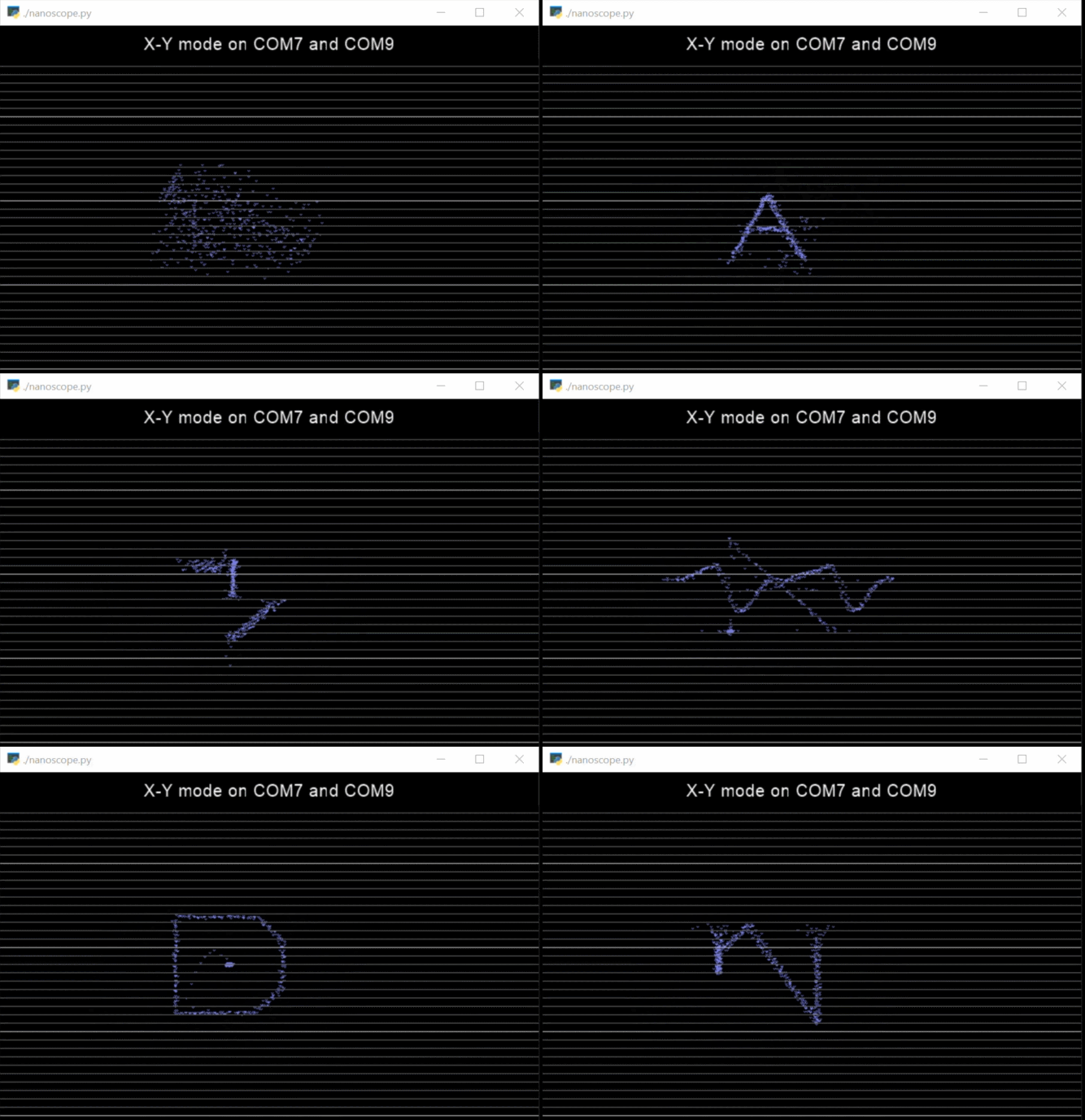
Nanoscope is a fully-featured cross-platform UI that turns your $5 Arduino Nano into a capable Oscilloscope. You can see a demo of Nanoscope running Oscillofun: https://youtu.be/ZQVlYfUenzs.
- Single channel or dual channel
- X-Y mode
- Adjustable scale and zoom (both vertical and horizontal)
- Capture and playback of sample data
- Both automatic and interactive voltage and time measurements
pip install pyglet
pip install pyserial
nanoscope.ino contains all the code necessary for your Nano to act as a data capture device. It simply transmits data that it reads from pin A0 to the COM port as fast as it can. Arduino's analogRead API is limited to about 8,000 to 10,000 samples per second, so needs only a standard COM rate of 230400.
Connect your Arduino's GND pin to your circuit's ground. Connect the A0 pin to the voltage source you want to measure. Alligator clips work well, although be careful not to bridge A0 and the pin next to it (VREF).
Run a basic single channel capture:
python ./nanoscope.py --input COM7 --rate 230400
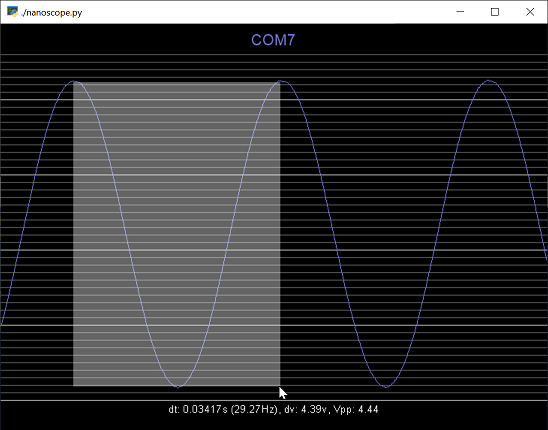
You can use your mouse to measure what you see on the screen - in this example, a 30Hz 4.4v Sine wave:
Use 'nanoscope --help' to see its command-line options. These are:
usage: nanoscope.py [-h] --input INPUT [--peak PEAK] [--rate RATE]
                    [--vref VREF] [--scale SCALE] [--zoom ZOOM]
                    [--offset OFFSET] [--trigger TRIGGER] [--invert]
                    [--capture CAPTURE] [--input2 INPUT2] [--peak2 PEAK2]
                    [--rate2 RATE2] [--vref2 VREF2] [--scale2 SCALE2]
                    [--zoom2 ZOOM2] [--offset2 OFFSET2] [--invert2]
                    [--capture2 CAPTURE2] [--oneshot] [--xy]

nanoscope - a simple viewer for streaming serial input data.

optional arguments:
  -h, --help           show this help message and exit
  --input INPUT        Path to input serial data stream
  --peak PEAK          Maximum possible value of input data points
  --rate RATE          Baud rate of input serial data stream
  --vref VREF          Voltage value when at input peak
  --scale SCALE        Vertical zoom to apply to data view
  --zoom ZOOM          Horizontal zoom to apply to data view
  --offset OFFSET      Offset to apply to data view
  --trigger TRIGGER    Trigger point (in either volts or raw data value)
  --invert             Whether to invert the channel
  --capture CAPTURE    Path to capture data stream to
  --input2 INPUT2      [2nd channel] Path to input serial data stream
  --peak2 PEAK2        [2nd channel] Maximum possible value of input data
                       points
  --rate2 RATE2        [2nd channel] Baud rate of input serial data stream
  --vref2 VREF2        [2nd channel] Voltage value when at input peak
  --scale2 SCALE2      [2nd channel] Vertical zoom to apply to data view
  --zoom2 ZOOM2        [2nd channel] Horizontal zoom to apply to data view
  --offset2 OFFSET2    [2nd channel] Offset to apply to data view
  --invert2            [2nd channel] Whether to invert the channel
  --capture2 CAPTURE2  [2nd channel] Path to capture data stream to
  --oneshot            Stop capturing once trigger point has hit
  --xy                 Display input channels in XY mode
X: Toggle XY modeT: Reset / re-enable triggerCtrl +/-/0: Change or reset the horizontal scaleAlt +/-/0: Change or reset the vertical scaleLeft,Right,Home: Pause capture and navigate captured dataEscape: Resume capturing
Nanoscope is a Python-based Oscilloscope front end. It supports streaming data from either a COM port or local file, where measurements (from the COM port or data file) are represented by two-byte integers in big-endian format.
- The
analogRead()API on Arduino Nano has a hard limit of approximately 10,000 samples per second. This means that Nanoscope provides acceptable performance when measuring frequencies below about 1kHZ. - The
analogRead()API on Arduino Nano does not understand negative voltage. You can use a small capacitor (i.e.: 1uf) between what you are measuring and the A0 pin for a basic adjustment, or a voltage divider circuit for a more stable and accurate version. - Nanoscope supports dual channels mode if you plug in two devices. Nanoscope makes every attempt to synchronize these data streams, but expect about a millisecond of error in the timing between these two channels.