
Add an AI coding toolbar to any web app. One command. Zero code changes.








OpenMagic injects a floating AI toolbar into your running web app via reverse proxy. Select any element, describe what you want, review the diff, approve — your code updates and HMR refreshes the page. No framework plugin. No IDE extension. No account. Bring your own API key.
Website · Quick Start · How It Works · Providers · GitHub
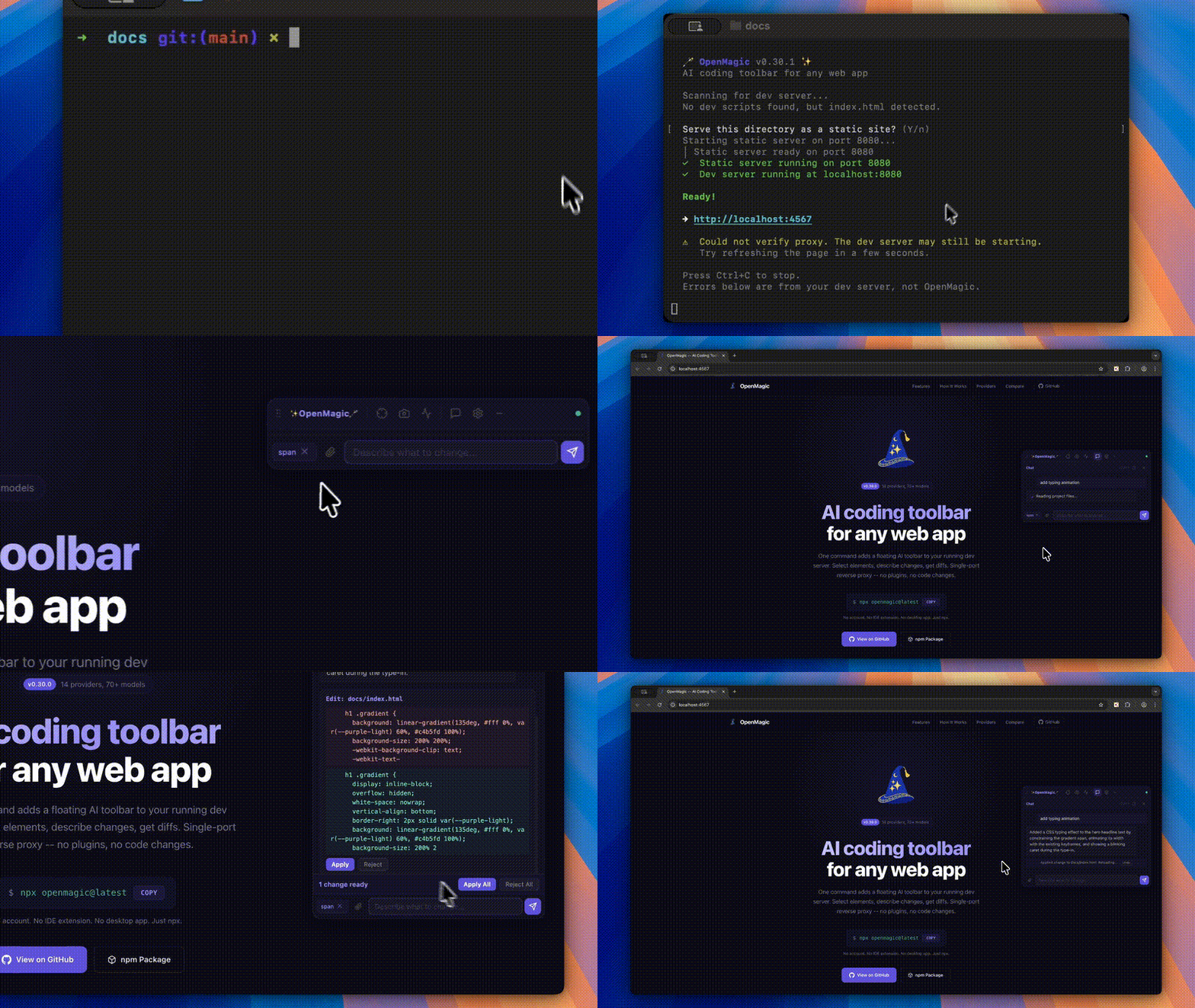
# 1. Start your dev server as usual
npm run dev

# 2. In your project folder, run OpenMagic (auto-detects your dev server)
npx openmagic@latest
Run this from your project folder so OpenMagic can find your source files and dev server. A proxied version of your app opens with the toolbar overlaid.
Requires Node.js 20.19 or newer.
| Feature | Description | |
|---|---|---|
| Select | Element Selection | Click any element to capture its DOM, computed styles, parent layout, siblings, React props, and component name |
| Ground | Smart File Grounding | Server-side route, component, import, and stylesheet matching sends the most relevant files first |
| Diff | Atomic Patch Preview | Approve or reject each change. Patch groups apply server-side with rollback support |
| Retry | Auto-Retry | If the LLM requests more files, OpenMagic reads them transparently and retries — no manual intervention |
| Chat | Markdown Chat | Streaming responses, copy buttons, session persistence across HMR reloads |
| Net | Network Profiling | Captures page load timing, TTFB, FCP, and flags slow resources |
| Img | Image Attachments | Drag-drop, paste from clipboard, or use the file picker — vision models analyze screenshots |
| Keys | Per-Provider Keys | Store a key for each provider. Switch models without re-entering credentials |
| Plan | Plan Before Editing | Review an implementation plan before asking the model to generate patches |
| KB | Keyboard Shortcuts | Toggle, send, close, minimize — all from the keyboard |
| Min | Minimize to Icon | Collapse the toolbar to a small floating button when you do not need it |
OpenMagic is a single-port reverse proxy. It sits between your browser and your dev server, injecting the toolbar script into HTML responses. Your project is never modified at install time.
                        +-----------------------+
                        |      Your Browser     |
                        |  localhost:4567        |
                        +---+---------------+---+
                            |               |
                      HTTP proxy        WebSocket
                            |               |
  +----------------+    +---+---------------+---+
  | Your Dev Server|    |   OpenMagic Server    |
  | localhost:3000  |<---|                       |
  +----------------+    |  File Read/Write      |
                        |  LLM API Proxy        |
                        |  (your key, localhost) |
                        +-----------------------+
- Proxy -- All requests forward to your dev server. HTML responses get the toolbar
<script>tag appended automatically. - Toolbar -- A Shadow DOM Web Component. Fully isolated from your app's styles.
- Server -- Local Node.js process handling file I/O and proxying LLM calls. API keys never leave your machine.
- HMR -- When the AI modifies source files, your dev server's hot module replacement picks up changes automatically.
Stop with Ctrl+C. Nothing stays behind.
14 providers, 70+ models. Providers ship with a static fallback list, and OpenMagic fetches live model lists from the local server when the provider supports it. API keys stay server-side and are never sent to the toolbar.
| Provider | Notable Models | Vision | Thinking / Reasoning |
|---|---|---|---|
| OpenAI | GPT-5.5, GPT-5.4 Pro/Mini/Nano, o3, o4-mini, Codex Mini | Yes | reasoning_effort |
| Anthropic | Claude Opus 4.6, Sonnet 4.6, Haiku 4.5 | Yes | Extended thinking (budget_tokens) |
| Google Gemini | Gemini 3.1 Pro, 3 Flash, 2.5 Pro, 2.5 Flash | Yes | thinking_level |
| xAI (Grok) | Grok 4.20, Grok 4.20 Reasoning, Grok 4.1 Fast | Yes | reasoning_effort |
| DeepSeek | DeepSeek V4 Flash/Pro, DeepSeek V3.2, DeepSeek R1 | -- | V4 Pro/R1: reasoning_effort |
| Mistral | Large 3, Small 4, Codestral, Devstral 2, Magistral | Yes | Magistral: reasoning_effort |
| MiniMax | MiniMax models | Varies | -- |
| Kimi | Kimi models | Varies | -- |
| Qwen | Qwen models | Varies | -- |
| Zhipu | Zhipu (GLM) models | Varies | -- |
| Doubao | Doubao models | Varies | -- |
| Groq | Llama 4 Scout, Llama 3.3 70B, Qwen 3 32B | Llama 4 | -- |
| Ollama | Any local model (free, private) | Varies | -- |
| OpenRouter | 200+ models from all providers | Varies | Varies |
Model lists are labeled internally as live, cached, or static. Cloud provider live lists are cached for 12 hours; local providers such as Ollama use a short cache so newly pulled models appear quickly.
Use Test model in Settings to verify a provider key/model combination before sending a real request. OpenMagic classifies common failures such as invalid keys, unavailable models, quota/rate limits, and provider errors.
Enable Plan before editing when you want the model to produce an implementation plan first. After reviewing the plan, choose Generate changes to ask for patches.
| Shortcut | Action |
|---|---|
Ctrl+Shift+O |
Toggle toolbar open/close |
Ctrl+Enter |
Send message |
Escape |
Close toolbar |
| Minimize button | Collapse to floating icon |
| Option | Description | Default |
|---|---|---|
-p, --port <port> |
Dev server port to proxy | Auto-detect |
-l, --listen <port> |
OpenMagic proxy port | 4567 |
-r, --root <paths...> |
Project root directories | Current directory |
--host <host> |
Dev server host | localhost |
--no-open |
Do not auto-open browser | false |
npx openmagic --port 3000 --root ./frontend --root ./backendSettings persist in ~/.openmagic/config.json (your home directory, never in your project):
{
  "provider": "anthropic",
  "model": "claude-opus-4-6",
  "apiKey": "sk-ant-..."
}ollama pull llama3.3
npx openmagic --port 3000
# Select "Ollama (Local)" as your provider- Localhost only -- The proxy and WebSocket bind to
localhost. Not accessible from the network. - Session tokens -- Each session generates a random token. The toolbar authenticates before accessing any API.
- Path sandboxing -- File operations are restricted to configured root directories. Symlinks that escape the root are rejected.
- API keys stay local -- Keys live in
~/.openmagic/config.json. They are proxied through the local server, never exposed to the browser or any third party. - Zero project modification -- OpenMagic never touches your
package.json, config files, or source code during installation. The toolbar exists only in the proxy layer. - Diff preview -- AI-proposed changes are shown as diffs with Approve/Reject buttons. Nothing is auto-applied without your consent.
- Origin change -- Your app runs on
:3000but you access it via:4567. This can break OAuth redirect URIs,localStorageisolation, and Service Worker scope. Most dev setups work fine, but if your app checkswindow.location.origin, you may need to adjust your dev config. - CSP via meta tags -- OpenMagic strips CSP response headers so the toolbar script can load, but
<meta>tag CSP can't be modified at the proxy level and may still block it. - Same-page trust boundary -- The toolbar runs inside your proxied development page so it can inspect selected DOM elements. Do not use OpenMagic with untrusted third-party scripts running in that page.
- Not for production -- This is a dev tool. Don't deploy the proxy to production.
| Feature | OpenMagic | Stagewise | Frontman | Agentation |
|---|---|---|---|---|
| Install | npx openmagic |
npm + Electron | Framework middleware | npm package |
| Framework support | Any (reverse proxy) | React, Vue, Angular, Svelte | Next.js, Astro, Vite | React |
| Code modification | Yes (diff + approve) | Yes (via IDE) | Yes | No (clipboard) |
| BYOK | Yes | Paid tiers | Yes | N/A |
| Prompt limits | None | 10 free/day | None | N/A |
| Vision | Yes | Yes | No | No |
| Network profiling | Yes | No | Server-side | No |
| Multi-repo | Yes | No | No | No |
| IDE required | No | VS Code extension | No | No |
| License | MIT | Partial | Apache 2.0 | MIT |
OpenMagic works via reverse proxy, so it supports any framework that serves HTML:
JavaScript/TypeScript -- React, Next.js, Vue, Nuxt, Angular, Svelte, SvelteKit, Astro, Remix, Solid, Qwik, Ember
Server-rendered -- Django, Flask, Rails, PHP (Laravel, WordPress)
Static -- Plain HTML with any HTTP server
PRs are welcome. Bug fixes, new providers, UI improvements, docs.
git clone https://github.com/Kalmuraee/OpenMagic.git
cd OpenMagic
npm install
npm run build
node dist/cli.js --port 3000   # Test with your dev server
See CONTRIBUTING.md for the architecture overview, how to add providers, and PR process.
| Version | Milestone |
|---|---|
| v0.1 - v0.3 | Core reverse proxy, dev server auto-detection, initial toolbar |
| v0.4 - v0.7 | Robustness hardening, Chinese model providers, session auth |
| v0.8 - v0.10 | Complete toolbar rewrite, professional UI, security audit (19 fixes) |
| v0.11 - v0.14 | Single-port architecture, diff preview, per-provider keys, streaming |
| v0.15 - v0.17 | Network profiling, image attachments, HMR WebSocket fixes |
| v0.18 - v0.20 | Full element context (parents, siblings, React props), auto-retry grounding |
| v0.21 - v0.22 | Fuzzy diff matching, import chain following |
| v0.23 - v0.24 | Undo, keyboard shortcuts, minimize, markdown rendering, chat polish |
Khalid Almuraee (@kalmuraee)
MIT -- Copyright (c) 2026 Khalid Almuraee. See LICENSE for details.
BYOK. Any framework. Zero lock-in.
GitHub · Website · npm · Report a Bug · Request a Feature